Introduction
The Moman C1X Wireless Lavalier Microphone system is designed for high-quality audio recording, offering versatile compatibility with various devices. This manual provides comprehensive instructions for the setup, operation, and maintenance of your new wireless microphone system, ensuring you achieve optimal sound performance for your vlogs, live streams, interviews, and more.
What's in the Box
Your Moman C1X package includes the following components:
- 2 Transmitters (TX)
- 1 Receiver (RX)
- 2 Lavalier Microphones (with wind muffs)
- 2 Mic Windshields (for built-in mics)
- 1 3.5mm TRS Camera Cable
- 1 3.5mm TRRS Smartphone Cable
- 1 2-in-1 Charging Cable
- 1 Carrying Bag
- Magnetic clips for attachment

Image: All components included in the Moman C1X Wireless Lavalier Microphone package.

Image: The Moman C1X system showing the two transmitters, one receiver, and included cables and accessories.
Product Overview
The Moman C1X system consists of two compact transmitters (TX) and one receiver (RX). Each unit is designed for ease of use and portability.

Image: Detailed view of the Moman C1X transmitter and receiver units, highlighting their compact design.
Transmitter (TX)
- Built-in microphone for direct clip-on use.
- 3.5mm TRS input for external lavalier microphone.
- Mute button for instant audio control.
- Noise cancellation feature.
- USB-C charging port.
Receiver (RX)
- 3.5mm TRS audio output for cameras.
- 3.5mm TRRS audio output for smartphones/tablets.
- Gain control buttons for adjusting audio levels (0-4 levels, up to 8dB).
- USB-C charging port.
- Real-time monitoring via headphone jack.
Setup
Charging the Units
Before first use, fully charge all transmitter and receiver units using the provided 2-in-1 USB-C charging cable. A full charge takes approximately 1.5 hours and provides up to 8 hours of usage.
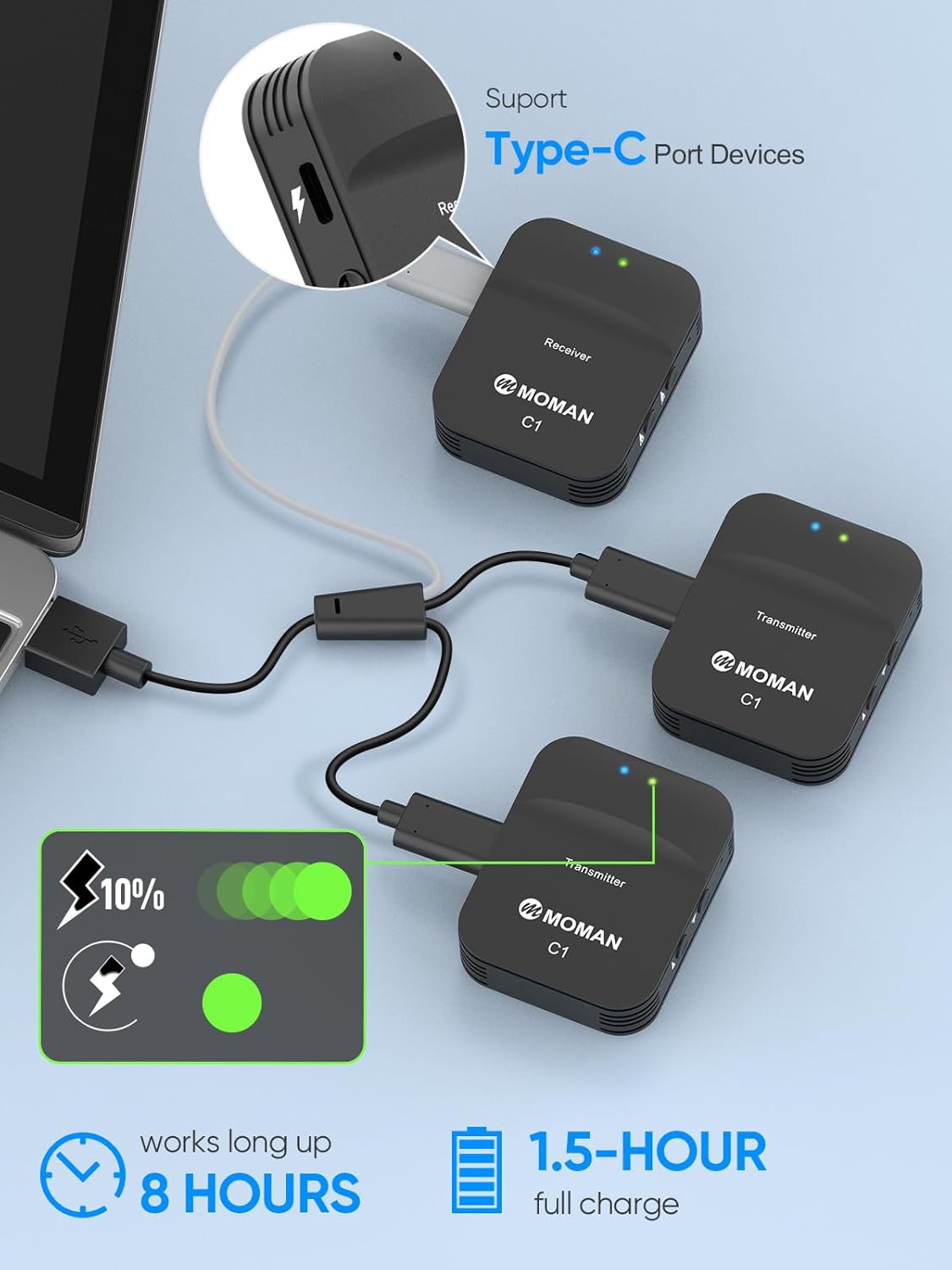
Image: The Moman C1X transmitters and receiver being charged simultaneously using the included multi-charging cable.
Pairing the Units
The Moman C1X units are designed for automatic pairing.
- Power on both the transmitter(s) and the receiver by long-pressing their respective power buttons.
- The indicator lights will blink, signifying they are searching for a connection.
- Once paired, the indicator lights will turn solid.
- If manual pairing is required, long-press the power button on both the transmitter and receiver for 8 seconds until the lights blink rapidly, then release. They should then pair automatically.
Connecting to Your Device
Use the appropriate cable to connect the receiver to your recording device:
- For DSLR cameras and camcorders: Use the 3.5mm TRS Camera Cable.
- For smartphones and tablets: Use the 3.5mm TRRS Smartphone Cable.
- For iPhones without a 3.5mm jack: A Lightning adapter (not included) is required.
- For USB-C devices: A Type-C to 3.5mm adapter (not included) may be required.

Image: The Moman C1X receiver mounted on a DSLR camera, connected via the 3.5mm TRS cable.

Image: The Moman C1X receiver connected to a smartphone, demonstrating its compatibility with mobile devices.
Video: Demonstrates connecting the Moman C1X receiver to various devices like cameras, laptops, and smartphones.
Operating Instructions
Mono/Stereo Mode
The Moman C1X supports both Mono and Stereo modes. Use the mode switch on the receiver to select your desired audio output, allowing for flexible recording scenarios.
Gain Control
Adjust the audio gain using the dedicated buttons on the receiver. The system offers 0-4 levels of gain control with an adjustable range of up to 8dB for both Channel A and Channel B. This allows fine-tuning of audio input levels to match your recording environment and source.

Image: Illustration of the 4-level gain control feature on the Moman C1X receiver, allowing precise audio level adjustments.
Noise Cancellation
The C1X features built-in DSP technology and an optional 180Hz low-cut filter to reduce unwanted background noise such as wind, air conditioning, or traffic. Activate this feature on the transmitter for clearer audio, especially in outdoor or noisy environments.
Image: The transmitter unit highlighting the one-button noise reduction feature for improved sound quality.
Real-time Monitoring
Connect headphones to the receiver's 3.5mm jack to monitor your audio in real-time, ensuring optimal sound capture during recording. This allows you to identify and correct any audio issues as they occur.
Transmission Range
The system utilizes a 2.4GHz frequency band, providing stable and interference-resistant signals up to 164ft/50m (Line of Sight) with 12.5ms low latency. This range is ideal for various recording scenarios, from close-up interviews to outdoor vlogging.
Image: The Moman C1X system showing the two transmitters, one receiver, and included cables and accessories.
Video: Demonstrates the effective range and audio clarity of the Moman C1X system in an outdoor setting.
Maintenance
Proper maintenance ensures the longevity and optimal performance of your Moman C1X system.
- Keep the units clean and dry. Use a soft, dry cloth for cleaning.
- Store the system in the provided carrying bag to protect it from dust, moisture, and physical damage when not in use.
- Avoid exposing the units to extreme temperatures, direct sunlight, or high humidity for prolonged periods.
- Regularly check cables for any signs of wear, fraying, or damage. Replace damaged cables immediately to prevent performance issues.
Troubleshooting
If you encounter any issues with your Moman C1X Wireless Lavalier Microphone system, refer to the table below for common problems and their solutions.
| Problem | Solution |
|---|---|
| No sound/Low volume |
|
| Static/Interference |
|
| Units not pairing |
|
| Short battery life |
|
Specifications
Detailed technical specifications for the Moman C1X Wireless Lavalier Microphone system:
- Model: C1X Dual
- Brand: Moman
- Connectivity Technology: 2.4GHz Wireless
- Transmission Range: Up to 164ft/50m (Line of Sight)
- Latency: 12.5ms
- Battery Life: Up to 8 hours (Built-in 400mAh lithium battery)
- Charging Time: Approx. 1.5 hours
- Gain Control: 0-4 levels (Up to 8dB adjustable range)
- Noise Cancellation: Built-in DSP technology, optional 180Hz low-cut filter
- Output Interface: 3.5mm TRS (Camera), 3.5mm TRRS (Smartphone)
- Charging Port: USB Type-C
- Item Weight: 12.6 ounces
- Package Dimensions: 8.07 x 3.9 x 2.44 inches
- Compatible Devices: Laptop, Camcorder, Personal Computer, Camera, Smartphone
Warranty and Support
Moman products typically come with a manufacturer's warranty. Please refer to the warranty card included in your package or visit the official Moman website for detailed warranty information and terms.
For technical support, troubleshooting assistance, or any inquiries regarding your Moman C1X Wireless Lavalier Microphone, please contact Moman customer service. You can often find support contact information on the product packaging, the official Moman website, or through your purchase platform.


