
1. Introduction
Thank you for purchasing the RUBOT P15 Handheld Vacuum Cleaner. This manual provides essential information for the safe and efficient operation, maintenance, and troubleshooting of your device. Please read this manual thoroughly before use and retain it for future reference.
2. Safety Instructions
- Read all instructions before using the appliance.
- Do not use the vacuum cleaner near water or in wet conditions.
- Keep hair, loose clothing, fingers, and all parts of the body away from openings and moving parts.
- Do not vacuum flammable or combustible liquids, such as gasoline, or use in areas where they may be present.
- Do not vacuum burning or smoking materials, such as cigarettes, matches, or hot ashes.
- Use only the charging cable provided by the manufacturer.
- Do not operate the vacuum cleaner if it has been dropped, damaged, left outdoors, or dropped into water.
- Ensure the dust cup and filters are properly installed before operation.
- This appliance is not intended for use by persons (including children) with reduced physical, sensory, or mental capabilities, or lack of experience and knowledge, unless they have been given supervision or instruction concerning use of the appliance by a person responsible for their safety.
3. Package Contents
Verify that all items are present in your package:
- RUBOT P15 Handheld Vacuum Cleaner
- Brush Nozzles (various types)
- Crevice Nozzle
- Pumping & Suction Accessories (Small, Medium, Large, Silicone)
- Flexible Hose
- USB Charging Cable
- User Manual (this document)

Image 1: The RUBOT P15 handheld vacuum cleaner shown with its complete set of accessories, including various nozzles, a flexible hose, and inflation attachments. The vacuum itself is white with a clear dust collection chamber.
4. Product Overview
The RUBOT P15 is a versatile 6-in-1 handheld vacuum cleaner designed for various cleaning tasks. It features a lightweight, cordless design with multiple functions including vacuuming, inflating, and integrated lighting.
Key Components:
- Main Unit: Contains the motor, battery, and control buttons.
- Dust Cup: Transparent chamber for collecting debris.
- Filter System: Includes a stainless steel pre-filter and a HEPA filter for efficient dust separation.
- Power/Mode Button: Controls power on/off and suction modes.
- Light Button: Activates the integrated flashlight and warning light.
- Charging Port: USB-C port for recharging the device.
- Nozzle Attachment Point: For connecting various cleaning and inflation accessories.
5. Setup
5.1 Charging the Device
- Before first use, fully charge the vacuum cleaner.
- Connect the provided USB charging cable to the charging port on the vacuum cleaner.
- Plug the other end of the USB cable into a compatible USB power adapter (not included) or a USB port.
- The indicator light will show charging status. A full charge typically takes 3-4 hours.
5.2 Attaching Accessories
Select the appropriate nozzle or accessory for your cleaning task and firmly attach it to the vacuum's suction opening. For inflation, attach the desired inflation accessory to the exhaust port.
6. Operating Instructions
6.1 Power On/Off and Suction Modes
- Press the Power/Mode button once to turn on the vacuum in Eco Mode (10kPa suction).
- Press the Power/Mode button a second time to switch to High-Speed Mode (13kPa suction).
- Press the Power/Mode button a third time to turn off the vacuum.
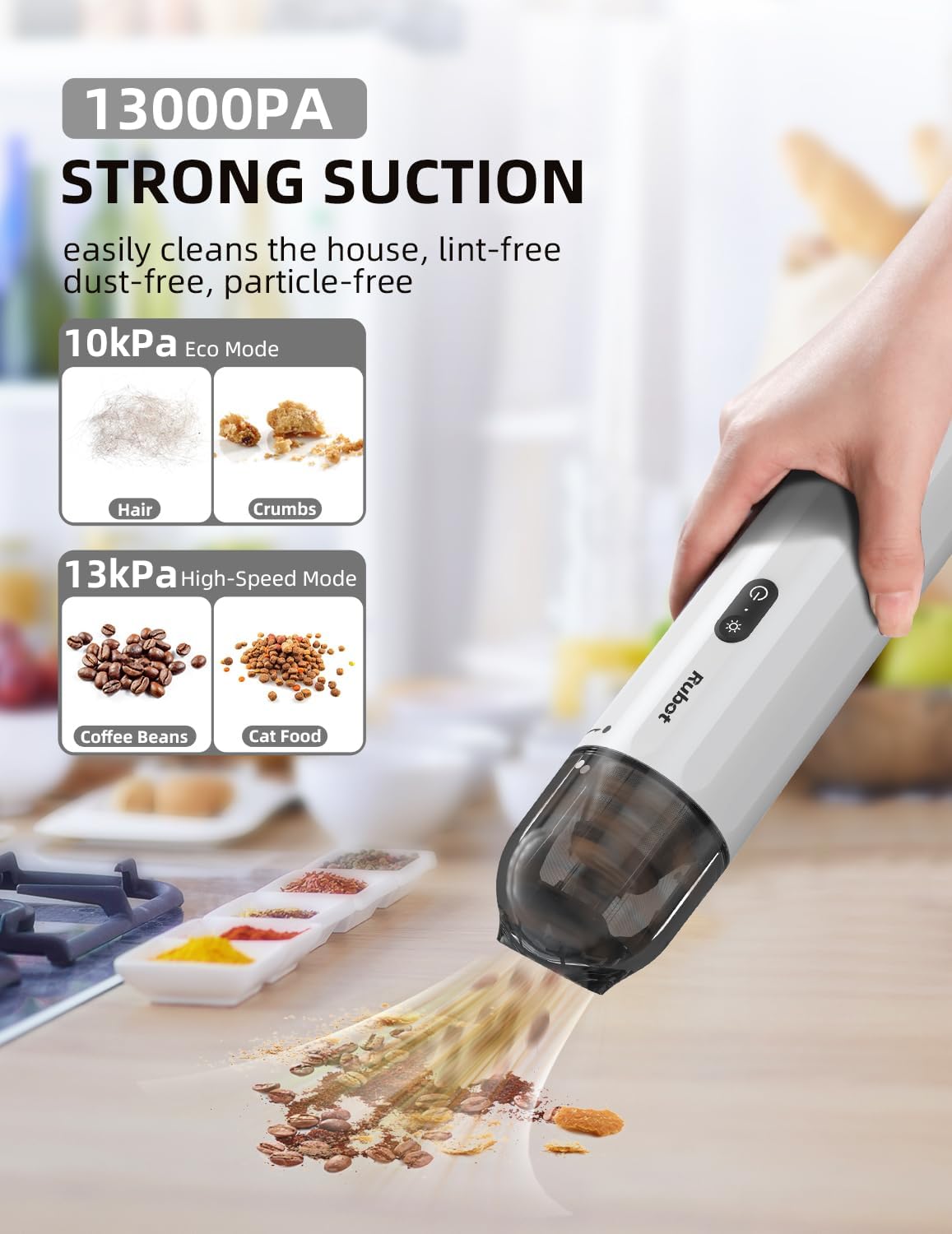
Image 2: Illustrates the two suction power modes of the RUBOT P15: 10kPa Eco Mode suitable for hair and crumbs, and 13kPa High-Speed Mode for heavier debris like coffee beans and cat food. The image shows the vacuum in action on a countertop.
6.2 Using Cleaning Nozzles
- Brush Nozzles: Ideal for cleaning upholstery, car mats, and surfaces that require gentle agitation to dislodge dirt.
- Crevice Nozzle: Designed for reaching tight spaces, corners, and gaps in car interiors or furniture.
- Flexible Hose: Extends reach for awkward angles and deep crevices, often used with other nozzles attached to its end.

Image 3: Displays the versatility of the RUBOT P15 with various attachments. It shows the brush nozzles, crevice nozzle, pumping and suction attachments, and the flexible hose being used for different cleaning scenarios, including car interiors and sofa gaps.
6.3 Inflation and Pumping Function
The RUBOT P15 can also be used to inflate items or pump air out of storage bags.
- Attach the appropriate pumping/suction accessory to the exhaust port of the vacuum cleaner.
- For inflation, connect the accessory to the item you wish to inflate (e.g., air mattress, swimming buoy).
- Turn on the vacuum cleaner to activate the air pump function.

Image 4: Demonstrates the inflation and vacuuming capabilities of the RUBOT P15, particularly useful for camping. It shows the vacuum inflating an air mattress and a ground sheet, highlighting the small, medium, large, and silicone nozzle options for various inflation needs.
6.4 Integrated Lighting
The vacuum cleaner includes a built-in flashlight and a warning light for enhanced utility.
- Press the Light button once to activate the white flashlight, useful for illuminating dark areas during cleaning, such as under car seats or engine bays.
- Press the Light button a second time to activate the red warning light, which can be used as an emergency signal, for example, when parked on the roadside.

Image 5: Showcases the dual lighting features of the RUBOT P15. One panel illustrates the white flashlight illuminating a car engine bay for inspection, while the other panel shows the red warning light active at the rear of a car, indicating an emergency or roadside stop.
7. Maintenance
7.1 Emptying the Dust Cup
Empty the dust cup regularly to maintain optimal suction power.
- Ensure the vacuum cleaner is turned off.
- Twist or unlatch the dust cup from the main unit according to the product design.
- Empty the collected debris into a waste bin.
7.2 Cleaning the Filters
The filters should be cleaned periodically to prevent clogging and maintain performance.
- Remove the filters from the dust cup. The RUBOT P15 typically uses a stainless steel pre-filter and a HEPA filter.
- Tap the filters gently over a waste bin to remove loose dust.
- If heavily soiled, rinse the filters under running water. Ensure they are completely dry before reinserting them into the vacuum cleaner. Do not use the vacuum with wet filters.
Image 6: A detailed view of the RUBOT P15's filter system, showing the stainless steel pre-filter and the HEPA filter separated from the dust cup, illustrating how they can be removed for cleaning.
7.3 Storage
Store the vacuum cleaner and its accessories in a cool, dry place, away from direct sunlight and extreme temperatures. The compact design allows for easy storage, such as in a car's cup holder.

Image 7: Demonstrates the ultra-slim and light design of the RUBOT P15, showing it conveniently stored in a car's cup holder, highlighting its portability and ease of storage.
8. Troubleshooting
| Problem | Possible Cause | Solution |
|---|---|---|
| Vacuum does not turn on | Battery is depleted Power button not pressed correctly | Charge the battery fully Press the Power/Mode button firmly |
| Weak suction power | Dust cup is full Filters are clogged Nozzle or hose is blocked | Empty the dust cup Clean or replace filters Check and clear any blockages in the nozzle or hose |
| Charging not working | Charging cable is faulty USB adapter is not working Charging port is dirty | Try a different USB charging cable Use a different USB power adapter Clean the charging port gently |
| Unusual noise during operation | Object stuck in the fan or nozzle Filters are improperly installed | Turn off and inspect for obstructions Ensure filters are correctly seated |
9. Specifications
- Model: P15 (CA15)
- Brand: RUBOT
- Power: 100 Watts
- Voltage: 12 Volts
- Suction Power: 10kPa (Eco Mode), 13kPa (High-Speed Mode)
- Noise Level: <65 dB
- Dimensions (L x W x H): 28 x 6.5 x 6.5 cm (11 x 2.56 x 2.56 inches)
- Weight: Approximately 544 g (1.2 lbs)
- Battery: 1 x 9V (included)
- Special Features: Lightweight, Portable, Cordless, LED Flashlight, Red Warning Light, Inflation/Pumping Function
10. Warranty and Support
For warranty information and customer support, please refer to the documentation included with your purchase or visit the official RUBOT website. Keep your proof of purchase for any warranty claims.

