
Audibax Detroit 400 BT
Contents
Audibax Detroit 400 BT PA System User Manual
Model: Detroit 400 BT
Introduction
The Audibax Detroit 400 BT is an active column PA system designed for high-quality audio playback and sound reinforcement. Featuring 400W of power, a Class D amplifier, and versatile connectivity options including Bluetooth 5.0 and auxiliary inputs, this system is suitable for various applications, from small events to professional sessions. Its robust construction and integrated top handle ensure durability and easy transport.

Figure 1: Audibax Detroit 400 BT PA System. This image shows the complete system, including the subwoofer base and the detachable column speaker.
Safety Instructions
- Read all instructions carefully before operating the device.
- Keep this manual for future reference.
- Do not expose the unit to rain or moisture to prevent fire or electric shock.
- Ensure the power supply matches the voltage requirements specified on the unit.
- Do not block any ventilation openings. Install in accordance with the manufacturer's instructions.
- Protect the power cord from being walked on or pinched, particularly at plugs, convenience receptacles, and the point where they exit from the apparatus.
- Only use attachments/accessories specified by the manufacturer.
- Unplug this apparatus during lightning storms or when unused for long periods of time.
- Refer all servicing to qualified service personnel. Servicing is required when the apparatus has been damaged in any way, such as power-supply cord or plug is damaged, liquid has been spilled or objects have fallen into the apparatus, the apparatus has been exposed to rain or moisture, does not operate normally, or has been dropped.
- Do not place the unit on an unstable cart, stand, tripod, bracket, or table. The product may fall, causing serious injury to a child or adult, and serious damage to the product.
Package Contents
Please check that all items listed below are included in your package:
- Audibax Detroit 400 BT Subwoofer Unit
- Column Speaker Array
- Power Cable
- Remote Control
- User Manual (this document)
Setup
Follow these steps for the initial setup of your Audibax Detroit 400 BT PA system:
Unpack Components:
Carefully remove all components from the packaging. Place the subwoofer unit on a stable, flat surface.

Figure 2: Front view of the Audibax Detroit 400 BT subwoofer unit. This shows the main speaker grille and power indicator.
Assemble Column Speaker:
Locate the column speaker array. Insert the bottom end of the column speaker into the designated slot on top of the subwoofer unit. Ensure it is securely seated and locked into place. Some models may have multiple column segments; connect them firmly before inserting into the subwoofer.
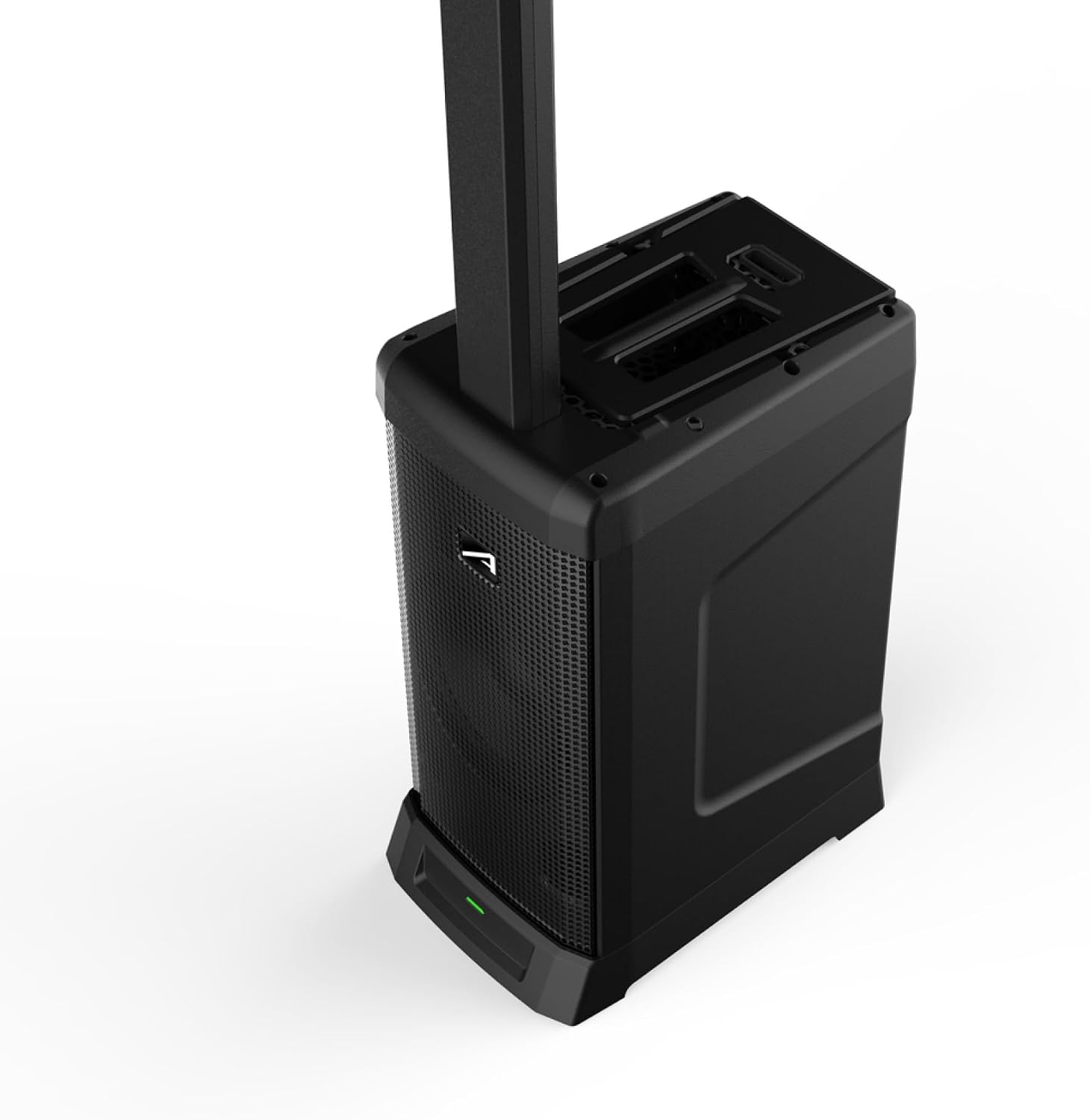
Figure 3: Top view of the subwoofer, highlighting the slot where the column speaker is inserted.
Connect Power:
Connect the provided power cable to the power input on the rear of the subwoofer unit. Plug the other end into a suitable power outlet. The power indicator light on the front of the subwoofer should illuminate.
Initial Power On:
Press the power button, usually located on the rear or front panel, to turn on the system. Allow a few seconds for the system to initialize.
Operating
Control Panel Overview

Figure 4: Detailed view of the control panel on the Audibax Detroit 400 BT. This panel includes inputs, volume controls, and equalization knobs.
The control panel, typically located on the rear of the subwoofer, provides access to all inputs, volume controls, and sound adjustments. Familiarize yourself with the layout before operation.
Bluetooth Connection
- Ensure the Audibax Detroit 400 BT is powered on.
- Press the "Mode" or "Bluetooth" button on the control panel until the Bluetooth indicator light flashes, indicating pairing mode.
- On your smartphone, tablet, or other Bluetooth-enabled device, go to the Bluetooth settings.
- Search for "Audibax Detroit 400 BT" (or similar name) in the list of available devices.
- Select the device to pair. Once connected, the Bluetooth indicator light on the PA system will become solid.
- You can now play audio from your device through the PA system. The effective range for Bluetooth 5.0 is up to 15 meters (approximately 49 feet) in open areas.
Auxiliary Connection (3.5mm Jack)
- Connect one end of a 3.5mm audio cable (not included) to the "AUX IN" port on the PA system's control panel.
- Connect the other end of the 3.5mm audio cable to the headphone jack or audio output of your external device (e.g., laptop, MP3 player).
- Select the "AUX" input mode on the PA system, if applicable, using the "Mode" button.
- Adjust the volume on both your external device and the PA system for optimal sound.
Using Microphones and Instruments
The Audibax Detroit 400 BT typically includes multiple input channels for microphones and instruments (e.g., XLR, 1/4" Jack). Refer to the control panel for specific input types and corresponding volume/gain controls.
- Connect your microphone or instrument to the appropriate input jack.
- Adjust the individual channel's gain/volume knob to prevent clipping (distortion) and achieve a balanced sound.
- Use the master volume control to set the overall output level.
- Utilize the Bass and Treble equalization knobs to fine-tune the sound to your preference and acoustic environment.
Maintenance
Proper maintenance ensures the longevity and optimal performance of your Audibax Detroit 400 BT PA system.
- Cleaning: Use a soft, dry cloth to wipe down the exterior of the unit. For stubborn dirt, a slightly damp cloth with mild soap can be used, followed by a dry cloth. Do not use abrasive cleaners, waxes, or solvents as they may damage the finish.
- Ventilation: Ensure that the ventilation openings are clear of dust and debris. Do not place the unit in an enclosed space that restricts airflow.
- Storage: When not in use for extended periods, store the PA system in a cool, dry place, away from direct sunlight and extreme temperatures. It is recommended to use the original packaging or a protective cover to prevent dust accumulation.
- Transport: Utilize the integrated top handle for easy and secure transport. When transporting, ensure the column speaker is detached and stored safely, ideally within the subwoofer's designated compartment if available, or separately to prevent damage.

Figure 5: Close-up view of the integrated top handle on the Audibax Detroit 400 BT subwoofer, designed for easy portability.
Troubleshooting
| Problem | Possible Cause | Solution |
|---|---|---|
| No power | Power cable not connected; Power outlet faulty; Unit fuse blown. | Ensure power cable is securely connected to unit and outlet. Test outlet with another device. Contact service if fuse is suspected. |
| No sound output | Volume too low; Incorrect input selected; Source device not playing; Cables faulty. | Increase master volume and individual channel volumes. Select correct input mode. Check source device playback. Test/replace audio cables. |
| Bluetooth not connecting | PA system not in pairing mode; Device too far; Interference; Previously paired device connected. | Ensure PA system is in pairing mode (flashing indicator). Move device closer. Reduce interference. Disconnect from other Bluetooth devices. |
| Distorted sound | Input gain too high; Master volume too high; Faulty cable/source. | Reduce input gain for specific channels. Lower master volume. Check audio cables and source device for issues. |
| Humming or buzzing noise | Ground loop issue; Interference from other electronics; Faulty cable. | Try plugging into a different outlet. Move unit away from other electronic devices. Replace audio cables. |
Specifications
| Feature | Detail |
|---|---|
| Model Name | Detroit 400 BT |
| Output Power | 400 Watts |
| Amplifier Type | Class D |
| Connectivity | Bluetooth 5.0, Auxiliary (3.5mm Jack), XLR/1/4" Jack Inputs |
| Material | Polypropylene (PP-H) |
| Item Weight | 23 Kilograms |
| Product Dimensions (Overall) | 52 x 37 x 67 cm |
| Included Components | PA Speaker (Subwoofer + Column), Power Cable, Remote Control |
| Recommended Use | Events for 50-100 people, professional sessions, music playback |
Warranty and Support
The Audibax Detroit 400 BT PA System comes with a limited warranty. Please refer to the warranty card included in your package for specific terms and conditions, including coverage period and limitations.
For technical support, troubleshooting assistance, or warranty claims, please contact Audibax customer service through their official website or the retailer from whom you purchased the product. Have your product model number (Detroit 400 BT) and serial number ready when contacting support.
Official Audibax Website: www.audibax.com (Note: This is a placeholder URL, please verify the actual official website for Audibax for accurate support information.)
Documents and downloads
Ask a question about this manual
Ask about setup, troubleshooting, compatibility, parts, safety, or missing instructions. Manuals+ will review the question and use this page’s manual context to help answer it.