
The Voice VDUO-6/2067
The Voice Duo True Wireless Stereo Earbuds
Model: VDUO-6/2067
Product Overview
The Voice Duo True Wireless Stereo Earbuds offer a seamless audio experience with advanced features designed for convenience and clarity. These earbuds come with a translucent charging case featuring an LCD screen for real-time battery status, ensuring you're always aware of your power levels. With Bluetooth connectivity, auto-pairing, and a built-in microphone, they are ideal for music, calls, and on-the-go use.

Image: The Voice Duo True Wireless Stereo Earbuds, showing both earbuds and the open charging case with an LCD display.
Video: An official product video demonstrating the key features and usage of The Voice Duo True Wireless Earbuds, including their design, connectivity, and charging capabilities.
What's Included
Your Voice Duo True Wireless Stereo Earbuds package includes the following components:
- The Voice Duo True Wireless Stereo Earbuds (Left and Right)
- Translucent Charging Case with LCD Screen
- USB Charging Cable
- User Manual

Image: The product packaging for The Voice Duo True Wireless Stereo Earbuds, indicating the contents.
Setup
Charging the Earbuds and Case
Before first use, ensure both the earbuds and the charging case are fully charged. The translucent charging case features an LCD screen that displays the current battery percentage of the case.
- Place the earbuds into their respective slots in the charging case. The magnetic design will ensure they are correctly seated for charging.
- Connect the provided USB charging cable to the charging port on the case and plug the other end into a compatible USB power source (e.g., computer USB port, wall adapter).
- The LCD screen on the case will illuminate to show the charging status. When fully charged, the display will indicate 100%.
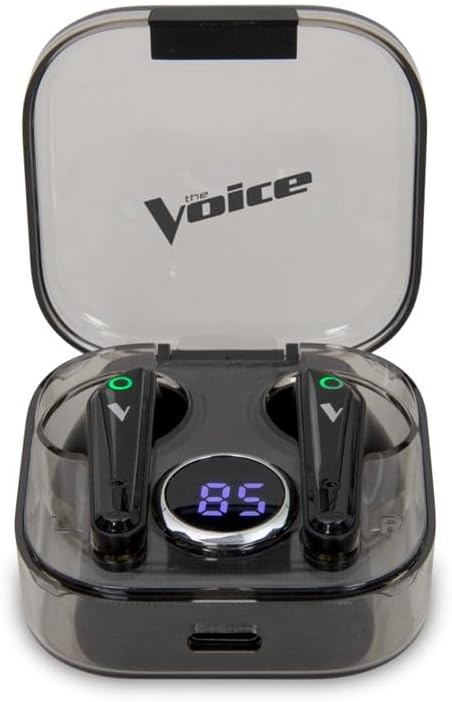
Image: The Voice Duo Earbuds securely placed within their charging case, displaying the battery percentage on the LCD screen.
Pairing with Your Device
The Voice Duo Earbuds feature auto-pairing for quick and easy connection.
- Ensure Bluetooth is enabled on your smartphone, tablet, or other compatible device.
- Open the charging case and remove both earbuds. They will automatically power on and enter pairing mode.
- On your device, search for Bluetooth devices and select "The Voice Duo" from the list.
- Once connected, you will hear an audible confirmation, and the earbuds will be ready for use.
Operating Instructions
Automatic Power On/Off
The earbuds automatically power on when removed from the charging case and power off when placed back into the case and the lid is closed. This feature helps conserve battery life.
Hands-Free Calling
The built-in microphone allows for clear, hands-free calls. When a call comes in, you can answer or end it using the touch controls on the earbuds (refer to the full user manual for specific touch commands).
Voice Assistant Integration
The Voice Duo Earbuds are optimized for use with Siri (iOS) and Google Assistant (Android). Simply tap the earbud (refer to the full user manual for specific touch commands) to activate your device's voice assistant and issue commands for navigation, music control, calls, and more.

Image: A person wearing one of The Voice Duo Earbuds, demonstrating its comfortable fit for daily use.
Maintenance
To ensure the longevity and optimal performance of your Voice Duo Earbuds, follow these maintenance guidelines:
- Cleaning: Regularly wipe the earbuds and charging case with a soft, dry, lint-free cloth. Avoid using abrasive materials or harsh chemicals.
- Storage: When not in use, store the earbuds in their charging case to protect them from dust and damage.
- Temperature: Avoid exposing the earbuds and case to extreme temperatures (hot or cold) or high humidity.
- Water Exposure: These earbuds are not waterproof. Avoid direct contact with water or excessive moisture.
Troubleshooting
If you encounter issues with your Voice Duo Earbuds, try the following solutions:
- No Sound/Connection Issues:
- Ensure earbuds are charged.
- Verify Bluetooth is enabled on your device and
Ask a question about this manual
Ask about setup, troubleshooting, compatibility, parts, safety, or missing instructions. Manuals+ will review the question and use this page’s manual context to help answer it.