
Introduction
This manual provides detailed instructions for the setup, operation, and maintenance of your Ambient Weather WS-1965 Pool Bundle. This system combines the WS-1965 WiFi Weather Station with a WH31PF Wireless Waterproof Floating Pool and Spa Thermometer to provide comprehensive environmental monitoring for your backyard and pool area. Please read this manual thoroughly before installation and use.
What's Included
The Ambient Weather WS-1965 Pool Bundle includes the following components:
- WS-1965 Weather Station Console: Color display unit for viewing weather data.
- Integrated Sensor Array: Measures wind speed/direction, temperature, humidity, dew point, rainfall, and heat index.
- WH31PF Pool Float Temperature Sensor: Waterproof, wireless floating thermometer for pool or spa.
- Mounting hardware for the sensor array.
- Power adapter for the console.
- User Manual (this document).

Image: Overview of the Ambient Weather WS-1965 Pool Bundle components, showing the integrated sensor array, the indoor display console, and the WH31PF floating pool thermometer, along with a smartphone displaying the Ambient Weather Network app.
Setup
1. Integrated Sensor Array Installation
The integrated sensor array measures various outdoor weather parameters. Choose an open location away from obstructions that could affect wind, rain, or temperature readings. Ensure it is securely mounted using the provided hardware.

Image: The integrated sensor array mounted on a pole outdoors, showing its wind cups, wind vane, rain collector, and thermo-hygrometer radiation shield.
2. WH31PF Pool Float Thermometer Placement
The WH31PF sensor is designed to float in your pool or spa. Ensure it is placed in an area where it can freely float and is not obstructed. The sensor is sealed and waterproof.

Image: A diagram illustrating the recommended placement of the main weather station unit indoors and the WH31PF pool sensor in the water, emphasizing a maximum distance of 100 feet (30 meters) and showing correct and incorrect signal paths.
Important: Maintain a maximum distance of 100 feet (30 meters) between the main display unit and the pool sensor for optimal wireless communication. Avoid placing the main unit near metal siding or large metal objects that can interfere with the signal.
3. WS-1965 Console Power and Initial Setup
Connect the power adapter to the WS-1965 console and plug it into a standard electrical outlet. The console will power on and begin searching for the outdoor sensor array and pool thermometer. Allow a few minutes for all sensors to connect and display data.
4. Wi-Fi Connectivity and Ambient Weather Network (AWN)
The WS-1965 console is Wi-Fi enabled, allowing you to upload data to the Ambient Weather Network (AWN). Follow the on-screen instructions on the console to connect it to your home Wi-Fi network. Once connected, you can access your weather data remotely via the AWN app or website.

Image: The WS-1965 color display console showing indoor and outdoor temperature, humidity, wind speed, rainfall, and a weather forecast icon.
For detailed instructions on connecting to AWN and using the app, refer to the Ambient Weather Network support pages or the app's built-in help section. The AWN allows you to view live data, set alerts, and access historical data.

Image: A collage of screenshots demonstrating features of the Ambient Weather Network app, including remote data access, alert settings, a customizable dashboard, and community-powered weather data.
Operating Instructions
1. Understanding the WS-1965 Display
The color display console provides real-time readings for various parameters. Familiarize yourself with the layout:
- Time and Date: Located at the top.
- Forecast: Weather icons indicating predicted conditions.
- Wind Data: Speed, direction, and gust information.
- Rainfall: Daily, weekly, monthly, and total rainfall.
- Outdoor Temperature & Humidity: Readings from the integrated sensor array.
- Indoor Temperature & Humidity: Readings from the console's internal sensors.
- Pool Temperature: Readings from the WH31PF sensor.
Image: The WS-1965 color display console showing indoor and outdoor temperature, humidity, wind speed, rainfall, and a weather forecast icon, along with a list of measured parameters.
2. Remote Monitoring with Ambient Weather Network (AWN)
Once your WS-1965 is connected to Wi-Fi and linked to your AWN account, you can monitor your data from anywhere using the AWN app or website. The app provides a customizable dashboard, historical data, and advanced charting features.

Image: Screenshots of the Ambient Weather Network app demonstrating remote data access, setting alerts for changing conditions, a customizable dashboard, and community weather features.
3. Setting Alerts
The AWN app allows you to set custom alerts for various weather conditions, such as high/low temperatures, wind speed, or rainfall thresholds. You can receive these alerts via push notifications or email. Refer to the AWN app settings for detailed alert configuration.
Maintenance
- Sensor Array Cleaning: Periodically inspect the rain collector funnel for debris (leaves, insects) and clean as necessary. Ensure the wind cups and wind vane spin freely.
- WH31PF Battery Replacement: The WH31PF pool thermometer is sealed with batteries for no maintenance or corrosion. If the unit stops transmitting, it may need replacement.
- Console Power: Ensure the WS-1965 console remains connected to power for continuous operation and data upload.
- General Care: Keep the console in a dry, indoor environment. Avoid exposing it to extreme temperatures or direct sunlight.
Troubleshooting
| Problem | Possible Solution |
|---|---|
| No outdoor sensor data on console. |
|
| No pool thermometer data. |
|
| Console not connecting to Wi-Fi. |
|
| Incorrect temperature/humidity readings. |
|
Specifications
| Feature | Detail |
|---|---|
| Model | WS-1965 (Weather Station), WH31PF (Pool Thermometer) |
| Connectivity Technology | Wi-Fi (2.4 GHz) |
| Power Source (Console) | AC Adapter |
| Power Source (Sensors) | Battery Powered (WH31PF sealed) |
| Display Type | LCD Color Display |
| Temperature Accuracy | 0.5 °C |
| Upper Temperature Rating | 140 Degrees Fahrenheit |
| Wireless Range (Console to Sensor Array) | Up to 300 feet (line of sight) |
| Wireless Range (Console to Pool Thermometer) | Up to 100 feet (30 meters) |
| Measured Parameters | Wind speed/direction, temperature (indoor/outdoor/pool), humidity (indoor/outdoor), dew point, rainfall, heat index, forecast. |
Support
For technical assistance, warranty inquiries, or any questions regarding your Ambient Weather WS-1965 Pool Bundle, please contact our US-based support team. They are available 5 days a week to assist you.
Contact Information:
- Visit the Ambient Weather website for support resources and contact details: www.ambientweather.com/support
- For AWN app support, visit: www.ambientweather.net
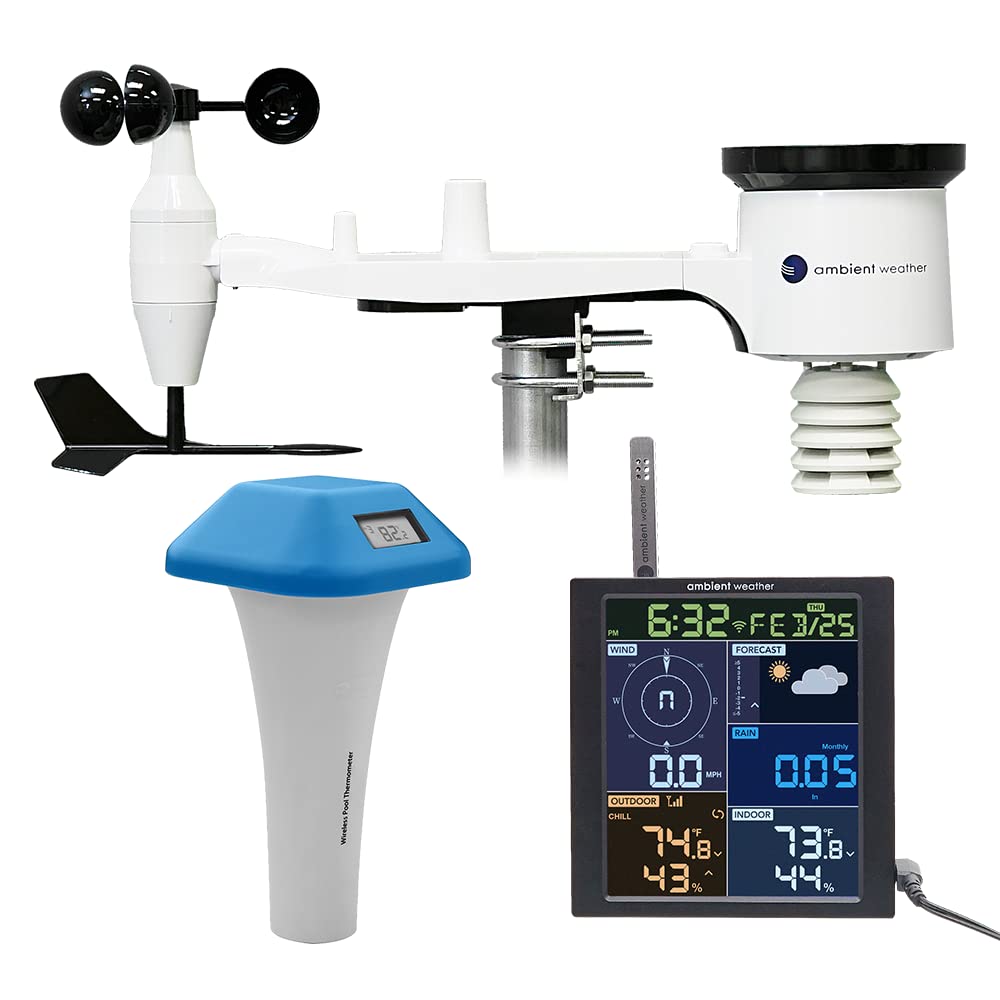
Image: A graphic indicating "US-BASED CUSTOMER SUPPORT" with an American flag emblem, emphasizing local support for Ambient Weather products.
Warranty Information
Ambient Weather products typically come with a limited warranty. Please refer to the official Ambient Weather website or the warranty card included with your product for specific terms, conditions, and registration details. Keep your purchase receipt as proof of purchase for warranty claims.


