
T'nB Single 2
T'nB Single 2 Bluetooth 5.0 Wireless Headphones User Manual
Model: CBSGL2PK
1. Introduction
Thank you for choosing the T'nB Single 2 Bluetooth 5.0 Wireless Headphones. These headphones are designed to provide a high-quality audio experience with the convenience of wireless connectivity, multiple playback options, and a comfortable, portable design. This manual will guide you through the setup, operation, and maintenance of your new headphones.

Figure 1: T'nB Single 2 Wireless Headphones (Pink)
2. Package Contents
Please check the package for the following items:
- T'nB Single 2 Wireless Headphones
- USB-C Charging Cable
- User Manual (this document)
3. Product Overview
The T'nB Single 2 headphones feature an adjustable headband, comfortable earcups, and integrated controls for easy operation. They also offer versatile connectivity options.
3.1 Controls and Ports
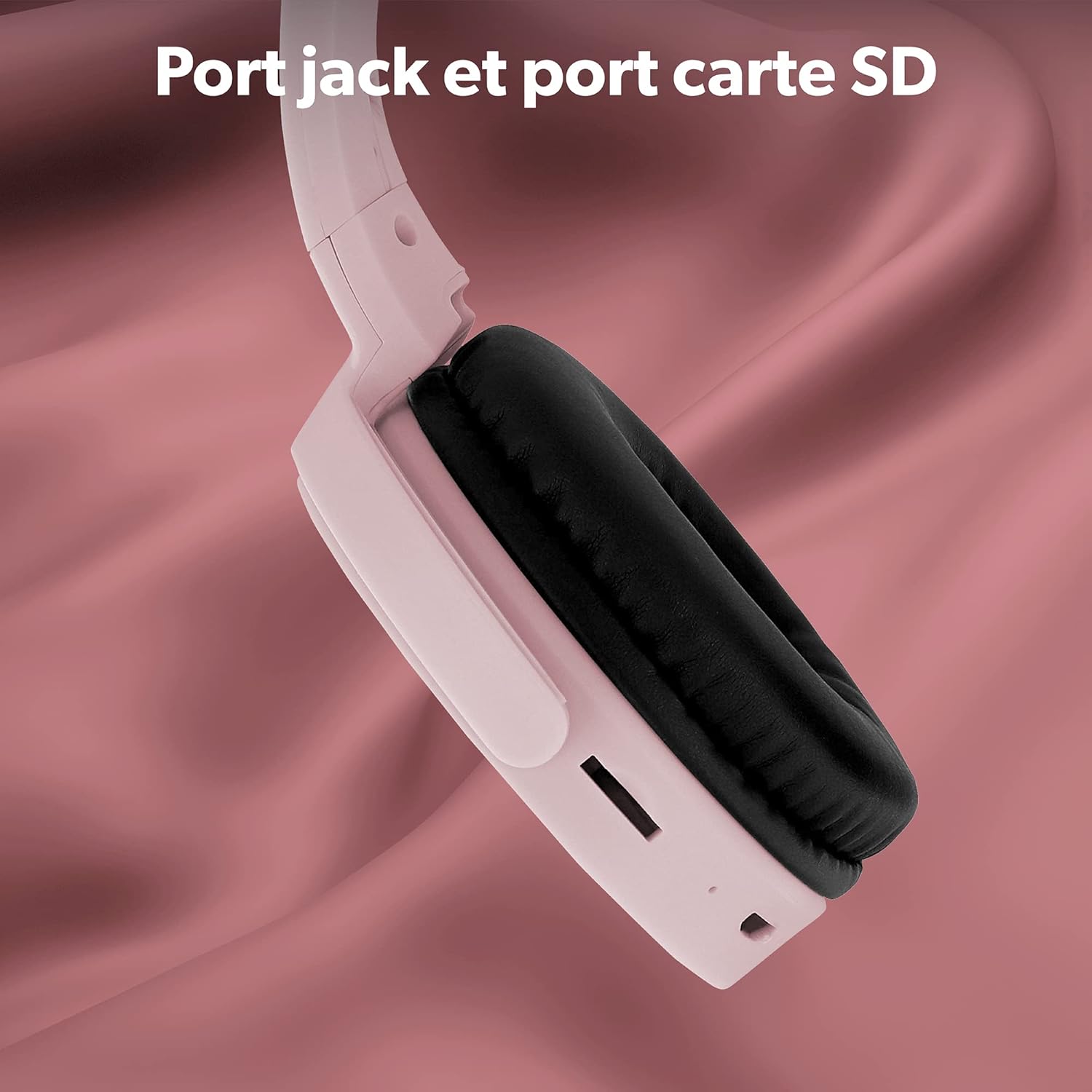
Figure 2: Integrated controls on the earcup for playback and volume.

Figure 3: The 3.5mm jack port and SD card slot for alternative audio sources.
The headphones include a 3.5mm audio jack for wired connection and an SD card slot for direct music playback without a connected device.
4. Setup
4.1 Charging the Headphones
Before first use, fully charge your headphones. Connect the supplied USB-C cable to the charging port on the headphones and the other end to a USB power source (e.g., computer USB port, wall adapter). The LED indicator will show the charging status. A full charge provides up to 8 hours of listening time.

Figure 4: Enjoy up to 8 hours of continuous music playback on a single charge.
4.2 Powering On/Off
- To Power On: Press and hold the Power button until the LED indicator lights up.
- To Power Off: Press and hold the Power button until the LED indicator turns off.
4.3 Bluetooth Pairing
To connect your headphones to a Bluetooth-enabled device:
- Ensure the headphones are powered off.
- Press and hold the Power button for approximately 5-7 seconds until the LED indicator flashes blue and red, indicating pairing mode.
- On your device (smartphone, tablet, computer), enable Bluetooth and search for new devices.
- Select "T'nB Single 2" from the list of available devices.
- Once connected, the LED indicator will flash blue slowly.

Figure 5: The headphones utilize Bluetooth 5.0 for stable wireless connection.
5. Operating the Headphones
5.1 Music Playback and Volume Control
Use the integrated controls on the earcup to manage your audio:
- Play/Pause: Press the Play/Pause button once.
- Volume Up: Press the Volume Up button.
- Volume Down: Press the Volume Down button.
- Next Track: Press and hold the Volume Up button.
- Previous Track: Press and hold the Volume Down button.

Figure 6: Easily control your music with integrated play/pause, volume, and track selection buttons.
5.2 Making and Receiving Calls
The built-in microphone allows for hands-free calls when connected via Bluetooth:
- Answer Call: Press the Play/Pause button once when a call comes in.
- End Call: Press the Play/Pause button once during a call.
- Reject Call: Press and hold the Play/Pause button for 2 seconds.

Figure 7: The integrated microphone ensures clear communication during calls.
5.3 Wired Connection (3.5mm Jack)
To use the headphones with a wired connection, simply plug a 3.5mm audio cable (not included) into the headphone's jack port and the other end into your audio source. This mode is useful for saving battery or connecting to non-Bluetooth devices.
5.4 SD Card Playback
Insert a microSD card (not included) with your music files into the dedicated SD card slot. The headphones will automatically switch to SD card playback mode. Use the integrated controls to manage your music.
6. Maintenance
6.1 Cleaning
Wipe the headphones with a soft, dry cloth. Do not use abrasive cleaners or solvents. Avoid getting moisture into any openings.
6.2 Storage
The T'nB Single 2 headphones are foldable and feature rotating earcups for compact storage. Store them in a cool, dry place away from direct sunlight and extreme temperatures.

Figure 8: The foldable design and rotating earcups allow for easy storage and portability.
7. Troubleshooting
| Problem | Possible Cause | Solution |
|---|---|---|
| Headphones do not power on | Low battery | Charge the headphones fully. |
| Cannot pair via Bluetooth | Headphones not in pairing mode; Device Bluetooth off; Too far from device | Ensure headphones are in pairing mode (flashing blue/red). Turn on Bluetooth on your device. Move headphones closer to the device (within 10 meters). |
| No sound | Volume too low; Incorrect audio source; Headphones not connected | Increase volume on headphones and device. Check if headphones are properly connected (Bluetooth, 3.5mm jack, or SD card). |
| Microphone not working | Headphones not connected via Bluetooth; Device microphone settings | Ensure headphones are connected via Bluetooth. Check your device's audio input settings. |
8. Specifications
- Model: CBSGL2PK
- Connectivity: Bluetooth 5.0, 3.5mm Jack, SD Card Slot
- Battery Life: Up to 8 hours
- Charging Port: USB-C
- Impedance: 32 Ohm
- Sensitivity: 110 dB
- Frequency Range: 20 Hz - 20,000 Hz
- Special Features: Foldable design, Integrated microphone, Touch controls
- Included Components: USB-C charging cable
- Battery Type: Lithium-ion (1 required, included)
- Weight: 240 g (approx.)
9. Warranty and Support
T'nB is a French brand committed to providing quality products that comply with European standards. For any product defects, questions, or support needs, please refer to your purchase documentation or contact the retailer where you purchased the product for warranty information and customer service. Your satisfaction is a priority.
Related documentsSingle 2


Ask a question about this manual
Ask about setup, troubleshooting, compatibility, parts, safety, or missing instructions. Manuals+ will review the question and use this page’s manual context to help answer it.