
Depusheng DR80
Depusheng DR80 Professional Wireless Microphone System User Manual
Model: DR80
1. Product Overview
The Depusheng DR80 is a professional UHF wireless microphone system designed for various applications, including stage performances, karaoke, conferences, and weddings. It features a robust all-metal construction, advanced anti-interference technology, and a long reception range to ensure clear and stable audio transmission.

Figure 1: Depusheng DR80 Wireless Microphone System showing the receiver unit and two handheld microphones with antennas.
2. Package Contents
Please check the package carefully to ensure all items are present and in good condition.
- 1 x Wireless Receiver Unit
- 2 x Wireless Handheld Microphones
- 1 x Power Adapter
- 1 x 6.35mm Audio Cable
- 4 x Antennas
- 2 x Anti-skid Rings
- 2 x Sponge Covers
- 1 x User Manual (this document)
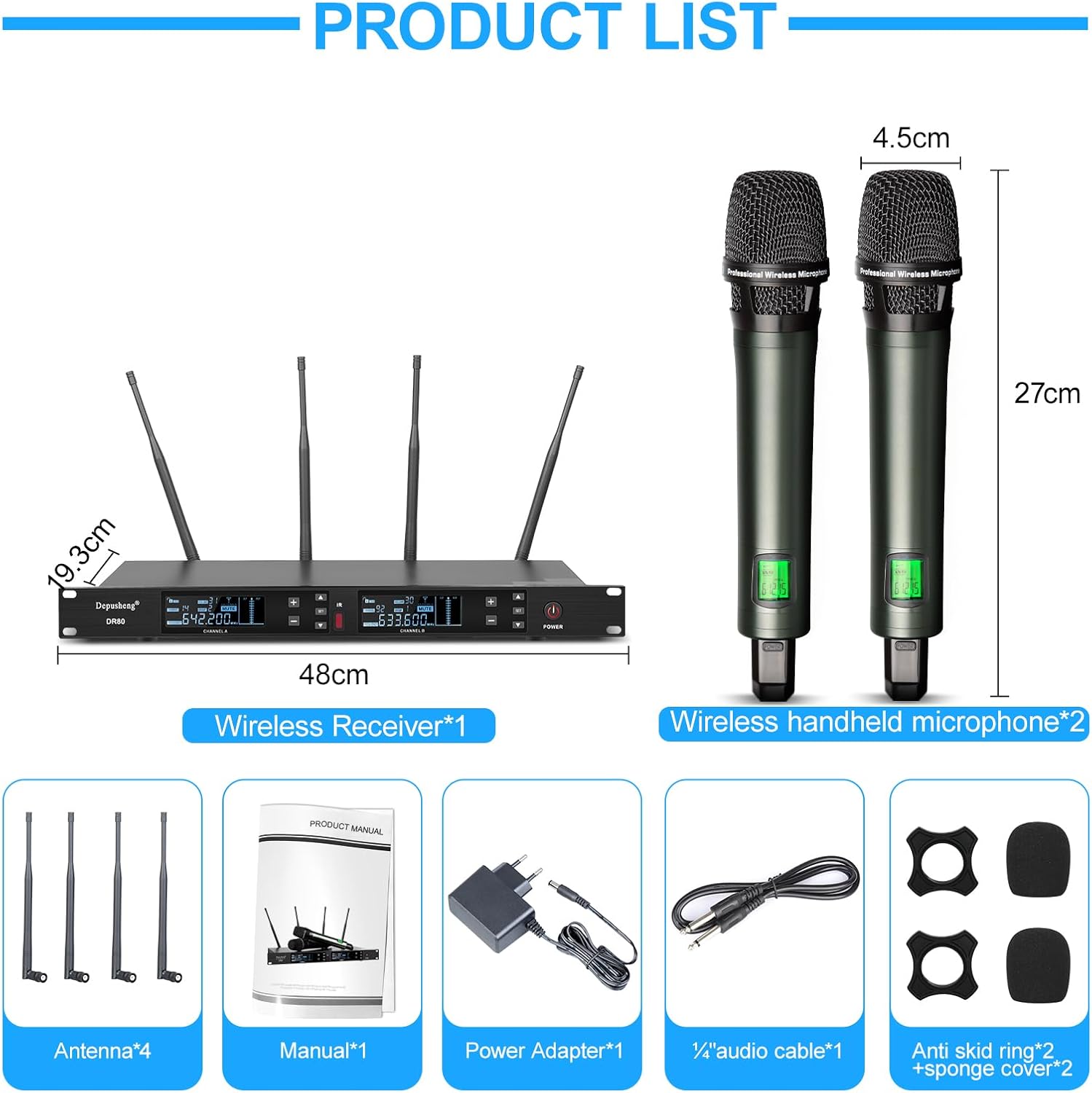
Figure 2: Detailed view of all components included in the DR80 package.
3. Key Features
- UHF Professional Wireless System: Utilizes a 4-antenna design for enhanced signal reception and stability, ensuring reliable performance over long distances.
- Extended Range: Achieves a signal reception distance of up to 150 meters (approximately 492 feet), ideal for large venues and outdoor events.
- One-Button Pairing: The receiver panel features a convenient one-button pairing function for quick and easy connection, minimizing interference.
- 200 Adjustable Frequencies: Offers 200 selectable frequency settings, allowing multiple sets to be used simultaneously without cross-frequency issues.
- High-Quality All-Metal Microphones: Handheld microphones are constructed from durable metal, featuring a high-fidelity cardioid dynamic microphone core for clear, real sound and intelligent noise reduction.
- Informative LCD Screen: Both microphones and the receiver feature large LCD screens displaying real-time working dynamics, including battery status and frequency.
- Versatile Connectivity: The all-metal receiver includes individual volume controls for precise vocal balance, a 1/4" audio jack, and two XLR output jacks for connection to speakers, amplifiers, and mixers.

Figure 3: Long-range reception capability of the DR80 system.

Figure 4: Features of the DR80 handheld microphone.

Figure 5: Multiple DR80 systems can operate concurrently.
4. Setup Guide
- Unpack Components: Carefully remove all items from the packaging and verify against the "Package Contents" list.
- Connect Antennas: Screw the four antennas onto the corresponding ports on the rear of the wireless receiver unit. Ensure they are securely tightened.
- Power Connection: Connect the power adapter to the DC IN port on the receiver and plug the adapter into a suitable power outlet.
- Audio Output Connection:
- For unbalanced output, connect one end of the 6.35mm audio cable to the "MIX OUT" jack on the receiver and the other end to the input of your mixer, amplifier, or speaker.
- For balanced output, use XLR cables (not included) to connect the "XLR OUT A" and "XLR OUT B" ports on the receiver to the balanced inputs of your audio equipment.
- Insert Batteries into Microphones: Open the battery compartment of each handheld microphone and insert 4 AA batteries (not included), observing the correct polarity (+/-). Close the compartment securely.
- Positioning: Place the receiver unit in a stable location, away from strong electromagnetic interference sources. Ensure the antennas are extended and unobstructed for optimal signal reception.
5. Operating Instructions
- Power On:
- Press the "POWER" button on the receiver unit to turn it on. The LCD screen will illuminate.
- Press and hold the power button on each handheld microphone to turn them on. The microphone's LCD screen will display battery level and frequency.
- Automatic Frequency Binding (Pairing):
The DR80 system features an easy one-button pairing function to automatically avoid nearby interfering frequencies.
- With both the receiver and microphone powered on, press the "IR" button on the receiver for the desired channel (Channel A or Channel B).
- Point the infrared (IR) sensor of the microphone towards the IR window on the receiver. The system will automatically scan and pair to an available frequency.
- The "AF" (Audio Frequency) and "RF" (Radio Frequency) indicators on the receiver's display should light up steadily when a successful connection is established.
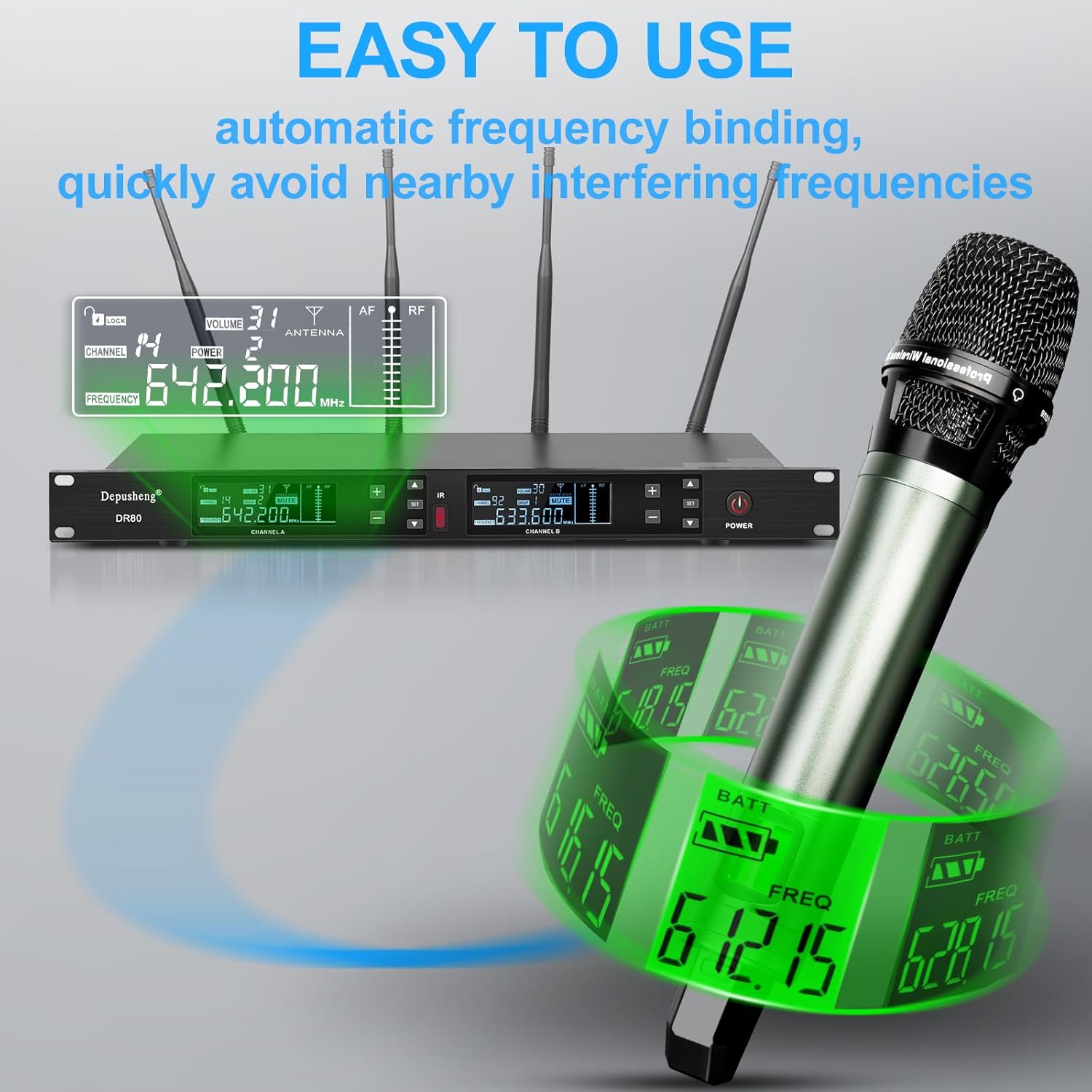
Figure 6: Automatic frequency binding process.
- Manual Frequency Adjustment:
If manual adjustment is needed or to select a specific frequency from the 200 available options:
- On the receiver, use the "SET" button and the arrow buttons (+ / -) to navigate and select the desired frequency for Channel A or Channel B.
- Once the frequency is selected on the receiver, perform the "Automatic Frequency Binding" step (point microphone IR to receiver IR) to synchronize the microphone with the new frequency.
- Adjusting Volume:
Each channel on the receiver has an independent volume control knob. Rotate the "VOLUME" knob for Channel A or Channel B to adjust the output level of the corresponding microphone.
- Monitoring Display:
The LCD screens on both the receiver and microphones provide real-time information:
- Receiver: Displays channel, frequency, signal strength (RF), audio level (AF), and mute status.
- Microphone: Displays battery level and current operating frequency.
- Mute Function:
Briefly press the power button on the handheld microphone to toggle the mute function. The microphone's display will indicate "MUTE" when active, and the receiver's display will also show the mute status for that channel.
6. Maintenance
- Cleaning: Use a soft, dry cloth to clean the receiver and microphones. Do not use liquid cleaners or abrasive materials.
- Battery Replacement: Replace batteries in the microphones when the battery indicator on the LCD screen shows low power to ensure uninterrupted performance. Remove batteries if the microphones will not be used for an extended period.
- Storage: Store the system in a cool, dry place, away from direct sunlight, extreme temperatures, and high humidity.
- Handling: Handle microphones and receiver with care. Avoid dropping or subjecting them to strong impacts.
7. Troubleshooting
| Problem | Possible Cause | Solution |
|---|---|---|
| No sound from microphone. |
|
|
| Interference or poor sound quality. |
|
|
| Receiver display not working. |
|
|
8. Specifications
| Feature | Detail |
|---|---|
| Model Number | DR80 |
| Microphone Form Factor | Handheld |
| Power Source | Battery Powered (Microphones), AC Adapter (Receiver) |
| Battery Requirement (Microphones) | 4 x AA batteries (per microphone, not included) |
| Material | Metal (Microphones and Receiver) |
| Number of Channels | 2 |
| Frequency Settings | 200 adjustable frequency points |
| Connections | XLR, 6.35mm Jack |
| Special Features | Volume Control, Battery Indicator, Automatic Frequency Binding, Noise Reduction |
| Rechargeable Battery | No |
| Recommended Uses | Singing, Karaoke, Stage Performance, Conference Speech, Wedding Scene |
| Polar Pattern | Unidirectional |
| Item Weight | 3.5 Kilograms |
| Color | Black |

Figure 7: Recommended use cases for the DR80 system.
9. Warranty and Support
For warranty information or technical support, please contact the manufacturer or your point of purchase. Keep your purchase receipt as proof of purchase.
Manufacturer: Depusheng
Related Documents - DR80
 |
Beta58 Professional Super-Cardioid Dynamic Microphone User Guide Comprehensive user guide for the Beta58 professional super-cardioid dynamic microphone. Learn setup, usage, and maintenance for KTV, stage, and studio applications. |
 |
TAVOSOP SM86 Professional Vocal Conference Microphone User Manual User manual for the TAVOSOP SM86, a professional vocal conference microphone designed for live broadcast, conferences, and concerts. Features include direct power, noise cancellation, and a cardioid polar pattern. This guide covers warnings, usage instructions, and technical specifications. |
 |
AKG D7, D7S, D7 LTD Vocal Microphone User Manual Comprehensive user manual for the AKG D7, D7S, and D7 LTD dynamic vocal microphones, covering features, setup, usage, cleaning, and troubleshooting. Designed for demanding stage applications, these microphones deliver exceptional vocal clarity and performance. |
 |
ICON DynaMic 7B Professional Broadcast Microphone User Manual Comprehensive user manual for the ICON DynaMic 7B professional broadcast microphone, detailing its features, setup, operation, specifications, and service information for optimal audio performance. |
 |
Electro-Voice Model D054 Omnidirectional Dynamic Microphone Specifications and Applications Comprehensive technical specifications, features, description, and applications for the Electro-Voice Model D054 omnidirectional dynamic microphone, a professional audio tool. |
 |
MONACOR HM-30 Dynamic Headband Microphone User Manual Detailed user manual for the MONACOR HM-30 dynamic headband microphone, covering its applications, important usage notes, setup instructions, and technical specifications. Includes frequency response information. |
Ask a question about this manual
Ask about setup, troubleshooting, compatibility, parts, safety, or missing instructions. Manuals+ will review the question and use this page’s manual context to help answer it.