
1. Introduction
This manual provides essential instructions for the safe and effective use of your BCXY NiMH replacement battery, model CS-FTX140RX. This battery is designed to be compatible with various FUTABA transmitter models.
Compatible Transmitter Models:
- FUTABA Transmitter 4PKS
- FUTABA Transmitter 10J
- FUTABA Transmitter 14SG
- FUTABA Transmitter 6J
- FUTABA Transmitter 8J
- FUTABA Transmitter 4PL
Compatible Battery Part Numbers: FUTM1484, HT5F1800B

Image 1.1: BCXY NiMH Battery Replacement. This image shows the full battery pack with its green casing and label, indicating model number, part numbers, rating, and safety warnings.
2. Safety Information
Please read and understand all safety warnings before using this product. Failure to follow these instructions may result in fire, electric shock, injury, or damage to the product or property.
- DO NOT attempt to disassemble, open, or service the battery pack.
- REPLACE ONLY with the battery pack designated for this product.
- DO NOT crush, puncture, short external contacts, or dispose of in fire or water.
- DO NOT store above 60°C (140°F).
- Keep the battery away from children.
- Dispose of used batteries according to local regulations.
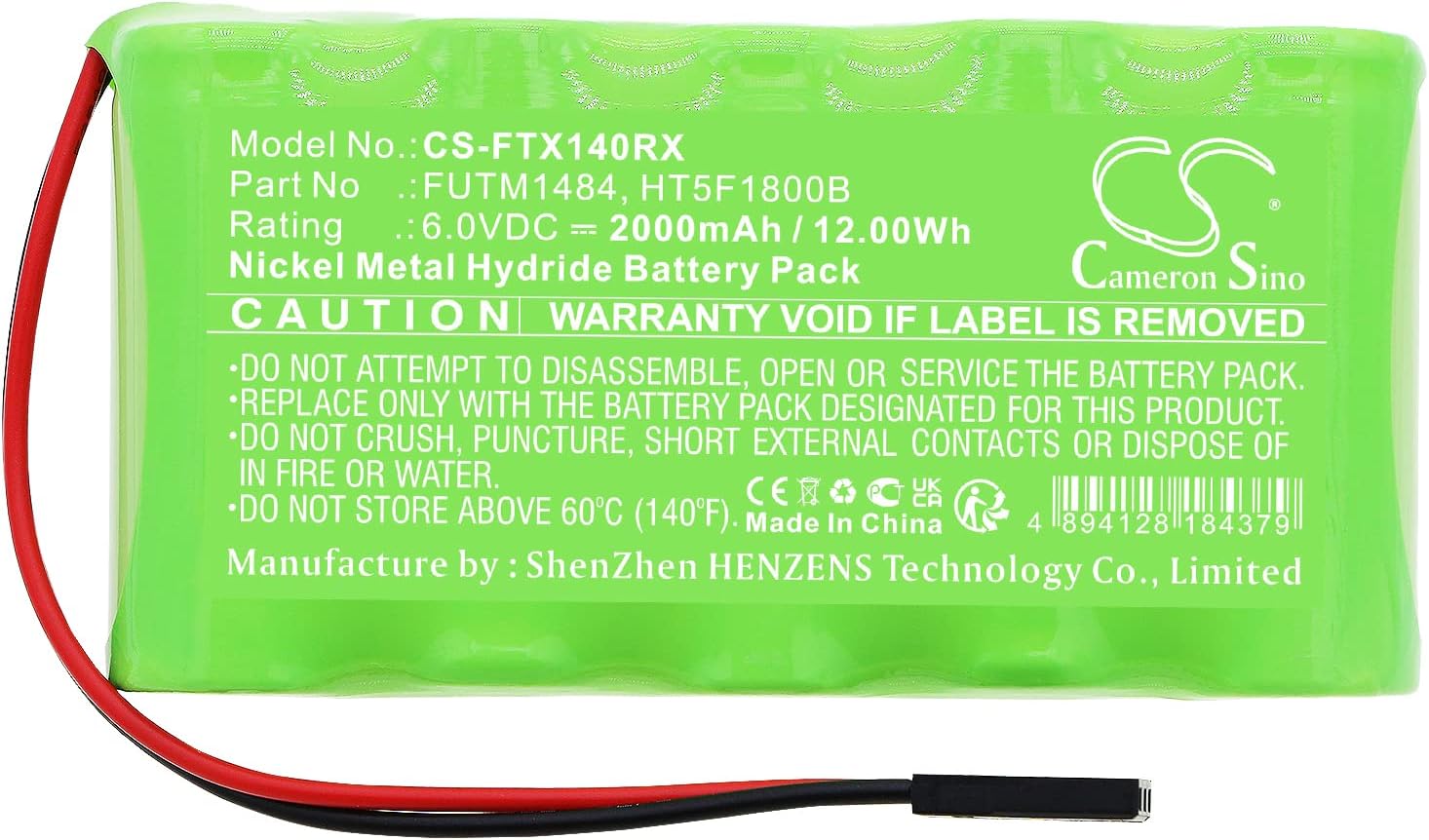
Image 2.1: Close-up of the battery label showing safety warnings and specifications. This image highlights the caution text: "WARRANTY VOID IF LABEL IS REMOVED" and other critical safety instructions.
3. Setup and Installation
Follow these steps to replace the battery in your FUTABA transmitter:
- Power Off Transmitter: Ensure your FUTABA transmitter is completely powered off before beginning the battery replacement process.
- Locate Battery Compartment: Identify and open the battery compartment on your transmitter. This is typically located on the back or bottom of the device. Refer to your transmitter's original manual if you are unsure.
- Remove Old Battery: Carefully disconnect the old battery from its connector. Gently pull on the connector, not the wires, to avoid damage. Remove the old battery pack from the compartment.
- Connect New Battery: Connect the BCXY replacement battery to the transmitter's battery connector. Ensure the connector is properly aligned and securely seated. Do not force the connection.
- Position New Battery: Place the new battery pack into the compartment, ensuring it fits snugly without bending or crimping any wires.
- Close Compartment: Securely close the battery compartment cover.
- Initial Charge: It is recommended to fully charge the new battery before its first use. Refer to the 'Operating' section for charging instructions.

Image 3.1: Close-up view of the battery connector (J17). This image shows the three-pin connector with red and black wires, crucial for proper installation.

Image 3.2: Another view of the battery connector. This image provides a broader perspective of the connector and its wiring, aiding in correct orientation during installation.
4. Operating Instructions
This NiMH battery is designed for reliable performance in your compatible FUTABA transmitter.
- First Use: Fully charge the battery before its initial use to ensure optimal performance and battery life.
- Charging: Use a charger compatible with NiMH batteries and your FUTABA transmitter. Follow the charging instructions provided with your transmitter or charger. Avoid overcharging.
- Discharge: NiMH batteries benefit from occasional full discharge cycles to prevent memory effect, though modern NiMH batteries are less prone to this.
- Temperature: Operate the battery within the recommended temperature range specified by your transmitter's manufacturer.
5. Maintenance
Proper maintenance can extend the life of your battery:
- Storage: If storing the battery for an extended period, store it in a cool, dry place, ideally at a partial charge (around 50%). Avoid extreme temperatures.
- Cleaning: Keep battery contacts clean and free of debris. Use a dry cloth to wipe the battery if necessary.
- Inspection: Periodically inspect the battery for any signs of damage, swelling, or leakage. Discontinue use immediately if any issues are observed.
6. Troubleshooting
If you encounter issues with your BCXY replacement battery, consider the following:
- Battery Not Charging:
- Ensure the charger is properly connected and functioning.
- Verify the battery connector is securely attached to the transmitter.
- Confirm the charger is compatible with NiMH batteries.
- Short Operating Time:
- Ensure the battery is fully charged before use.
- NiMH batteries may experience reduced capacity over time or with improper charging cycles.
- Check the transmitter's power consumption settings.
- Battery Overheating:
- Discontinue use and charging immediately.
- Ensure proper ventilation during charging and operation.
- Contact support if overheating persists.
7. Specifications
| Feature | Specification |
|---|---|
| Model Number | CS-FTX140RX |
| Battery Cell Composition | NiMH (Nickel Metal Hydride) |
| Voltage | 6.0V |
| Capacity | 2000mAh |
| Watt-Hours (Wh) | 12.0Wh |
| Dimensions (L x W x H) | 84.0 x 44.6 x 17.0 mm (3.31 x 1.76 x 0.67 inches) |
| Weight | 193 Grams |
| Certifications | ISO9001, RoHS, CE, UN38.3, MSDS |
8. Warranty and Support
This BCXY battery is manufactured under strict quality control standards and is certified with ISO9001, RoHS, and CE for quality assurance and toxic-free materials.
For any questions, technical assistance, or support regarding this product, please contact the seller or manufacturer directly through the platform where the purchase was made. Please provide your product model number (CS-FTX140RX) and purchase details for efficient service.