
Introduction
Thank you for purchasing the Victrola 3-in-1 Bluetooth Record Player with Built-in Speakers and the accompanying Wooden Stand. This manual provides essential information for the safe and efficient operation, setup, and maintenance of your new audio system. Please read this manual thoroughly before use and retain it for future reference.
Your Victrola system combines a classic 3-speed turntable with modern Bluetooth connectivity and an FM radio, all housed in a stylish Farmhouse Walnut finish. The included wooden stand offers convenient storage for your vinyl records and complements the record player's design.
Important Safety Instructions
- Read these instructions.
- Keep these instructions.
- Heed all warnings.
- Follow all instructions.
- Do not use this apparatus near water.
- Clean only with a dry cloth.
- Do not block any ventilation openings. Install in accordance with the manufacturer's instructions.
- Do not install near any heat sources such as radiators, heat registers, stoves, or other apparatus (including amplifiers) that produce heat.
- Protect the power cord from being walked on or pinched, particularly at plugs, convenience receptacles, and the point where they exit from the apparatus.
- Only use attachments/accessories specified by the manufacturer.
- Unplug this apparatus during lightning storms or when unused for long periods of time.
- Refer all servicing to qualified service personnel. Servicing is required when the apparatus has been damaged in any way, such as power-supply cord or plug is damaged, liquid has been spilled or objects have fallen into the apparatus, the apparatus has been exposed to rain or moisture, does not operate normally, or has been dropped.
Package Contents
Please check that all items listed below are included in your package:
- Victrola 3-in-1 Bluetooth Record Player
- Removable Clear Acrylic Dust Cover
- Victrola Wooden Stand (Assembly Required)
- Power Adapter
- Instruction Manual (This Document)
Product Overview
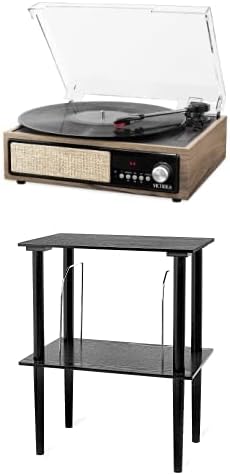
Image 1: The Victrola 3-in-1 Bluetooth Record Player (top) and the accompanying Wooden Stand (bottom). The record player features a turntable with a clear dust cover, a front-facing speaker grille, and control knobs. The stand is black with two shelves for record storage.
Record Player Components:
- Turntable Platter: Where records are placed.
- Tonearm: Holds the stylus (needle) for playing records.
- Stylus: The needle that reads the grooves of a record.
- Dust Cover: Protects the turntable from dust when not in use.
- Built-in Stereo Speakers: For audio output.
- Function Selector: To switch between Phono (Turntable), Bluetooth, and FM Radio modes.
- Volume Control Knob: Adjusts audio output level.
- Speed Selector: For 33 1/3, 45, and 78 RPM records.
- RCA Output Jacks: For connecting to external amplifiers or powered speakers.
- Headphone Jack: For private listening.
Wooden Stand Components:
- Top Shelf: Designed to hold the record player.
- Bottom Shelf: Provides additional storage.
- Record Holder Rails: Metal rails to organize and store vinyl records.
- Legs: Support the stand structure.
Setup
1. Assembling the Wooden Stand:
- Unpack all components of the wooden stand and identify the top shelf, bottom shelf, legs, and record holder rails.
- Attach the legs to the bottom shelf using the provided hardware. Ensure they are securely fastened.
- Attach the top shelf to the upper part of the legs.
- Insert the record holder rails into the designated slots on the shelves.
- Verify that the stand is stable and all connections are tight.
2. Setting up the Record Player:
- Place the record player on a flat, stable surface, preferably on the assembled wooden stand.
- Remove the protective cap from the stylus (needle).
- Connect the power adapter to the DC IN jack on the back of the record player and then plug it into a wall outlet.
- Place the clear acrylic dust cover onto the hinges at the back of the record player.
- If connecting to external speakers or an amplifier, use RCA cables (not included) to connect the RCA output jacks on the record player to the corresponding input on your audio system.
Operating Instructions
1. Turntable Operation (Playing Records):
- Lift the dust cover.
- Place a record on the turntable platter.
- Select the appropriate speed (33 1/3, 45, or 78 RPM) using the speed selector switch, matching the record's speed. For 45 RPM records, place the included 45 RPM adapter on the center spindle.
- Set the Function Selector to "PHONO".
- Gently lift the tonearm using the cue lever and position it over the desired track of the record.
- Lower the tonearm slowly onto the record using the cue lever. The record will begin to play.
- Adjust the volume using the Volume Control Knob.
- To stop playing, lift the tonearm, return it to the tonearm rest, and lower the cue lever.
2. Bluetooth Operation:
- Set the Function Selector to "BLUETOOTH". The Bluetooth indicator light will flash, indicating it is in pairing mode.
- Enable Bluetooth on your external device (e.g., smartphone, tablet) and search for "Victrola".
- Select "Victrola" from the list of available devices to pair. Once paired, the Bluetooth indicator light will stop flashing and remain solid.
- You can now play audio from your device through the record player's speakers. Adjust volume using both your device and the record player's Volume Control Knob.
3. FM Radio Operation:
- Set the Function Selector to "FM".
- Use the Tuning Knob to scan for available FM radio stations.
- Adjust the volume using the Volume Control Knob.
- For improved reception, adjust the position of the FM antenna located at the back of the unit.
4. Headphone and RCA Output:
- Headphone Jack: Plug standard 3.5mm headphones into the headphone jack for private listening. The built-in speakers will be muted.
- RCA Output: Connect the RCA output jacks to an external amplifier or powered speakers for enhanced audio. Ensure the external device is set to the correct input.
Maintenance
- Cleaning the Dust Cover: Wipe gently with a soft, dry, lint-free cloth. Avoid abrasive cleaners.
- Cleaning the Stylus: Use a soft brush (not included) to gently clean the stylus from back to front. Do not touch the stylus with your fingers.
- Cleaning the Cabinet: Wipe the cabinet with a soft, dry cloth. Do not use harsh chemicals or solvents.
- Record Care: Keep records clean and free of dust. Store them vertically in their sleeves to prevent warping.
- Stylus Replacement: The stylus has a limited lifespan. If sound quality deteriorates, the stylus may need replacement. Contact Victrola support for replacement information.
Troubleshooting
| Problem | Possible Cause | Solution |
|---|---|---|
| No power | Power cord not connected; outlet not active. | Ensure power cord is securely plugged into the unit and a working outlet. |
| No sound from speakers | Volume too low; function selector incorrect; headphones plugged in. | Increase volume. Ensure function selector is on the correct mode (PHONO, BLUETOOTH, FM). Unplug headphones. |
| Turntable not spinning | Power issue; belt dislodged (rare). | Check power connection. If problem persists, contact customer support. |
| Bluetooth not pairing | Device too far; not in pairing mode; already paired to another device. | Ensure record player is in Bluetooth pairing mode. Move device closer. Disconnect from other Bluetooth devices. |
| Poor radio reception | Antenna position; local interference. | Adjust the FM antenna. Try moving the unit to a different location. |
Specifications
| Brand | Victrola |
| Model | 3-in-1 Bluetooth Record Player and Wooden Stand |
| ASIN | B0C6X7WJ8C |
| Features | 3-Speed Turntable (33 1/3, 45, 78 RPM), Bluetooth Connectivity, FM Radio, Built-in Stereo Speakers, RCA Output, Headphone Jack |
| Included Components | Dust cover, Wooden stand |
| Material | Plastic, Wood |
| Color | Farmhouse Walnut (Record Player), Black (Stand) |
| Power Source | Corded Electric |
| Compatible Devices | Headphones, External Speakers |
Warranty and Support
Victrola products are designed for reliability and performance. For warranty information, technical support, or to inquire about replacement parts (such as a stylus), please visit the official Victrola website or contact their customer service department.
Website: www.victrola.com
Please have your model number (Victrola 3-in-1 Bluetooth Record Player and Wooden Stand) and ASIN (B0C6X7WJ8C) ready when contacting support.