
1. Important Safety Information
Please read all instructions carefully before using this product and retain them for future reference. Improper use may result in damage to the product or personal injury.
- Do not expose the microphone to extreme temperatures, direct sunlight, or high humidity.
- Avoid dropping or subjecting the microphone to strong impacts.
- Do not attempt to disassemble or modify the microphone. This will void the warranty.
- Keep the microphone away from water and other liquids.
- Use only the provided charging cable or a certified equivalent.
- When cleaning, use a soft, dry cloth. Do not use abrasive cleaners or solvents.
2. Package Contents
Verify that all items are present in your package:
- The Voice Champ Deluxe Wireless Handheld Karaoke Microphone
- USB Charging Cable
- Auxiliary Audio Cable
- User Manual (this document)

Image: Contents of the The Voice Champ Deluxe package, including the microphone, user manual, and charging cable.
3. Product Overview
Familiarize yourself with the various parts and controls of your microphone:

Image: Labeled diagram of the microphone's control panel, showing buttons for previous/next track, scan, record, volume up/down, LED control, microphone volume, and remix/echo.
- PREV/NEXT: Skip to previous or next track.
- SCAN: Tune into FM Radio or initiate Bluetooth pairing.
- REC: Record vocals.
- VOL+/-: Adjust music playback volume.
- LED +/-: Control LED light brightness or patterns.
- MIC VOL: Adjust microphone input volume.
- REMIX: Activate or adjust echo/voice effects.
4. Setup
4.1 Charging the Microphone
- Connect the small end of the USB charging cable to the charging port on the microphone.
- Connect the larger end of the USB cable to a USB power adapter (not included) or a computer's USB port.
- The LED indicator will illuminate during charging and turn off when fully charged.
- A full charge typically takes 2-3 hours.
4.2 Powering On/Off
- To power on, press and hold the Power button (often integrated with the SCAN button) until the LED lights illuminate and you hear an audible prompt.
- To power off, press and hold the Power button again until the LED lights turn off and you hear an audible prompt.
4.3 Bluetooth Pairing
Connect your microphone wirelessly to a smartphone, tablet, or other Bluetooth-enabled device.
- Ensure the microphone is powered on. It will automatically enter Bluetooth pairing mode, indicated by a flashing LED light and an audible prompt.
- On your device, enable Bluetooth and search for available devices.
- Select "The Voice Champ Deluxe" from the list of devices.
- Once paired, the LED light will stop flashing, and you will hear a confirmation sound.
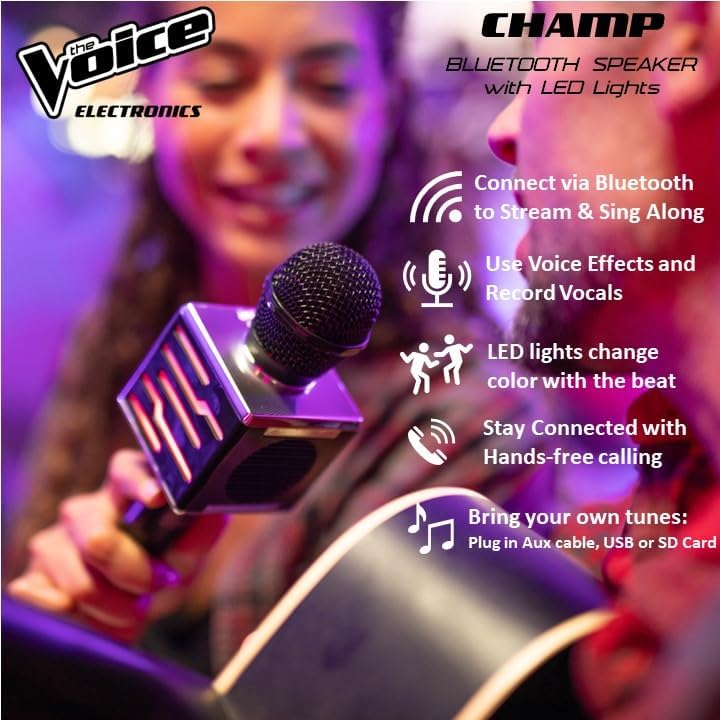
Image: A person holding the microphone, with an icon indicating Bluetooth connection.
4.4 Auxiliary (AUX) Connection
For devices without Bluetooth, use the provided auxiliary cable.
- Connect one end of the auxiliary audio cable to the AUX input port on the microphone.
- Connect the other end to the headphone jack or audio output of your device.
- The microphone will automatically switch to AUX mode.
4.5 USB Connection
The microphone supports playing music from a USB drive.
- Insert a USB flash drive containing MP3 audio files into the USB port on the microphone.
- The microphone will automatically detect the USB drive and begin playing music.
5. Operating Instructions
5.1 Playing Music
- Bluetooth/AUX/USB: Once connected, music from your device or USB drive will play through the microphone's built-in speaker.
- Volume Control: Use the VOL+/- buttons on the microphone to adjust the music playback volume.
- Track Navigation: Use the PREV and NEXT buttons to skip between tracks.
5.2 Microphone Volume and Echo
- Microphone Volume: Use the MIC VOL slider or buttons to adjust the volume of your voice.
- Echo Effect: Use the REMIX slider or buttons to add or adjust the echo effect to your voice.
5.3 Voice Effects
The microphone features multiple voice effects to enhance your performance.

Image: The microphone displaying icons representing different voice effects such as Voice Echo, Helium Voice, Low Bass Voice, Female Child Voice, and Male Voice.
- Press the REMIX button repeatedly to cycle through available voice effects (e.g., Voice Echo, Helium Voice, Low Bass Voice, Female Child Voice, Male Voice).
- Select the desired effect for your vocal performance.
5.4 LED Lights Control
The microphone features LED lights that can change with the music rhythm.

Image: A woman holding the microphone, showcasing its green LED lights in action.
- Use the LED +/- buttons to adjust the brightness or change the pattern of the LED lights.
- The lights are designed to synchronize with the music rhythm.
5.5 Recording Vocals
Record your singing performances directly onto the microphone (if supported by internal memory or connected storage) or through a connected device.
- Press the REC button to start recording.
- Press the REC button again to stop recording.
- Refer to your connected device's instructions for recording audio via Bluetooth or AUX.
5.6 FM Radio Function
The microphone includes an FM radio tuner.
- Press the SCAN button to search for available FM radio stations.
- Use the PREV/NEXT buttons to navigate between scanned stations.
5.7 Hands-free Calling
When connected via Bluetooth to a smartphone, the microphone can be used for hands-free calls.
- An incoming call will pause music playback.
- Press the SCAN button (or a dedicated call button if present) to answer or end a call.
6. Maintenance and Care
6.1 Cleaning
- Wipe the microphone's exterior with a soft, dry, lint-free cloth.
- Do not use liquid cleaners, aerosols, or solvents.
6.2 Battery Care
- Charge the microphone fully before first use.
- If the microphone will not be used for an extended period, charge it at least once every three months to maintain battery health.
- Do not expose the battery to excessive heat.
6.3 Storage
- Store the microphone in a cool, dry place, away from direct sunlight and extreme temperatures.
7. Troubleshooting
| Problem | Solution |
|---|---|
| Microphone does not power on. | Ensure the microphone is fully charged. Press and hold the Power button for a few seconds. |
| No sound from the speaker. | Check the music volume (VOL+/-) and microphone volume (MIC VOL). Ensure the device is properly connected via Bluetooth, AUX, or USB. |
| Bluetooth connection fails. | Ensure the microphone is in pairing mode. Turn off and on Bluetooth on your device. Move closer to the microphone. Forget the device on your phone and re-pair. |
| Poor sound quality or distortion. | Reduce the volume on both the microphone and the connected device. Ensure there are no obstructions between the microphone and the connected device (for Bluetooth). Check the audio cable for damage if using AUX. |
| LED lights are not working. | Press the LED +/- buttons to activate or adjust the lights. |
8. Specifications
| Feature | Detail |
|---|---|
| Model Name | The Voice Champ Deluxe |
| Model Number | VCHP-6/2072 |
| Connectivity Technology | Auxiliary, Bluetooth, USB |
| Connector Type | USB Type-A, 3.5 mm TRS |
| Special Features | Bluetooth, USB, Wireless, LED Lights, Sound Effects |
| Compatible Devices | Karaoke Machine, Smartphones, Tablets |
| Color | Black |
| Included Components | Microphone, USB Charging Cable, Auxiliary Audio Cable |
| Polar Pattern | Unidirectional |
| Impedance | 4 Ohms |
| Microphone Form Factor | Handheld |
| Power Source | Battery Powered |
| Number of Channels | 1 |
| Frequency Range | 50-15000 Hz |
| Enclosure Material | Plastic |
| Item Dimensions | 2.82 x 2.86 x 9.12 inches |
| UPC | 841133120728 |
9. Product Video Overview
Video: A brief overview demonstrating the key features of The Voice Champ Deluxe Karaoke Microphone, including Bluetooth connectivity, voice effects, and the built-in speaker functionality.
10. Warranty and Support
This product is covered by a limited manufacturer's warranty. Please refer to the warranty card included in your package for specific terms and conditions.
For technical support, troubleshooting assistance, or warranty claims, please contact The Voice customer service:
- Website: The Voice Electronics Store
- Email: [Insert Customer Service Email Here]
- Phone: [Insert Customer Service Phone Number Here]
Please have your model number (VCHP-6/2072) and proof of purchase ready when contacting support.