
The Voice The Voice Legend
The Voice Legend Wireless Bluetooth Speaker User Manual
Model: The Voice Legend | Brand: The Voice
Introduction
Thank you for purchasing The Voice Legend Wireless Bluetooth Speaker. This portable speaker is designed to deliver clear audio with a vibrant LED light show, making it perfect for various settings. It features Bluetooth connectivity for seamless music streaming, FM radio, hands-free calling, and support for USB and Micro SD playback. Its durable and lightweight design ensures portability and ease of use.
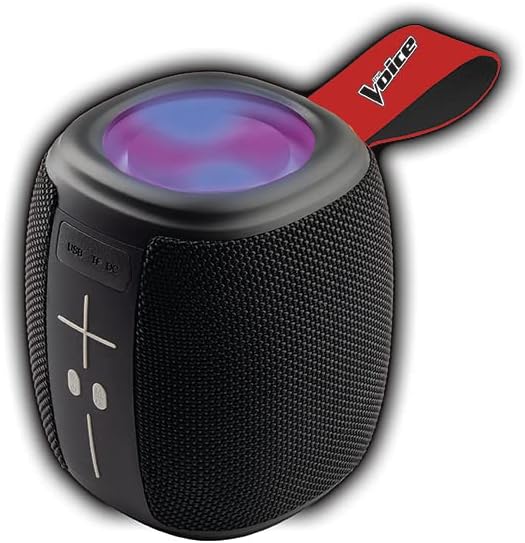
Image: The Voice Legend Wireless Bluetooth Speaker, showcasing its compact design and top-mounted LED light panel.
What's in the Box
Please check the contents of your package to ensure all items are present:
- 1x The Voice Legend Bluetooth Speaker
- 1x USB-C Charging Cable
- 1x Instruction Manual

Image: A visual representation of the package contents, including the speaker, USB-C charging cable, and the user manual.
Product Features
- Wireless Bluetooth Connectivity: Easily connect to your smartphone, tablet, or laptop from up to 30 feet away.
- Vibrant LED Light Show: Features multiple color modes for a dynamic visual experience, suitable for parties or ambient lighting.
- Portable & Lightweight Design: Compact dimensions (4.49 x 4.49 x 5.16 inches) and light weight (1.4 pounds) with a handy carrying strap for easy transport.
- FM Radio: Tune into your favorite radio stations.
- Hands-Free Calling: Built-in microphone allows for clear speakerphone calls.
- Multiple Playback Options: Supports music playback via USB and Micro SD card slots.
- Rechargeable Battery: Provides up to 4 hours of playtime on a single charge.
- Oversize Controls: Easy-to-use large buttons for volume and playback control.
- True Wireless Stereo (TWS) Functionality: Connect two The Voice Legend speakers for an enhanced stereo sound experience.
- Waterproof: Designed to withstand splashes and light rain.
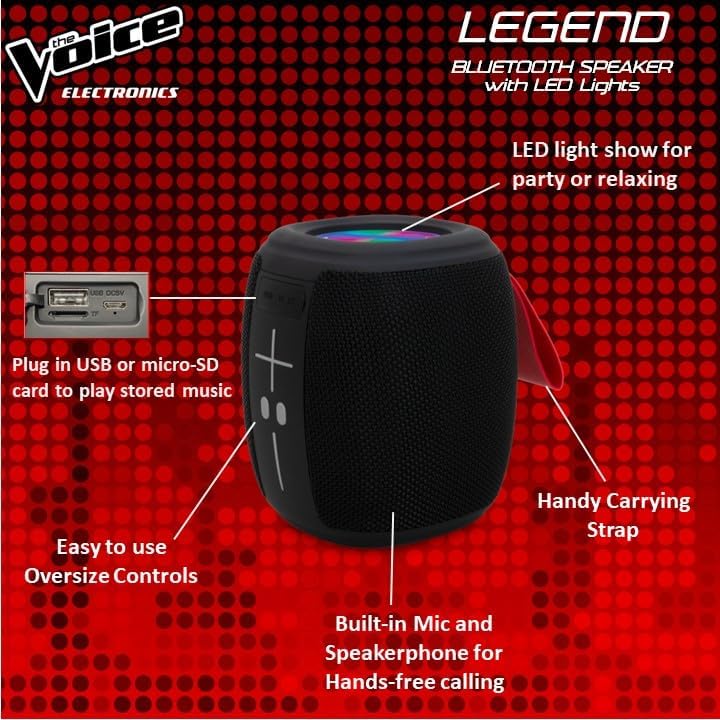
Image: Detailed view of the speaker's side, pointing out the oversized controls, USB and Micro-SD card slots, built-in microphone for hands-free calling, and the handy carrying strap.
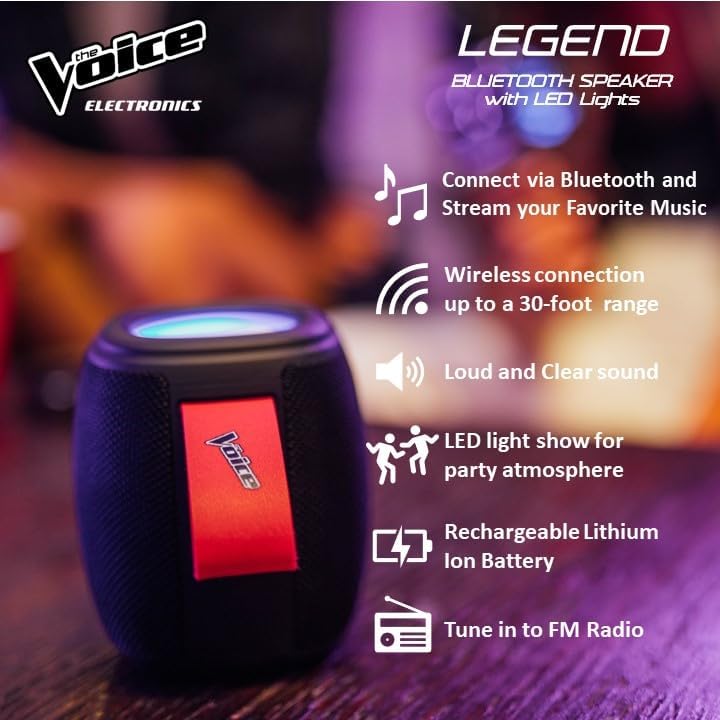
Image: Infographic showcasing key features like Bluetooth connectivity, 30-foot wireless range, loud and clear sound, LED light show, rechargeable lithium-ion battery, and FM radio tuning.

Image: Demonstrating the speaker's lightweight and durable nature, and how to activate the LED light show for different ambiances.
Setup
1. Charging the Speaker
Before first use, fully charge the speaker. Connect the provided USB-C charging cable to the speaker's DC 5V port and the other end to a USB power adapter (not included) or a computer USB port. The charging indicator light will show charging status and turn off when fully charged. A full charge provides approximately 4 hours of playtime.
2. Powering On/Off
Press and hold the power button (usually marked with a circle or power symbol) for a few seconds to turn the speaker ON or OFF. A sound prompt will indicate the power status.
3. Bluetooth Pairing
- Ensure the speaker is powered ON and in Bluetooth pairing mode. A blue LED light will flash rapidly, indicating it's ready to pair.
- On your device (smartphone, tablet, etc.), go to the Bluetooth settings.
- Search for "The Voice Legend" in the list of available devices.
- Select "The Voice Legend" to connect. Once connected, the blue LED light will stop flashing and remain solid, and you will hear a confirmation sound.
Video: An official product video demonstrating the features and ease of use of The Voice Legend Bluetooth Speaker, including its LED light show and portability.
Operating Instructions
1. Music Playback (Bluetooth Mode)
- Once paired, open your music app on your device and start playing.
- Use the + and - buttons on the speaker to adjust volume. Press and hold for volume control.
- Short press the + button to skip to the next track.
- Short press the - button to go to the previous track.
- Press the Play/Pause button (often marked with a play/pause symbol) to pause or resume playback.
2. FM Radio Mode
- Press the Mode button (often marked "M") to switch to FM Radio mode.
- The speaker will automatically scan and save available radio stations.
- Use the + and - buttons to navigate between saved stations.
- For better reception, try repositioning the speaker.
3. USB / Micro SD Playback
- Insert a USB drive or Micro SD card (with pre-loaded MP3 audio files) into the respective slot.
- The speaker will automatically detect the media and begin playback.
- Use the playback controls (volume, next/previous track, play/pause) as in Bluetooth mode.
4. Hands-Free Calling
- When a call comes in while connected via Bluetooth, the music will pause.
- Press the Play/Pause button to answer an incoming call.
- Press the Play/Pause button again to end the call.
- Press and hold the Play/Pause button to reject an incoming call.
5. LED Light Control
The speaker features a dynamic LED light show. Press the dedicated light button (if available, or refer to specific button functions in the included manual) to cycle through different light modes or turn the lights off. There are typically 4 different color modes.
6. True Wireless Stereo (TWS) Pairing
To achieve a true stereo sound experience, you can pair two The Voice Legend speakers together:
- Ensure both speakers are powered ON and not connected to any Bluetooth device.
- On one speaker (this will be your primary speaker), press and hold the TWS pairing button (refer to the included manual for exact button location, often a dedicated button or a long press on a multi-function button).
- The primary speaker will search for the secondary speaker. Once connected, you will hear a confirmation sound.
- Now, connect your device to the primary speaker via Bluetooth as described in the "Bluetooth Pairing" section. Audio will play in stereo through both speakers.

Image: Two The Voice Legend speakers shown side-by-side, illustrating their True Wireless Functionality (TWS) for connecting and streaming stereo audio.
Maintenance
- Cleaning: Wipe the speaker with a soft, dry cloth. Do not use abrasive cleaners or solvents.
- Storage: Store the speaker in a cool, dry place away from direct sunlight and extreme temperatures.
- Battery Care: To prolong battery life, avoid fully discharging the battery frequently. Charge the speaker regularly, even if not in use for extended periods.
- Water Resistance: While waterproof, avoid submerging the speaker in water for prolonged periods. Ensure charging ports are dry before charging.
Troubleshooting
| Problem | Possible Cause | Solution |
|---|---|---|
| Speaker does not turn ON. | Low battery. | Charge the speaker fully. |
| Cannot pair with Bluetooth device. | Speaker not in pairing mode; device Bluetooth off; too far from speaker. | Ensure speaker is flashing blue LED. Turn device Bluetooth off/on. Move device closer (within 30 ft). |
| No sound or distorted sound. | Volume too low; speaker not connected; audio source issue. | Increase speaker and device volume. Re-pair Bluetooth. Check audio source. |
| FM Radio static/poor reception. | Weak signal. | Reposition the speaker to find a stronger signal. |
| Cannot play from USB/Micro SD. | Incorrect file format; card/drive not inserted correctly. | Ensure files are MP3. Reinsert card/drive. |
Specifications
- Model Name: The Voice Legend
- Speaker Type: Portable Wireless Speaker
- Connectivity Technology: Bluetooth
- Wireless Communication Technology: Bluetooth
- Bluetooth Range: Up to 30 feet (9.14 meters)
- Audio Output Mode: Stereo (with TWS)
- Speaker Maximum Output Power: 3 Watts
- Battery Life: Up to 4 Hours
- Power Source: Battery Powered
- Included Components: Rechargeable battery, Built-in microphone
- Waterproof: Yes
- Control Method: Voice Control
- Product Dimensions: 4.49 x 4.49 x 5.16 inches
- Item Weight: 1.4 pounds
- UPC: 841133120667
- Manufacturer: The Voice
Warranty and Support
The Voice Legend Wireless Bluetooth Speaker comes with a Limited Warranty. Please refer to the warranty card included in your package for specific terms and conditions, including coverage period and details on how to obtain service.
For technical support, troubleshooting assistance, or warranty claims, please contact The Voice customer service. Contact information can typically be found on the product packaging or on the official The Voice Electronics website.
Please retain your proof of purchase for warranty purposes.
Related documentsThe Voice Legend


Ask a question about this manual
Ask about setup, troubleshooting, compatibility, parts, safety, or missing instructions. Manuals+ will review the question and use this page’s manual context to help answer it.