1. Introduction
This manual provides detailed instructions for the safe and effective use of your GHB Baby Monitor SM43A-A2. Please read this manual thoroughly before operating the device and retain it for future reference. This system is designed to assist in monitoring infants and young children.

The GHB Baby Monitor system includes a 4.3-inch parent unit monitor and two baby cameras, designed for comprehensive child supervision.
2. Package Contents
Verify that all items are present in the package:
- 1 x Parent Unit (Monitor)
- 2 x Baby Units (Cameras)
- 3 x Power Adapters (for Monitor and Cameras)
- 1 x User Manual
3. Product Overview
3.1 Key Features
- 4.3-inch Color LCD Screen
- 720HD Video Resolution
- Two-Way Audio Communication
- Automatic Infrared Night Vision
- VOX (Voice Operated Exchange) / ECO Mode
- Room Temperature Monitoring
- Remote Pan (350°) and Tilt (110°) Camera Control
- Digital Zoom Function
- Built-in Lullabies
- Supports up to 4 Cameras (2 included)
- Secure FHSS 2.4GHz Wireless Connection (No Wi-Fi/App required)
- 2100mAh Rechargeable Battery for Parent Unit

This image highlights the key features of the GHB Baby Monitor, including its 4.3-inch LCD screen, 2100mAh battery, ECO mode for power saving, two-way intercom, secure FHSS connection, night vision, zoom function, temperature monitoring with alarms, support for up to four cameras with dual-screen display, remote camera rotation, and lullaby playback.
4. Setup
4.1 Charging the Parent Unit
Before first use, fully charge the parent unit for approximately 8 hours. Connect the small end of the power adapter to the parent unit's charging port and the other end to a power outlet. The battery indicator on the screen will show charging status.
4.2 Powering the Baby Units (Cameras)
Connect each baby unit to a power outlet using its respective power adapter. The cameras require continuous power to operate.
4.3 Placement Guidelines
Place the baby unit (camera) at a safe distance from the baby, ensuring the power cord is out of reach. Position the camera to provide a clear view of the baby's crib or play area. The parent unit can be placed in a convenient location within range.
- Ensure proper ventilation around both units.
- Avoid placing units near heat sources or direct sunlight.
- Keep units away from other electronic devices that may cause interference.
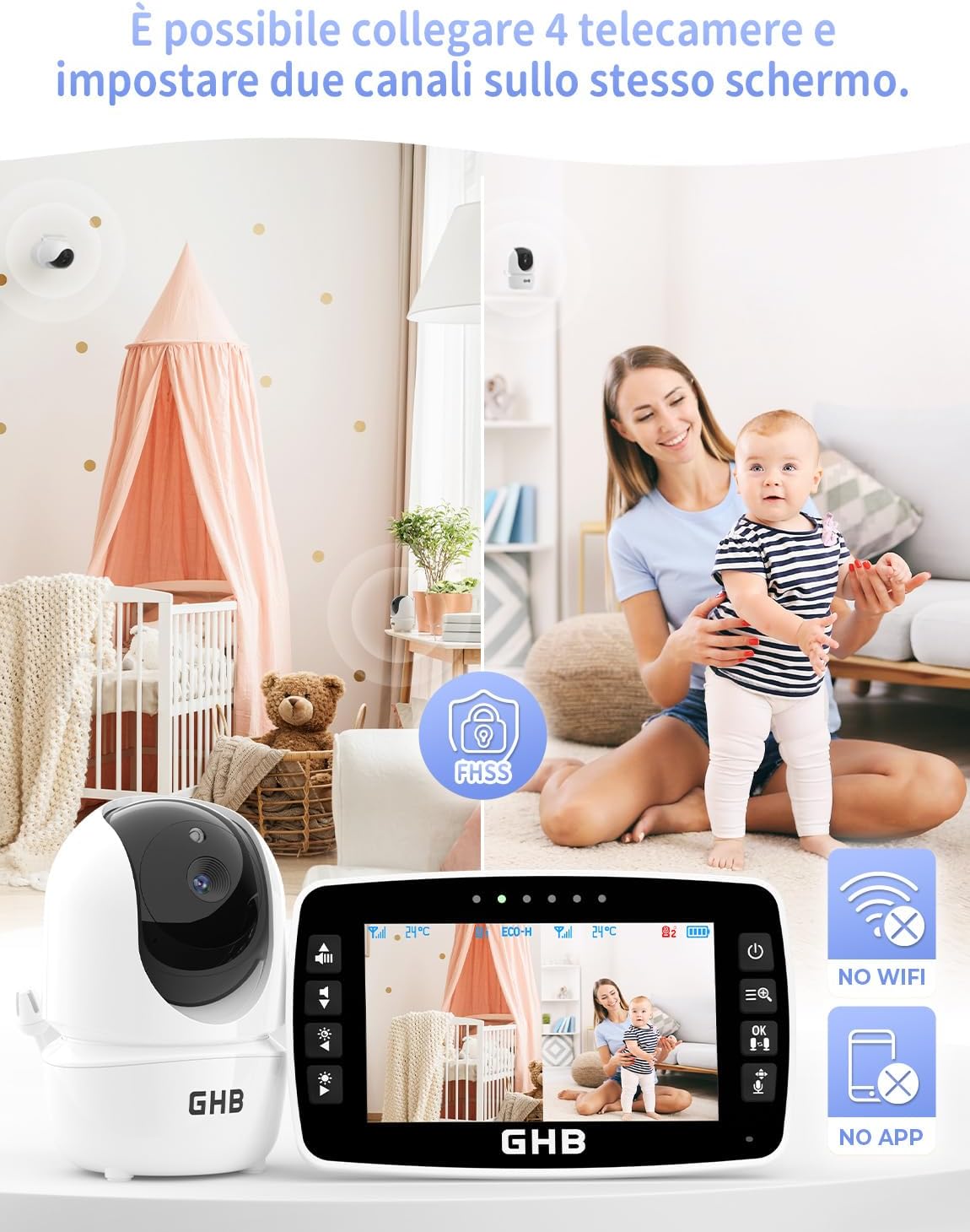
The GHB Baby Monitor system can connect up to four cameras, enabling simultaneous viewing of two camera feeds on the 4.3-inch screen. It operates on a secure FHSS connection, requiring no Wi-Fi or smartphone application.
5. Operating Instructions
5.1 Power On/Off
- Parent Unit: Press and hold the power button on the parent unit to turn it on or off.
- Baby Unit: The baby units power on automatically when connected to a power source.
5.2 Monitor Controls
Use the buttons on the parent unit to navigate menus, adjust volume, and control brightness. Refer to the on-screen icons for specific functions.
5.3 Camera Control (Pan & Tilt, Zoom)
From the parent unit, you can remotely adjust the camera's viewing angle.
- Pan & Tilt: Use the directional buttons on the parent unit to move the camera horizontally (350°) and vertically (110°).
- Zoom: Activate the zoom function via the menu to get a closer view of your baby.

The baby camera offers a wide viewing range with 350 degrees horizontal pan and 110 degrees vertical tilt, allowing full room coverage remotely from the parent unit.
5.4 Two-Way Communication
Press and hold the talk button on the parent unit to speak to your baby through the camera's speaker. Release the button to hear your baby.

The two-way communication feature allows parents to speak to their baby through the monitor, providing comfort and reassurance from another room.
5.5 VOX / ECO Mode
The ECO mode conserves battery power by automatically turning off the monitor screen when the environment is quiet. The screen and audio will reactivate upon detection of sound from the baby's room.
- Activation: Access the menu on the parent unit to enable or disable ECO mode.
- Sensitivity: Adjust the VOX sensitivity level to determine how loud a sound needs to be to activate the monitor.

The ECO mode conserves battery by automatically turning off the monitor screen when the environment is quiet. The screen reactivates instantly upon detection of sound from the baby's room.
5.6 Night Vision
The baby unit is equipped with infrared LEDs that automatically activate in low-light conditions, providing a clear black-and-white image on the parent unit.

The monitor provides clear night vision for monitoring in low light conditions. The baby camera can also play soothing lullabies to help the baby sleep.
5.7 Temperature Monitoring
The baby unit has a built-in temperature sensor that displays the room temperature on the parent unit's screen. You can set temperature alarms to be notified if the room temperature goes outside a predefined range.

The baby camera features a built-in temperature sensor that continuously monitors and displays the ambient room temperature on the parent unit, ensuring a comfortable environment for the baby.
5.8 Lullabies
Select from a variety of pre-programmed lullabies through the parent unit's menu to soothe your baby. You can control playback and volume from the parent unit.
5.9 Multi-Camera View
If you have multiple cameras connected, you can switch between camera views or display two camera feeds simultaneously on the screen. Refer to the parent unit's menu for camera selection options.
6. Maintenance
6.1 Cleaning
Wipe the units with a dry, soft cloth. Do not use abrasive cleaners or solvents. Ensure units are unplugged before cleaning.
6.2 Battery Care
To prolong battery life, avoid fully discharging the parent unit's battery frequently. Recharge the battery when the low battery indicator appears. If storing the unit for an extended period, charge it periodically.
7. Troubleshooting
If you encounter issues with your GHB Baby Monitor, please refer to the following common solutions:
| Problem | Possible Solution |
|---|---|
| No image/sound on parent unit |
|
| Poor image quality |
|
| Short battery life |
|
| Interference/Static |
|
8. Specifications
| Feature | Detail |
|---|---|
| Model Number | SM43A-A2 |
| Screen Size | 4.3 inches |
| Video Resolution | 720p |
| Pan Angle | 350 degrees |
| Tilt Angle | 110 degrees |
| Parent Unit Battery | 2100 mAh Lithium-ion (1 AA battery included) |
| Power Input | 5V, 5W |
| Wireless Technology | FHSS 2.4GHz |
| Material | Plastic |
| Weight | 960 g (package) |
| Mounting Type | Tabletop |
9. Safety Information
- Strangulation Hazard: Keep all cords out of reach of children (at least 3 feet / 1 meter away). Never place the camera or cords in or near the crib or playpen.
- Choking Hazard: This product contains small parts. Keep out of reach of children.
- Overheating: Do not cover the units with blankets or clothing. Ensure proper ventilation.
- Water and Moisture: Do not expose the units to water or moisture. This product is for indoor use only.
- Power Source: Use only the provided power adapters. Using unauthorized adapters may damage the product and void the warranty.
- Battery Safety: Do not attempt to replace the internal battery of the parent unit. Contact customer support for battery-related issues.
10. Warranty and Support
GHB products are designed for reliability and performance. For warranty information, technical support, or service inquiries, please contact GHB customer support through the retailer where the product was purchased or visit the official GHB website. Please have your model number (SM43A-A2) and purchase date available when contacting support.


