
Product Overview
The MOUNT-IT! Motorized Fireplace TV Wall Mount is designed to provide a flexible and comfortable viewing experience, especially when mounting a television above a fireplace. This innovative mount features a whisper-quiet motor that allows for effortless lowering and raising of your TV to the perfect viewing height. It combines sleek aesthetics with high functionality, ensuring a harmonious integration into your living space. The mount supports a wide range of TV sizes and VESA patterns, offering universal compatibility and robust support for your display.
Important Safety Information
Please read all instructions carefully before installation and use. Failure to do so may result in personal injury or property damage.
- Ensure the mounting surface can safely support the combined weight of the mount and your television.
- Professional installation is recommended for optimal safety and performance.
- Do not exceed the maximum weight capacity of 77 lbs (35 kg).
- Keep hands and fingers clear of moving parts during operation to avoid pinch points.
- Do not attempt to modify the mount or use it for purposes other than its intended design.
- Keep the remote control out of reach of children to prevent unintended operation.
Package Contents
Please verify that all components are present and undamaged before beginning installation. If any parts are missing or damaged, please contact Mount-It! customer support.
- Motorized TV Wall Mount Assembly
- Remote Control
- Power Adapter
- Mounting Hardware Kit (various screws, anchors, washers)
- Instruction Manual
Technical Specifications
| Brand | Mount-It! |
| Model Number | MI-386W |
| Item Weight | 27.2 pounds (12.3 kg) |
| Package Dimensions | 28.6 x 20.8 x 6.6 inches (72.6 x 52.8 x 16.8 cm) |
| Country of Origin | China |
| Mounting Type | Wall Mount |
| Movement Type | Height Adjustable, Swivel, Tilt |
| Material | Aluminum |
| Maximum Compatible Size | 70 Inches |
| Minimum Compatible Size | 37 Inches |
| Compatible Devices | Television |
| Maximum Tilt Angle | 3 Degrees |
| VESA Compatibility | 200x100mm to 600x400mm |
| Weight Capacity | Up to 77 lbs (35 kg) |
Setup and Installation Guide
Proper installation is critical for the safety and functionality of your motorized TV mount. Please follow these steps carefully. If you are unsure about any part of the installation process, consult a qualified professional.
Pre-Installation Checklist
- Verify Wall Type: Ensure your wall is suitable for mounting (solid concrete, brick, or wood stud walls).
- Locate Studs: For wood stud walls, use a stud finder to accurately locate the center of the studs. The mount is designed for 16-inch stud spacing.
- Check VESA Compatibility: Confirm your TV's VESA pattern falls within the supported range (200x100mm to 600x400mm).
- Confirm TV Weight: Ensure your TV's weight does not exceed 77 lbs (35 kg).

Image: Illustration of 16-inch stud spacing for wall mounting.
Mounting the Wall Plate
- Determine the desired height for your TV when fully retracted. Mark the drilling points for the wall plate.
- Drill pilot holes at the marked locations.
- Secure the wall plate to the wall using the appropriate mounting hardware for your wall type.
Attaching TV Brackets
- Attach the vertical TV brackets to the back of your television using the VESA mounting holes and the provided screws and spacers. Ensure the brackets are securely fastened and centered.

Image: VESA pattern compatibility chart for TVs from 37" to 70" and up to 77 lbs.
Mounting TV to Wall Plate
- Carefully lift the television and hook the TV brackets onto the wall plate.
- Secure the TV to the mount using the safety screws or locking mechanisms.
Cable Management
Utilize the integrated cable management system to neatly route and conceal your TV cables. This helps maintain a clean appearance and prevents cables from interfering with the mount's movement.
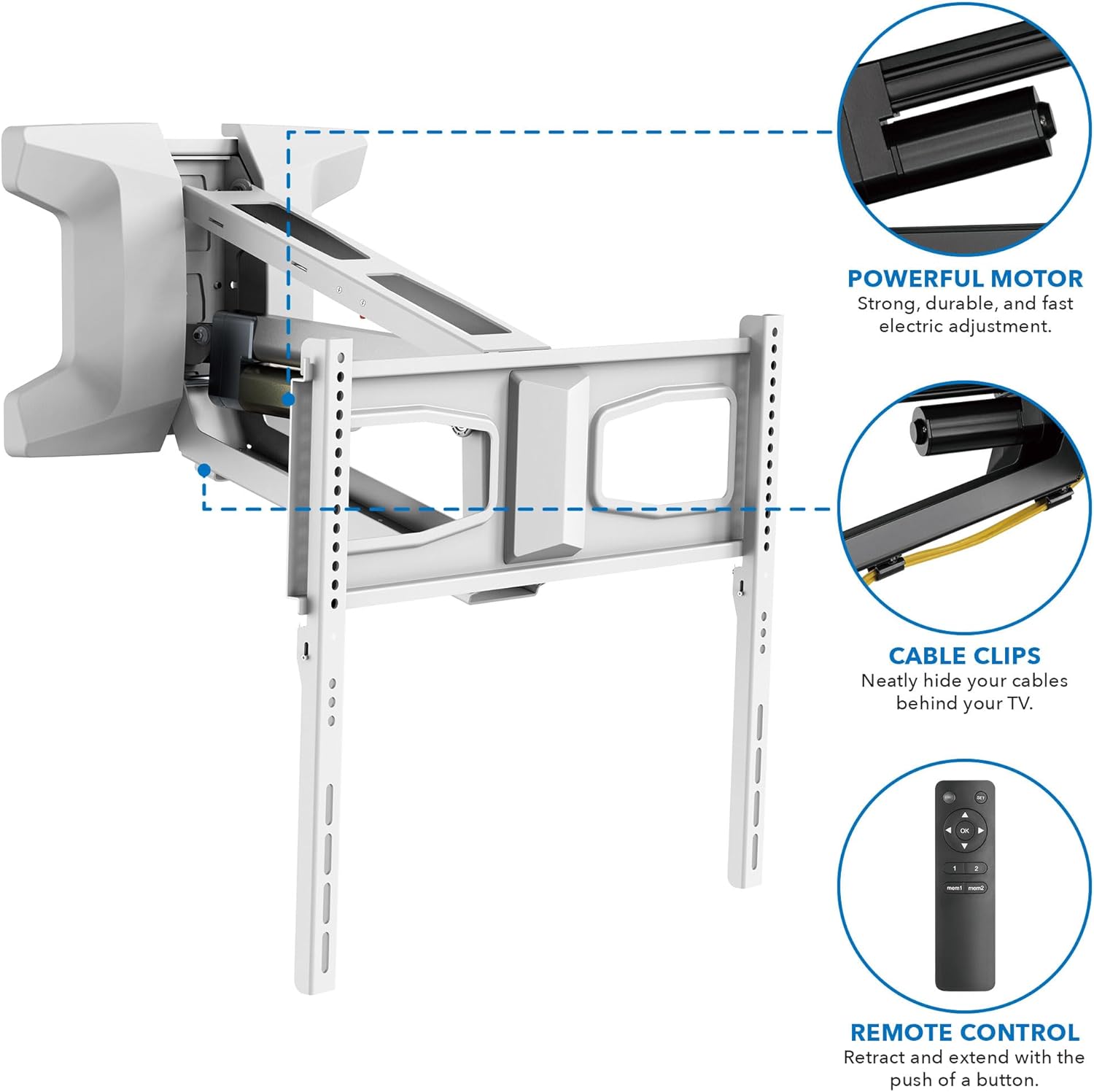
Image: Features of the mount including the powerful motor, cable clips, and remote control.
Operating Your Motorized TV Mount
Your MOUNT-IT! motorized TV mount is designed for ease of use with its programmable remote control.
Remote Control Functions
- Up/Down Buttons: Press and hold to raise or lower the TV. Release to stop at the desired height.
- Memory Settings (1 & 2): The remote allows you to save two favorite viewing positions. To set a position, move the TV to the desired height and angle, then press and hold the 'SET' button until the indicator light flashes, then press either '1' or '2'. To recall a saved position, simply press '1' or '2'.
- OK Button: Often used to confirm settings or return the mount to its default retracted position.

Image: Remote control for adjusting TV height up to 22.6 inches and saving favorite positions.
Adjusting Viewing Angle
In addition to motorized height adjustment, the mount offers manual swivel and tilt capabilities for optimal viewing from various positions in your room.
- Swivel: Manually swivel the TV up to 25 degrees left or right to direct the screen towards your viewing area.
- Tilt: The mount allows for a slight tilt of up to 3 degrees, which can help reduce glare.
- Extension: The mount extends from 6 to 19.1 inches from the wall, providing flexibility for viewing and access.

Image: Manual adjustments for tilt (-3 degrees), swivel (+/- 25 degrees), and leveling (+/- 3 degrees), along with extension range.
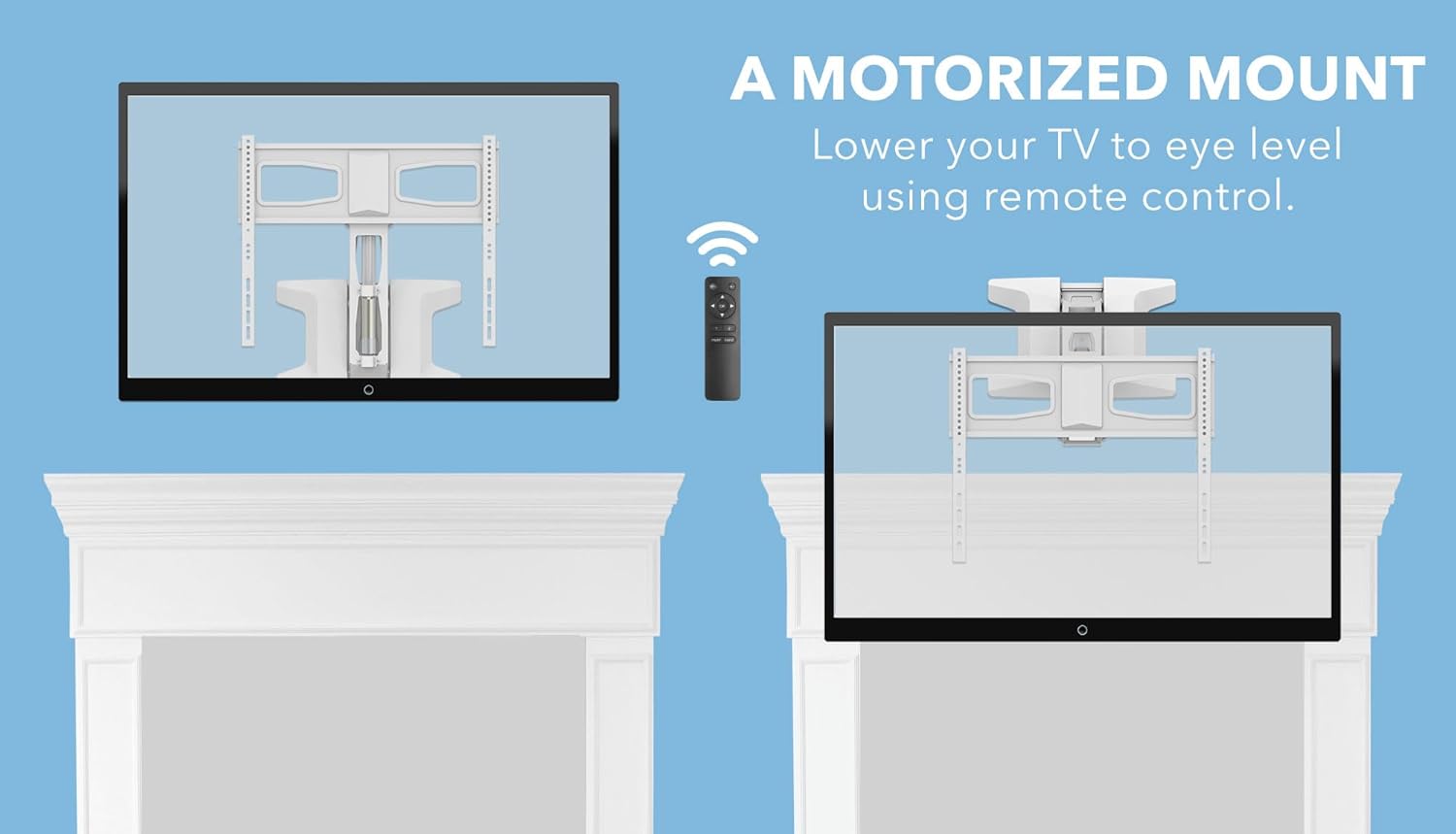
Image: A motorized mount allows you to lower your TV to eye level using remote control.

Image: The mount adapts to avoid neck strain by lowering the TV to a more comfortable viewing level.
Maintenance
Regular maintenance helps ensure the longevity and smooth operation of your motorized TV mount.
- Cleaning: Use a soft, dry cloth to clean the mount. Avoid abrasive cleaners or solvents.
- Check Connections: Periodically inspect all screws and bolts to ensure they are tight and secure.
- Motor Inspection: Listen for any unusual noises during operation. If you notice any issues, discontinue use and contact customer support.
Troubleshooting
If you encounter any issues with your motorized TV mount, refer to the following table for common problems and solutions.
| Problem | Possible Cause | Solution |
|---|---|---|
| Mount not moving or unresponsive to remote. | No power; Remote batteries low/dead; Obstruction. | Check power connection; Replace remote batteries; Remove any obstructions. |
| TV is not level after adjustment. | Manual leveling adjustment needed. | Manually adjust the leveling screws on the TV brackets. |
| Unusual noise during operation. | Loose components; Motor strain. | Check all connections and tighten any loose screws; Ensure TV weight is within limits. If noise persists, contact support. |
| Remote memory settings not working. | Incorrect programming. | Refer to the 'Remote Control Functions' section to re-program memory settings. |
Warranty and Customer Support
Mount-It! products are designed for durability and performance. This product is covered by a manufacturer's warranty against defects in materials and workmanship. For specific warranty details, please refer to the warranty card included with your product or visit the official Mount-It! website.
For technical assistance, troubleshooting, or to inquire about replacement parts, please contact Mount-It! customer support directly. You can find contact information on their official website or through the retailer where you purchased the product.
For more information, visit the Mount-It! Store.


