
Tebild H2008
TEBILD H2008 9L Ultrasonic Cool Mist Humidifier
Instruction Manual
Introduction
Thank you for purchasing the TEBILD H2008 9L Ultrasonic Cool Mist Humidifier. This manual provides essential information for the safe operation, maintenance, and troubleshooting of your new humidifier. Please read it thoroughly before use and retain it for future reference.
Important Safety Instructions
- Always place the humidifier on a firm, flat, water-resistant surface away from walls and heat sources.
- Do not immerse the base unit in water or other liquids.
- Unplug the humidifier before filling, cleaning, or moving it.
- Do not add essential oils directly into the water tank. Use only the designated essential oil tray.
- Keep out of reach of children and pets.
- Do not block air vents.
- Use only clean, cool tap water. Distilled water is recommended to prevent mineral buildup.
- If the humidifier is damaged, do not operate it. Contact customer support.
Package Contents
Verify that all items are present:
- TEBILD H2008 Humidifier Unit
- Remote Control
- Essential Oil Tray
- Instruction Manual (this document)
Product Overview
The TEBILD H2008 is a 9-liter ultrasonic cool mist humidifier designed for large rooms. It features a top-fill design, intelligent humidity control, multiple mist levels, a 360° rotating nozzle, sleep mode, night light, and remote control operation.

Image 1: TEBILD H2008 Humidifier with its remote control and decorative lavender. This image displays the overall design of the humidifier, highlighting its tall, sleek white body with a black top control panel and a visible water level indicator.
Control Panel and Display
The humidifier features an intuitive control panel with a digital display and touch-sensitive buttons. A remote control is also included for convenient operation.

Image 2: Close-up of the TEBILD H2008 humidifier's control panel and remote control. The control panel shows icons for power, humidity, sleep, mist level, timer, and UV function. The remote control mirrors these functions.
Setup
Unpacking
- Carefully remove all components from the packaging.
- Remove any protective films or packaging materials.
- Place the humidifier on a flat, stable surface.
Filling the Water Tank
The H2008 features a convenient top-fill design.

Image 3: Illustration of the top-fill design and cleaning process. The image shows water being poured directly into the top opening of the humidifier and a hand cleaning the inside of the water tank, emphasizing ease of use.
- Ensure the humidifier is unplugged.
- Remove the top cover.
- Pour clean, cool tap water directly into the water tank through the top opening. Do not exceed the maximum fill line.
- Replace the top cover securely.
Operation
Power On/Off
- Plug the power cord into a suitable electrical outlet.
- Press the Power button on the control panel or remote control to turn the humidifier on or off.
Adjusting Mist Levels
The humidifier offers three adjustable mist levels: Low, Medium, and High.

Image 4: Visual representation of the three mist output levels (Low, Medium, High) from the TEBILD H2008 humidifier. The image shows the humidifier in a living room setting, demonstrating the different mist intensities.
- Press the 'Mist' button repeatedly to cycle through Low, Medium, and High mist output settings.
- The 360° rotating nozzle allows you to direct the mist output as needed.
Intelligent Constant Humidity
The humidifier can automatically maintain a desired humidity level.
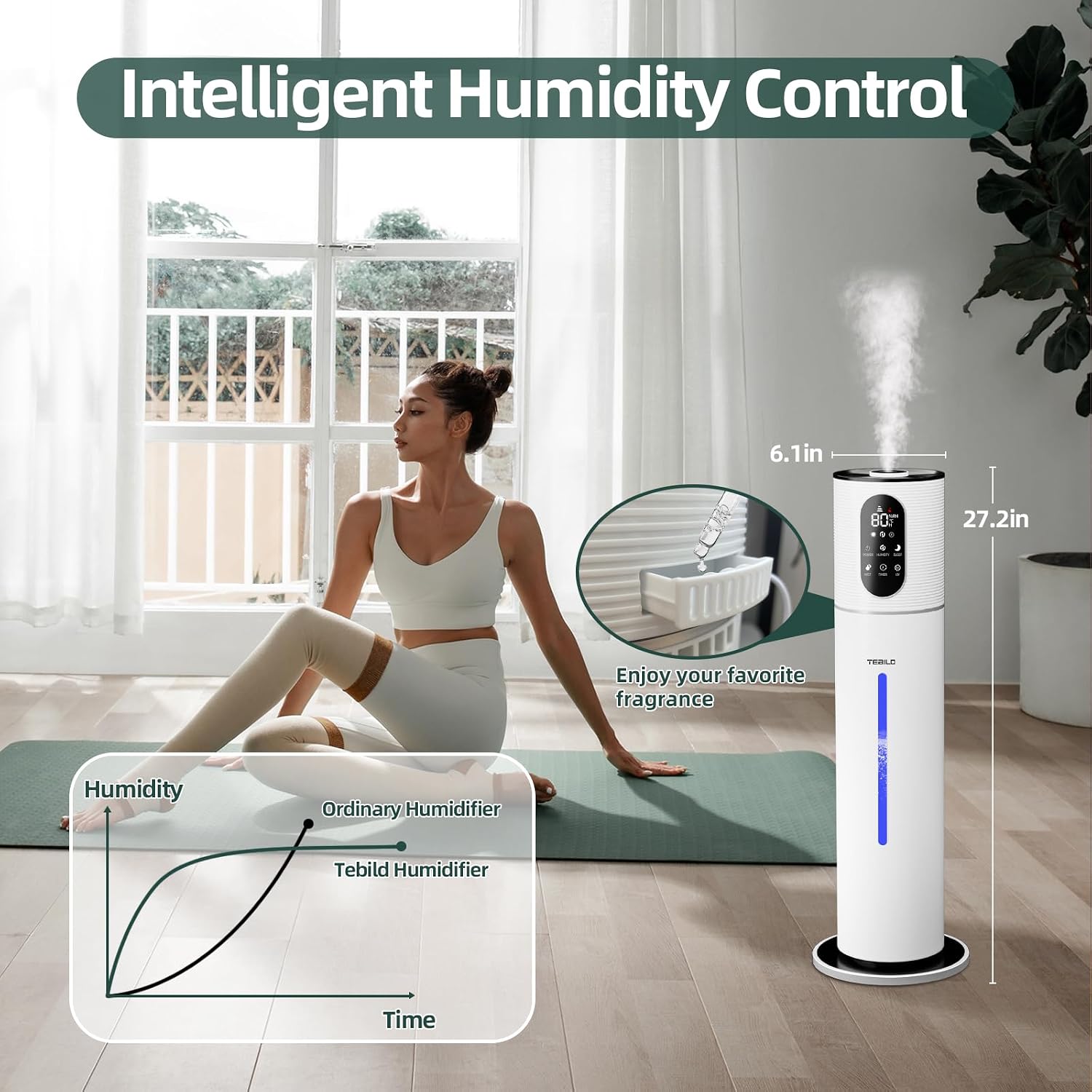
Image 5: Diagram illustrating the intelligent humidity control feature. It shows a graph comparing the humidity curve of an ordinary humidifier versus the TEBILD humidifier, indicating stable humidity maintenance. An inset shows the essential oil tray.
- Press the 'Humidity' button to set your desired humidity level (40%-90%, adjustable in 5% increments).
- The humidifier will automatically turn on or off to maintain the set humidity.
Sleep Mode and Timer
For undisturbed rest, activate Sleep Mode or set a timer.

Image 6: A child sleeping peacefully in a bedroom with the TEBILD H2008 humidifier operating. Icons highlight the 25dB low noise level and 12-hour timer feature, emphasizing a quiet environment for better sleep.
- Sleep Mode: Press the 'Sleep' button to enter ultra-quiet operation (below 25dB) and dim the display lights.
- Timer: Press the 'Timer' button to set an operating duration from 1 to 12 hours. The humidifier will automatically shut off when the timer expires.
Night Light
The humidifier includes a 7-color LED night light.
- Press the 'Light' button to cycle through the 7 colors or turn the night light off.
Essential Oil Tray
Add your favorite aromas to the air.
- Locate the essential oil tray on the back of the unit.
- Add a few drops of essential oil to the pad in the tray.
- Do not add essential oils directly into the water tank.
UV Sterilization
The humidifier features a UV light function for water sterilization.
- Press the 'UV' button to activate or deactivate the UV sterilization function.
Maintenance
Regular cleaning is crucial for optimal performance and hygiene.
Cleaning the Water Tank and Base
- It is recommended to clean the humidifier every 1 to 2 weeks.
- Unplug the unit and remove the top cover.
- Empty any remaining water from the tank.
- Wipe the inside of the water tank and the base with a soft, damp cloth. Do not rinse the top of the humidifier with water, as this may damage internal components.
- For mineral buildup, use a descaling solution or a mixture of white vinegar and water. Let it soak for 30 minutes, then rinse thoroughly.
- Ensure all parts are dry before reassembling.
Cleaning the Essential Oil Tray
- Remove the essential oil tray.
- Clean the pad and tray with a mild detergent and water. Rinse thoroughly and dry before reinserting.
Troubleshooting
| Problem | Possible Cause | Solution |
|---|---|---|
| No mist output | No water in tank; Unit not plugged in; Power button not pressed; Mineral buildup on transducer. | Refill water tank; Check power connection; Press power button; Clean transducer with a soft brush and vinegar solution. |
| Unusual odor | New unit odor; Stagnant water; Dirty water tank. | Run for a few hours; Change water daily; Clean water tank thoroughly. |
| Excessive noise | Unit not on a flat surface; Water level too low. | Place on a flat, stable surface; Refill water tank. |
| Remote control not working | Battery depleted; Obstruction between remote and unit. | Replace battery; Ensure clear line of sight. |
| Humidifier turns off automatically | Low water level; Desired humidity reached; Timer expired. | Refill water tank; Adjust desired humidity setting; Check timer setting. |
Specifications
| Feature | Detail |
|---|---|
| Model Name | H2008 |
| Brand | Tebild |
| Capacity | 9 Liters (2.37 Gallons) |
| Operation Mode | Ultrasonic Cool Mist |
| Max Mist Output | 300 ml/hour |
| Runtime | Up to 52 hours (on low setting) |
| Coverage Area | 120-560 sq. ft. |
| Noise Level | Below 25dB |
| Product Dimensions | 15.5D x 15.5W x 69.1H Centimetres |
| Item Weight | 1.7 kg |
| Special Features | Top-fill Design, Colorful Nightlight, Smart Humidistat, 3 Speeds Cool Mist, Ultra Quiet, Filterless, 12 Hours Timer, Sleep Mode, 360° Nozzle, Auto Shut-Off, UV Sterilization, Essential Oil Tray |
Warranty and Support
TEBILD is committed to providing high-quality products and excellent customer service.
- Return Policy: 30-day return policy.
- Replacement: 24-month replacement for quality issues.
- Customer Support: We offer 24-hour online service. If you have any product questions or need assistance, please do not hesitate to contact us.

Image 7: A customer service representative wearing a headset, smiling and working at a computer. Overlayed icons indicate '24 Hours Fast Support', '30 Days Return', and '24 Months Replacement', highlighting TEBILD's commitment to customer satisfaction.
Ask a question about this manual
Ask about setup, troubleshooting, compatibility, parts, safety, or missing instructions. Manuals+ will review the question and use this page’s manual context to help answer it.