
Introduction
Thank you for purchasing the Kruger&Matz Street KM0563 Bluetooth Speaker. This manual provides essential information for setting up, operating, and maintaining your speaker. Please read it carefully before use and retain it for future reference.
Package Contents
Ensure all items are present in the package:
- Kruger&Matz Street KM0563 Bluetooth Speaker
- USB-C Charging Cable (54 cm)
- 3.5 mm AUX Cable (53 cm)
- Lanyard
- User Manual (this document)

Image: The included USB-C charging cable, 3.5mm AUX cable, and a black lanyard.
Product Overview
Familiarize yourself with the speaker's components and controls.

Image: Front view of the Kruger&Matz Street KM0563 Bluetooth Speaker, showing its cylindrical shape and mesh grille.
Control Panel
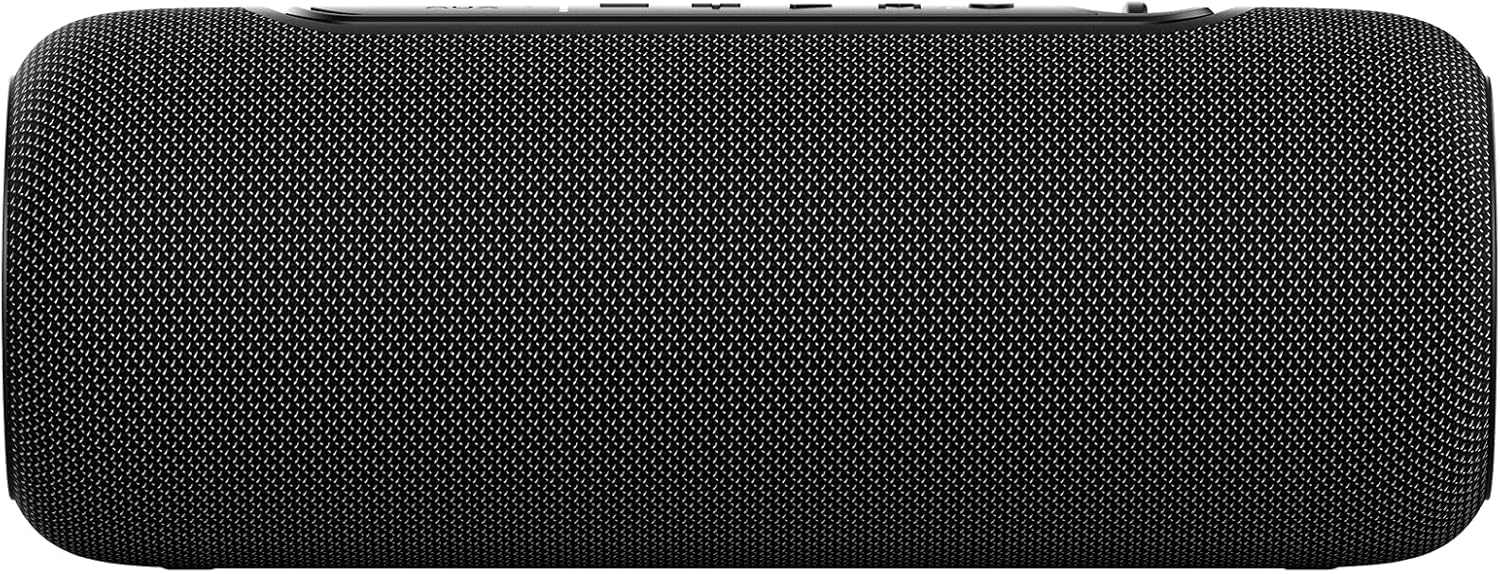
Image: Close-up of the top control panel with buttons for USB/AUX mode, volume down, volume up, play/pause, mode, and power. An LED indicator is also visible.
- USB / AUX Button: Short press to cycle RGB lighting modes.
- Volume Down / Previous Track: Short press for volume down, long press for previous track.
- Volume Up / Next Track: Short press for volume up, long press for next track.
- Play / Pause: Plays or pauses audio playback.
- Mode Button (M): Cycles through Bluetooth, AUX, and USB modes.
- Power Button: Turns the speaker on or off.
- LED Indicator: Shows power and connection status.
Ports

Image: Close-up of the speaker's input ports, including a USB-A port, a 3.5mm AUX input, and a USB-C charging port.
- USB 2.0 Port: For playing audio from USB flash drives.
- AUX Input (3.5 mm Jack): For connecting external audio devices via an AUX cable.
- USB-C Charging Port (DC 5V): For charging the speaker's internal battery.
Setup
Charging the Speaker
Before first use, fully charge the speaker. Connect the supplied USB-C cable to the speaker's USB-C charging port and the other end to a 5V/1A USB power adapter (not included) or a computer's USB port. The LED indicator will show charging status and turn off or change color when fully charged.
Power On/Off
- To Power On: Press and hold the Power Button for approximately 3 seconds. You will hear an audible prompt.
- To Power Off: Press and hold the Power Button for approximately 3 seconds. You will hear an audible prompt.
Bluetooth Pairing
The speaker will automatically enter Bluetooth pairing mode when powered on for the first time or if no device is connected. The LED indicator will flash, indicating it's ready to pair.
- Ensure the speaker is powered on and in Bluetooth mode (LED flashing). If not, press the Mode Button (M) to switch to Bluetooth mode.
- On your smartphone or tablet, enable Bluetooth and search for available devices.
- Select "KM0563" from the list of devices.
- Once paired, the LED indicator will stop flashing and remain solid, and you will hear a confirmation sound.
The speaker has a Bluetooth range of up to 10 meters (33 feet).

Image: A Kruger&Matz Street speaker positioned next to a smartphone displaying a music player interface, illustrating Bluetooth connectivity.
True Wireless Stereo (TWS) Pairing
The TWS function allows you to connect two KM0563 speakers together for a stereo sound experience.
- Ensure both KM0563 speakers are powered on and not connected to any Bluetooth device.
- On one of the speakers (this will be the primary speaker), double-press the Mode Button (M). The speaker will emit a sound, indicating it's searching for another TWS speaker.
- The two speakers will automatically connect to each other. You will hear a confirmation sound once TWS pairing is successful.
- Now, connect your smartphone or tablet to the primary speaker via Bluetooth as described in the "Bluetooth Pairing" section.
Once TWS is enabled, both speakers will play audio in stereo. To disconnect TWS, double-press the Mode Button (M) on either speaker.

Image: An illustration showing two Kruger&Matz Street speakers wirelessly connected, with "TWS True Wireless Stereo" text, indicating the stereo pairing function.
Operating the Speaker
Basic Audio Controls
- Play/Pause: Press the Play/Pause Button once.
- Volume Up: Short press the Volume Up (+) Button.
- Volume Down: Short press the Volume Down (-) Button.
- Next Track: Long press the Volume Up (+) Button.
- Previous Track: Long press the Volume Down (-) Button.
RGB Backlighting
The speaker features RGB backlighting. Short press the USB / AUX Button to cycle through different lighting modes or turn the lighting off.

Image: A close-up of the end cap of a Kruger&Matz Street speaker, showing the illuminated Kruger&Matz logo with a vibrant green RGB light ring.
AUX Mode
To play audio from a device without Bluetooth, use the AUX input.
- Connect one end of the supplied 3.5 mm AUX cable to the speaker's AUX input port.
- Connect the other end of the AUX cable to the headphone jack or audio output of your external device.
- Press the Mode Button (M) until the speaker enters AUX mode. You will hear an audible prompt.
- Control playback and volume from your external device.
USB Playback
To play audio files directly from a USB flash drive:
- Insert a USB flash drive containing MP3, WAV, WMA, or FLAC audio files into the speaker's USB 2.0 port.
- Press the Mode Button (M) until the speaker enters USB mode. The speaker will automatically begin playing audio from the USB drive.
- Use the speaker's control buttons for playback (Play/Pause, Next/Previous Track, Volume).
Maintenance
Cleaning
- Always power off the speaker before cleaning.
- Use a soft, dry cloth to wipe the exterior of the speaker.
- Do not use abrasive cleaners, waxes, or solvents as they may damage the finish.
Storage
- Store the speaker in a cool, dry place away from direct sunlight and extreme temperatures.
- If storing for an extended period, charge the battery to approximately 50% every few months to prolong battery life.
Water Resistance (IPX5)
The KM0563 speaker is rated IPX5, meaning it is protected against low-pressure water jets from any direction. This makes it suitable for outdoor use and splashes, but it is not designed to be submerged in water. Ensure all port covers are securely closed before exposing the speaker to water.

Image: A red Kruger&Matz Street speaker being splashed with water, demonstrating its IPX5 water resistance rating.
Troubleshooting
| Problem | Possible Cause | Solution |
|---|---|---|
| Speaker does not power on. | Low battery; Speaker is off. | Charge the speaker fully. Press and hold the Power Button for 3 seconds to turn on. |
| No sound. | Volume too low; Incorrect mode; Device not connected. | Increase speaker and device volume. Press the Mode Button to select the correct input (Bluetooth, AUX, USB). Ensure Bluetooth device is paired or AUX/USB is connected properly. |
| Bluetooth connection fails. | Speaker not in pairing mode; Device too far; Interference. | Ensure speaker is in Bluetooth pairing mode (flashing LED). Move device closer to speaker (within 10m). Turn off other Bluetooth devices. Forget "KM0563" on your device and re-pair. |
| TWS pairing fails. | Speakers already connected to other devices; Too far apart. | Ensure both speakers are not connected to any Bluetooth device. Place speakers close to each other. Follow TWS pairing steps carefully. |
| USB playback not working. | Incorrect file format; USB drive not recognized; Incorrect mode. | Ensure files are MP3/WAV/WMA/FLAC. Try a different USB drive. Press the Mode Button to select USB mode. |
Specifications
| Model: | KM0563 |
| Power Output: | 20 W |
| Impedance: | 3 ohms |
| Frequency Response: | 80 Hz – 16 kHz |
| S/N Ratio: | 85 dB |
| Speakers: | 2x 2" |
| Bluetooth Version: | 5.0 |
| Bluetooth Range: | Up to 10 m |
| Supported Bluetooth Profiles: | A2DP/AVRCP/HFP |
| Supported Audio Formats (USB): | MP3/WAV/WMA/FLAC |
| Features: | TWS Function, RGB Backlighting |
| Protection Rating: | IPX5 |
| Inputs/Outputs: | USB 2.0 Port, AUX Input (3.5 mm), USB-C (charging) |
| Power Requirements: | 5 V / 1 A |
| Battery: | 3.7 V / 2000 mAh Lithium-ion |
| Dimensions (L x W x H): | 242 x 92 x 92 mm (9.2 x 24 x 9.2 cm) |
| Weight: | 0.75 kg (750 grams) |
Safety Information
- Do not expose the speaker to extreme temperatures, direct sunlight, or high humidity.
- Avoid dropping or subjecting the speaker to strong impacts.
- Do not attempt to disassemble or repair the speaker yourself. Refer to qualified service personnel.
- Keep the speaker away from medical devices (e.g., pacemakers) as it contains magnets.
- Dispose of the battery and speaker responsibly according to local regulations. Do not dispose of in household waste.
- Use only the specified charging voltage (5V/1A).
- Prolonged listening at high volume levels may cause hearing damage.
Warranty and Support
For warranty information or technical support, please refer to the documentation provided at the time of purchase or contact your retailer. Keep your proof of purchase for warranty claims.


