
Introduction
This user manual provides detailed instructions for the MOFII Wireless Keyboard and Mouse Combo, featuring a retro typewriter style with a number pad and an ambidextrous wireless mouse. Designed for comfort and efficiency, this combo offers a reliable 2.4G wireless connection and universal compatibility with various operating systems. Please read this manual thoroughly to ensure proper setup and optimal performance of your new device.

Image: The MOFII Wireless Keyboard and Mouse Combo in Light Blue Colorful, showcasing its retro round keycaps and matching ambidextrous mouse, along with the USB receiver.
Package Contents
- 1 x MOFII Wireless Keyboard
- 1 x MOFII Wireless Mouse
- 1 x USB Receiver (stored inside the mouse)
- 1 x User Manual
Setup
- Install Batteries: Open the battery compartments on the underside of both the keyboard and the mouse. Insert the required batteries (not included) according to the polarity indicators.
- Locate USB Receiver: The USB receiver is cleverly stored inside the mouse's battery compartment or a dedicated slot on the mouse's underside. Carefully remove it.
- Connect Receiver: Plug the USB receiver into an available USB port on your computer or laptop.
- Power On: Ensure both the keyboard and mouse are switched ON. The devices should automatically connect to your computer. No additional drivers are needed for most operating systems.

Image: A visual representation of the plug-and-play setup, showing the USB receiver connected to a laptop and the wireless signal extending to the keyboard and mouse, indicating a range of 35 feet.

Image: A close-up showing the single USB receiver that connects both the wireless keyboard and mouse, highlighting the convenience of a unified connection.
Operating Instructions
Keyboard Features:
- Retro Typewriter Design: Features 104 round keycaps with a floated design for tactile feedback and a unique aesthetic.
- Full-Size Layout: Includes a dedicated number pad for enhanced productivity.
- Adjustable Tilt: The keyboard has foldable stands on the back to adjust the typing angle for ergonomic comfort.
- Indicator Lights: Includes lights for Number Lock, Caps Lock, and Power/Low Battery status.
- Hotkey Functions: Equipped with 13 hotkey functions for quick access to multimedia and common tasks (e.g., F1-F12, volume control).
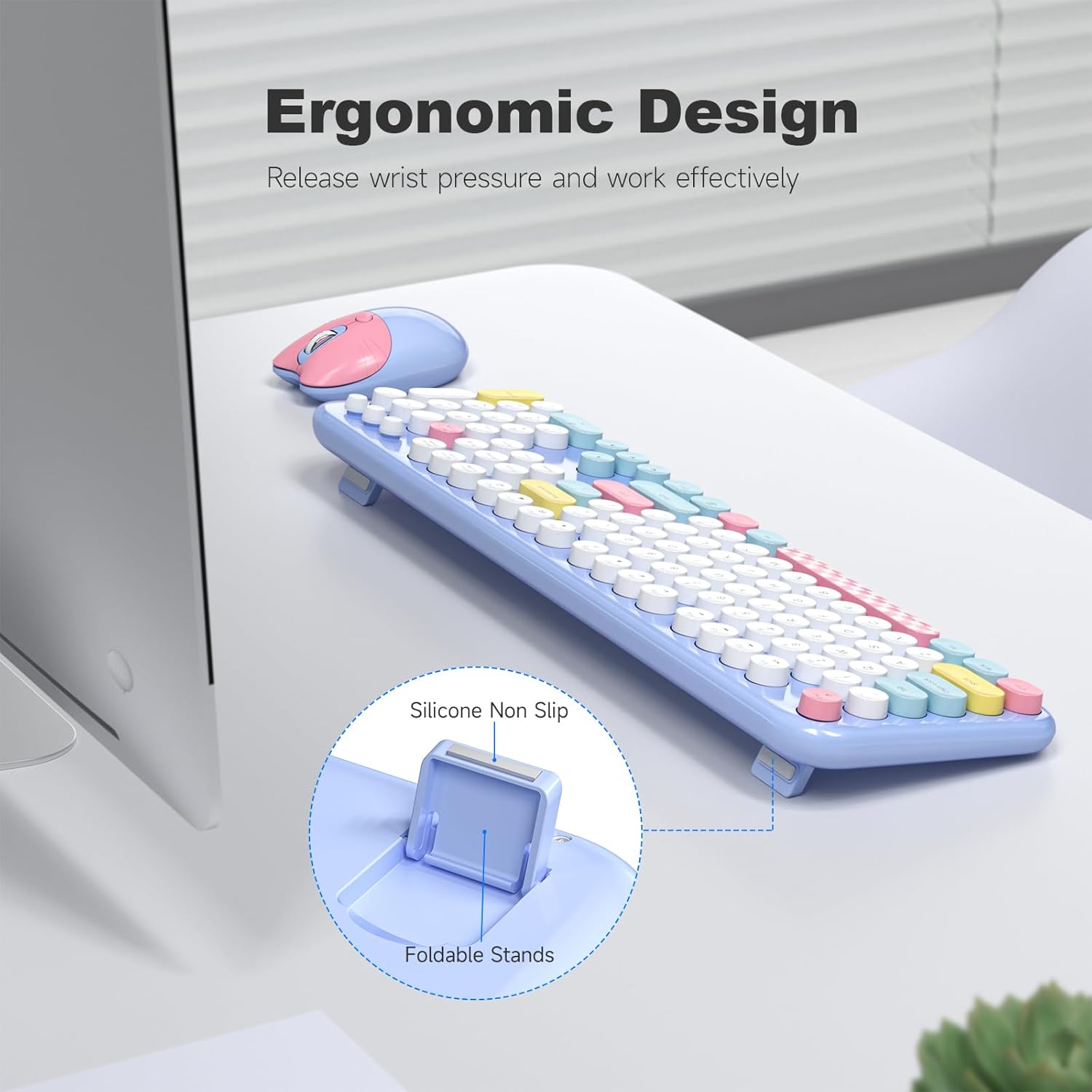
Image: The keyboard viewed from the side, illustrating its ergonomic design with silicone non-slip pads and foldable stands that allow for an adjustable typing angle.

Image: An overhead view of the keyboard highlighting the Number Lock, Caps Lock, and Power/Low Battery indicator lights. It also mentions the mouse's adjustable DPI settings (800/1200/1600).

Image: The keyboard with an overlay indicating its 13 hotkey functions, designed to streamline work and entertainment tasks.
Mouse Features:
- Cute Cat Design: An ambidextrous wireless optical mouse with a unique and relaxing design.
- Adjustable DPI: Offers adjustable settings (800/1200/1600 DPI) to suit various tasks and preferences, ensuring accuracy and speed.
- Ambidextrous Design: Suitable for both left and right-handed users.
Maintenance
- Cleaning Keycaps: The round keycaps are removable for easy dust cleaning. Use a soft brush or cloth to clean between the keys and the keycaps themselves.
- General Cleaning: Wipe the keyboard and mouse surfaces with a soft, dry cloth. For stubborn dirt, a slightly damp cloth can be used, ensuring no moisture enters the internal components.
- Battery Replacement: When the low battery indicator lights up or performance degrades, replace the batteries in both the keyboard and mouse. Refer to the "Setup" section for battery compartment locations.

Image: A close-up of the keyboard showing a few keycaps removed, along with a small brush, illustrating how easy it is to detach keycaps for deep cleaning.
Power Saving Function
The keyboard and mouse combo features an automatic power-saving function to extend battery life. After 8 minutes of inactivity, both devices will automatically enter sleep mode. To wake them up, simply click any key on the keyboard or move the mouse.

Image: The keyboard and mouse on a desk in a dimly lit room, with a clock icon indicating the "Intelligent Auto-Sleep" feature that saves battery life by entering sleep mode when not in use.
Troubleshooting
| Problem | Possible Cause | Solution |
|---|---|---|
| Keyboard/Mouse not responding. | Low battery; USB receiver not properly connected; devices in sleep mode. | Replace batteries; ensure USB receiver is firmly plugged in; click a key or move mouse to wake from sleep. |
| Intermittent connection. | Interference from other wireless devices; distance from receiver too great. | Move devices closer to the receiver (within 10 meters/33 ft); minimize interference from other 2.4G devices. |
| Mouse cursor erratic or not moving smoothly. | Dirty optical sensor; incorrect DPI setting. | Clean the optical sensor on the mouse's underside; adjust DPI settings (800/1200/1600) using the DPI button on the mouse. |
| Keyboard keys feel sticky or unresponsive. | Dust or debris under keycaps. | Remove keycaps and clean thoroughly as described in the Maintenance section. |
Specifications
- Brand: MOFII
- Model: B0C6QCP1GX
- Color: Light Blue Colorful
- Connectivity Technology: 2.4G Wireless
- Keyboard Layout: 104-key full-size with number pad
- Mouse DPI: 800/1200/1600 adjustable
- Keyboard Dimensions: 18.1 x 5.5 x 1.7 inches (approximate, based on image)
- Mouse Dimensions: 4.1 x 2.7 x 1.6 inches (approximate, based on image)
- Item Weight: 2.05 pounds (approximate, for the combo)
- Special Feature: Round Keycaps, Automatic Power Saving

Image: Detailed dimensions of the full-size keyboard and the ambidextrous mouse, providing measurements in inches for both components.
Compatibility
The MOFII Wireless Keyboard and Mouse Combo offers universal compatibility with a wide range of operating systems and devices, ensuring seamless integration into your existing setup.
- Windows XP, Windows Vista, Windows 11/10/8/7
- Chromebook
- Mac OS
- Linux
- Compatible Devices: Laptop, Personal Computer

Image: Icons representing compatibility with Windows operating systems, laptops, and personal computers, indicating broad device support.


