
1. Introduction
Thank you for choosing the WALI TV Wall Mount. This manual provides important safety information, installation instructions, and operational guidelines for your new TV wall mount. Please read this manual thoroughly before installation and keep it for future reference. Proper installation is crucial for the safety and performance of this product.
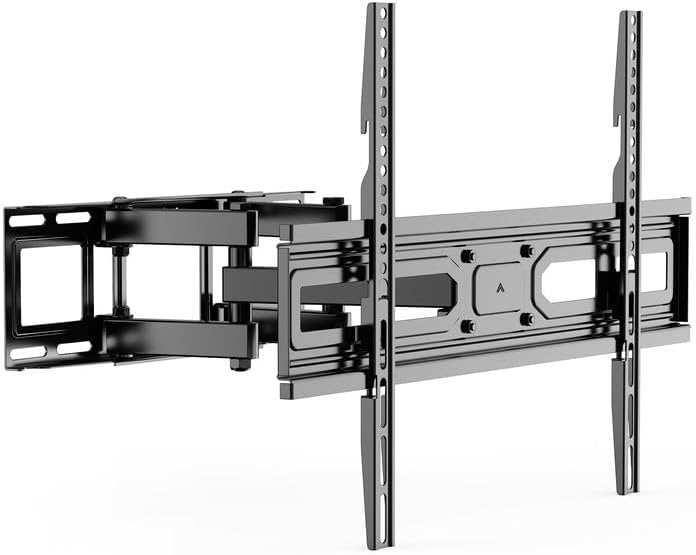
Image 1.1: Front view of the WALI Full Motion Articulating TV Wall Mount.
2. Safety Information
WARNING: Failure to read and follow all instructions can result in personal injury or damage to the product and property. WALI is not responsible for damage or injury caused by incorrect mounting, incorrect assembly, or incorrect use.
- Ensure the mounting surface can safely support the combined weight of the mount and the TV.
- Do not exceed the maximum weight capacity of 88 lbs (40 kg).
- This product is designed for installation on vertical wood studs, brick, or concrete walls. DO NOT mount on drywall alone.
- Use appropriate safety gear and tools during installation.
- Always have two people for lifting and positioning the TV.
- Check all connections and fasteners regularly to ensure they remain secure.
3. Package Contents
Verify that all components are present and undamaged. If any parts are missing or defective, please contact WALI customer support.
- WALI TV Wall Mount Bracket (Black) x 1
- Mounting Hardware Kit (various screws, washers, spacers)
- User Manual x 1
4. Product Features
- Full Motion Design: Allows for maximum viewing flexibility.
- Articulating Arms: Dual arms provide stability and smooth movement.
- High-Grade Steel Construction: Ensures durability and secure support.
- Space Saving: Low-profile design retracts close to the wall.

Image 4.1: Illustration of the mount's six articulating arms and 88 lbs (40 kg) weight capacity.
5. Compatibility
This full motion TV wall mount is compatible with most flat and curved TVs ranging from 32 to 80 inches.
- TV Size Range: 32" - 80"
- Weight Capacity: Up to 88 lbs (40 kg)
- VESA Mounting Patterns: Compatible with mounting holes from 100x100mm to 600x400mm.

Image 5.1: Diagram showing compatibility with flat and curved TVs from 37" to 80" and various VESA sizes.
Image 5.2: Illustration of vertical and horizontal mounting holes on a TV for VESA compatibility.
6. Installation Instructions
Before beginning, ensure you have all necessary tools and understand all instructions. It is recommended to have two people for installation.
6.1. Choose Your Wall Type
The 17.32" x 5.31" wall plate can be mounted on vertical wood studs, brick, or concrete walls. Do NOT mount on drywall alone.
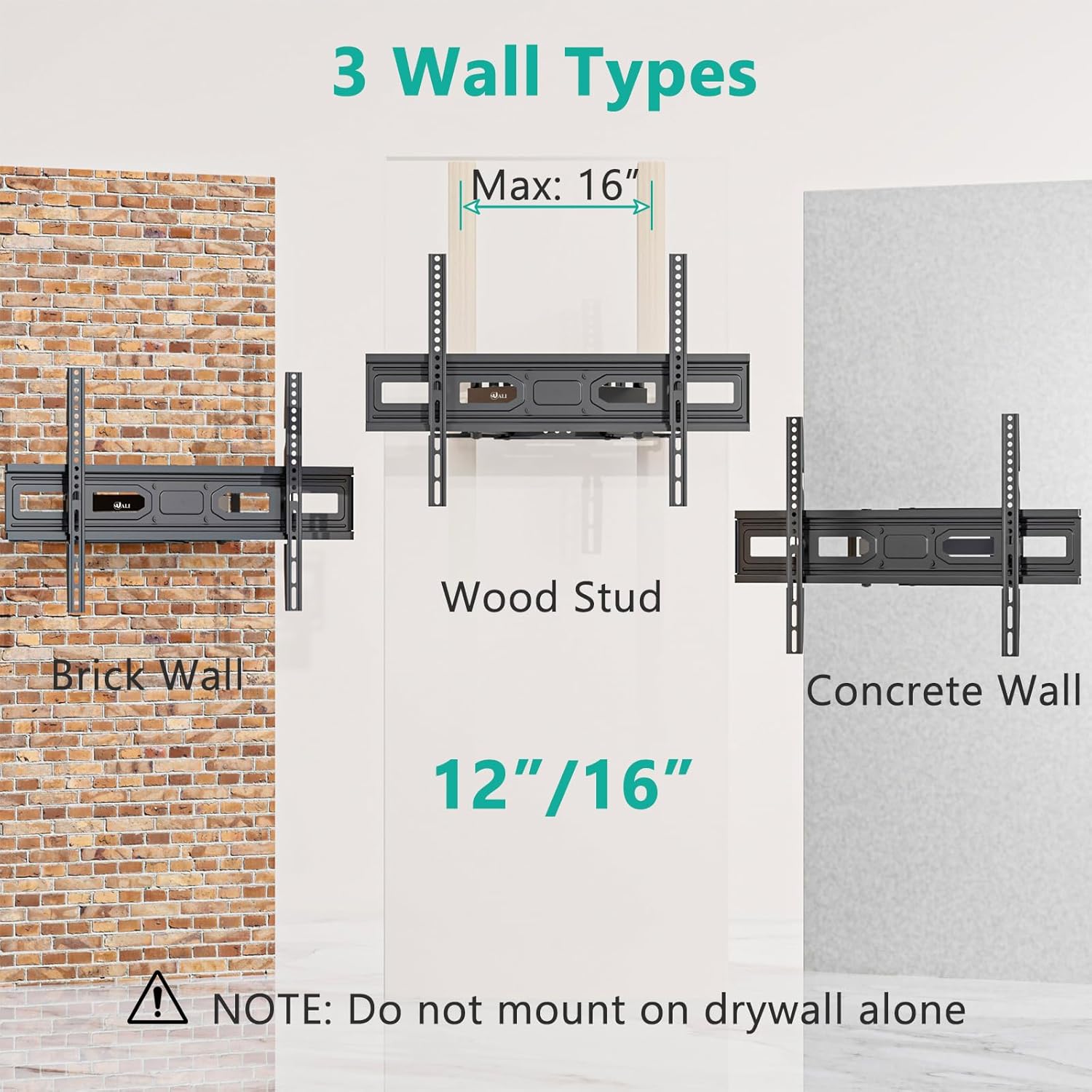
Image 6.1: Visual guide for mounting on Brick Wall, Wood Stud (max 16" spacing), and Concrete Wall.
6.2. Easy & Fast Installation Steps
- Attach Wall Plate: Secure the wall plate to your chosen wall type using the appropriate hardware from the kit. Ensure it is level and firmly attached.
- Attach TV Brackets: Fasten the TV brackets to the back of your TV using the correct screws, washers, and spacers for your TV's VESA pattern.
- Hang TV: Carefully lift the TV and hook the TV brackets onto the wall plate. Secure the TV to the wall plate using the locking mechanisms.
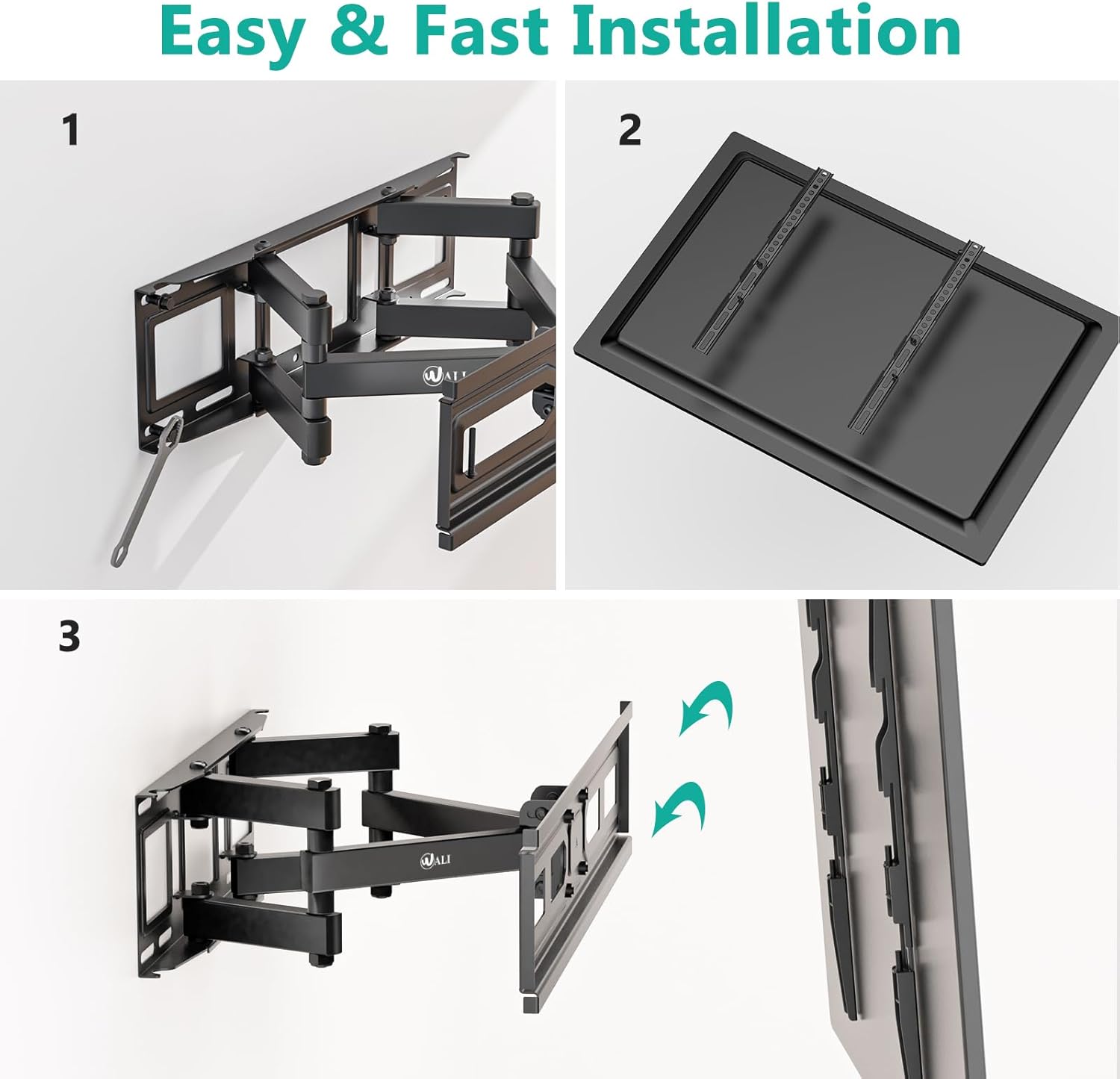
Image 6.2: Step-by-step visual guide for attaching the mount to the wall and the TV.
7. Operation and Adjustment
The WALI TV Wall Mount offers full motion capabilities to optimize your viewing experience.
- Tilt Adjustment: Adjust the TV angle from +3° to -15° to reduce glare and find the perfect viewing height.
- Swivel Adjustment: Swivel the TV +60° to -60° left or right to view from different seating positions.
- Leveling Adjustment: Fine-tune the TV's level by +3° to -3° after installation.
- Extension/Retraction: Extend the TV from the wall up to 14 inches or retract it to a minimum of 2.6 inches to save space.

Image 7.1: Demonstrates the swivel (+60°/-60°) and rotation (+3°/-3°) capabilities for a comfortable viewing angle.

Image 7.2: Overview of all adjustment ranges: Tilt (+3°/-15°), Extension (2.5"-14"), Level (+3°/-3°), and Swivel (+60°/-60°).
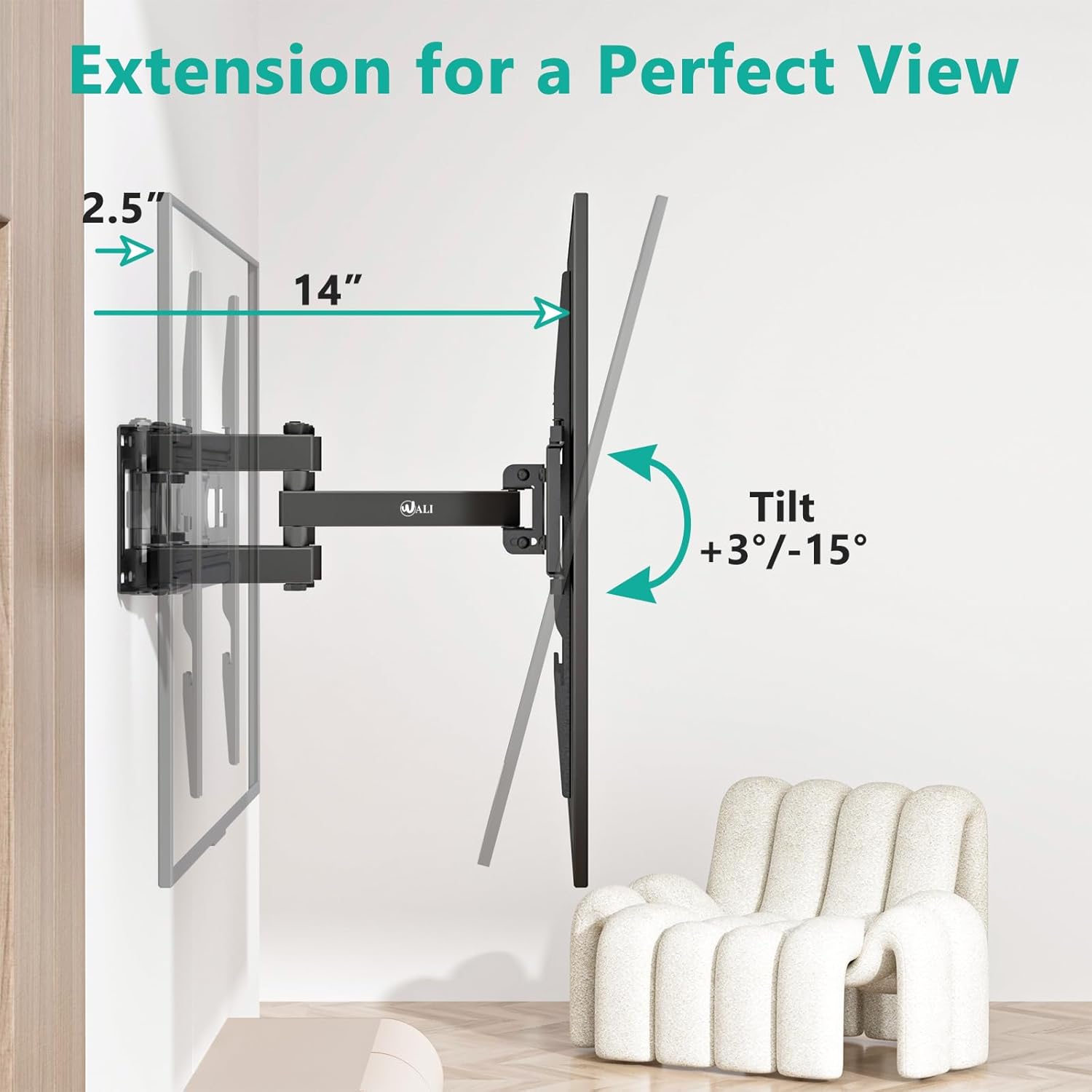
Image 7.3: Illustrates the mount's extension up to 14 inches and tilt adjustment for optimal viewing.
8. Maintenance
Regular maintenance helps ensure the longevity and safe operation of your TV wall mount.
- Periodically check all screws and bolts to ensure they are tight and secure.
- Clean the mount with a soft, dry cloth. Avoid abrasive cleaners or solvents.
- If the articulating arms become stiff, a small amount of silicone-based lubricant can be applied to the pivot points.
9. Troubleshooting
If you encounter issues with your WALI TV Wall Mount, refer to the following common problems and solutions.
- TV is not level: Use the leveling adjustment feature (+3°/-3°) to correct the tilt. Ensure the wall plate was installed level.
- Mount feels loose: Re-check all mounting bolts on the wall and TV brackets. Ensure they are tightened securely. Do not overtighten.
- Difficulty moving the TV: The articulating arms may require some force, especially when new. Ensure no cables are snagged. If still stiff, apply a small amount of silicone lubricant to the joints.
- TV appears to be sagging: Verify that the TV weight does not exceed the 88 lbs (40 kg) capacity. Ensure the wall structure is adequate and all fasteners are secure.
If problems persist, contact WALI customer support for assistance.
10. Specifications
| Feature | Specification |
|---|---|
| Brand | WALI |
| Model | B0C6P8Y7S3 |
| Mounting Type | Wall Mount |
| Movement Type | Articulating (Full Motion) |
| Material | Alloy Steel |
| Color | Black |
| Compatible TV Sizes | 32 - 80 Inches |
| Weight Capacity | 88 lbs (40 kg) |
| VESA Compatibility | 100x100mm to 600x400mm |
| Tilt Angle | +3° / -15° |
| Swivel Angle | +60° / -60° |
| Leveling Adjustment | +3° / -3° |
| Extension from Wall | 2.6" - 14" |
| Item Weight | 8.48 pounds |
| UPC | 811278025776 |
11. Customer Support
WALI is committed to providing high-quality products and excellent customer service. If you have any questions, concerns, or require assistance with your TV wall mount, please do not hesitate to contact our experienced and friendly US-based customer support team.
Our customer support is available 7 days a week to assist you.
For further information or support, please visit the WALI Store on Amazon.