
Spider Farmer SF-clipfan6''
Contents
Spider Farmer Grow Tent Fan 6" Instruction Manual
Model: SF-clipfan6'' | Brand: Spider Farmer
Introduction
The Spider Farmer Grow Tent Fan 6" is designed to provide powerful yet quiet airflow for optimal ventilation and circulation in grow tents, bedrooms, study rooms, and other indoor environments. Featuring an efficient EC motor, dynamic wind speeds, and oscillating capabilities, this fan ensures a consistent and healthy environment for plant growth or personal comfort.

Figure 1: Spider Farmer Grow Tent Fan 6"
Product Features
Powerful Airflow and Dynamic Speeds
Equipped with a professional EC motor, the fan delivers powerful airflow ranging from 0 to 2100 RPM, quickly circulating air. It offers 10 customizable speed settings, allowing precise control for all plant growth stages. An innovative natural wind mode helps reduce plant stress by simulating natural air movement.

Figure 2: Airflow circulation within a grow tent

Figure 3: Professional EC Motor for powerful airflow
Flexible Oscillation and Adjustment
The fan features 90° horizontal automatic oscillation and 100° vertical manual adjustment, providing wide-angle coverage and directed airflow. The cool clip fan can automatically rebound when contacting objects, preventing damage.

Figure 4: 90° Adjustable Oscillation
Adjustable Grip Clip
The fan's excellent grip ensures secure and stable placement, featuring a thick rubber pad that prevents scratching of the pole. It is suitable for poles ranging from 16mm to 25mm in diameter.
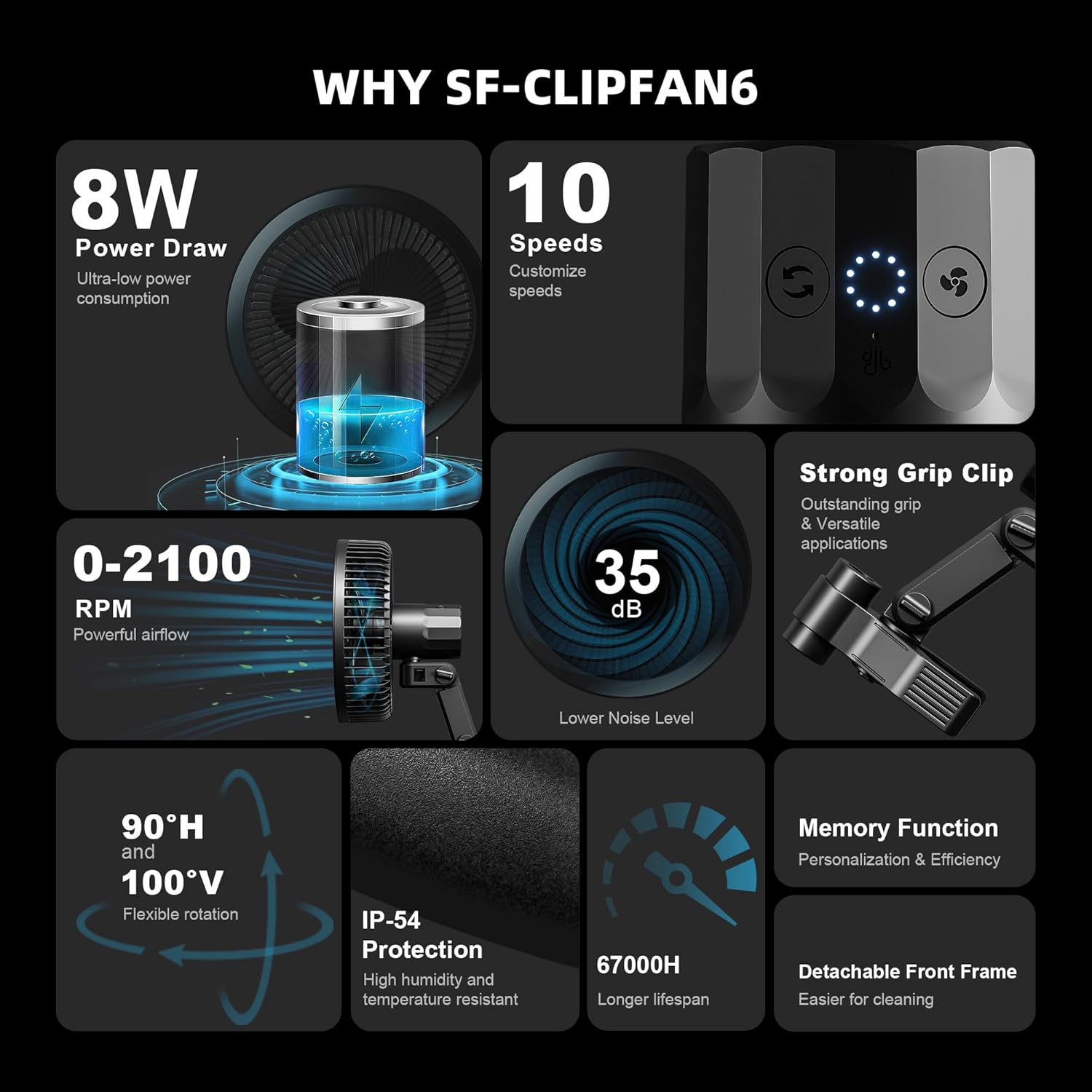
Figure 5: Strong Grip Clip for secure mounting
Low Noise and High Quality
Operating at just 35 dB at its loudest, the fan provides strong airflow with minimal noise. It boasts an IP-54 Protection rating, making it resistant to high humidity and heat, specifically designed for grow environments. The fan has a long lifespan of 67000 hours.
Multi-functional and Easy to Clean
Specially designed for plant tents, its compact size also makes it suitable for various environments such as bedrooms and study rooms. The front frame is detachable for easy cleaning.

Figure 6: 5-Blade design for gentle airflow
Smart Ventilation Control
The fan can be connected to a GGS controller for advanced control over fan speed, oscillation angle, working time, and more via the controller and a WiFi APP.
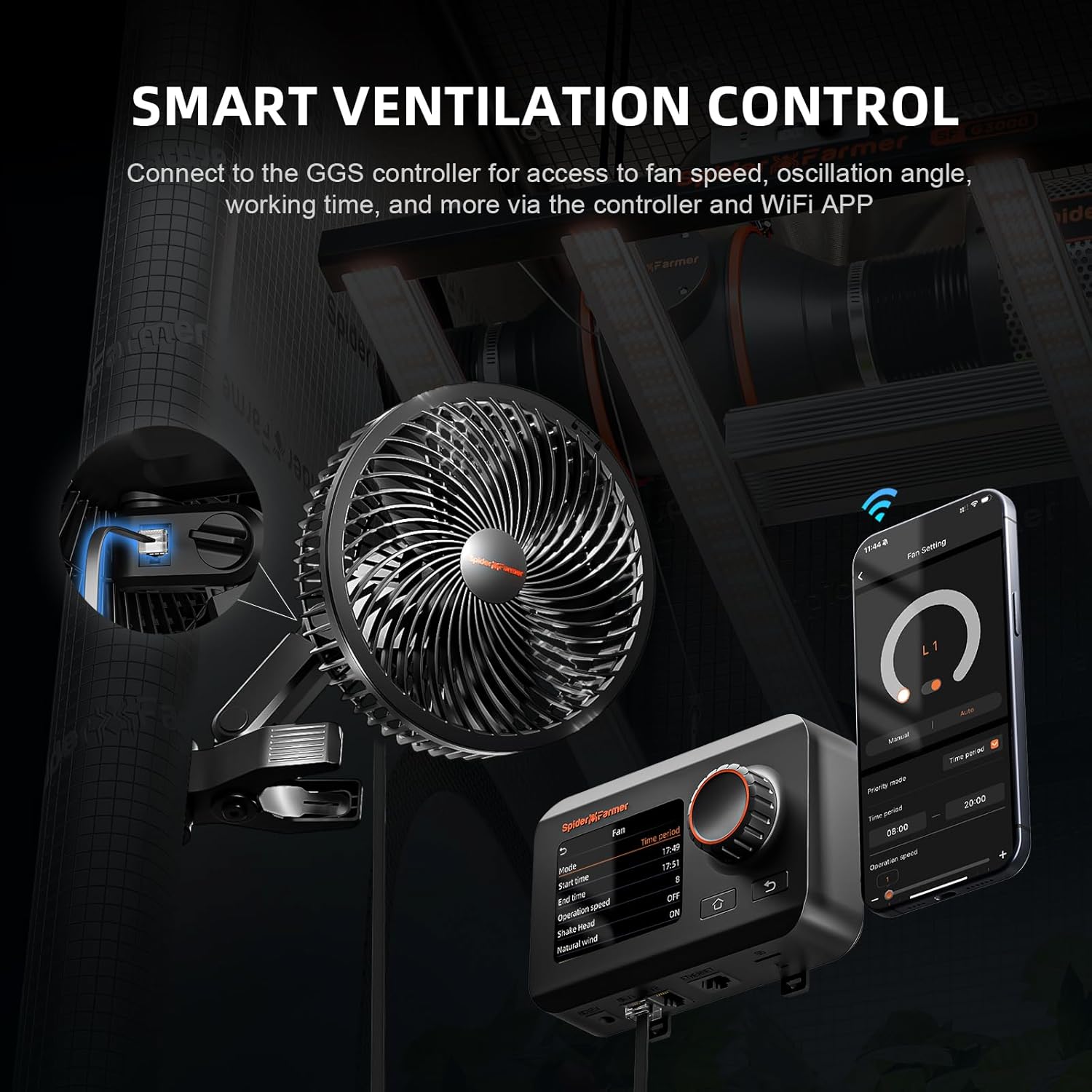
Figure 7: Smart Ventilation Control setup
Official Product Video
Video 1: Spider Farmer 6 Inch Grow Tent Clip Fan Overview
Setup
- Unpack: Carefully remove all components from the packaging. Verify that all parts are present: fan unit, grip clip, thumb screw, cable ties, and cable mount.
- Attach Grip Clip: Twist the thumb screw to detach the grip clip from the fan unit if it is pre-attached. Slide the grip clip into the swivel mechanism on the fan.
- Secure Fan to Grip Clip: Install the thumb screw to firmly attach the fan and grip clip together. Ensure it is tightened securely to prevent wobbling.
- Mount Fan: Use the clamp to secure the fan onto a pole or post within your grow tent or desired location. The adjustable grip is suitable for poles 16mm to 25mm.
- Position Fan: Adjust the fan's vertical angle manually (up to 100°) and ensure it is aimed correctly for optimal airflow.
- Connect Power: Plug the fan's cord into an AC power outlet.
- Cable Management: Utilize the included cable ties to organize the cords. Adhere the cable mount onto a clean surface if needed, and loop the zip ties around the cables and through the mount to keep wiring tidy.
Operating Instructions
- Power On/Off: Press the power button located on the fan's control panel to turn the unit on or off.
- Adjust Fan Speed: Use the speed control button to cycle through the 10 dynamic wind speed settings. Select the appropriate speed for your plants' growth stage or desired air circulation.
- Activate Oscillation: Press the oscillation button to activate the 90° horizontal automatic oscillation feature. Press it again to stop oscillation.
- Manual Vertical Adjustment: The fan head can be manually tilted up to 100° vertically to direct airflow precisely where needed.
- Natural Wind Mode: This mode simulates natural wind patterns, which can help reduce plant stress. Refer to the control panel for activation, typically indicated by a specific light or icon.
- Auto Shut-Off Indicator: The indicator light will turn off after 10 seconds of inactivity to ensure it does not disturb plant rest cycles.
Maintenance
- Cleaning the Fan: Regularly clean the fan blades and grille to prevent dust buildup, which can reduce efficiency. The front frame is detachable for easy access to the blades.
- Detaching Front Frame: To clean, gently twist or unclip the front frame as indicated on the unit. Wipe the blades and interior with a soft, dry cloth. Do not use harsh chemicals or abrasive materials.
- IP-54 Protection: While the fan is IP-54 rated for dust and splash resistance, avoid submerging it in water or exposing it to direct water jets.
- Storage: If storing the fan for an extended period, ensure it is clean and dry. Store in a cool, dry place away from direct sunlight.
Troubleshooting
| Problem | Possible Cause | Solution |
|---|---|---|
| Fan does not turn on. | No power supply; loose connection. | Check if the power cord is securely plugged into the outlet. Verify the outlet has power. |
| Weak airflow. | Dust buildup on blades; incorrect speed setting. | Clean the fan blades and grille. Increase the fan speed setting. |
| Fan makes unusual noise. | Obstruction in blades; loose parts; normal oscillation sound. | Turn off and unplug the fan. Check for any obstructions and remove them. Ensure all parts are securely fastened. Some minor noise during oscillation may be normal. |
| Oscillation not working. | Oscillation function not activated; internal issue. | Press the oscillation button. If the issue persists, contact customer support. |
Specifications

Figure 8: Detailed Product Specifications
- Fan Size: 6 inches
- Weight: 2 pounds (0.91 kg)
- Voltage: 100-240V AC
- Power Draw: 8 watts
- Speeds: 0-2100 RPM (10 levels)
- Air Flow Capacity: 300-315 Cubic Feet Per Minute (CFM)
- Lifespan: 67000 hours
- Noise Level: 35 dB
- Oscillation: 90° Horizontal Automatic, 100° Vertical Manual
- IP Rating: IP-54 Dust & Splashproof
- Pole Compatibility: 16mm to 25mm
- Product Dimensions: 8.8"D x 6"W x 10.6"H
Warranty and Support
The Spider Farmer Grow Tent Fan 6" comes with a 1-year warranty. For warranty claims, technical support, or any product-related inquiries, please contact Spider Farmer customer service through their official website or the retailer where the product was purchased. Please retain your proof of purchase for warranty validation.
Ask a question about this manual
Ask about setup, troubleshooting, compatibility, parts, safety, or missing instructions. Manuals+ will review the question and use this page’s manual context to help answer it.