
Introduction
This manual provides comprehensive instructions for the use and maintenance of your KZ AZ09 PRO Bluetooth 5.2 Module and KZ ZSN PRO X Bluetooth Earbuds. This bundle offers a versatile audio solution, allowing you to switch between wired and wireless listening experiences.
The KZ ZSN PRO X earbuds are designed for detailed sound reproduction, while the KZ AZ09 PRO Bluetooth module provides wireless connectivity with advanced features.
Product Overview
KZ ZSN PRO X Earbuds

Image: Internal view of the KZ ZSN PRO X earbud, showing the high-frequency balanced armature unit and the 10mm mid-bass low frequency balanced armature unit.
- Sound Quality: Features a balanced armature driver for detailed and powerful sound with flexible lows, smooth mids, and bright highs.
- Design: Modern design with a metal texture and fashionable shape, combining zinc alloy metal and a durable resin cavity.
- Connectivity: Designed to connect with the KZ AZ09 PRO Bluetooth module or a standard 3.5mm jack cable (not included in this bundle, but compatible).
KZ AZ09 PRO Bluetooth Module

Image: The KZ AZ09 PRO Bluetooth earhooks shown with their charging case, highlighting their wireless capability.
- Bluetooth Version: Utilizes Bluetooth 5.2 technology for fast transmission and stable connection.
- Chipset: Equipped with the Qualcomm QCC3040 chipset for enhanced performance.
- Audio Decoding: Supports A-ptx/AAC/SBC decoding for high-fidelity sound.
- Battery Life: Up to 7 hours of playback on a single charge. The 800mAh charging case provides up to 6 additional recharges, totaling up to 42 hours of continuous playback.
- Controls: Features a one-key operation button for media and call control.

Image: The complete bundle including the KZ AZ09 PRO Bluetooth module with its charging case and the KZ ZSN PRO X earbuds.
Setup
1. Charging the KZ AZ09 PRO Module
Before first use, fully charge the KZ AZ09 PRO Bluetooth module and its charging case.
- Connect the charging case to a USB power source using a compatible cable.
- Charging Case Indicator: The red light is on during charging. Once fully charged, the green light will be on.
- Earphone Indicator (on module): When the module's battery is low, the red indicator light flashes.
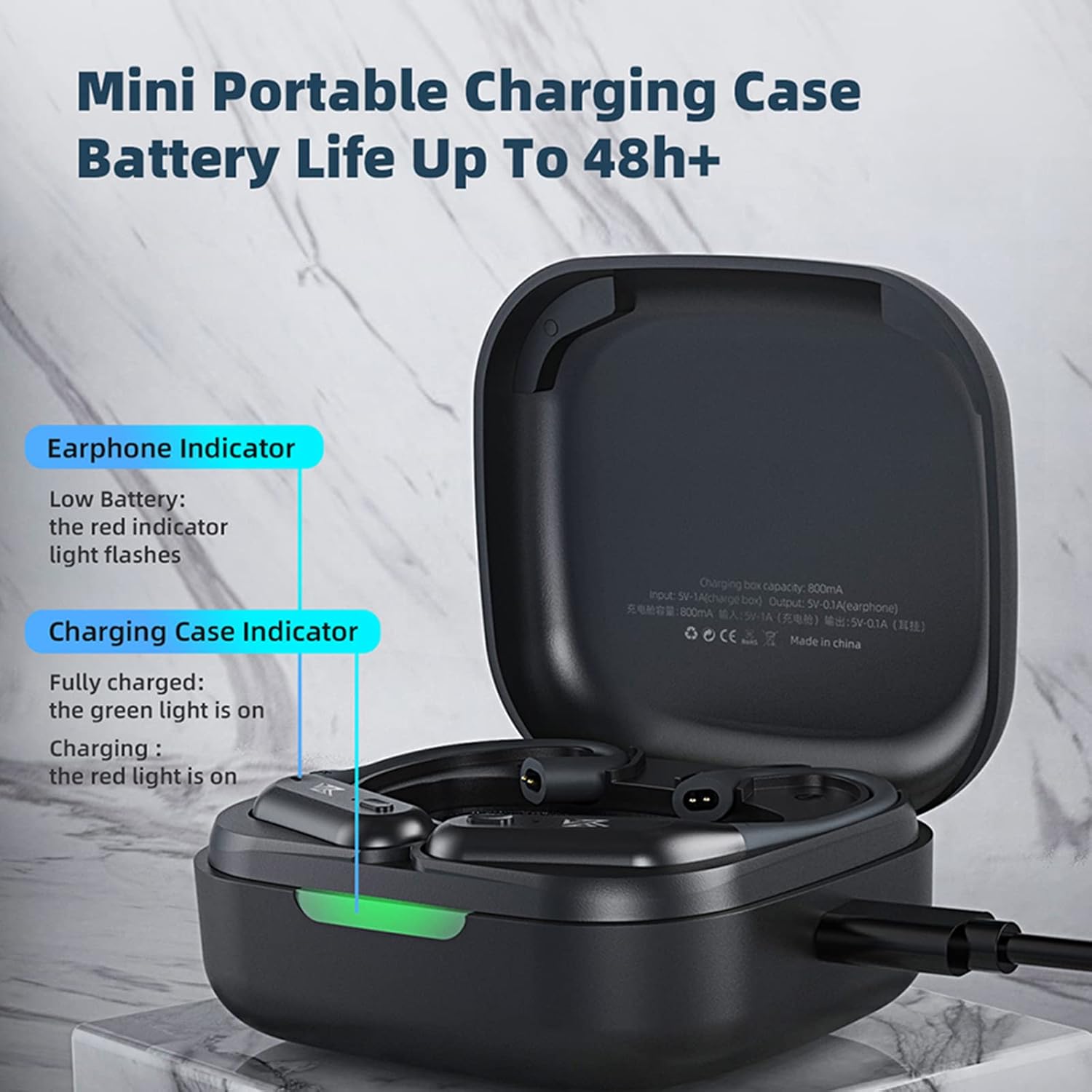
Image: Diagram showing the earphone indicator (red light flashes for low battery) and charging case indicator (red light for charging, green for full).
2. Connecting KZ ZSN PRO X Earbuds to the AZ09 PRO Module
The KZ ZSN PRO X earbuds are designed to be detachable. To use them wirelessly, connect them to the KZ AZ09 PRO Bluetooth module.
- Carefully align the 2-pin connectors of the KZ ZSN PRO X earbuds with the corresponding sockets on the KZ AZ09 PRO Bluetooth module.
- Gently push the earbuds into place until they are securely connected. Ensure the left earbud connects to the left module and the right to the right.
3. Pairing the KZ AZ09 PRO Module with Your Device
Once the earbuds are connected to the module, you can pair the module with your Bluetooth-enabled audio device (e.g., smartphone, tablet, computer).
- Ensure the KZ AZ09 PRO module is charged and powered on. It should automatically enter pairing mode when taken out of the charging case for the first time. If not, refer to the operating instructions for manual pairing mode activation.
- On your device, navigate to the Bluetooth settings.
- Search for available Bluetooth devices. The module should appear as "KZ AZ09 PRO" or similar.
- Select "KZ AZ09 PRO" to initiate the pairing process.
- Once paired, the module's indicator light will change (e.g., solid blue or off) to indicate a successful connection.

Image: Visual representation of the Qualcomm QCC3040 Bluetooth 5.2 chip, emphasizing its role in stable and high-quality wireless transmission.
Operating Instructions
The KZ AZ09 PRO Bluetooth module features a multi-function button for easy control of audio playback and calls.
| Action | Function |
|---|---|
| Single Press | Play/Pause music, Answer/End call |
| Double Press (Right Module) | Next Track |
| Double Press (Left Module) | Previous Track |
| Long Press (approx. 2 seconds) | Reject call, Activate Voice Assistant |
| Long Press (approx. 5 seconds, when off) | Power On/Off |
For optimal audio quality, ensure your device supports Apt-X decoding. If not, AAC/SBC modes will be used automatically.

Image: Illustrates the Apt-X HD pure sound quality feature, indicating high-definition audio analysis and sound field restoration.
Maintenance
- Cleaning: Use a soft, dry cloth to clean the earbuds and Bluetooth module. Do not use abrasive cleaners or immerse the devices in water.
- Storage: When not in use, store the KZ AZ09 PRO module and KZ ZSN PRO X earbuds in their charging case to protect them from dust and damage.
- Temperature: Avoid exposing the devices to extreme temperatures (hot or cold) or high humidity.
- Water Resistance: These devices are not water resistant. Avoid contact with liquids.
Troubleshooting
| Problem | Possible Cause | Solution |
|---|---|---|
| No sound from earbuds | Earbuds not properly connected to module; Module not paired; Low battery; Volume too low. | Ensure earbuds are securely attached to the module. Re-pair the module with your device. Charge the module and case. Increase volume on your device. |
| Module not pairing | Module not in pairing mode; Device Bluetooth off; Interference. | Ensure module is in pairing mode (indicator flashing). Turn Bluetooth off and on again on your device. Move closer to your device and away from other wireless devices. |
| Intermittent connection | Distance from device; Obstructions; Interference. | Reduce distance between module and device. Avoid physical obstructions. Move away from strong Wi-Fi signals or other Bluetooth devices. |
| Charging issues | Faulty cable/charger; Dirty charging contacts. | Try a different USB cable and charger. Clean the charging contacts on the module and case with a dry cotton swab. |
Specifications
| Feature | Detail |
|---|---|
| Model Names | KZ AZ09 PRO, KZ ZSN PRO X |
| Brand | CCA |
| Connectivity Technology | Bluetooth 5.2, Wireless |
| Wireless Communication Technology | Bluetooth |
| Included Components | Protective Case |
| Material | Plastic (Module), Zinc Alloy Metal & Resin (Earbuds) |
| Control Type | Media Control |
| Control Method | Touch (One-key operation button) |
| Water Resistance Level | Not Water Resistant |
| Frequency Range | 20 Hz - 20,000 Hz |
| Battery Life (Module) | 7 Hours (playback) |
| Carrying Case Battery Life | Up to 42 Hours (with recharges) |
| Carrying Case Battery Capacity | 800mAh |
| Audio Driver Type (ZSN PRO X) | Balanced Armature Driver, 10mm Dual Magnetic Dynamic |
| Bluetooth Range | 30 Meters (approx.) |
| Color | Gold (Earbuds) |
| Ear Placement | In Ear |
Warranty and Support
For warranty information and technical support, please contact the seller directly. The product is sold by "CCA Offical Store" on Amazon. Please refer to your purchase receipt or Amazon order details for specific warranty terms and contact information.
You can typically find seller contact information through your Amazon order history or by visiting the seller's store page on Amazon.
Link to CCA Store: CCA Official Store on Amazon