
DAYTECH DTD240818
Product Instruction Manual
DAYTECH Doorbell Sensor
Model: DTD240818
1. Product Overview
The DAYTECH Doorbell Sensor is a versatile wireless system designed to alert you when a door or window is opened. Ideal for home security, caregiver assistance, or business use, it features a long reception range, adjustable melodies, and volume control. This package typically includes one receiver and two magnetic sensors, providing comprehensive monitoring capabilities.

Image 1.1: The DAYTECH Doorbell Sensor system, including the main receiver unit and two magnetic door/window sensors.
2. Key Features
- Caregiver Assistance: The sensor detects door openings, and the receiver emits a sound, providing a remote alert for caregivers monitoring elderly individuals or children.
- 150M Reception Range: Enjoy a wide wireless range of up to 150 meters (approximately 492 feet) in open areas, ensuring reliable signal transmission even across multiple floors or rooms.
- Adjustable Sound & Volume: Choose from 13 distinct melodies and adjust the volume across 5 levels, ranging from 0dB (silent) to 110dB (very loud). The system retains your last selected melody and volume settings even after power loss.
- Multi-purpose Use: This versatile system can be used for various applications, including anti-theft security, preventing individuals from wandering, confirming family members' return, alerting to delivery box access, notifying of visitors, and securing valuable items.
- Easy Installation: The magnetic sensors can be easily attached to doors or windows using adhesive tape, and the receiver simply plugs into a standard electrical outlet, making setup quick and hassle-free.
- Expandable System: The system is highly expandable. One receiver can be paired with up to 20 magnetic sensors, and a single magnetic sensor can be paired with multiple receivers, allowing for customized coverage.

Image 2.1: System overview with sound and volume adjustment.
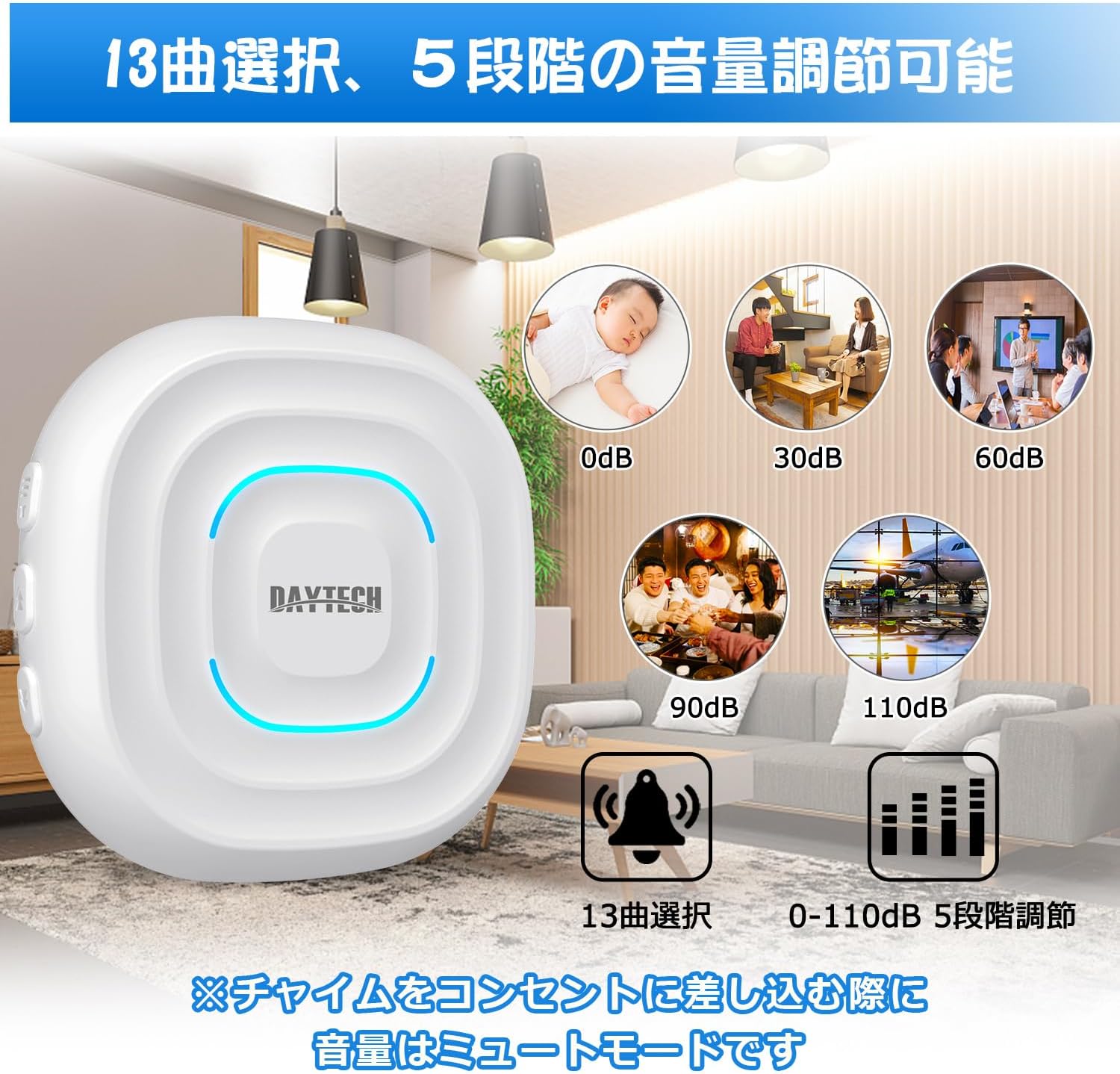
Image 2.2: Melody and volume adjustment options.

Image 2.3: Indoor reception range illustration.

Image 2.4: Diverse application scenarios.
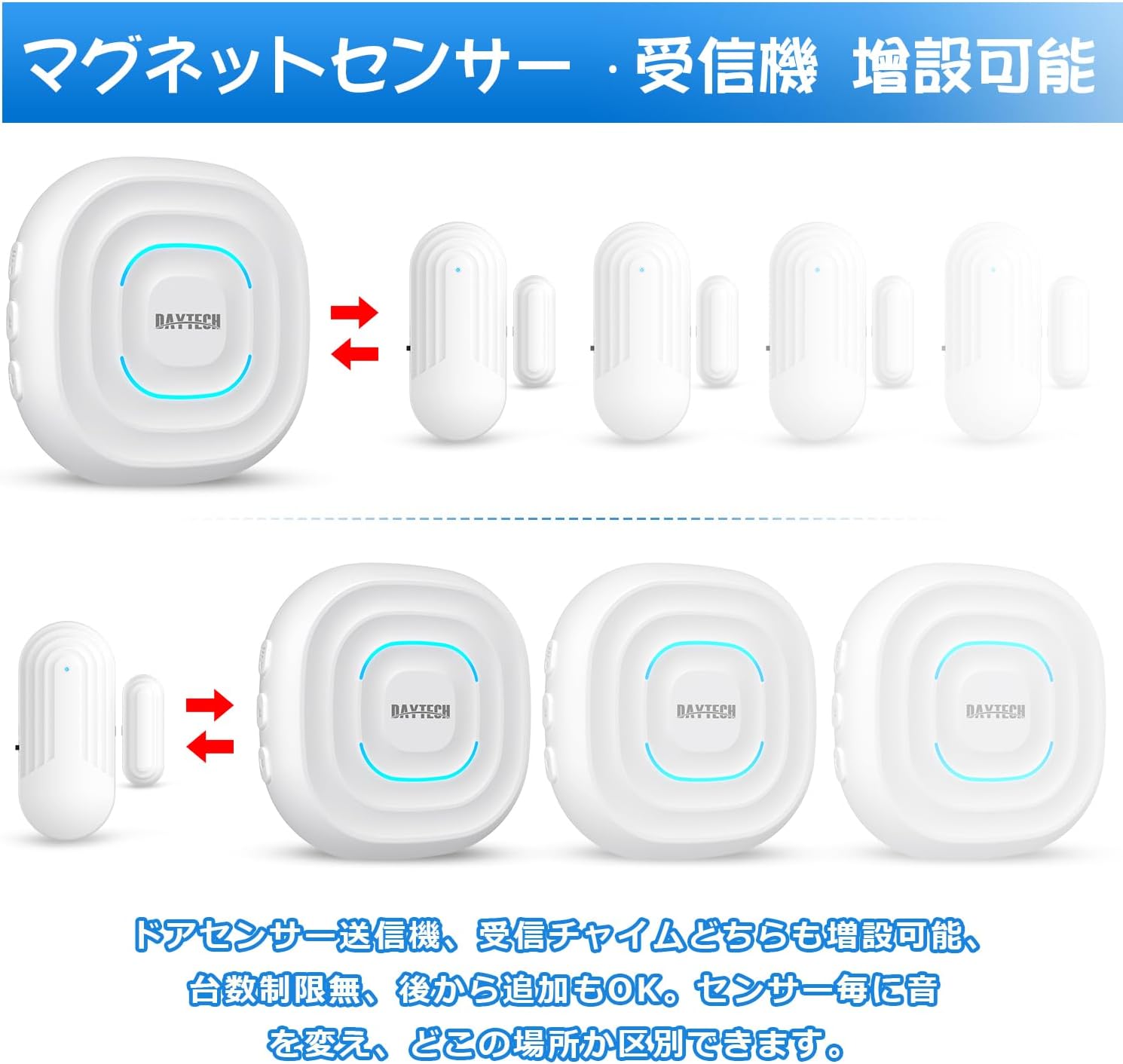
Image 2.5: System expandability.
3. Package Contents
Please verify that all items are present in your package:
- 1 x DAYTECH Receiver
- 2 x DAYTECH Magnetic Sensors
- Mounting accessories (e.g., double-sided adhesive tape, screws)
- User Manual (this document)
Image 3.1: Components included in the package.
4. Setup and Installation
Follow these steps to set up your DAYTECH Doorbell Sensor system:
- Unpack: Carefully remove all components from the packaging.
- Receiver Placement: Plug the receiver into a standard AC electrical outlet in a central location within your desired monitoring area. Ensure it is within the effective range of the sensors.
- Sensor Installation:
- Identify the main sensor unit and the smaller magnetic strip.
- Ensure the ON/OFF switch on the side of the main sensor unit is set to the "ON" position.
- Attach the main sensor unit to the fixed part of the door or window frame.
- Attach the magnetic strip to the moving part of the door or window (e.g., the door itself).
- Ensure that when the door/window is closed, the main sensor unit and the magnetic strip are aligned and within 1.5 cm (0.6 inches) of each other. When the door/window opens, the separation of these two parts triggers the alert.
- Use the provided double-sided adhesive tape or screws for secure mounting. Clean the surface thoroughly before applying adhesive.
- Pairing (if needed): The units typically come pre-paired from the factory. If they do not respond, refer to the "Operating Instructions" section for pairing procedures.
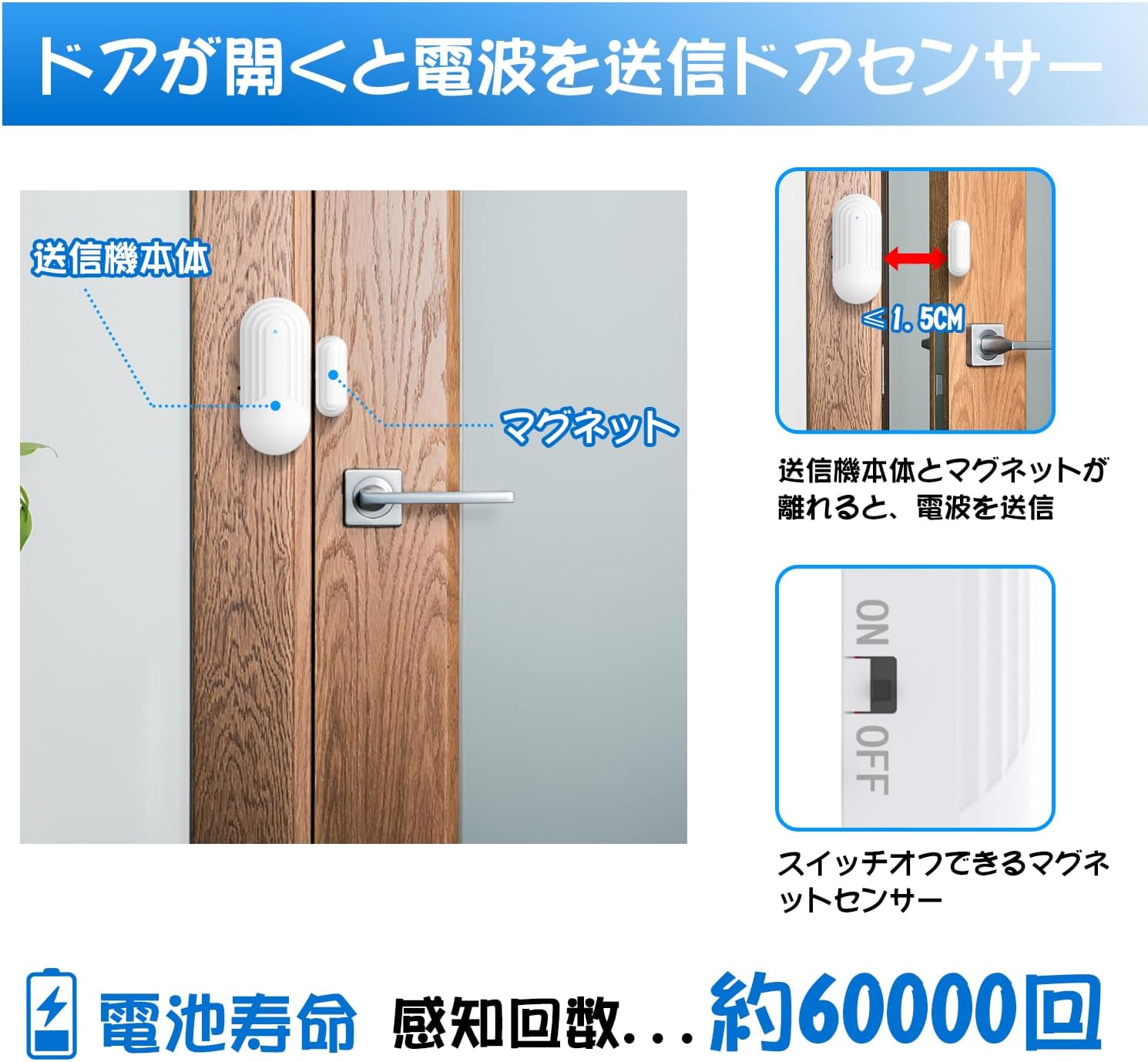
Image 4.1: Magnetic sensor installation details.
5. Operating Instructions
Learn how to customize and use your doorbell sensor system:
- Volume Adjustment: Locate the volume control button on the side of the receiver. Press this button repeatedly to cycle through the 5 available volume levels, from silent (0dB) to maximum (110dB).
- Melody Selection: Use the forward and backward buttons on the side of the receiver to browse and select your preferred melody from the 13 available options. The receiver will remember your last chosen melody.
- Call Duration Modes: The receiver offers three distinct call duration modes: 8 seconds, 16 seconds, and 12 minutes. Slide the "Call Duration" switch (often located on the side or back of the receiver) to select the desired mode.
- Stopping the Chime: If you are in the 16-second or 12-minute call duration mode, you can press any button on the receiver to stop the chime prematurely. Please note that the 8-second mode does not support premature stopping.
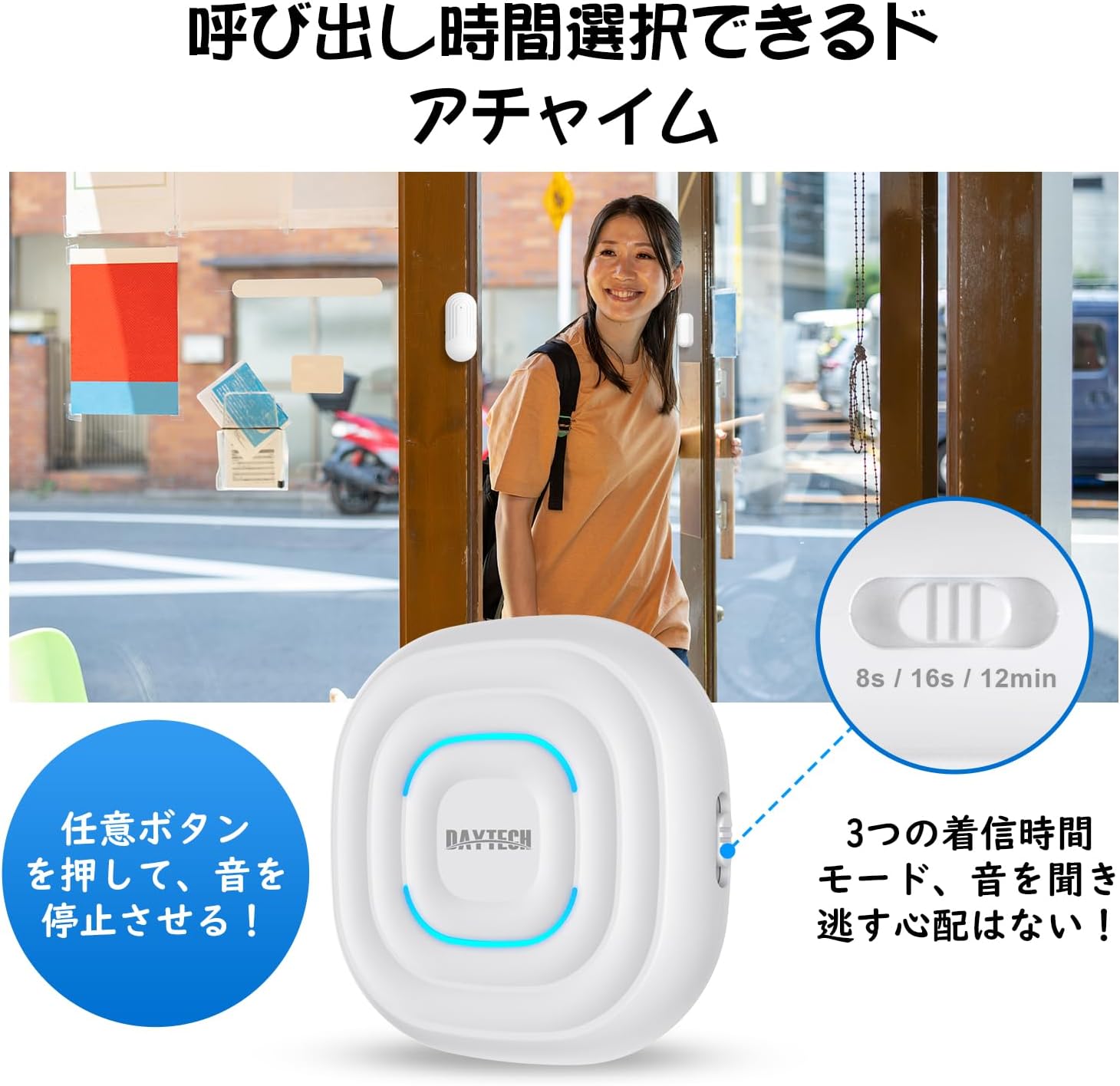
Image 5.1: Call duration selection.
Image 5.2: Melody and volume adjustment.
6. Maintenance
Proper care ensures the longevity and optimal performance of your device:
- Cleaning: Use a soft, dry cloth to clean the surfaces of the receiver and sensors. Avoid using abrasive cleaners, solvents, or strong chemicals, as these can damage the product's finish or internal components.
- Battery Replacement: The magnetic sensors are powered by Lithium Ion batteries. If you notice the sensor's LED indicator dimming, or if the detection range decreases, it may be time to replace the battery. The sensor battery life is approximately 60,000 detections. Refer to the sensor unit for specific battery type and replacement instructions.
- Environmental Conditions: To prevent damage, avoid exposing the units to extreme temperatures, direct sunlight, high humidity, or excessive moisture. The sensors are designed for indoor use unless otherwise specified.
7. Troubleshooting
If you encounter issues with your DAYTECH Doorbell Sensor, refer to the following common problems and solutions:
- No Sound or No Alert from Receiver:
- Ensure the receiver is properly plugged into a working electrical outlet.
- Verify that the magnetic sensor's ON/OFF switch is in the "ON" position.
- Check if the magnetic sensor and its magnetic strip are correctly aligned and within 1.5 cm when the door/window is closed.
- Replace the battery in the magnetic sensor if it is low or depleted.
- Ensure the receiver and sensor are within the effective operating range. Walls, large metal objects, and other electronic devices can reduce the range.
- If the units have lost connection, they may need to be re-paired. Consult the manufacturer's website or support for specific pairing instructions if not provided in this manual.
- Chime is Too Loud or Too Quiet:
- Adjust the volume using the volume control button on the side of the receiver.
- False Alarms:
- Ensure the magnetic sensor and its strip are securely mounted and do not shift or separate unintentionally when the door/window is closed.
- Check for strong magnetic fields or significant electronic interference near the sensor, which could cause false triggers.
8. Specifications

Image 8.1: Product dimensions and weight.
| Feature | Specification |
|---|---|
| Brand | DAYTECH |
| Model Number | DTD240818 |
| Voltage | 12V DC |
| Mounting Type | Door Mount |
| Sensor Technology | Contact Sensor |
| Product Dimensions (Receiver) | 6 x 3 x 10 cm (approx. 2.36 x 1.18 x 3.94 inches) |
| Product Dimensions (Sensor) | 30mm x 10mm x 65mm (approx. 1.18 x 0.39 x 2.56 inches) |
| Item Weight (Total) | 170 g (approx. 0.37 lbs) |
| Item Weight (Receiver) | Approx. 58 g |
| Item Weight (Sensor) | Approx. 29 g |
| Included Components | Receiver (and typically 2 sensors as per product variant) |
| Batteries Included | Yes (2 Lithium Ion batteries) |
| Battery Type | Lithium Ion |
| Reception Range | Up to 150m (open area) |
| Melodies | 13 selectable |
| Volume Levels | 5 levels (0dB - 110dB) |
| Sensor Battery Life | Approx. 60,000 detections |
| First Available Date | May 30, 2023 |
9. Warranty and Support
DAYTECH is committed to providing high-quality products and customer satisfaction.
- Warranty: Your DAYTECH Doorbell Sensor comes with a 24-month free repair warranty from the date of purchase. Please retain your proof of purchase for warranty claims.
- Technical Support: We offer lifetime technical support for our products. If you have any questions, require assistance with setup, or encounter any issues, please do not hesitate to contact us.
For further assistance or inquiries, please visit the official DAYTECH website or contact their customer service through the platform where you purchased the product.
Related documentsDTD240818


Ask a question about this manual
Ask about setup, troubleshooting, compatibility, parts, safety, or missing instructions. Manuals+ will review the question and use this page’s manual context to help answer it.