1. Introduction
The DAYTECH Wireless Doorbell Sensor is designed to provide remote notification of door or window activity. It is an ideal solution for various applications, including caregiver assistance, home security, and business customer alerts. This manual provides detailed instructions for setting up, operating, and maintaining your device.

Image: The DAYTECH Wireless Doorbell Sensor system, featuring a central receiver unit and two separate magnetic door/window sensors.
2. Product Overview
2.1 Components
- Receiver Unit: Plugs into a standard AC outlet, emits sound and light alerts.
- Magnetic Sensors (x2): Two-part sensors installed on doors or windows.

Image: Detailed view of the receiver and magnetic sensor, illustrating their dimensions and key features such as LED light, volume control, and on/off switch.
2.2 Key Features
- Remote Notification: Alerts the receiver when a door or window opens, providing remote monitoring.
- Extended Range: Offers a reception range of up to 100 meters (approx. 328 feet) indoors, allowing for flexible placement.
- Customizable Alerts: Choose from 13 melodies and adjust volume across 5 levels (0-110dB).
- Adjustable Chime Duration: Select chime durations of 8 seconds, 16 seconds, or 12 minutes.
- Memory Function: Remembers the last selected melody and volume settings after power off.
- Expandable System: One receiver can pair with up to 20 magnetic sensors, and one magnetic sensor can pair with multiple receivers.
- Versatile Applications: Suitable for elderly care, shop entry alerts, home security, and monitoring valuable items.

Image: Illustration of the system's effective range, demonstrating its ability to transmit signals up to 100 meters indoors, covering multiple rooms and floors.

Image: Examples of diverse applications for the door sensor, such as preventing elderly individuals from wandering, alerting shop owners to customers, securing delivery boxes, and protecting valuables.
3. Setup
3.1 Installation Steps
- Prepare the Magnetic Sensor: Ensure the magnetic sensor is in two parts. One part is the main transmitter unit, and the other is the smaller magnet.
- Attach the Magnetic Sensor: Affix the two parts of the magnetic sensor to the door/window frame and the door/window itself, respectively. Ensure they are aligned and within 1.5 cm of each other when the door/window is closed. Use the provided adhesive or screws for secure mounting.
- Plug in the Receiver: Insert the receiver unit into a standard AC power outlet in your desired location.
- Test the System: Open and close the door/window where the sensor is installed. The receiver should emit a sound and/or flash, indicating successful detection.
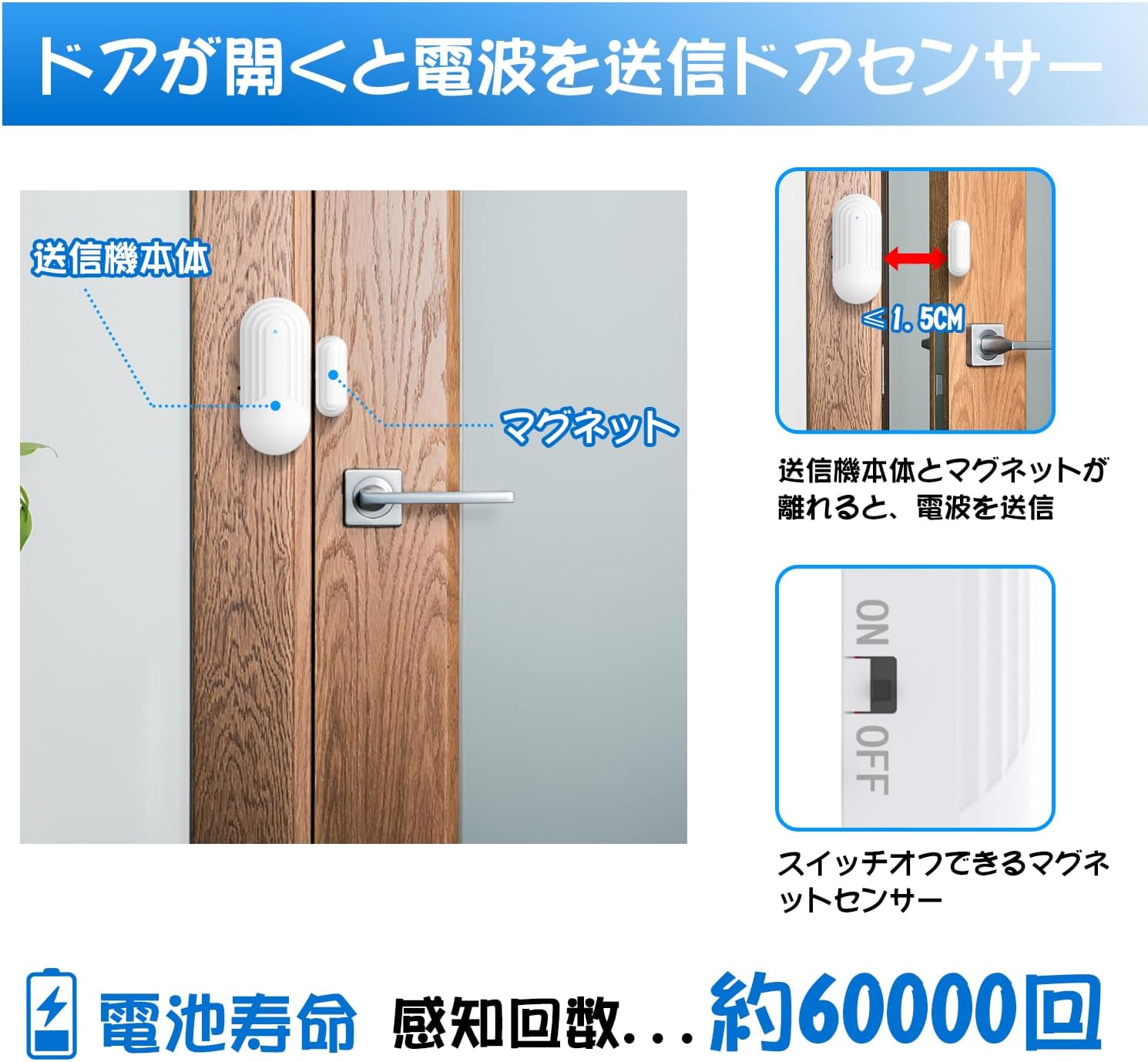
Image: Guide for installing the magnetic sensor on a door. The main unit and the magnet should be placed within 1.5 cm of each other when the door is closed. When separated, the sensor transmits a signal.
4. Operating Instructions
4.1 Sound and Volume Adjustment
- Melody Selection: Use the forward and backward buttons on the receiver to cycle through 13 available melodies, including a standard 'ding-dong' sound.
- Volume Control: Adjust the volume across 5 levels, ranging from 0dB (silent/flash only) to 110dB (maximum). This allows for silent monitoring or loud alerts as needed.
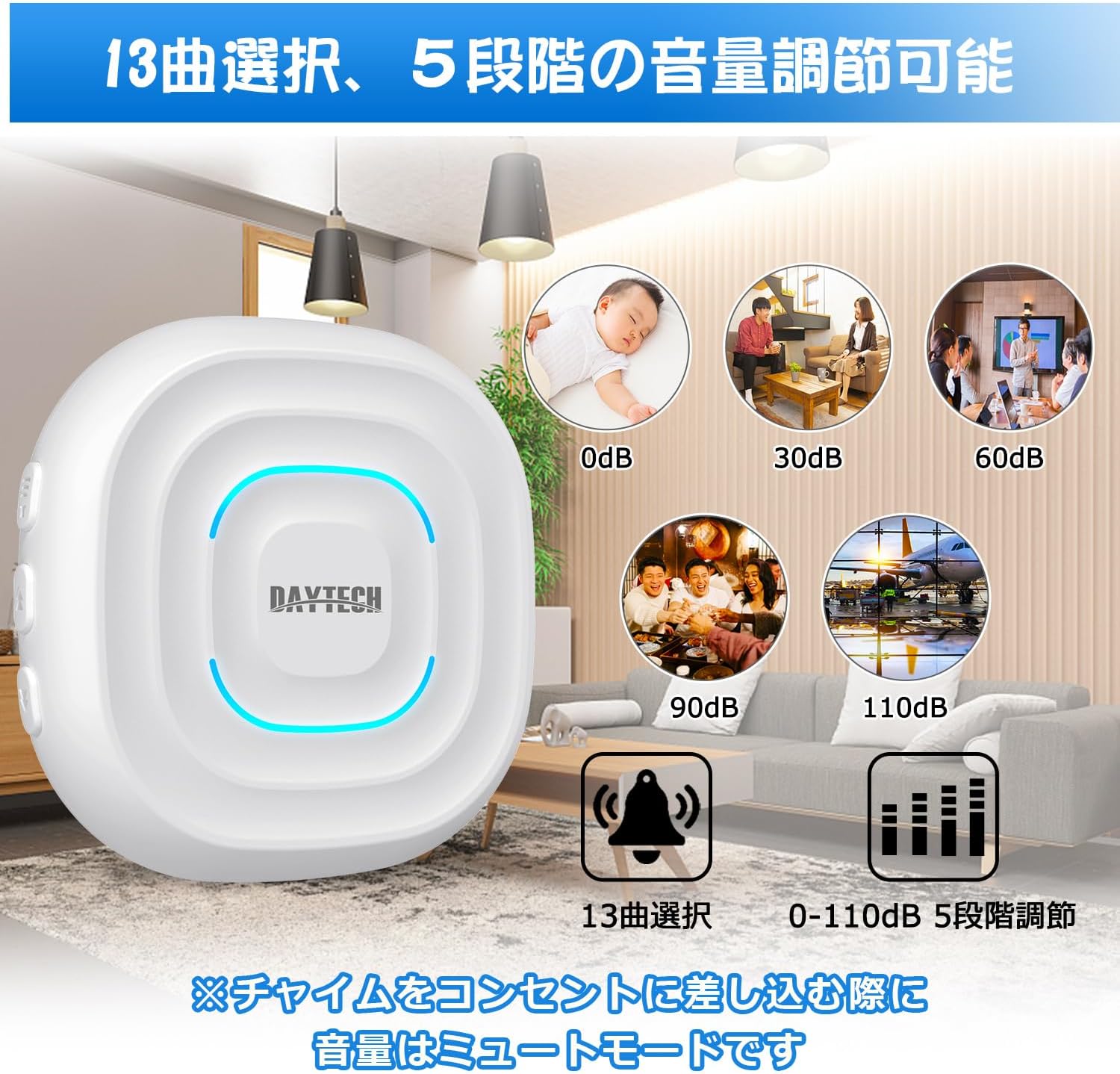
Image: Visual representation of the 13 selectable melodies and the 5-level volume adjustment feature, ranging from 0dB to 110dB.
4.2 Chime Duration Settings
The receiver offers three chime duration options:
- 8 seconds: Standard alert duration.
- 16 seconds: Extended alert duration.
- 12 minutes: Long alert duration, useful for continuous monitoring.
You can stop the chime at any time by pressing the volume or music selection button on the receiver.
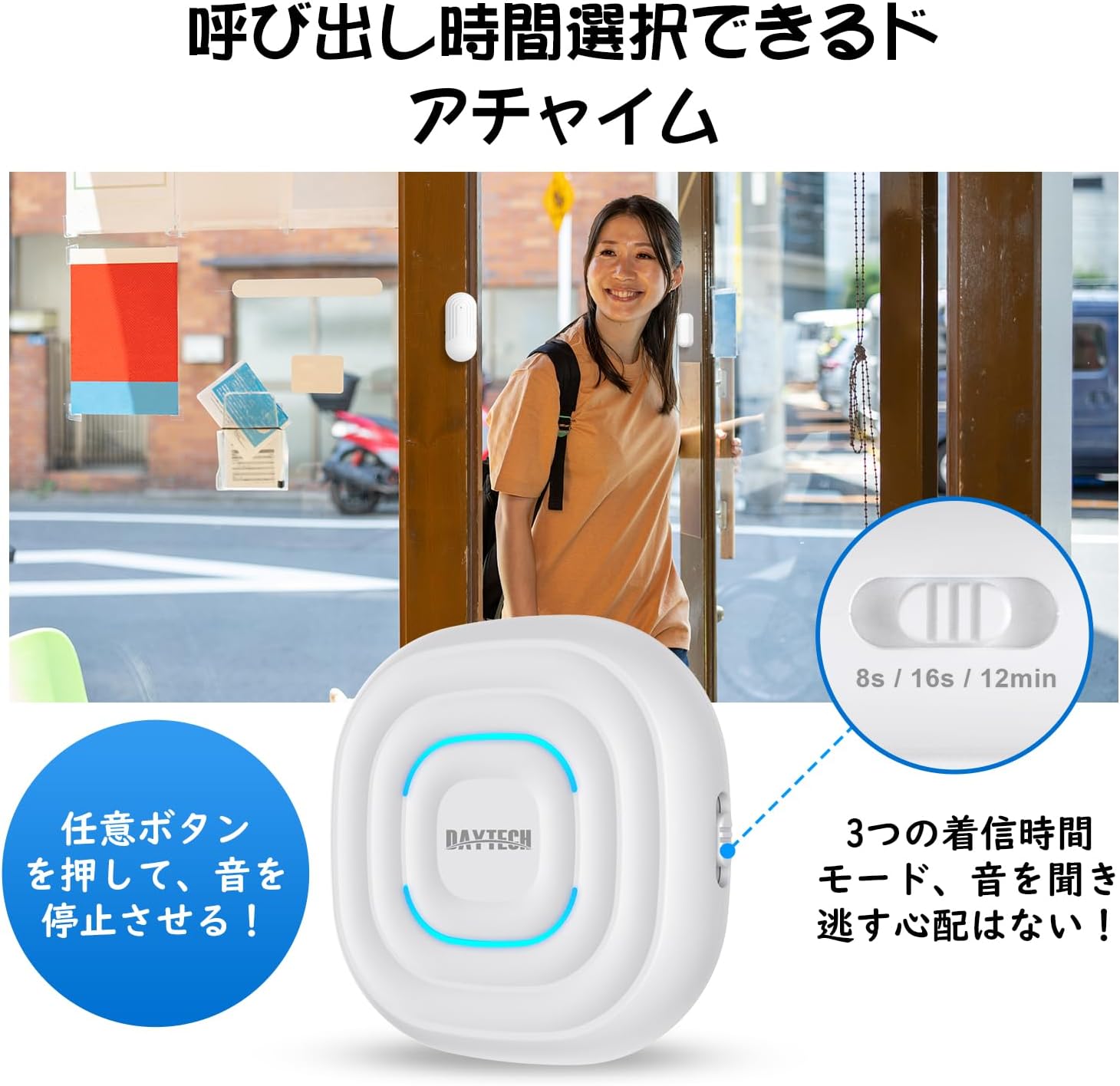
Image: The receiver unit displaying the switch for selecting chime duration, offering 8-second, 16-second, and 12-minute options. A note indicates that pressing any button can stop the sound.
4.3 Expanding Your System
The DAYTECH system is expandable. You can pair additional magnetic sensors with your existing receiver, or pair a single magnetic sensor with multiple receivers. This allows for comprehensive coverage across different entry points or multiple monitoring locations.
- One receiver supports up to 20 magnetic sensors.
- Each magnetic sensor can be paired with multiple receivers.
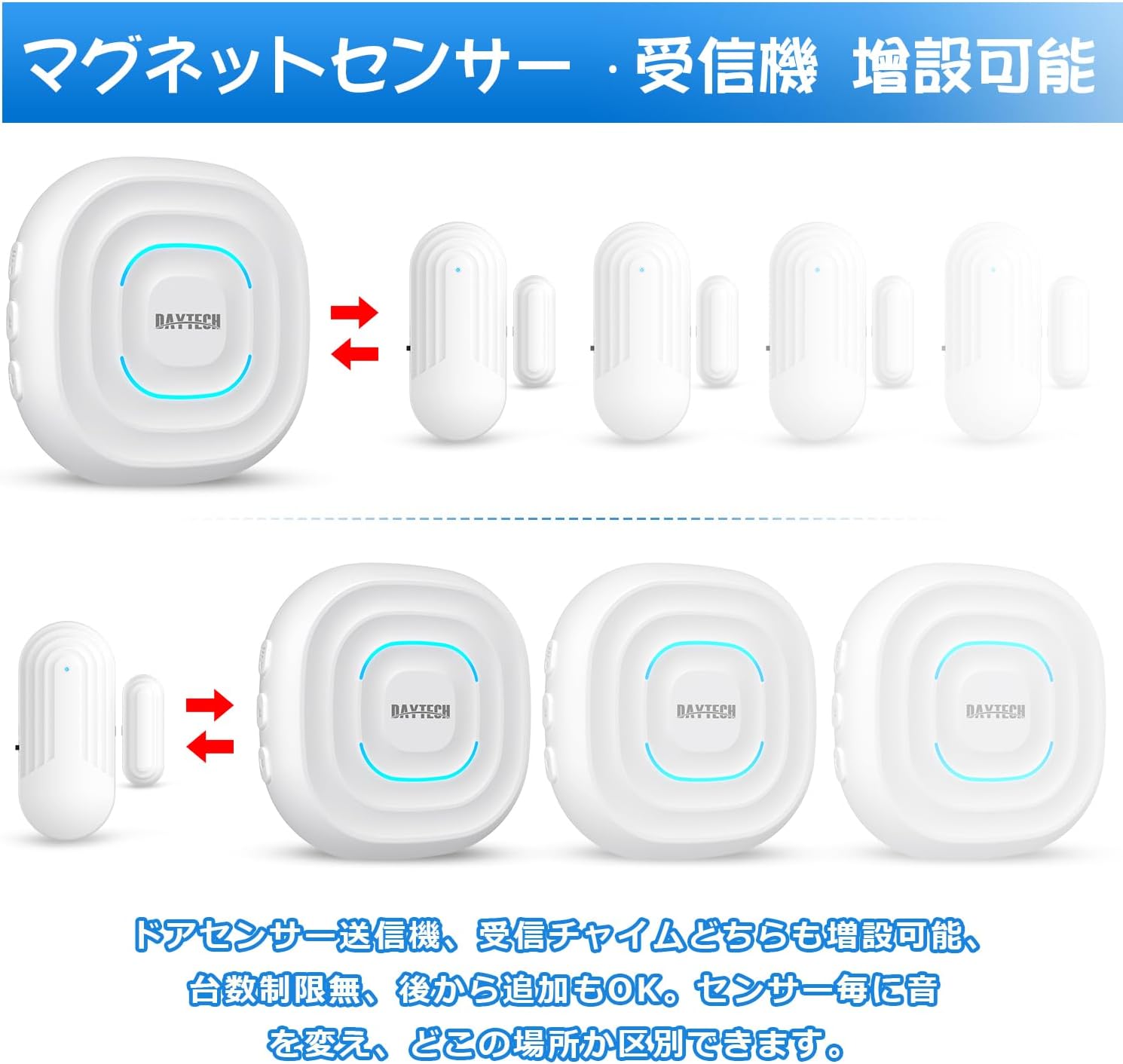
Image: Visual explanation of the system's expandability, demonstrating that additional magnetic sensors and receivers can be added and paired, allowing for customized sound settings per sensor.
5. Maintenance
- Cleaning: Wipe the receiver and sensors with a soft, dry cloth. Do not use abrasive cleaners or solvents.
- Battery Life: The magnetic sensors are designed for long-lasting performance, with an estimated battery life of approximately 60,000 detections. Replace batteries when the sensor's LED indicator no longer flashes or the signal becomes unreliable.
- Placement: Ensure sensors are not exposed to extreme temperatures or direct moisture, as this may affect performance and battery life.
6. Troubleshooting
| Problem | Possible Cause | Solution |
|---|---|---|
| Receiver does not chime when door opens. | Sensor parts are too far apart; receiver is unplugged; battery in sensor is low/dead; pairing issue. | Ensure sensor parts are within 1.5 cm when closed. Check receiver power. Replace sensor battery. Re-pair sensor with receiver. |
| Chime is too loud or too quiet. | Volume setting is incorrect. | Adjust the volume using the buttons on the receiver. There are 5 levels of adjustment. |
| Signal range is poor. | Obstructions (thick walls, metal objects); excessive distance. | Relocate the receiver to a more central position. Minimize obstructions between sensor and receiver. |
| Sensor battery drains quickly. | Frequent activation; faulty battery. | Ensure the sensor is not being triggered unnecessarily. Replace with a new, high-quality lithium-ion battery. |
| Difficulty understanding operation. | Unfamiliarity with features. | Review the 'Operating Instructions' section carefully. Experiment with melody and duration settings. |
7. Specifications
- Model Number: DTD240818
- Brand: DAYTECH
- Power Supply (Receiver): AC (plugs into outlet)
- Voltage: 12 Volts (DC)
- Mounting Type: Door Mount
- Sensor Technology: Contact Sensor
- Product Dimensions (Receiver): Approximately 6 x 3 x 10 cm
- Product Weight (Total): 170 g
- Batteries Included: Yes (2 Lithium Ion batteries for sensors)
- Wireless Range: Up to 100 meters (indoor, open area)
- Melody Options: 13
- Volume Levels: 5 (0dB to 110dB)
8. Warranty and Support
DAYTECH is committed to providing high-quality products and customer satisfaction. For any inquiries or support needs, please refer to the following:
- Free Replacement: 24 months from the date of purchase.
- Technical Support: Lifetime technical support is available.
- Contact: For assistance, please contact Daytech Electronics Co., Ltd. through your purchase platform or their official website.


