
1. Introduction and Overview
The ARROWMAX SES ULTRA Electric Screwdriver is designed for precision tasks, offering a comfortable grip and convenient control. It features an innovative cubic design, an integrated OLED screen for important information, and four shadowless LED lights to illuminate your work area. This manual provides essential information for the safe and efficient operation of your electric screwdriver.

Figure 1: The SES ULTRA Electric Screwdriver in action, highlighting its five adjustable torque modes.
2. Package Contents
Ensure all items are present upon unboxing:
- 1x Aluminum alloy storage box
- 1x Electric screwdriver pen (SES ULTRA)
- 1x User Manual (this document)
- 1x SES Power Tip Extension
- 1x USB-Type-C Cable
- 70x S2 steel 4mm bits
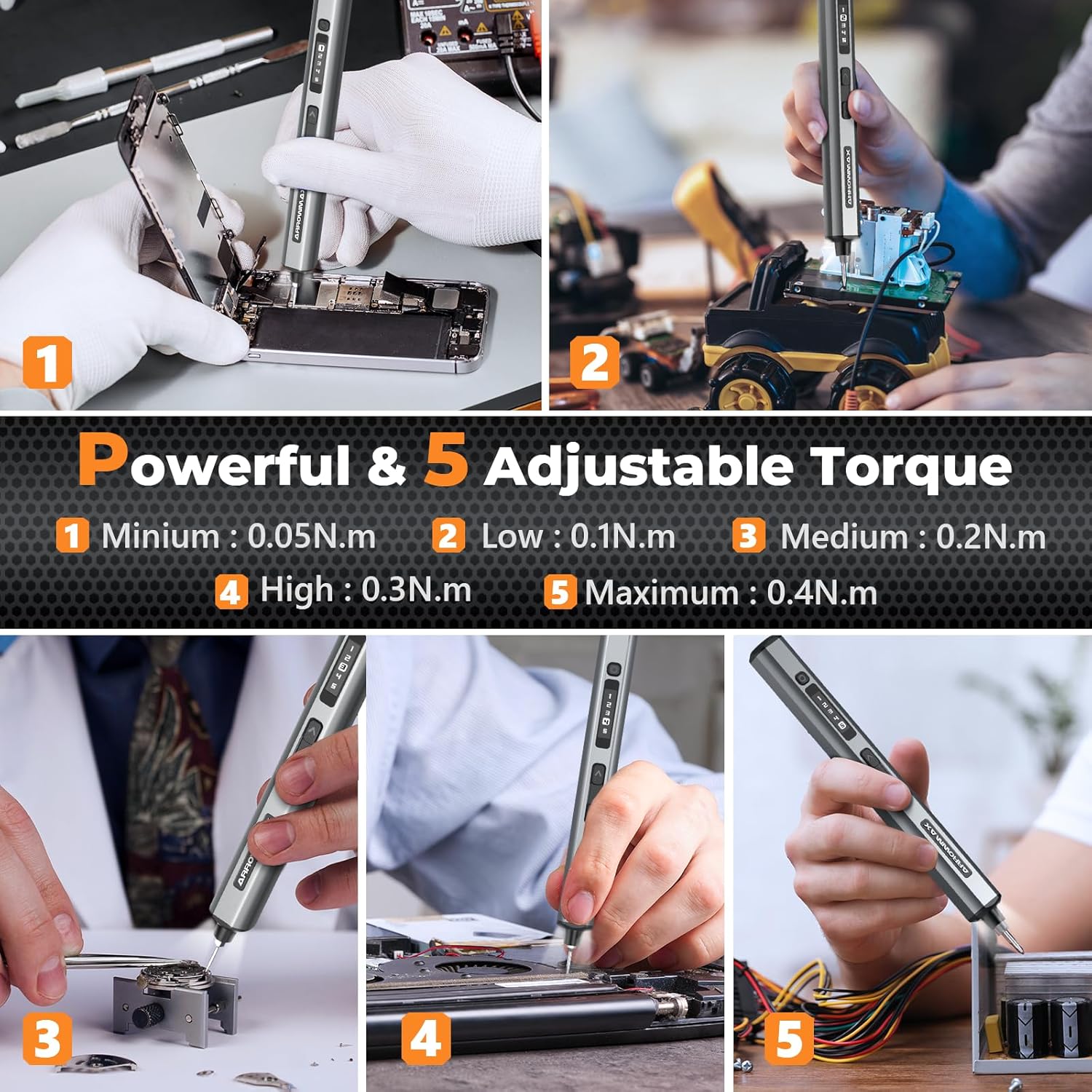
Figure 2: All components of the SES ULTRA Electric Screwdriver set, neatly organized in its storage case.
3. Product Features
- Powerful & Precise Tightening: Features 5 adjustable torque settings (0.05 to 0.4 N.m) and a manual torque of 3 N.m, with forward and reverse functions for versatile use.
- Multifunctional 70pcs Magnetic Bits: Includes 70 S2 steel precision bits in 17 different sizes, suitable for various electronic repairs and DIY projects. The magnetic blade holder and push-to-pop storage design ensure bits are secure and organized.
- 500mAh Large-Capacity Battery: Provides extended usage, capable of handling over 900 precision screws on a single full charge. Offers a high-speed 280 RPM spin.
- Compact Design & Convenience: The innovative cubic design ensures a comfortable grip and precise control. An integrated OLED screen displays essential information, and 4 shadowless LED lights provide clear visibility in dim environments.

Figure 3: Close-up of the SES ULTRA screwdriver, showcasing its innovative cubic design, OLED screen, and integrated LED lights.
4. Setup
4.1 Bit Installation
- Select the appropriate S2 steel 4mm bit from the storage box for your task.
- Gently insert the chosen bit into the bit installation port at the tip of the electric screwdriver. The magnetic holder will secure the bit in place.
- For extended reach, attach the SES Power Tip Extension first, then insert the desired bit into the extension.
4.2 Initial Charge
Before first use, fully charge the device. Connect the provided USB-Type-C cable to the charging port on the screwdriver and a USB-A power source. The OLED screen will indicate charging status.

Figure 4: The SES ULTRA screwdriver connected for Type-C charging, illustrating its long-lasting battery capacity.
5. Operating Instructions
5.1 Powering On/Off
The screwdriver is always ready for use when a bit is inserted. There is no separate power button; operation is controlled by the forward/reverse keys.
5.2 Forward/Reverse Operation
Press the Forward Key to tighten screws (clockwise rotation). Press the Reverse Key to loosen screws (counter-clockwise rotation).
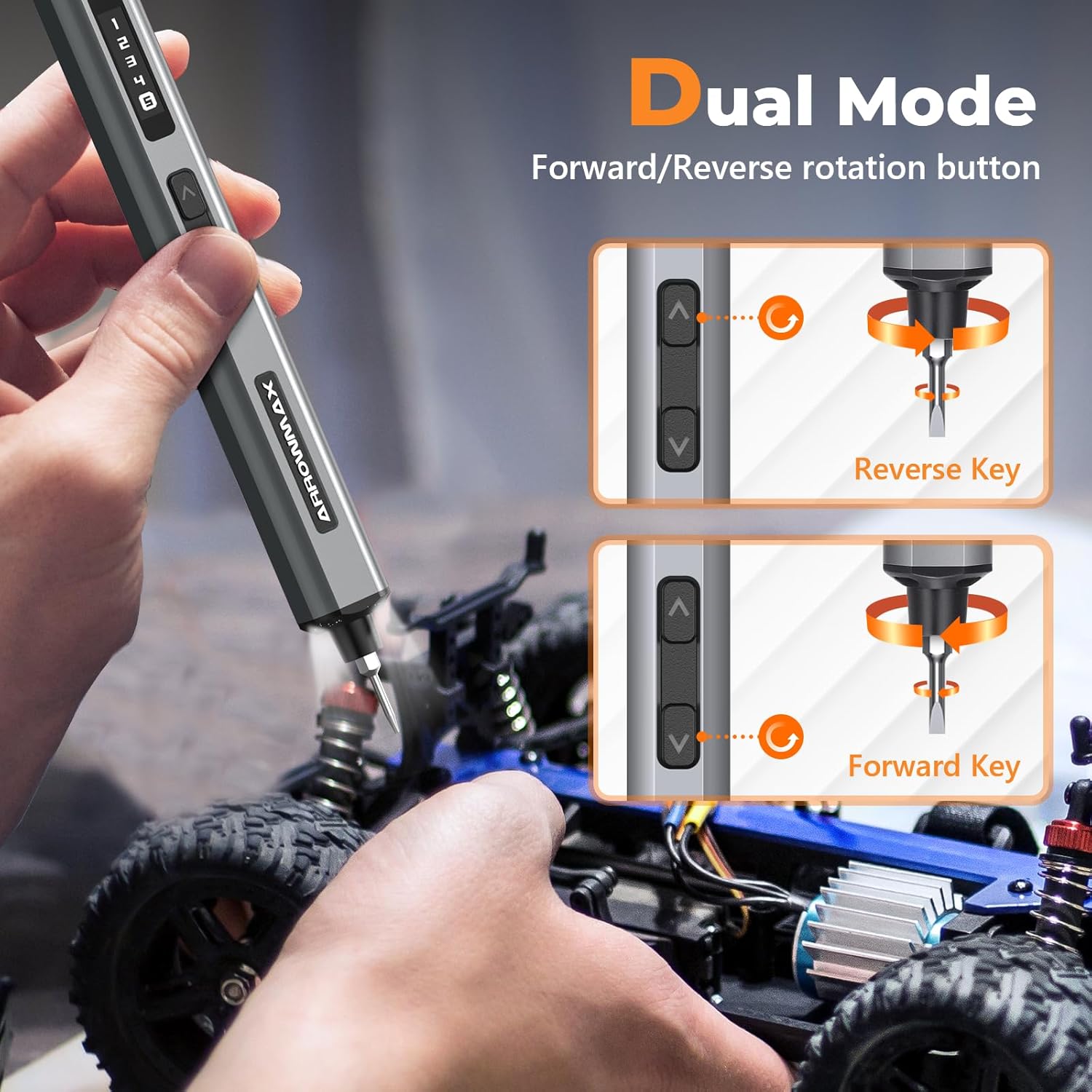
Figure 5: Illustration of the dual mode operation, indicating the forward and reverse rotation buttons on the screwdriver.
5.3 Adjusting Torque Modes
The SES ULTRA offers 5 adjustable torque settings (0.05 N.m to 0.4 N.m) for precise control. Use the Torque Adjustment Button to cycle through the settings displayed on the OLED screen. For tasks requiring higher force, manual torque up to 3 N.m can be applied.
5.4 Using LED Lights
The built-in 4 shadowless LED lights automatically activate during operation, providing illumination for your work area, especially in dim conditions.

Figure 6: Detailed diagram labeling the key components of the SES ULTRA screwdriver, including the magnetic charging port, torque adjustment button, status display, forward/reverse keys, aluminum alloy body, LED lights, and bit installation port.
6. Maintenance
6.1 Charging
Charge the screwdriver using the provided USB-Type-C cable. The device only supports USB-A to USB-C charging. Avoid using other cable types to prevent damage. A full charge provides power for approximately 900 precision screws.
6.2 Bit Care and Storage
Keep the S2 steel bits clean and dry. Store them in the magnetic storage box to prevent loss and maintain their condition. The push-to-pop design ensures easy access and secure storage.

Figure 7: The magnetic and pop-up design of the bit storage, ensuring bits are securely held and easily accessible.
7. Troubleshooting
- Device not turning on: Ensure the battery is charged. Connect to a power source and check the OLED screen for charging indication.
- Bit not rotating: Verify that a bit is properly inserted and secured in the bit installation port. Check the selected torque mode on the OLED screen.
- Insufficient torque: Adjust to a higher torque setting using the torque adjustment button. For very tight screws, apply manual force up to 3 N.m.
- LED lights not working: The LED lights activate automatically during operation. If they do not light up, ensure the device is powered on and operating.
8. Specifications
| Manufacturer | AM ARROWMAX |
| Model Name | SES ULTRA |
| Part Number | AM-230611-G |
| Product Dimensions | 23.77 x 7.59 x 2.79 cm |
| Item Weight | 671 g |
| Power Source | Battery Powered |
| Battery Type | 1 Lithium Polymer (included) |
| Voltage | 5 Volts |
| Torque (Electric) | 0.05 - 0.4 N.m (5 adjustable modes) |
| Torque (Manual) | 3 N.m |
| Speed | 280 RPM |
| Head Style | Flat, Phillips, Hex, Tri-Wing, Torx |
| Special Features | Cubic design, OLED screen, 4 LED lights |
| Material | Plastic |
9. Warranty and Support
Warranty information for this product is not applicable as per the provided data. For any product inquiries or technical support, please refer to the manufacturer's official website or contact their customer service directly.
10. Additional Resources
No official product videos from the seller were available for this specific model. Please refer to the included manual for further details or visit the ARROWMAX website for general product information.


