Introduction
This manual provides detailed instructions for the safe and effective use of your Godox SK400II-V Strobe Light Kit. Designed for studio photography, this kit offers stable output, powerful performance, and integrated wireless control, making it suitable for portraits, product photography, and more. Please read this manual thoroughly before operation to ensure proper setup and functionality.
What's in the Box
The Godox SK400II-V Strobe Light Kit includes the following components:
- Godox SK400II-V Strobe Light (400Ws)
- Power Cable
- Standard 7-inch Reflector
- 60x90cm Rectangular Softbox with Grid
- Speed Ring for Softbox (Bowens Mount)
- Inner and Outer Diffusers for Softbox
- Light Stand (78 inches)
- Colored Filters (various colors)
- Protective Cover for Strobe

Image: All components included in the Godox SK400II-V Strobe Light Kit, neatly laid out.
Product Overview
Godox SK400II-V Strobe Light
The SK400II-V is a 400Ws studio strobe featuring a robust design and advanced functionalities for professional and enthusiast photographers.
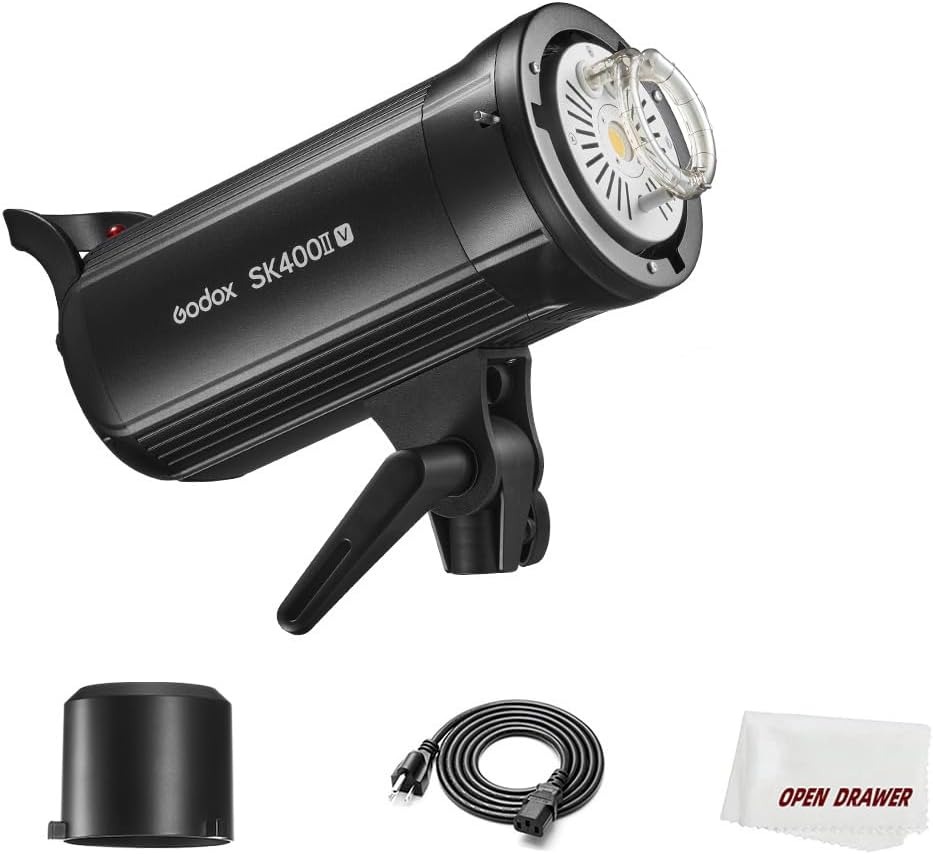
Image: The Godox SK400II-V Strobe Light with a standard reflector, showcasing its compact design.
- Power Output: 400Ws, adjustable from 1/16 to 1/1 (full power) in 40 steps.
- Recycle Time: Fast recycle time of 0.1-1.5 seconds.
- Modeling Light: 10W LED modeling light with 5%-100% manual dimming. Features a proportional mode where modeling light brightness adjusts with flash output.
- Wireless System: Built-in 2.4G Godox X wireless system for remote triggering and control with compatible Godox Xpro, X1, X2, XT32, or FT-16 flash triggers. Supports 16 groups and 32 channels.
- Mount: Standard Bowens mount for compatibility with a wide range of light modifiers.
- Safety Features: Anti-pre-flash function for synchronized shooting with cameras having pre-flash, built-in heat dissipation fan, and overheating protection.

Image: Detailed view of the strobe's control panel, showing the LCD screen and adjustment buttons.

Image: The strobe's 10W LED modeling lamp, illustrating its adjustable brightness.

Image: Illustration of the 2.4G Wireless X System, demonstrating remote control capabilities.
Setup
1. Assembling the Softbox
- Unpack the softbox and speed ring.
- Insert the metal rods into the designated channels on the softbox fabric, ensuring the tips reach the front pockets in each corner.
- Attach the speed ring to the rear opening of the softbox, securing the rods into the holes on the speed ring.
- Attach the inner diffuser by clipping its elastic loops to the corresponding points inside the softbox.
- Attach the outer diffuser to the front of the softbox using the Velcro strips.
- If desired, attach the honeycomb grid to the outer diffuser using its Velcro edges.
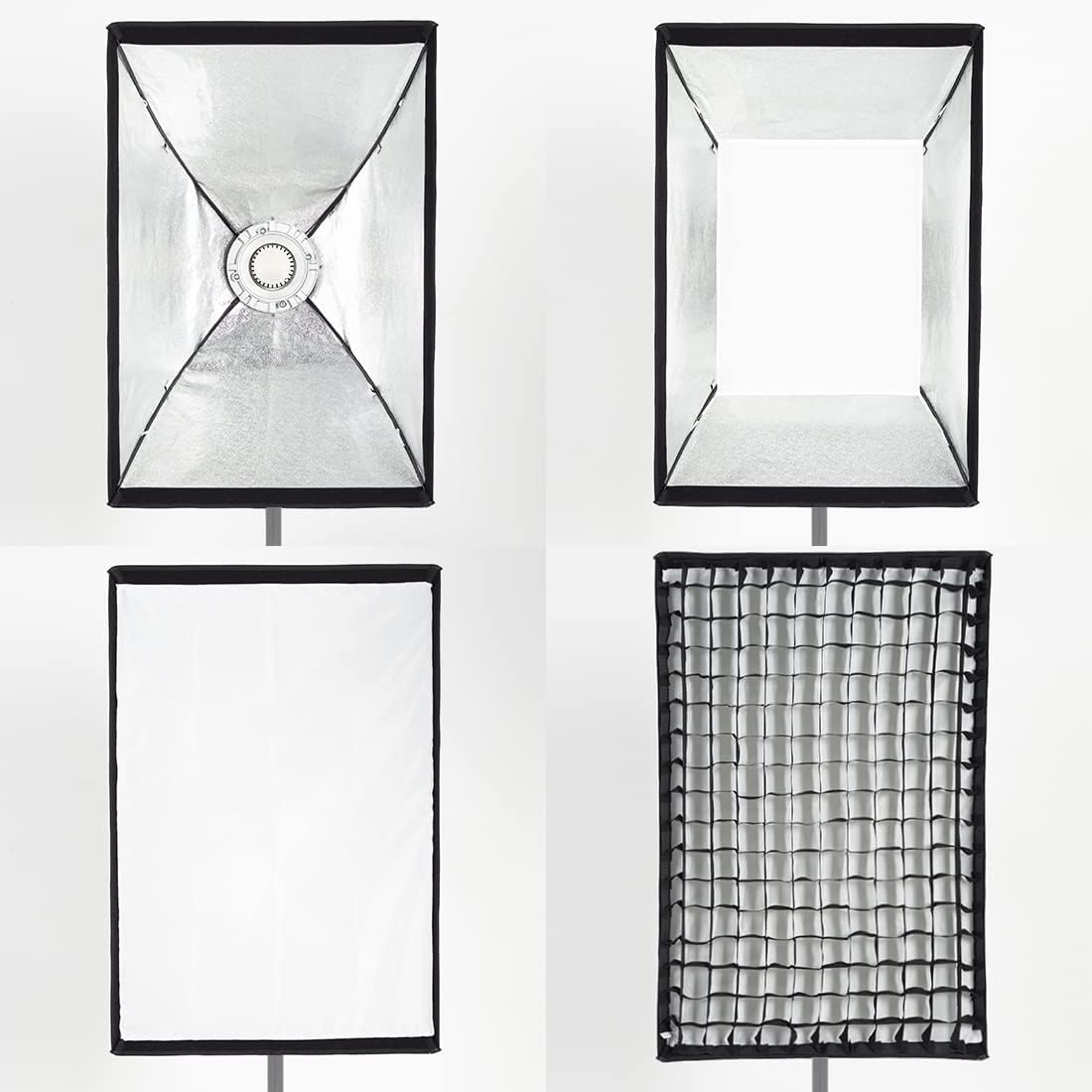
Image: Disassembled softbox components, showing the inner reflective material, diffusers, and grid.

Image: A fully assembled softbox with a strobe light, ready for use on a light stand.
2. Attaching the Strobe and Light Modifiers
- Mount the SK400II-V Strobe Light onto the light stand. Secure it firmly.
- Align the Bowens mount of the assembled softbox (or standard reflector) with the strobe's mount.
- Twist the softbox/reflector clockwise until it clicks into place, ensuring it is securely locked.
- Connect the power cable to the strobe and plug it into a suitable power outlet.

Image: The Godox SK400II-V Strobe Light with a standard reflector, mounted on a light stand.
Operating Instructions
1. Power On/Off
Flip the power switch located on the rear panel of the strobe to turn the unit on or off.
2. Adjusting Flash Power
Use the rotary dial on the control panel to adjust the flash output from 1/16 to 1/1 (full power). The current power setting will be displayed on the LCD screen.
3. Modeling Light Control
- Manual Mode: Press the 'MODEL' button to cycle through modeling light modes. In manual mode, use the rotary dial to adjust brightness from 5% to 100%.
- Proportional Mode: In this mode, the modeling light brightness automatically adjusts in proportion to the set flash output.
4. Wireless Control
The SK400II-V has a built-in 2.4G wireless receiver. To control it remotely:
- Set the strobe to the desired group and channel using the buttons on the control panel.
- Ensure your Godox Xpro, X1, X2, XT32, or FT-16 flash trigger is set to the same group and channel.
- You can now trigger the flash and adjust settings remotely from your trigger.
5. Buzzer Function
The strobe features an audible buzzer that indicates when the flash has fully recycled and is ready to fire again. This can be toggled on or off via the control panel.
6. Sync Cable Port
For wired triggering, connect a sync cable from your camera or a compatible trigger to the sync port on the strobe's rear panel.
Video: A detailed overview of the Godox SK400II-V Strobe Light Kit, demonstrating its components, features, and practical applications in studio photography. This video highlights the ease of use and versatility of the kit for various shooting scenarios.
Maintenance
- Always disconnect the power cable before cleaning or performing any maintenance.
- Clean the strobe body and accessories with a soft, dry cloth. Avoid using abrasive cleaners or solvents.
- Ensure proper ventilation during operation to prevent overheating. The built-in fan helps, but do not obstruct air vents.
- Store the kit in a dry, dust-free environment when not in use.
- Handle the flash tube and modeling light with care to avoid damage.
Troubleshooting
- Flash not firing: Check power connection, ensure the strobe is turned on, verify trigger settings (group/channel), and check if the flash has fully recycled (listen for the beep).
- Modeling light not working: Ensure the modeling light is turned on and not set to 0% brightness. Check the power connection.
- Inconsistent flash output: Verify power settings on the strobe and trigger. Ensure the strobe is not overheating (allow it to cool down if necessary).
- Softbox assembly issues: Ensure all rods are correctly inserted into their channels and secured in the speed ring.
Specifications
| Item Model Number | SK400II-V |
| Brand | GODOX |
| Power Output | 400Ws |
| Recycle Time | 0.1-1.5S |
| Modeling Light | 10W LED, 5%-100% adjustable |
| Wireless System | Built-in 2.4G (16 groups, 32 channels) |
| Compatible Mountings | Bowens Mount |
| Flash Sync Speed | 1/200s or slower |
| Item Weight | 13.62 pounds |
| Package Dimensions | 34.8 x 13.6 x 10.7 inches |
Warranty and Support
For warranty information and customer support, please refer to the documentation included with your product or visit the official GODOX website. Keep your purchase receipt as proof of purchase for any warranty claims.