
1. Introduction
The Net Wansa Smart TV Remote Control is designed for compatibility with Wansa Smart TVs. It features a compact and durable construction, engineered for ease of use. The remote control's design aims to provide efficient performance and a long operational lifespan. Its ergonomic form factor allows for comfortable handling and facilitates quick navigation through television functions. The device is constructed with a high-quality plastic body and a soft rubber keypad.
2. Product Overview
This section provides a visual and descriptive overview of the remote control.
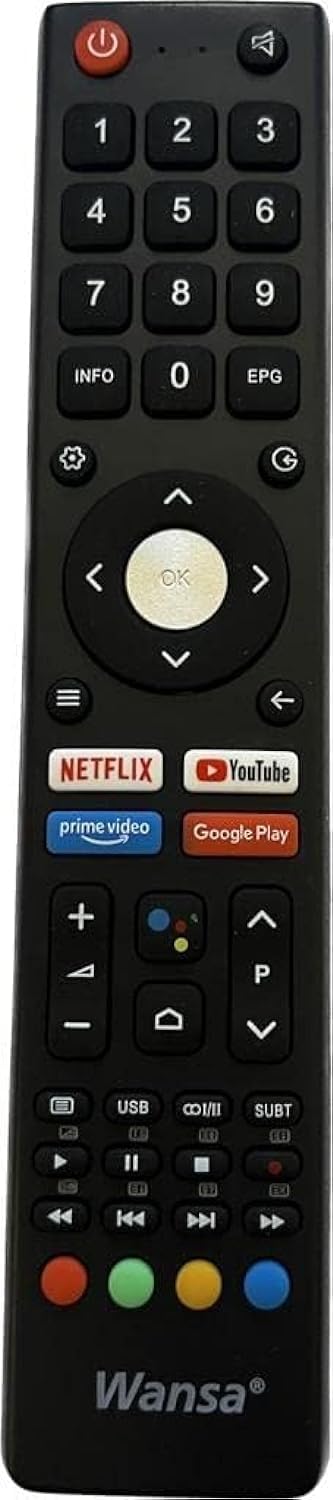
Image: Front view of the Net Wansa Smart TV Remote Control RCU60WANSA. The remote is black with various buttons for TV operation.
Key Features:
- Features high quality and a solid, durable design.
- Efficient performance extends the product's lifespan.
- High-quality plastic body and soft rubber keypad.
- Compact size and easy to use.
- Fits naturally in your hand and aids quick navigation.
3. Setup
3.1 Battery Installation
- Locate the battery compartment on the back of the remote control.
- Slide open the battery compartment cover.
- Insert two AAA batteries (not included), ensuring the correct polarity (+ and -) as indicated inside the compartment.
- Close the battery compartment cover securely.
3.2 Initial Pairing (for Wi-Fi Connectivity)
This remote control utilizes Wi-Fi connectivity for enhanced functionality. Follow these steps to pair it with your Wansa Smart TV:
- Ensure your Wansa Smart TV is powered on.
- Point the remote control towards the TV.
- Press and hold the PAIRING button (if available, typically located in the battery compartment or on the back) or follow the on-screen instructions on your TV to initiate pairing mode. If no dedicated pairing button is present, consult your TV's manual for remote control pairing procedures.
- Once the TV recognizes the remote, a confirmation message should appear on the screen.
- Test the remote's functions to ensure successful pairing.
Note: If the remote control does not pair, ensure there are no obstructions between the remote and the TV, and that the batteries are correctly installed and charged.
4. Operating Instructions
The remote control provides intuitive access to your Wansa Smart TV's functions. Below are common operations:
- Power Button: Press to turn the TV on or off.
- Volume Up/Down: Adjust the audio level.
- Channel Up/Down: Change TV channels.
- Navigation Buttons (Arrow Keys): Use to move through menus and select options.
- OK/Enter Button: Confirm selections or open items.
- Back/Return Button: Go back to the previous screen or menu.
- Home Button: Access the Smart TV's main home screen.
- Mute Button: Temporarily silence the TV audio.
- Input/Source Button: Switch between different input sources (HDMI, AV, etc.).
Refer to your Wansa Smart TV's on-screen interface for specific button functionalities related to smart features and applications.
5. Maintenance
5.1 Cleaning
- Wipe the remote control with a soft, dry cloth.
- For stubborn dirt, slightly dampen the cloth with water or a mild cleaning solution. Avoid excessive moisture.
- Do not use abrasive cleaners, alcohol, or solvents, as these can damage the surface and buttons.
5.2 Battery Replacement
Replace batteries when the remote control becomes unresponsive or its range decreases. Always replace both batteries at the same time with new ones of the same type (AAA).
5.3 Storage
If the remote control will not be used for an extended period, remove the batteries to prevent leakage and potential damage to the device.
6. Troubleshooting
If you encounter issues with your remote control, refer to the following common problems and solutions:
| Problem | Possible Cause | Solution |
|---|---|---|
| Remote is unresponsive. | Dead or incorrectly installed batteries. | Replace batteries with new ones, ensuring correct polarity. |
| Remote does not control the TV. | Not paired correctly (for Wi-Fi models) or line of sight obstructed (for IR functions). | Re-pair the remote control with the TV. Ensure no objects block the signal path. |
| Some buttons do not work. | Button stuck or internal fault. | Gently press the button multiple times. If the issue persists, consider replacing the remote. |
7. Specifications
Detailed specifications for the RCU60WANSA remote control:
| Manufacturer | Net |
| Country of Origin | China |
| Item Model Number | RCU60WANSA |
| Product Dimensions | 21 x 4.5 x 1.5 cm |
| Brand | Net |
| Color | Black |
| Maximum Number of Supported Devices | 1 |
| Compatible Devices | Television |
| Connectivity Technology | Wi-Fi |
| Number of Buttons | 25 |
| Controller Type | Button Control |
| Model Name | Wansa |
| Item Weight | 70 grams |
| Battery Description | Modern Design (Requires AAA batteries) |
8. Warranty and Support
For warranty information or technical support, please refer to the documentation provided with your original purchase or contact the retailer where the product was acquired. Specific warranty terms and support channels may vary by region and retailer.


