
1. Introduction
Thank you for choosing the LOUTOC Replacement Remote Control. This remote is designed to provide seamless control for compatible Roku streaming devices. It offers a straightforward, out-of-the-box experience without the need for complex programming. Please read this manual carefully to ensure proper use and to understand the full capabilities and limitations of your new remote.
2. Compatibility
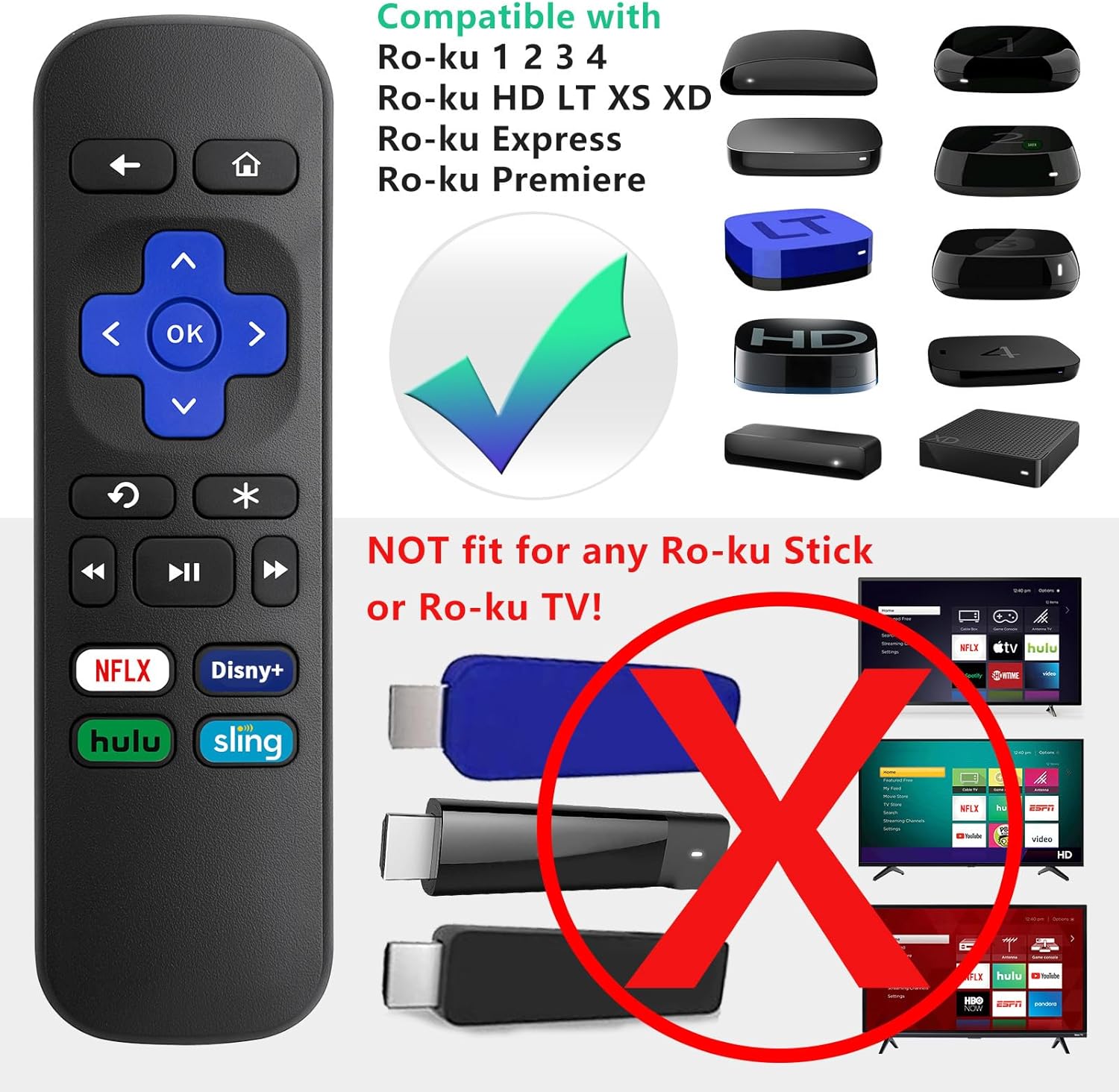
This LOUTOC Replacement Remote Control is specifically designed for use with the following Roku models:
- Roku Express
- Roku Premiere
- Roku Box
- Roku Player (Models 1, 2, 3, 4)
- Roku HD, LT, XS, XD
Important Compatibility Notes:
- This remote is NOT compatible with any Roku Stick or Roku TV models.
- This is an IR (Infrared) remote. It does NOT feature volume control, a power button, a headphone jack, a pairing button, or voice search functionality.

3. Features
Your LOUTOC Replacement Remote Control offers the following features:
- Instant Setup: No programming required. Simply insert batteries and it's ready to use.
- IR Technology: Operates using infrared signals, requiring a direct line of sight to your Roku device.
- Dedicated Shortcut Buttons: Quick access to popular streaming channels including Netflix, Disney+, Hulu, and Sling.
- Durable Construction: Made from ABS material for longevity.


4. Setup and Installation
Follow these simple steps to begin using your new remote:
- Insert Batteries: Open the battery compartment cover on the back of the remote. Insert two (2) AAA batteries, ensuring correct polarity (+/-). Close the cover securely.
- Automatic Connection: Point the remote directly at your compatible Roku device. The remote should function immediately without any additional programming or pairing steps.

Video 4.1: This video demonstrates the ease of setup for the LOUTOC Replacement Remote Control, highlighting that it works immediately after battery insertion with compatible Roku devices.
5. Operating Instructions
The remote features standard navigation and playback controls:
- Directional Pad (Purple Cross): Use the up, down, left, and right arrows to navigate menus and content.
- OK Button: Confirms selections.
- Back Button (Left Arrow): Returns to the previous screen or menu.
- Home Button (House Icon): Returns to the Roku home screen.
- Playback Controls: Play/Pause, Fast Forward, Rewind buttons for media control.
- Instant Replay: The curved arrow button allows for quick replay of content.
- Shortcut Buttons: Directly launch Netflix, Disney+, Hulu, and Sling with a single press.

6. Troubleshooting
If you encounter issues with your remote, consider the following:
- Remote Not Responding: Ensure fresh AAA batteries are correctly inserted.
- No Line of Sight: As an IR remote, ensure there are no obstructions between the remote and your Roku device.
- Incorrect Roku Model: Double-check that your Roku device is one of the compatible models listed in Section 2. This remote will not work with Roku Sticks or Roku TVs.
7. Specifications
| Product Dimensions | 3.93 x 1.12 x 0.59 inches |
| Item Weight | 1.76 ounces |
| Batteries Required | 2 AAA batteries (not included) |
| Technology | Infrared (IR) |
| Material | ABS |
8. Warranty and Support
Your LOUTOC Replacement Remote Control comes with a 60-day replacement policy. For any questions or support needs, please refer to the LOUTOC store on Amazon or contact customer service.

Visit the LOUTOC Store for more products and support.