
1. Introduction
The SWAREY S1000 Portable Power Station is a versatile and high-capacity energy storage device designed to provide reliable power for various applications, including outdoor activities, emergency backup, and mobile charging. With a 725.76Wh capacity and 1000W (1500W peak) AC output, it supports multiple charging and output methods to keep your devices powered.
Safety Instructions
- Do not disassemble, repair, or modify the unit.
- Keep the unit away from fire, water, and extreme temperatures.
- Use the product in a well-ventilated area.
- Avoid dropping or subjecting the unit to strong impacts.
- Keep out of reach of children.
- Dispose of the product according to local regulations.
2. Package Contents
Please check all accessories are complete after unpacking. If any items are missing or damaged, contact customer support.
- SWAREY S1000 Power Station x 1
- Power Adapter x 1
- Car Charger x 1
- AC Cable x 1
- DC-MC4 Solar Charging Cable x 1
- User Manual x 1

Image: The SWAREY S1000 Portable Power Station displayed with all its included accessories: power adapter, AC cable, car charger, DC-MC4 solar charging cable, and user manual.
3. Product Features and Interface Overview
The SWAREY S1000 features a comprehensive set of input and output ports, along with a clear display panel, to manage your power needs efficiently.

Image: Front panel of the SWAREY S1000 Portable Power Station, highlighting its various output ports and the central display screen. Labels indicate AC outlets, Type-C ports, USB (QC3.0) ports, USB-A ports, DC (5.5*2.1mm) outputs, and the car charger output.
Output Ports:
- AC Output (x2): 220-240V, 1000W (Rated), 1500W (Peak). Pure Sine Wave output.
- DC Output (5.5*2.1mm) (x2): 12V/10A (120W MAX).
- Car Charger Output (x1): 12V/10A.
- USB-A Output (x2): 5V/2.4A.
- USB QC3.0 Output (x1): 5V/3A; 9V/2A; 12V/1.5A.
- Type-C Output (PD 65W) (x1): 5V/3A; 9V/3A; 12V/3A; 15V/3A; 20V/3.25A.
Input Ports:
- DC Input (7.5*0.8mm): 12V-36V (Max. 10A).
4. Setup
Before first use, it is recommended to fully charge the SWAREY S1000 Power Station. This ensures optimal battery performance and calibration.
5. Charging the Power Station
The SWAREY S1000 offers multiple convenient charging methods.
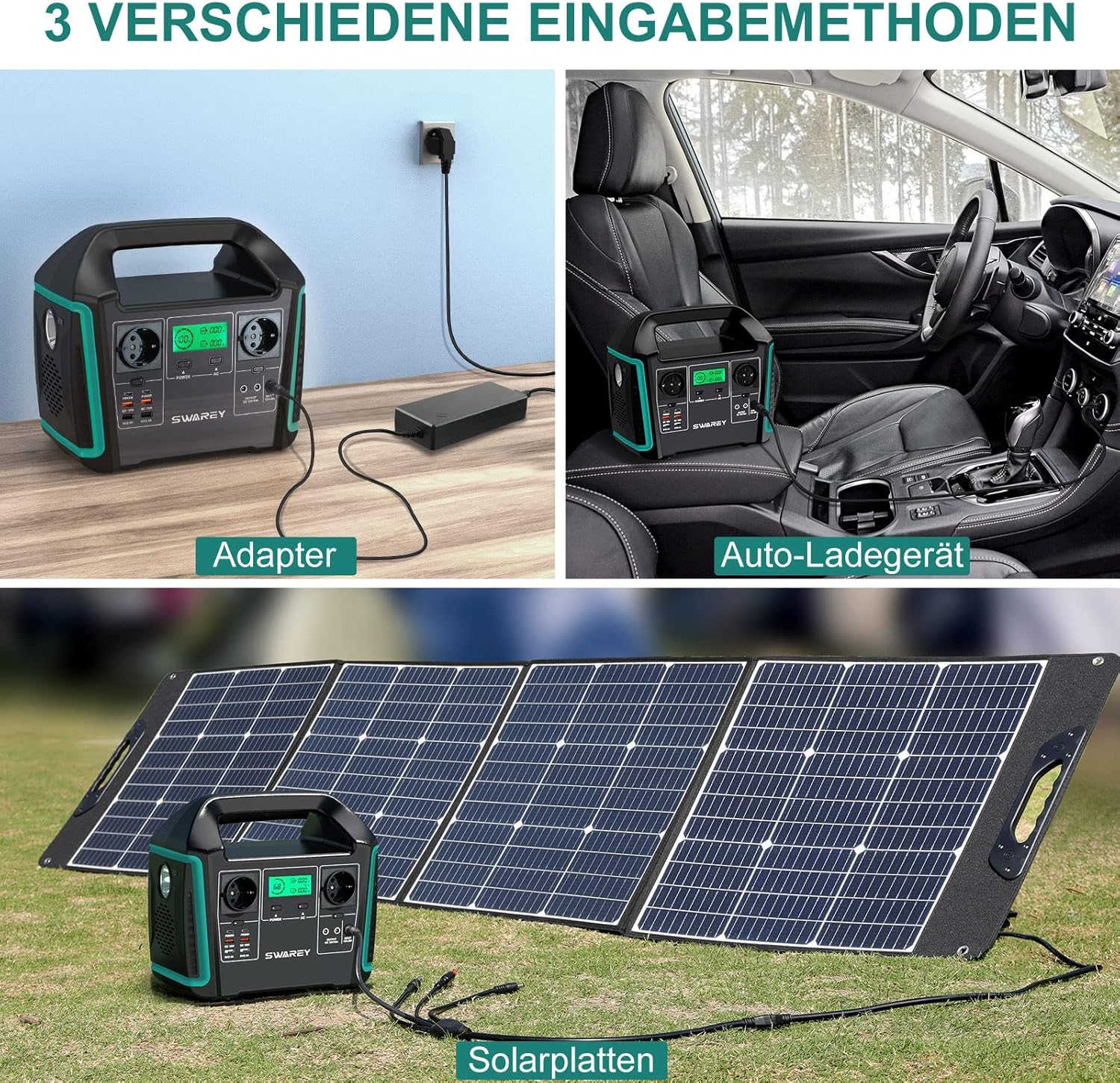
Image: Three panels illustrating the charging options for the SWAREY S1000: charging via a wall adapter, charging via a car charger, and charging via solar panels.
Charging Methods:
- AC Wall Outlet: Connect the provided power adapter and AC cable to the DC input port and a standard wall outlet.
- Car Charger: Use the included car charger cable to connect the power station to your vehicle's 12V cigarette lighter socket.
- Solar Panel: Connect a compatible solar panel (15-36V/5A, 126W max) to the DC input port using the DC-MC4 solar charging cable. The built-in MPPT controller optimizes solar charging efficiency.
The display screen will show the charging status and battery level during the charging process.
6. Operating the Power Station
The SWAREY S1000 is designed for ease of use, providing power to a wide range of devices.
Powering On/Off:
- Press and hold the main power button to turn the unit on or off.
- Individual output sections (AC, DC, USB) may have their own power buttons; press them to activate or deactivate specific outputs.
Using Output Ports:
- Connect your devices to the appropriate output ports (AC, DC, USB, Type-C).
- Ensure the output section for the connected port is activated.
- The power station can charge up to 11 devices simultaneously, provided the total power consumption does not exceed the rated output.

Image: The SWAREY S1000 Portable Power Station on a table, powering a laptop, fan, lamp, smartphone, and tablet, demonstrating its 1000W pure sine wave output capability.
Quiet Operation:
The SWAREY S1000 is designed for quiet operation, ensuring it does not disturb your peace or activities, even when powering sensitive equipment like CPAP machines.

Image: The SWAREY S1000 Portable Power Station placed on a bedside table, quietly powering a CPAP machine for a person sleeping in bed, illustrating its low noise operation.
7. LED Lighting Modes
The power station includes an integrated LED light with multiple modes for convenience in various situations.
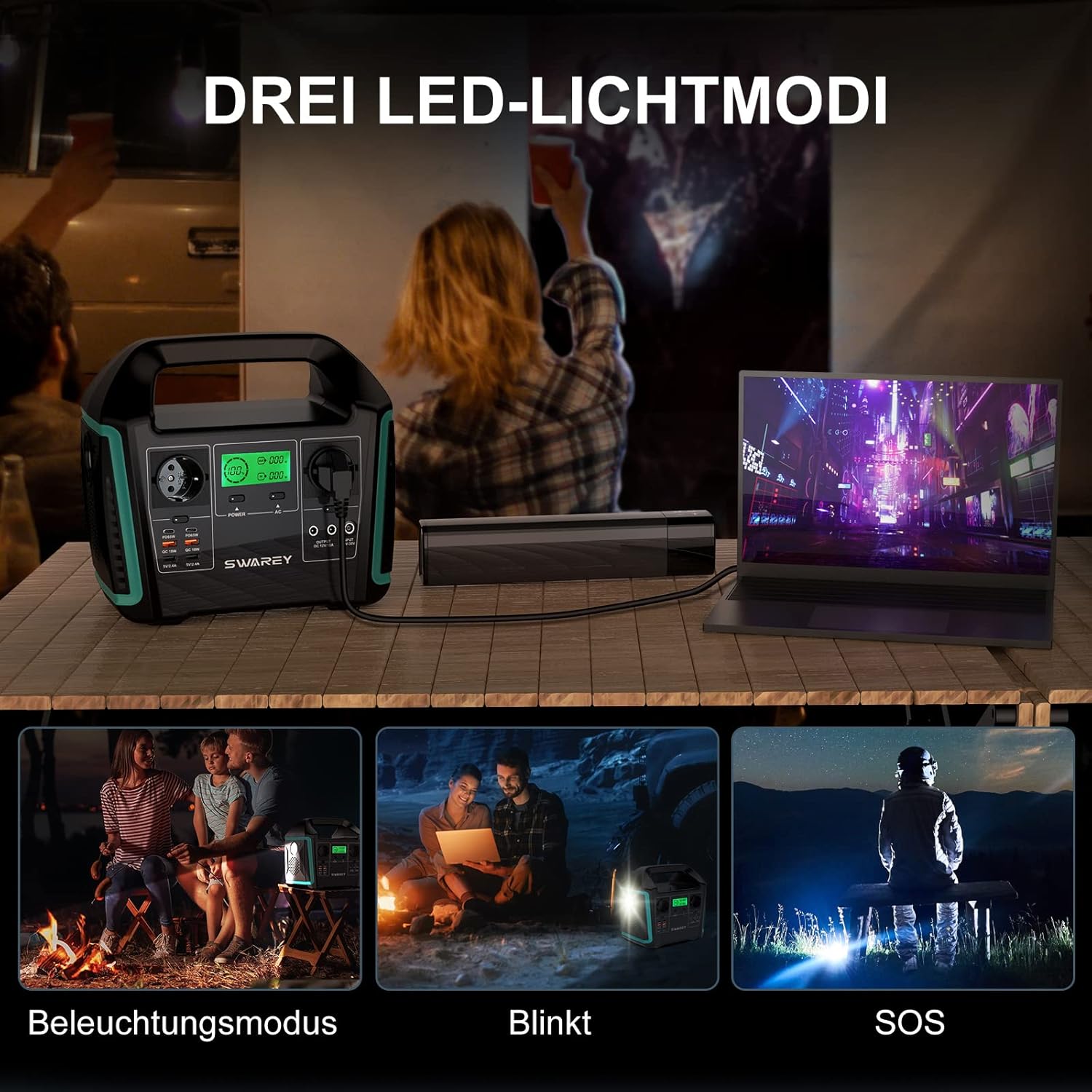
Image: Three scenarios demonstrating the SWAREY S1000's LED light functions: standard illumination for reading, blinking mode, and SOS signal mode for emergencies.
Available Modes:
- Illumination Mode: Provides steady light for general use.
- Blink Mode: A flashing light for signaling or attracting attention.
- SOS Mode: Emits the international Morse code signal for distress.
Press the LED light button to cycle through the modes or turn the light on/off.
8. Maintenance
Proper maintenance ensures the longevity and optimal performance of your SWAREY S1000 Power Station.
- Storage: If storing the unit for an extended period, charge it to 50-80% every 3-6 months to prevent battery degradation. Store in a cool, dry place away from direct sunlight.
- Cleaning: Use a dry, soft cloth to wipe the exterior of the unit. Do not use abrasive cleaners or immerse the unit in water.
- Temperature Control: The Battery Management System (BMS) provides temperature control. Ensure adequate ventilation around the unit during operation and charging.
9. Troubleshooting
If you encounter issues with your SWAREY S1000, refer to the following common troubleshooting steps:
- Unit Not Turning On: Ensure the battery is charged. If the battery is depleted, connect it to a power source.
- No Output from Ports: Check if the specific output section (AC, DC, USB) is activated by pressing its respective power button. Ensure the device connected is within the power station's output limits.
- Charging Issues: Verify that the charging cable and adapter are securely connected and functional. Check the input voltage and current specifications for solar charging.
- Overload Protection: If an output port stops working, it might be due to an overload. Disconnect the device, turn off the output, and then reactivate it. Reduce the load if necessary.
- Display Errors: If the display shows an error code, refer to the full user manual for specific meanings or contact customer support.
10. Specifications
Detailed technical specifications for the SWAREY S1000 Portable Power Station.
| Feature | Specification |
|---|---|
| Model | S1000 |
| Battery Capacity | 725.76Wh / 201600mAh |
| AC Output (Rated) | 1000W |
| AC Output (Peak) | 1500W |
| AC Output Voltage | 220-240V |
| DC Output (5.5*2.1mm) | 12V/10A (120W MAX) x 2 |
| Car Charger Output | 12V/10A |
| USB-A Output | 5V/2.4A x 2 |
| USB QC3.0 Output | 5V/3A; 9V/2A; 12V/1.5A |
| Type-C Output (PD 65W) | 5V/3A; 9V/3A; 12V/3A; 15V/3A; 20V/3.25A |
| DC Input (7.5*0.8mm) | 12V-36V (Max. 10A) |
| Solar Panel Input | MPPT 15-36V/5A (126W max) |
| Product Dimensions | 27.2 x 24.9 x 16.5 cm (10.7 x 9.8 x 6.5 inches) |
| Product Weight | 6 kg (13.2 lbs) |
11. Warranty and Support
The SWAREY S1000 Portable Power Station comes with a 2-year warranty from the date of purchase.
For technical support, warranty claims, or any questions regarding your product, please contact SWAREY customer service through the retailer where you purchased the product or visit the official SWAREY website for contact information.
Please retain your proof of purchase for warranty validation.