
Rocketfish RF-SBM102
Rocketfish Universal Soundbar Mounting System (RF-SBM102) Instruction Manual
Brand: Rocketfish | Model: RF-SBM102
Introduction
The Rocketfish Universal Soundbar Mounting System provides a secure and adjustable solution for integrating your soundbar with your wall-mounted television. Designed for compatibility with 32-inch to 90-inch TVs and soundbars weighing up to 20 lbs, this system allows for vertical and horizontal adjustments to achieve optimal audio alignment and a clean aesthetic.
Package Contents
Before beginning installation, verify that all components are present. The package typically includes:
- Soundbar mounting bracket assembly
- Mounting arms (left and right)
- Various screws, washers, and spacers for TV and soundbar attachment
- Installation hardware
- Instruction manual

Image: The product packaging displaying the soundbar mounting system and its key features.
Installation Guide
This section provides step-by-step instructions for installing your Rocketfish Universal Soundbar Mounting System. Ensure your TV is securely mounted to the wall before proceeding.
1. Attach Mounting Arms to TV
The soundbar mounting system attaches to the VESA mounting holes on the back of your wall-mounted TV. Identify the appropriate VESA mounting pattern on your TV (e.g., 75x75mm, 600x600mm). Use the provided screws, washers, and spacers to secure the main horizontal bar of the soundbar mount to the lower VESA holes on your TV's wall mount brackets. Ensure the bar is level and securely fastened.
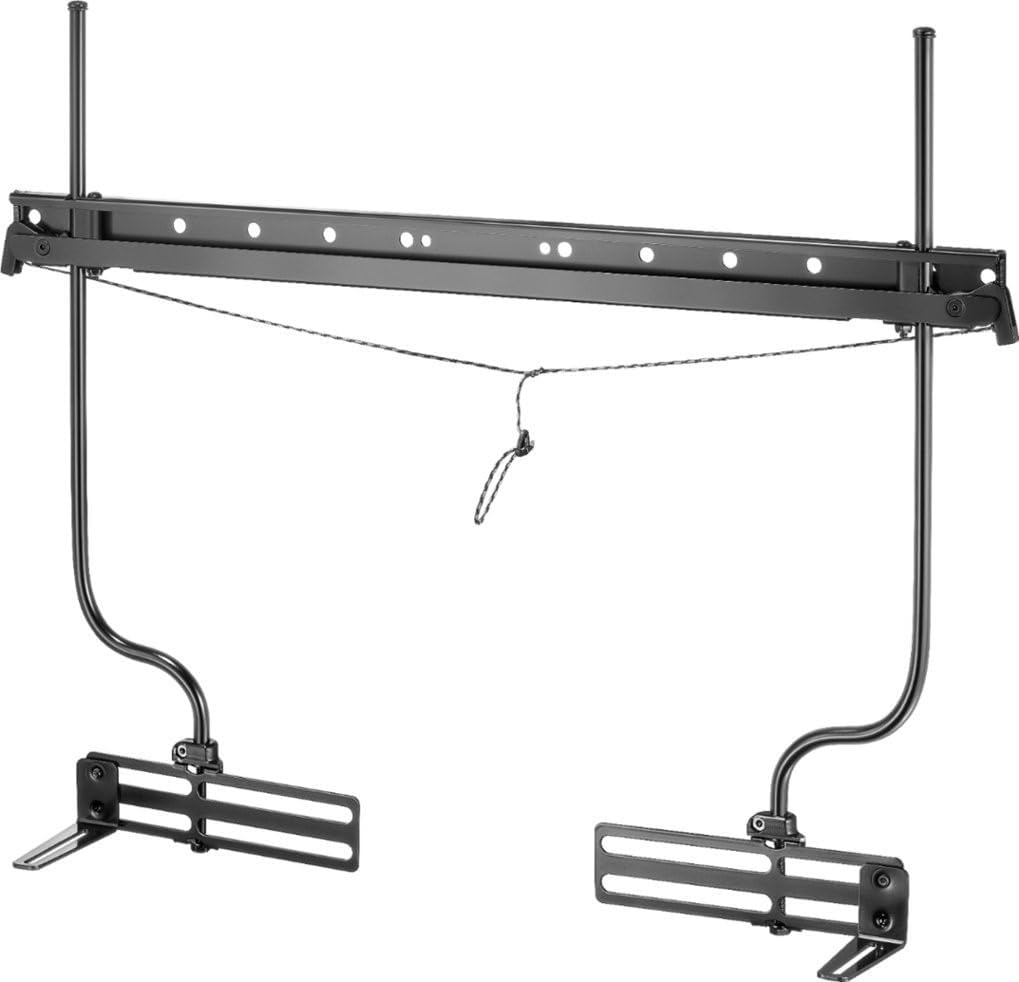
Image: Components of the soundbar mounting system, including the main horizontal bar and adjustable arms.
2. Position Soundbar Brackets
Attach the vertical soundbar support arms to the main horizontal bar. These arms are designed to be adjustable. Loosen the adjustment screws to slide the arms horizontally to match the width of your soundbar. The arms also allow for vertical adjustment to position the soundbar at your desired height below or above the TV.

Image: A soundbar mounting system attached to the back of a television, with a soundbar positioned below it.
3. Secure Soundbar
Once the vertical arms are correctly positioned, attach your soundbar to the bottom brackets of these arms. Use the appropriate screws and washers provided to secure the soundbar. Ensure the soundbar is centered and stable. The adjustable design allows for moving the soundbar vertically and horizontally, as well as adjusting its distance from the TV for a clean, integrated look.
Video: An overview of the Rocketfish Universal Soundbar Mounting System, demonstrating its features and compatibility with various TV sizes and VESA patterns, as well as its adjustable nature for optimal soundbar placement.
Operating and Adjusting
After installation, you can fine-tune the position of your soundbar. The system allows for:
- Vertical Adjustment: Loosen the screws on the vertical arms to slide the soundbar up or down relative to the TV. Retighten securely once the desired height is achieved.
- Horizontal Adjustment: The soundbar can be shifted left or right along the horizontal bar to ensure it is perfectly centered with your TV.
- Depth Adjustment: Some models allow for adjusting the soundbar's distance from the TV to accommodate different soundbar depths and TV profiles.
Always ensure all screws and fasteners are tightened securely after making any adjustments to prevent movement or instability.
Maintenance
To ensure the longevity and safe operation of your soundbar mounting system:
- Periodically check all mounting screws and connections to ensure they remain tight. Loose connections can lead to instability.
- Clean the mount with a soft, dry cloth. Avoid abrasive cleaners or solvents that could damage the finish.
- Ensure no cables are pinched or stressed by the mount or soundbar.
Troubleshooting
If you encounter issues during or after installation, consider the following:
- Soundbar is not level: Re-check the horizontal bar's levelness and adjust the vertical arms as needed. Ensure all fasteners are tight.
- Mount feels unstable: Verify that the mount is correctly attached to the TV's VESA holes and that all screws are fully tightened. Ensure the TV's wall mount itself is securely installed.
- Soundbar does not fit: Confirm your soundbar's weight and dimensions are within the system's specifications (up to 20 lbs). Ensure the vertical arms are adjusted to the correct width.
- Cables are difficult to manage: Route cables carefully behind the TV and through any available cable management features on your TV or wall mount.
Specifications
| Brand: | Rocketfish |
| Model: | RF-SBM102 |
| Compatible TV Sizes: | 32" – 90" wall-mounted TVs |
| Maximum Soundbar Weight: | 20 lbs (9.07 kg) |
| Product Dimensions: | 26.5 x 8.9 x 1.65 inches (67.3 x 22.6 x 4.2 cm) |
| Item Weight: | 5.14 pounds (2.33 kg) |
| Color: | Black |
| Mounting Type: | Wall Mount (attaches to TV's wall mount) |
| Movement Type: | Adjustable (vertical, horizontal, depth) |
| UPC: | 600603280498 |

Image: Technical diagram illustrating the width, height, and depth dimensions of the soundbar mounting system.
Warranty and Support
This Rocketfish product is backed by a LIFETIME LIMITED WARRANTY. For detailed warranty information or technical support, please refer to the contact information provided in your product packaging or visit the official Rocketfish support website.
For additional mounting screws or assistance with VESA mounting patterns on larger TVs (70"-90"), you may contact Rocketfish customer support at 1-800-620-2790.
Related documentsRF-SBM102


Ask a question about this manual
Ask about setup, troubleshooting, compatibility, parts, safety, or missing instructions. Manuals+ will review the question and use this page’s manual context to help answer it.