
1. Introduction
This manual provides detailed instructions for the JOYO Atmosphere Digital Reverb Effect Pedal (R-14) and the accompanying Mono 6.35mm Guitar Pedal Amplifier Instrument Cable (CM-12). Please read this manual thoroughly before using the products to ensure proper operation and to maximize their lifespan.
2. Safety Information
- Do not expose the pedal or cable to water or excessive moisture.
- Use only the specified power adapter for the pedal (DC 9V, center negative).
- Avoid dropping or subjecting the units to strong impacts.
- Keep out of reach of children.
- Disconnect power when not in use or during cleaning.
3. Package Contents
The JOYO Atmosphere R-14 bundle includes:
- 1 x JOYO Atmosphere Digital Reverb Effect Pedal (R-14)
- 1 x Mono 6.35mm Guitar Pedal Amplifier Instrument Cable (CM-12, 15 Feet)
- 1 x User Manual (this document)
4. JOYO Atmosphere R-14 Digital Reverb Pedal Overview
The JOYO Atmosphere R-14 is a versatile digital reverb effect pedal offering 9 distinct reverb types. It features intuitive controls for shaping your sound.
4.1 Pedal Layout and Controls

Image: Top view of the JOYO Atmosphere R-14 pedal, showing the MIX, DECAY, TONE, MOD knobs, the 9-position reverb type selector, the TRAIL switch, and the footswitch.
- MIX Knob: Adjusts the balance between the dry (unaffected) signal and the wet (reverb) signal.
- DECAY Knob: Controls the length of the reverb tail.
- TONE Knob: Adjusts the brightness or darkness of the reverb sound.
- MOD Knob: Controls the modulation depth or intensity, depending on the selected reverb type.
- Reverb Type Selector: A rotary switch to select one of the 9 reverb algorithms:
- SPRING: Classic spring reverb emulation.
- CHURCH: Large, expansive church hall reverb.
- PLATE: Smooth, dense plate reverb.
- EKO-VERB: Combines echo and reverb effects.
- SHIMMER: Ethereal, octave-shifted reverb.
- COMET: Swirling, modulated reverb.
- REWIND: Reverse reverb effect.
- FOREST: Natural, organic sounding reverb.
- PULSE: Rhythmic, pulsating reverb.
- TRAIL Switch (OFF/ON): When ON, the reverb tail will naturally decay even after the pedal is bypassed. When OFF, the reverb cuts off immediately upon bypass.
- Footswitch: Engages or bypasses the effect.
4.2 Input/Output and Power
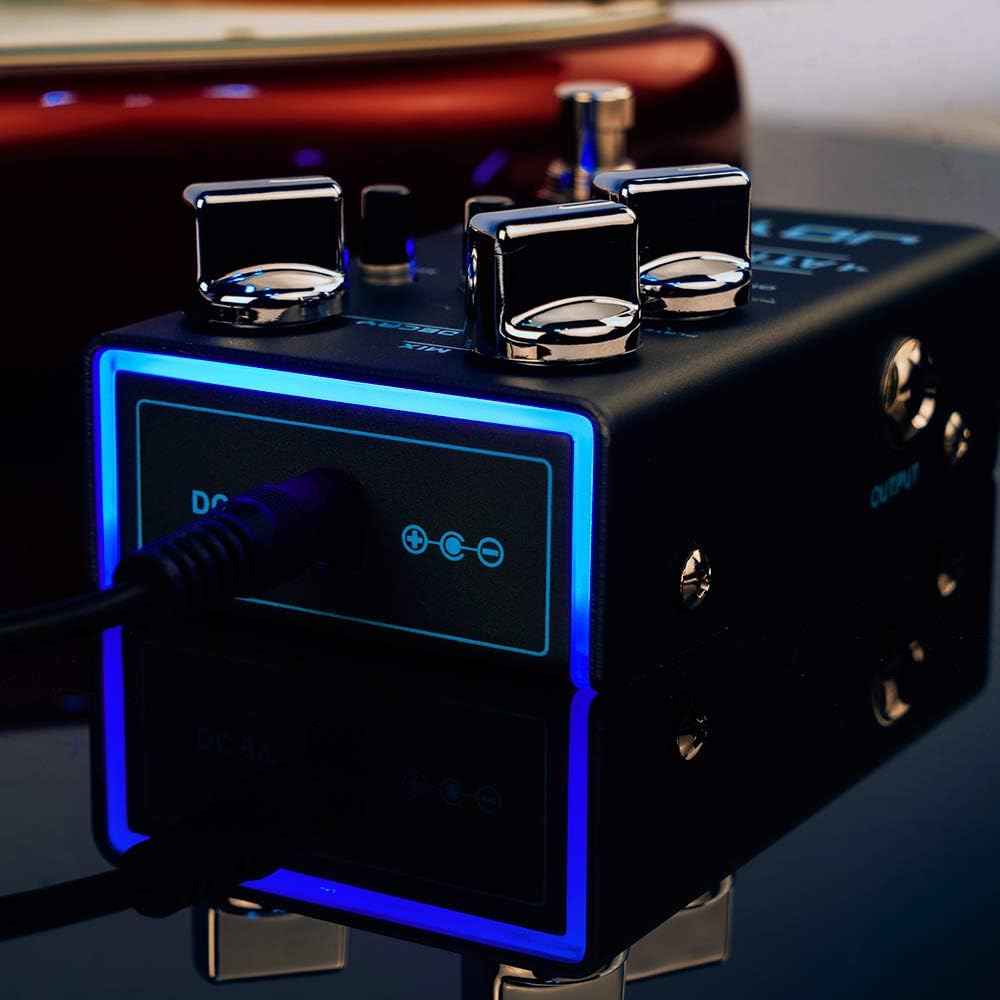
Image: Rear view of the JOYO Atmosphere R-14 pedal, showing the DC 9V power input, INPUT jack, and OUTPUT jack.
- INPUT Jack: Connect your instrument or the output of another effect pedal here.
- OUTPUT Jack: Connect to your amplifier or the input of another effect pedal.
- DC 9V Input: Connect a standard 9V DC power adapter (center negative).
5. CM-12 Instrument Cable Overview
The JOYO CM-12 is a 15-foot (4.5m) mono 6.35mm (1/4-inch) instrument cable designed for high-fidelity audio transmission with strong anti-interference and noise reduction capabilities.
5.1 Cable Features

Image: Diagram illustrating key features of the JOYO instrument cable, including its nickel-plated, rust-proof plugs, high-quality PVC jacket, and anti-slip texture.
- Nickel Plated Plugs: Rust-proof and wear-resistant for durability and reliable connection.
- High Quality PVC Jacket: Provides durability and protection for the internal wiring.
- Anti-slip Texture Design: Enhances grip for easy handling.
- Detachable Plug: Allows for easy maintenance or repair.
- Length: 15 feet (4.5 meters).
5.2 Compatibility

Image: Visual representation of the JOYO instrument cable's compatibility with various musical equipment, including guitars, keyboards, amplifiers, electronic drums, and mixers.
The CM-12 instrument cable is suitable for connecting a wide range of musical instruments and audio equipment, including:
- Electric Guitars
- Acoustic Guitars
- Bass Guitars
- Keyboards
- Amplifiers
- Electronic Drums
- Mixers
6. Setup Instructions
Follow these steps to set up your JOYO Atmosphere R-14 pedal and CM-12 cable:
- Power Connection: Connect a standard 9V DC (center negative) power adapter to the DC 9V input jack on the JOYO Atmosphere R-14 pedal. Do not connect to power yet.
- Instrument Connection: Use one end of the CM-12 instrument cable to connect your guitar (or other instrument) to the INPUT jack of the R-14 pedal.
- Amplifier Connection: Use another instrument cable (not included, or the other end of the CM-12 if used for pedal-to-amp) to connect the OUTPUT jack of the R-14 pedal to your amplifier's input.
- Power On: Once all connections are secure, connect the power adapter to a wall outlet. The pedal's indicator light should illuminate when engaged.
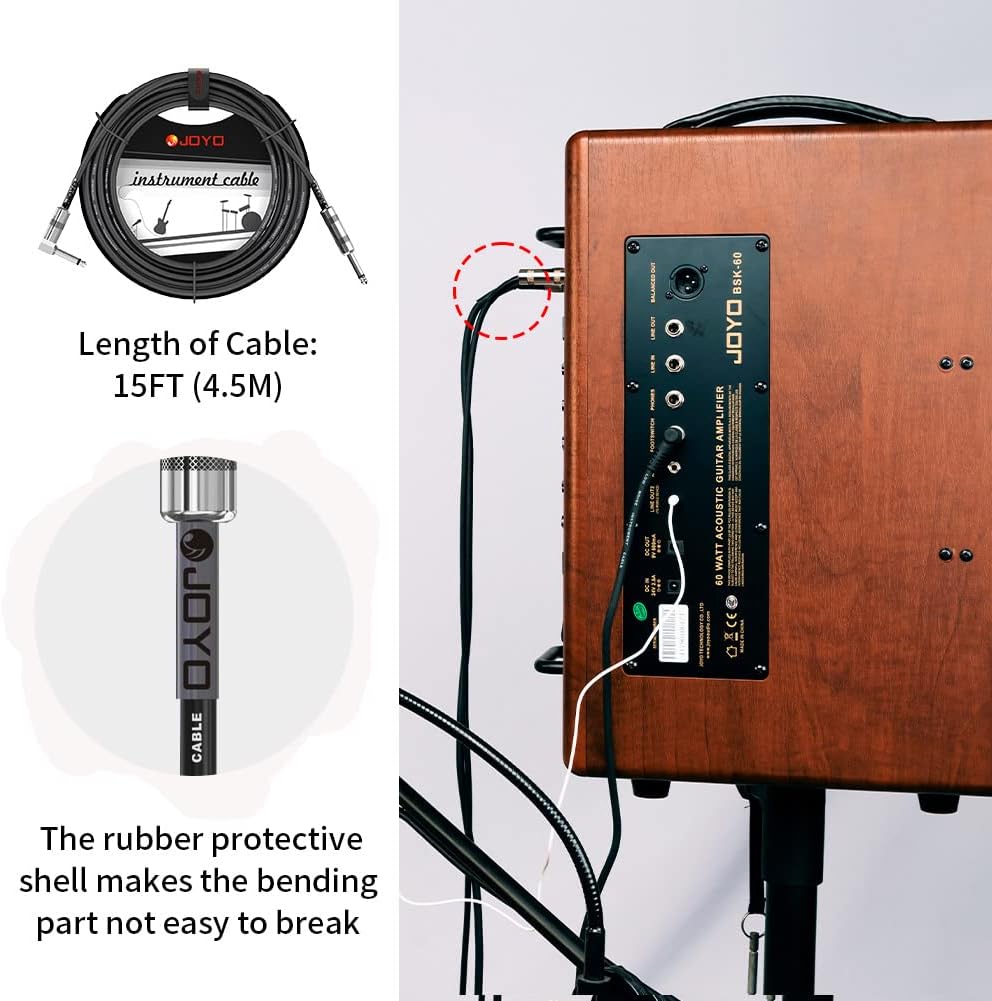
Image: Example of an instrument cable connected to an amplifier, demonstrating a typical setup configuration.
7. Operating Instructions
Once set up, operate the JOYO Atmosphere R-14 pedal as follows:
- Engage/Bypass: Press the footswitch to toggle the reverb effect ON or OFF. The LED indicator will show the pedal's status.
- Select Reverb Type: Rotate the Reverb Type Selector knob to choose one of the 9 available reverb algorithms. Experiment with each type to find the desired sound.
- Adjust Reverb Parameters: Use the MIX, DECAY, TONE, and MOD knobs to fine-tune the selected reverb effect.
- Start with MIX at 12 o'clock and adjust to blend the reverb with your dry signal.
- Increase DECAY for longer reverb tails, decrease for shorter ones.
- Adjust TONE to brighten or darken the reverb.
- Explore the MOD knob's effect, as its function varies slightly with each reverb type.
- TRAIL Function: Set the TRAIL switch to ON if you want the reverb tail to continue decaying naturally after bypassing the effect. Set it to OFF if you prefer the reverb to cut off immediately.

Image: Front view of the JOYO Atmosphere R-14 pedal with its blue LED light active, signifying the effect is engaged.
8. Maintenance
- Cleaning: Use a soft, dry cloth to clean the pedal and cable. Do not use liquid cleaners or solvents.
- Storage: Store the pedal and cable in a dry, cool place away from direct sunlight and extreme temperatures.
- Cable Care: Avoid sharp bends or kinks in the cable. Coil it loosely when not in use to prevent damage.
- Inspections: Periodically check the cable and pedal for any signs of wear or damage.
9. Troubleshooting
| Problem | Possible Cause | Solution |
|---|---|---|
| No sound when pedal is engaged. | Incorrect cable connection, no power, pedal bypassed. | Check all cable connections. Ensure power adapter is connected and working. Press footswitch to engage pedal. |
| Excessive noise or hum. | Poor quality power supply, ground loop, faulty cable. | Use a regulated 9V DC (center negative) power supply. Try a different power outlet. Ensure cables are fully inserted and not damaged. |
| Reverb cuts off abruptly when bypassed. | TRAIL switch is set to OFF. | Set the TRAIL switch to ON for natural reverb decay after bypass. |
| Cable not working. | Damaged cable, improper connection. | Inspect cable for visible damage. Ensure plugs are fully inserted into jacks. Try a different cable to isolate the issue. |
10. Specifications
10.1 JOYO Atmosphere R-14 Digital Reverb Pedal
- Model: R-14
- Effect Type: Digital Reverb
- Reverb Types: 9 (SPRING, CHURCH, PLATE, EKO-VERB, SHIMMER, COMET, REWIND, FOREST, PULSE)
- Controls: MIX, DECAY, TONE, MOD, Reverb Type Selector, TRAIL Switch (OFF/ON), Footswitch
- Input: 1/4-inch Mono Jack
- Output: 1/4-inch Mono Jack
- Power Requirement: DC 9V (center negative)
- Signal Format: Analog
10.2 JOYO CM-12 Instrument Cable
- Model: CM-12
- Type: Mono Instrument Cable
- Connectors: 6.35mm (1/4-inch) Straight-to-Right Angle
- Length: 15 feet (4.5 meters)
- Features: Nickel plated plugs, high quality PVC jacket, anti-slip texture, detachable plug.
11. Warranty and Support
For any product issues or support inquiries, please contact the seller directly through your order details. This is the most efficient way to receive assistance and ensure the best service.
JOYO Technology Co.,LTD is committed to providing excellent customer service and support for its products.

