
1. Introduction
This manual provides essential information for the proper setup, operation, and maintenance of your HOBBYWING EZRUN MAX5 HV G2 Electronic Speed Controller (ESC). The EZRUN MAX5 HV G2 is designed for high-performance remote-controlled vehicles, offering robust power delivery and advanced features for demanding applications.
The ESC features an innovative waterproof and dust-proof design, ensuring reliable performance in various environmental conditions, including those with sediment, ice, snow, or water accumulation. It incorporates a powerful switch-mode BEC, supporting a wide range of high-voltage servos, and advanced protection functions to safeguard your system.
2. Key Features
- Wide Voltage Compatibility: Supports 6-12S LiPo cells.
- Powerful BEC Output: Adjustable 6V/7.4V/8.4V with a continuous current of 8A and instant 25A (Switch-mode).
- Enhanced Sensored Mode: Designed for full-sensored operation when paired with HOBBYWING EzRun 56118 SD G2. The maximum output current of the ESC is as high as 250A.
- Turbo Timing Technology: Supports up to 24 degrees of Turbo Timing adjustment for increased performance, especially with HOBBYWING EzRun 56118 SD G2 motors.
- High Protection Level (IP-67): Guarantees excellent waterproofing and dust-proof protection for all-weather operation.
- Intelligent Freewheeling Technology: Reduces heat generation and improves driving efficiency, leading to lower operating temperatures and enhanced stability.
- Real-time Data Logging: Connects to the OTA Bluetooth module for viewing real-time data (throttle, voltage, current, temperature, speed) via the HW LINK app.
- Upgraded Sensor Wire Interface: Enhances protection and addresses waterproof concerns of traditional interfaces.
- Multiple Protection Functions: Includes battery low voltage protection, ESC and motor overheat protection, signal loss protection, and current protection.
- Firmware Upgradeable: Supports firmware upgrades via the multi-function LCD G2 program box or OTA Programmer.
3. What's in the Box
Upon unboxing your HOBBYWING EZRUN MAX5 HV G2, you will find the following components:
- (1) Ezrun MAX5 G2 ESC
Please inspect all components for any signs of damage during transit. If any items are missing or damaged, contact your retailer or Hobbywing support immediately.
4. Setup and Installation
Proper installation is crucial for the performance and longevity of your EZRUN MAX5 HV G2 ESC. Follow these guidelines carefully:
4.1. Connecting the ESC
Ensure all connections are secure and correctly polarized. The ESC supports 6-12S LiPo cells. Connect your battery pack to the input wires (red for positive, black for negative). The BEC output is adjustable (6V/7.4V/8.4V) and provides continuous current for your servos.

Figure 1: Top-down view of the EZRUN MAX5 HV G2 ESC, showing the main power leads (red and black) and the signal wire. The fan and heat sink are visible on top.
Connect the motor to the ESC's motor output terminals. For optimal performance, especially to utilize the full-sensored mode and Turbo Timing, it is recommended to pair the ESC with a HOBBYWING EzRun 56118 SD G2 motor. Note that non-Hobbywing EzRun 56118 SD G2 motors may not support motor overheat protection or Turbo Timing functionality.
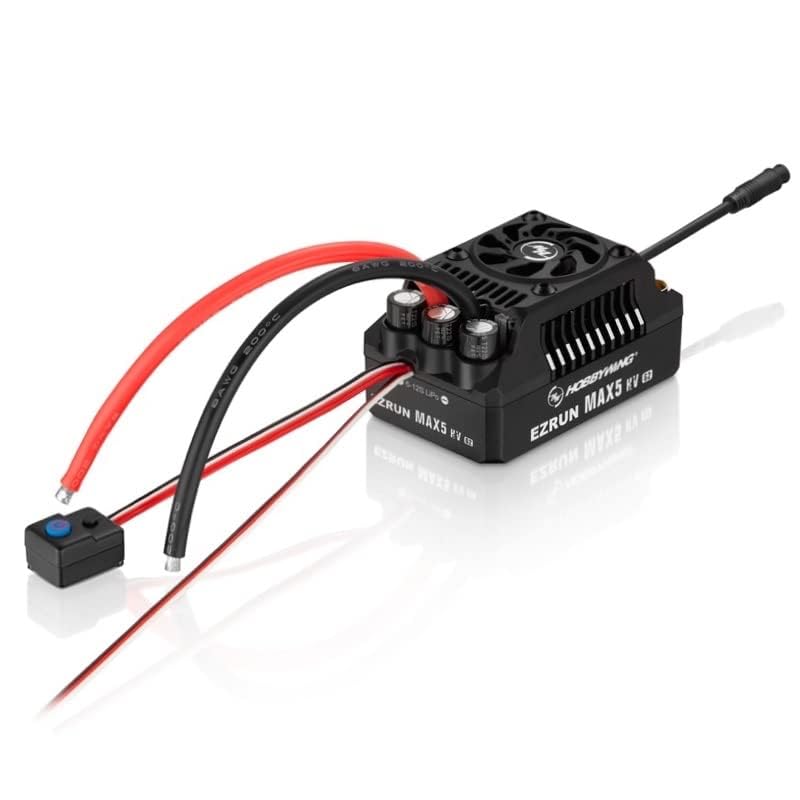
Figure 2: Side view of the EZRUN MAX5 HV G2 ESC, illustrating the compact design and the robust connections for power and signal wires. The cooling fan is visible on the top surface.
4.2. Sensor Wire Connection
The EZRUN MAX5 HV G2 features a new sensor wire interface designed to enhance protection and waterproof capabilities. Connect the sensor wire from your sensored motor to this interface on the ESC. A sensor wire needs to be purchased separately if not included with your motor.
4.3. Parameter Settings
Parameters of the ESC can be set using a LED program card, LCD G2 program box, or an OTA programmer (optional accessories). Refer to the respective accessory manuals for detailed instructions on parameter adjustment.
5. Operating Instructions
Once installed and configured, the EZRUN MAX5 HV G2 is ready for operation. Observe the following for optimal performance:
5.1. Powering On and Off
Connect the battery pack to the ESC. The ESC will power on. To power off, disconnect the battery pack. Always ensure the ESC is properly connected before applying power.
5.2. Driving Conditions
The IP-67 waterproof rating allows the ESC to operate reliably in various challenging conditions, including mud, sand, ice, snow, and water. However, it is always recommended to clean the unit after exposure to harsh elements to prevent long-term corrosion or buildup.
5.3. Data Logging and Firmware Updates
For real-time monitoring of operational data (throttle, voltage, current, temperature, speed), connect the ESC to an OTA Bluetooth module and use the HW LINK mobile application. Note that the effective Bluetooth transmission distance is approximately 5 meters. Firmware updates can be performed using the multi-function LCD G2 program box or OTA Programmer to access the latest features and improvements.
6. Maintenance
Regular maintenance ensures the longevity and optimal performance of your EZRUN MAX5 HV G2 ESC.
- Cleaning: After use, especially in wet or dusty conditions, clean the ESC with a soft brush or compressed air to remove dirt and debris. While the unit is waterproof, cleaning helps prevent accumulation that could affect cooling or connections.
- Connection Checks: Periodically inspect all wires and connectors for signs of wear, corrosion, or loose connections. Ensure all plugs are securely seated.
- Storage: Store the ESC in a dry, cool environment away from direct sunlight and extreme temperatures.
- Firmware: Keep the ESC firmware updated to the latest version to benefit from performance enhancements and bug fixes.
7. Troubleshooting
This section addresses common issues you might encounter with your EZRUN MAX5 HV G2 ESC.
| Problem | Possible Cause | Solution |
|---|---|---|
| ESC does not power on. | Battery not connected, battery discharged, faulty connection. | Check battery connection and charge level. Ensure all wires are securely plugged in. |
| Motor not responding or erratic behavior. | Signal loss, incorrect motor connection, sensor wire issue. | Check receiver connection and signal. Verify motor phase wire connections. Ensure sensor wire is properly connected and undamaged. |
| ESC or motor overheating. | Overloading, improper gearing, insufficient cooling, non-compatible motor. | Reduce load, adjust gearing, ensure adequate airflow. Note: Motor overheat protection may not function with non-Hobbywing EzRun 56118 SD G2 motors. |
| Unexpected power cut-off. | Battery low voltage protection, current protection triggered. | Recharge battery. Check for excessive current draw or short circuits. |
| Turbo Timing not activating. | Non-compatible motor. | Turbo Timing is only supported with HOBBYWING EzRun 56118 SD G2 motors. |
If the problem persists after attempting these solutions, please contact Hobbywing customer support for further assistance.
8. Specifications
| Attribute | Value |
|---|---|
| Model Name | EZRUN MAX5 HV G2 |
| Item Model Number | 30104200 |
| Product Dimensions (L x W x H) | 94.5 x 59.4 x 50.9 mm |
| Weight | 428.5g (Included input wires) |
| Lipo Cells Supported | 6-12S LiPo |
| BEC Output | 6V/7.4V/8.4V adjustable, continuous current 8A (Switch-mode), instant 25A |
| Motor Limit (with 8S LiPo) | KV≤1200 (56118 size motor) |
| Motor Limit (with 12S LiPo) | KV≤800 (56118 size motor) |
| Applications | 1/5th Buggy, Truck |
| Waterproof Rating | IP-67 |
| Manufacturer | Hobbywing Technology |
| Date First Available | May 25, 2023 |
9. Warranty and Support
For warranty information, please refer to the official Hobbywing website or contact your authorized dealer. Keep your proof of purchase for any warranty claims.
If you encounter any issues not covered in this manual or require further technical assistance, please contact Hobbywing customer support. Provide your product model number (30104200) and a detailed description of the issue for efficient support.
Official Hobbywing Website: www.hobbywing.com
10. Important Safety Information
Always operate your RC equipment responsibly. Read and understand all safety warnings provided with your vehicle and other components. Misuse can lead to serious injury or damage to property.
- Keep out of reach of children. Recommended age for use is 3 years and up, but adult supervision is always advised for complex RC equipment.
- Avoid short circuits.
- Do not expose to extreme temperatures or open flames.
- Always disconnect batteries when not in use.