
1. Introduction
The ICM Controls ICM518 is a UL 1449 listed Surge Protective Device (SPD) designed to safeguard 120/240V split-phase electrical systems from damaging voltage spikes. This device can be installed at the service entrance (Type 1) or as a panel-mounted protector (Type 2). Its rugged NEMA 4X enclosure allows for reliable indoor or outdoor installation. The ICM518 incorporates thermally fused MOV technology for effective surge suppression and features a green LED status indicator to confirm active protection.

Figure 1: ICM Controls ICM518 Whole House Surge Protector.
2. Safety Information
ELECTRICAL SHOCK HAZARD: Before installing or servicing this unit, always turn off power at the main service panel by removing the fuse or switching the appropriate circuit breaker to the OFF position. Failure to do so can result in serious injury or death.
- This product contains no internal serviceable parts. Do not attempt to open or repair the unit.
- Installation should only be performed by a licensed electrician or a licensed HVAC technician to ensure compliance with local, state, and national electrical codes.
- Ensure all wiring connections are secure and properly insulated.

Figure 2: Datasheet excerpt showing safety warnings and product overview.
3. Installation Instructions
The ICM518 is designed for straightforward installation. However, professional installation is recommended to ensure safety and compliance with electrical codes.
General Installation Guidelines:
- The conductors connecting the SPD should be as short and straight as possible to maximize effectiveness.
- Mount the ICM518 using the integrated 3/4 inch threaded conduit hub for a clean and code-friendly installation.
- For Type 2 installations, connect the unit to a properly sized 2-pole breaker.
Step-by-Step Installation:
- Power Disconnection: Turn off the main breaker and/or disconnect power to the service disconnect or electrical panel where the SPD will be installed.
- Voltage Verification: Verify the main voltage matches the ICM518's ratings (120/240V split-phase).
- Access Panel: Remove the cover of the service disconnect or the electrical panel.
- Mounting: Mount the ICM518 through the 3/4 inch conduit connection of the electrical panel.
- Secure Unit: Remove the retaining nut and washer from the ICM518, feed the wires into the electrical panel or service disconnect, then re-secure the retaining nut and washer.
- Wiring - Neutral: Route the white wire to the neutral lug and secure it.
- Wiring - Line (Type 1 & 2): Route and connect the two black wires (L1 and L2) to the individual breakers on the circuit breaker panel (for Type 1) or to the appropriate L1 and L2 connections before the breaker panel (for Type 2). Refer to local, state, and national electrical codes for specific wiring diagrams.
- Close Panel: Reinstall the cover on the service disconnect or electrical panel.
- Restore Power: Restore power to the system. The green LED on the ICM518 should illuminate, indicating active protection.

Figure 3: ICM518 showing pre-attached wiring leads.
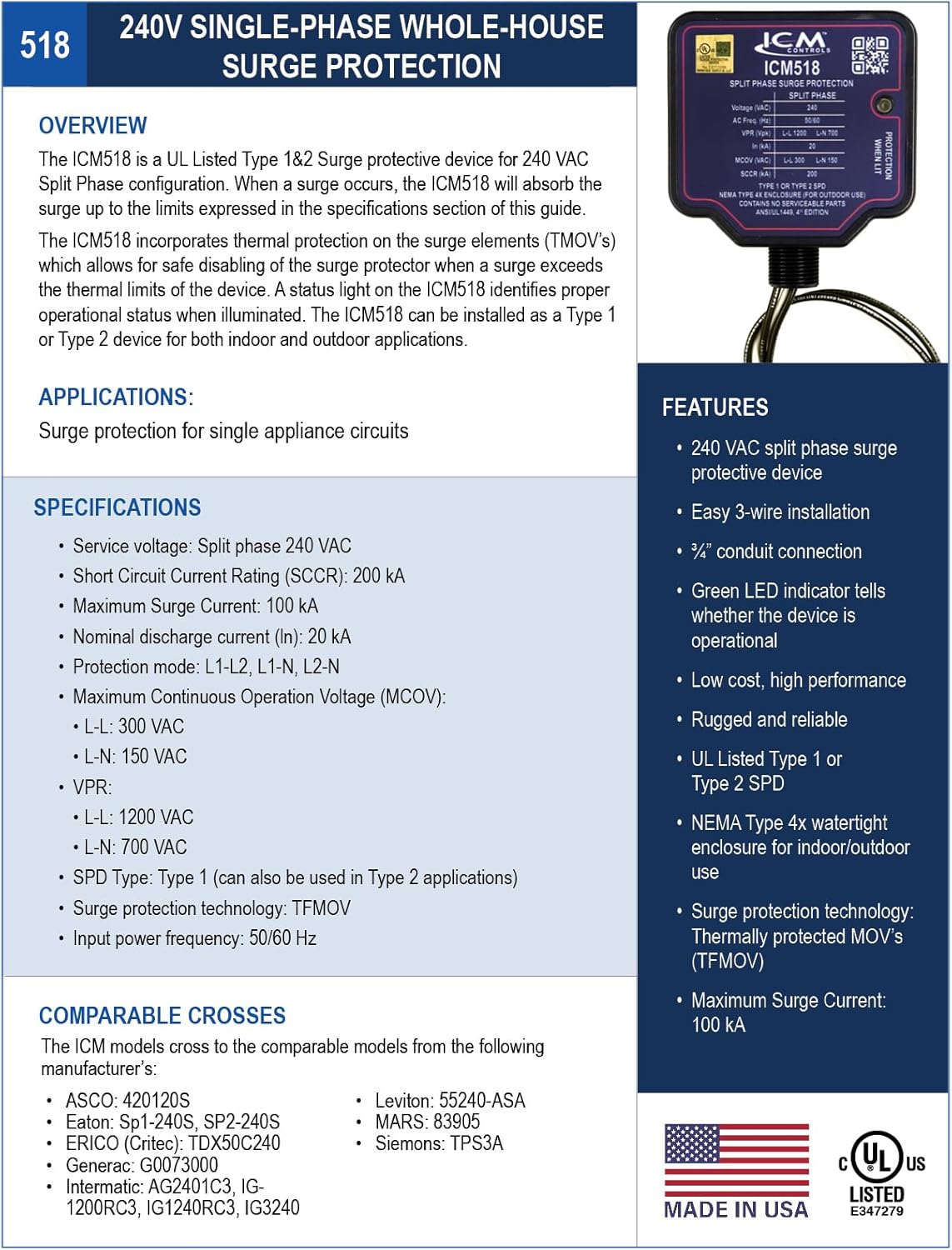
Figure 4: Example installation of the ICM518 in an electrical panel.
4. Operation
The ICM518 operates automatically to protect your electrical system from surges.
Status Indicator:
- A green LED on the unit indicates that the surge protector is operational and actively providing protection.
- If the green LED is off, it signifies that the protection is no longer active, and the unit needs to be replaced immediately.
5. Maintenance
The ICM518 is a maintenance-free device with no user-serviceable parts.
Regular Checks:
- Periodically check the status of the green LED indicator.
- If the green LED is off, the surge protection is no longer active. The unit will continue to pass power to the load, but without surge protection.
Important: If the green LED is off, the ICM518 must be replaced immediately to restore surge protection.
6. Troubleshooting
| Problem | Possible Cause | Solution |
|---|---|---|
| Green LED is off | The surge protective components have reached their end-of-life due to absorbing surges. | Replace the ICM518 unit immediately. The unit is designed to disconnect its surge protective components while maintaining power to the load, but without protection. |
| No power to protected devices after installation | Incorrect wiring or tripped circuit breaker. | Verify all wiring connections are correct and secure. Check the circuit breaker connected to the SPD and reset if tripped. If issues persist, consult a licensed electrician. |
7. Specifications
| Feature | Detail |
|---|---|
| Model | ICM518 |
| Service Voltage | 120/240 VAC Split-Phase |
| SPD Type | Type 1 or Type 2 |
| Short Circuit Current Rating (SCCR) | 200 kA |
| Maximum Surge Current | 100 kA |
| Nominal Discharge Current (In) | 20 kA |
| Protection Mode | L1-L2, L1-N, L2-N |
| Maximum Continuous Operation Voltage (MCOV) L-L | 300 VAC |
| Maximum Continuous Operation Voltage (MCOV) L-N | 150 VAC |
| Voltage Protection Rating (VPR) L-L | 1200V |
| Voltage Protection Rating (VPR) L-N | 700V |
| Surge Protection Technology | Thermally Fused MOV (TFMov) |
| Input Power Frequency | 50/60 Hz |
| Enclosure Rating | NEMA 4X (Watertight, corrosion resistant) |
| Dimensions (Approx.) | 4.30 x 4.10 x 2.30 inches |
| Weight (Approx.) | 1.10 lb |
| Operating Temperature | -40°F to 185°F (-40°C to 85°C) |
| Operating Humidity | Less than 95%, non-condensing |
| Agency Certification | UL 1449 Listed |
8. Warranty Information
The ICM Controls ICM518 Whole House Surge Protector comes with a 1-Year Manufacturer's Warranty. For specific terms and conditions, please refer to the warranty documentation included with your product or contact ICM Controls directly.
9. Support and Contact
For technical assistance, installation questions, or warranty claims, please contact ICM Controls customer support.
- Manufacturer: ICM Controls
- Professional installation is highly recommended for this product.