
Introduction
The Benro FS20PROC Professional Video Head is engineered for filmmakers and videographers requiring precise and stable camera movements. This manual provides essential information for the proper setup, operation, and maintenance of your video head, ensuring optimal performance and longevity.
What's in the Box
- Benro FS20PRO 3-Way 2-in-1 Pan/Tilt Head
- Arca-Type Quick Release Plate (PU45)
- Allen Wrench
Product Overview
The Benro FS20PROC features a robust design with independent controls for pan, tilt, and ball head adjustments, allowing for versatile camera positioning. It includes an Arca-Type quick release system for fast camera attachment and detachment.

Figure 1: Front view of the Benro FS20PROC Video Head, showcasing its main body, pan handle, and quick release plate.

Figure 2: Close-up view of the video head, highlighting the 'LOCK' knob for pan, 'TILT LOCK' knob for tilt, and 'BALL LOCK' lever for ball head adjustment.
Setup
- Mounting the Video Head to a Tripod:
Locate the 3/8"-16 threaded mounting hole at the base of the video head. Screw the head onto your tripod's mounting plate until secure. Ensure it is tightened firmly to prevent rotation during use.
- Attaching the Quick Release Plate to Your Camera:
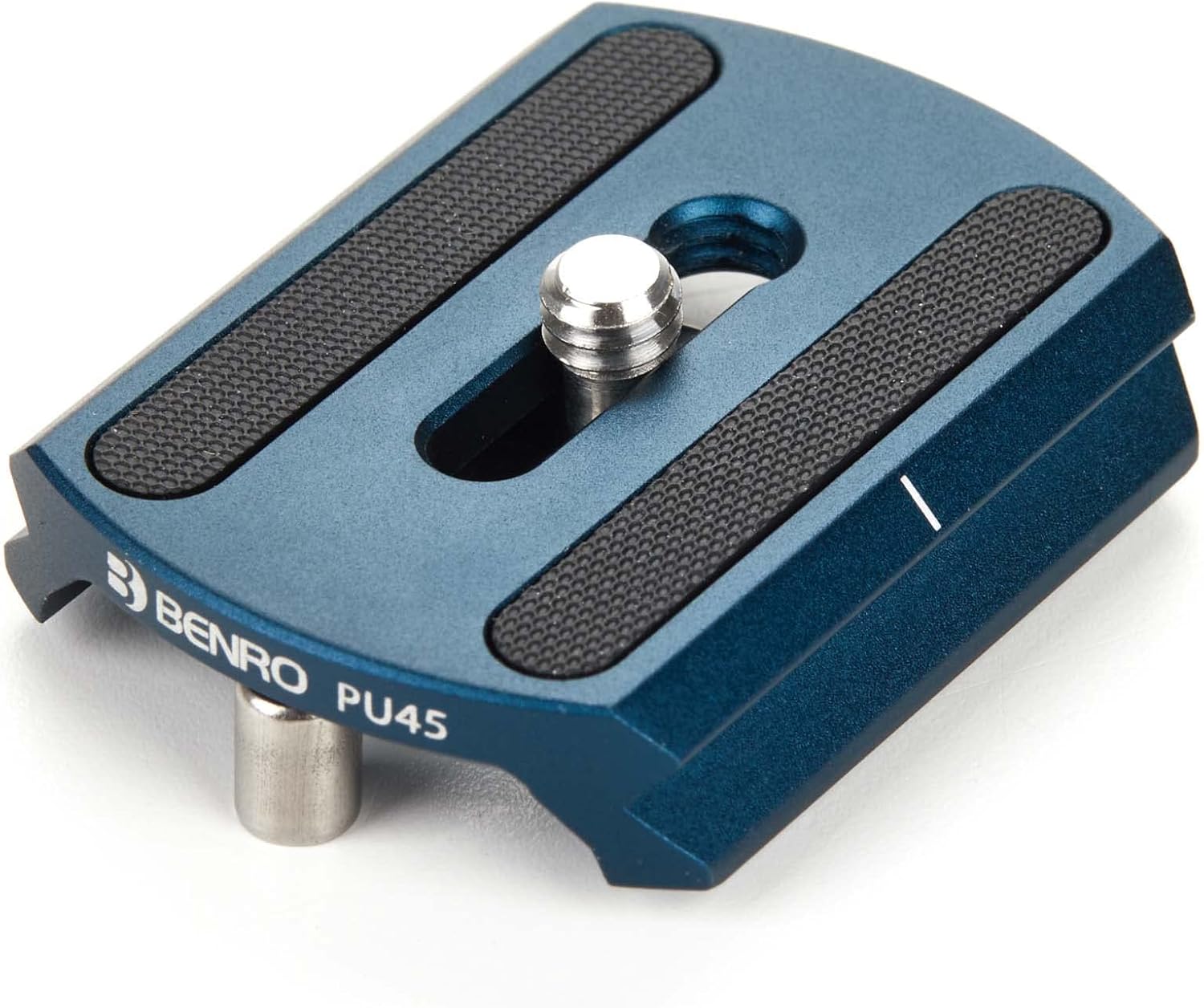
Figure 3: Top view of the PU45 Arca-Type Quick Release Plate, showing the camera mounting screw and anti-slip pads.

Figure 4: Bottom view of the PU45 Quick Release Plate, illustrating the D-ring screw for tool-free attachment to a camera.
Attach the PU45 quick release plate to the bottom of your camera using the 1/4"-20 camera screw. Ensure the plate is aligned correctly and tightened securely. The D-ring on the screw allows for tool-free tightening, or use an Allen wrench for extra security.
- Mounting the Camera to the Video Head:
Ensure the quick release clamp on the video head is open. Slide the camera with the attached quick release plate into the clamp. Once positioned, close the clamp lever firmly to secure the camera. Verify that the camera is stable and cannot be easily dislodged.
- Attaching the Pan Handle:
Insert the pan handle into its designated socket on the video head. Tighten the handle locking screw to secure it in place. The handle can be adjusted for optimal comfort and control.

Figure 5: The pan handle features a convenient storage slot for the included Allen wrench.
Operating Instructions
- Pan Adjustment:
To pan the camera horizontally, loosen the 'LOCK' knob located at the base of the pan handle. This allows for smooth 360-degree rotation. Tighten the knob to lock the pan position.
- Tilt Adjustment:
To tilt the camera vertically, loosen the 'TILT LOCK' knob. This enables upward and downward camera movement. Tighten the knob to secure the desired tilt angle.
- Ball Head Adjustment:
The FS20PROC features a ball head for additional flexibility. To adjust the ball head, loosen the 'BALL LOCK' lever. This allows for quick repositioning of the camera in various angles. Tighten the lever to lock the ball head securely.
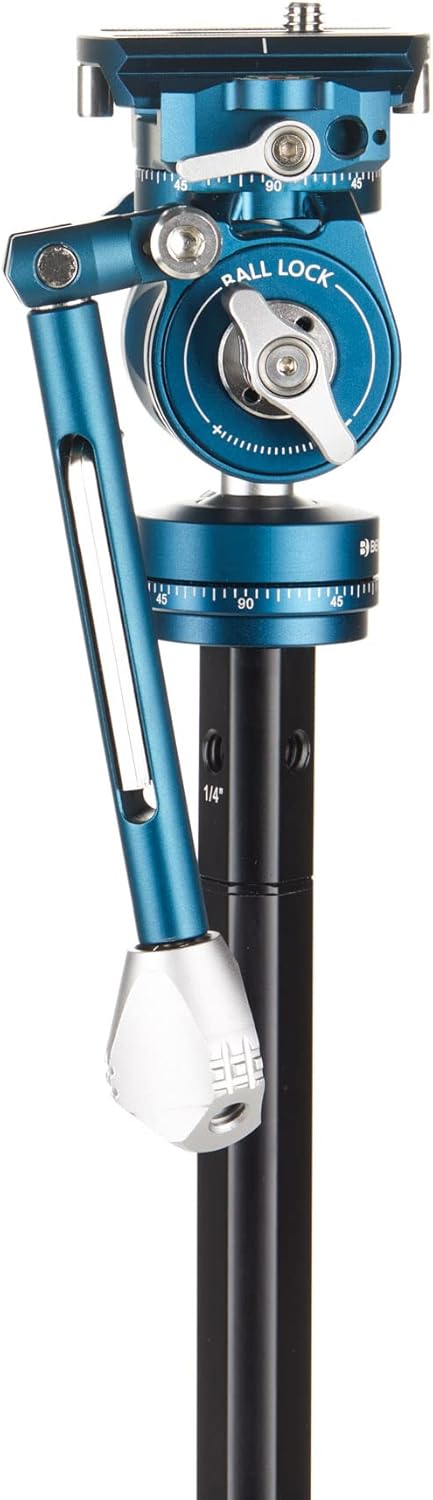
Figure 6: Side view of the video head, illustrating the pan handle and the 'BALL LOCK' lever for adjusting the ball head.
- Fluid Drag Control:
The fluid system provides consistent resistance for smooth camera movements. While specific drag adjustments are not independently controlled, the design ensures a professional feel for pan and tilt operations.
Maintenance
- Cleaning: Use a soft, dry cloth to wipe down the video head after each use. For stubborn dirt, a slightly damp cloth can be used, followed by immediate drying. Avoid harsh chemicals or abrasive materials.
- Lubrication: The fluid system is factory-sealed and does not require user lubrication. Attempting to lubricate internal components may damage the head and void the warranty.
- Storage: Store the video head in a clean, dry environment, away from extreme temperatures and humidity.
- Inspection: Periodically check all screws and levers to ensure they are tight and functioning correctly.
Troubleshooting
- Camera Not Stable:
Ensure the quick release plate is securely attached to the camera and the quick release clamp on the video head is fully closed and locked. Verify that the tripod is stable and all its leg locks are engaged.
- Movement Not Smooth:
Check that the pan, tilt, and ball lock knobs/levers are sufficiently loosened for movement. If movement remains stiff, ensure no foreign objects are obstructing the mechanism. Avoid over-tightening controls, as this can cause wear.
- Difficulty Attaching/Detaching Quick Release Plate:
Ensure the quick release clamp is fully open before attempting to insert or remove the plate. Do not force the plate; it should slide in smoothly when the clamp is open.
Specifications
| Feature | Specification |
|---|---|
| Product Dimensions | 0.12 x 3.07 x 1.97 inches |
| Item Weight | 15.2 ounces |
| Item Model Number | FS20PROC |
| Color | Black |
| Folded Size | 0.12 in (l) x 3.07 in (w) x 1.97 in (h) |
| Maximum Load Capacity | 9.9 lbs (Inferred from customer review, not explicit in specs, but a useful detail.) |
Warranty and Support
Benro offers a standard limited warranty of 3 years from the date of purchase for the original owner. If the product is registered online, the warranty is extended by an additional 2 years, totaling 5 years in applicable regions. For warranty claims, technical support, or service inquiries, please refer to the official Benro website or contact your local Benro distributor.
For more information, visit the Benro Store on Amazon.


