1. Important Safety Information
WARNING: Read the ENTIRE instruction manual to become familiar with the features of the product before operating. Failure to operate the product correctly can result in damage to the product, personal property, and cause serious injury. This is a sophisticated hobby product. It must be operated with caution and common sense and requires some basic mechanical ability. Failure to operate this Product in a safe and responsible manner could result in injury or damage to the product or other property. This product is not intended for use by children without direct adult supervision. Do not use with incompatible components or alter this product in any way outside of the instructions provided by Horizon Hobby, LLC. The product manual contains instructions for safety, operation, and maintenance. It is essential to read and follow all the instructions and warnings in the manual, prior to assembly, setup or use, in order to operate correctly and avoid damage or serious injury.
2. Product Overview
The Horizon Hobby 2-in-1 ESC/Rx (Electronic Speed Controller/Receiver) model HRZ00003 is designed for 1/10 scale remote-controlled vehicles. This integrated unit combines the functions of a speed controller and a receiver, simplifying the electronics setup in your RC model. It features a 45A capacity, providing reliable power management and control for your vehicle's motor.
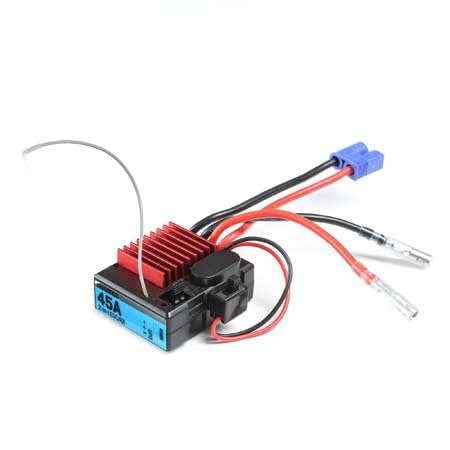
Figure 2.1: Horizon Hobby 2-in-1 ESC/Rx 1/10 45A (HRZ00003). This image displays the Horizon Hobby 2-in-1 ESC/Rx unit. It features a black casing with a prominent red heatsink for heat dissipation and a blue label indicating '45A 2-in-1 ESC/Rx'. Various wires for power, motor, and receiver connections are visible, including a blue connector for the battery and clear connectors for the motor phases.
Key Features:
- Integrated Electronic Speed Controller (ESC) and Receiver (Rx)
- 45A continuous current capacity
- Designed for 1/10 scale RC vehicles
- Provides precise control for forward and reverse motion
Product Overview Video:
Video 2.2: Product Overview. This video provides a general overview of the product, showcasing its compact design and basic functionality. It highlights the unit's ability to control forward and reverse motion for RC vehicles.
3. Setup and Installation
Proper installation is crucial for optimal performance and safety. Follow these general steps for setting up your 2-in-1 ESC/Rx unit:
- Mounting: Securely mount the ESC/Rx unit in your RC vehicle using double-sided tape or a suitable mounting tray. Ensure it is protected from excessive vibrations and moisture.
- Motor Connection: Connect the three motor wires from the ESC to your brushless motor. Ensure the connections are firm and insulated. If the motor spins in the wrong direction during initial testing, swap any two of the motor wires.
- Battery Connection: Connect your compatible battery pack to the ESC's power input connector. Ensure the polarity is correct (red to positive, black to negative).
- Steering Servo Connection: Connect your steering servo to the designated channel on the receiver section of the unit. Typically, this is Channel 1.
- Transmitter Binding: Follow the instructions for your specific transmitter to bind it with the integrated receiver. This process establishes a secure communication link between your transmitter and the ESC/Rx unit.
- Calibration: Calibrate the ESC to your transmitter's throttle range. This usually involves holding the throttle at full, neutral, and full brake positions during a specific power-up sequence. Refer to your transmitter's manual for detailed calibration steps.
Always perform a range check and functional test before operating your vehicle at full speed or in an open area.
4. Operating Instructions
Once the ESC/Rx unit is properly installed and calibrated, you can begin operating your RC vehicle:
- Power On: Turn on your transmitter first, then connect the battery to the ESC/Rx unit. The unit will typically emit a series of beeps or flashes to indicate it's ready.
- Throttle Control: Use the throttle trigger on your transmitter to control the motor speed. Pulling the trigger typically provides forward motion, while pushing it forward from neutral engages the brake or reverse.
- Steering Control: Use the steering wheel on your transmitter to control the direction of your vehicle.
- Reverse Function: The 2-in-1 ESC/Rx supports forward and reverse motion. To engage reverse, typically you will push the throttle trigger forward once for brake, then release to neutral, and push forward again for reverse. This sequence can vary slightly depending on the ESC's programming.
- Power Off: Always disconnect the battery from the ESC/Rx unit first, then turn off your transmitter.
Avoid continuous full throttle operation for extended periods, especially in high-load conditions, to prevent overheating.
5. Maintenance
Regular maintenance helps ensure the longevity and performance of your ESC/Rx unit:
- Cleaning: Keep the unit clean and free from dirt, dust, and moisture. Use a soft brush or compressed air to remove debris.
- Inspections: Periodically inspect all wires and connectors for signs of wear, damage, or loose connections. Replace any damaged components immediately.
- Heat Management: Ensure the heatsink is clear of obstructions to allow for proper airflow. Overheating can damage the ESC.
- Storage: When not in use, store the ESC/Rx unit in a cool, dry place, away from direct sunlight and extreme temperatures.
6. Troubleshooting
If you encounter issues with your ESC/Rx unit, consider the following common troubleshooting steps:
- No Power:
- Check battery connection and charge level.
- Ensure power switch (if applicable) is in the ON position.
- Inspect power wires for damage.
- No Response from Motor/Steering:
- Verify transmitter is ON and has fresh batteries.
- Confirm the ESC/Rx is properly bound to the transmitter.
- Check motor and servo connections to the ESC/Rx.
- Recalibrate the ESC throttle range.
- Motor Runs in Wrong Direction:
- Swap any two of the three motor wires connected to the ESC.
- Overheating:
- Ensure adequate airflow around the ESC/Rx unit.
- Check motor gearing; excessive gearing can cause overheating.
- Verify battery C-rating is sufficient for your motor.
If problems persist, contact Horizon Hobby customer support for further assistance.
7. Specifications
| Feature | Detail |
|---|---|
| Model Number | HRZ00003 |
| Type | 2-in-1 Electronic Speed Controller (ESC) / Receiver (Rx) |
| Current Capacity | 45A |
| Scale Compatibility | 1/10 Scale RC Vehicles |
| Product Dimensions | 4 x 2.3 x 1.05 inches |
| Item Weight | 1.92 ounces |
| Manufacturer | Horizon Hobby |
| Release Date | June 19, 2020 |
8. Warranty and Support
For warranty information and technical support, please refer to the official Horizon Hobby website or contact their customer service directly. Keep your proof of purchase for any warranty claims.
Horizon Hobby Contact Information:
- Website: www.horizonhobby.com
- Customer Service: Refer to the website for current contact methods (phone, email, support tickets).


