Product Overview
The Ayybboo Kids Digital Watch, model Ayy2206, is designed for children aged 4 to 12 years. Featuring a charming cat design and available in multiple colors, this watch helps children learn to tell time and develop a sense of punctuality. It is built with durable materials and offers several useful functions.
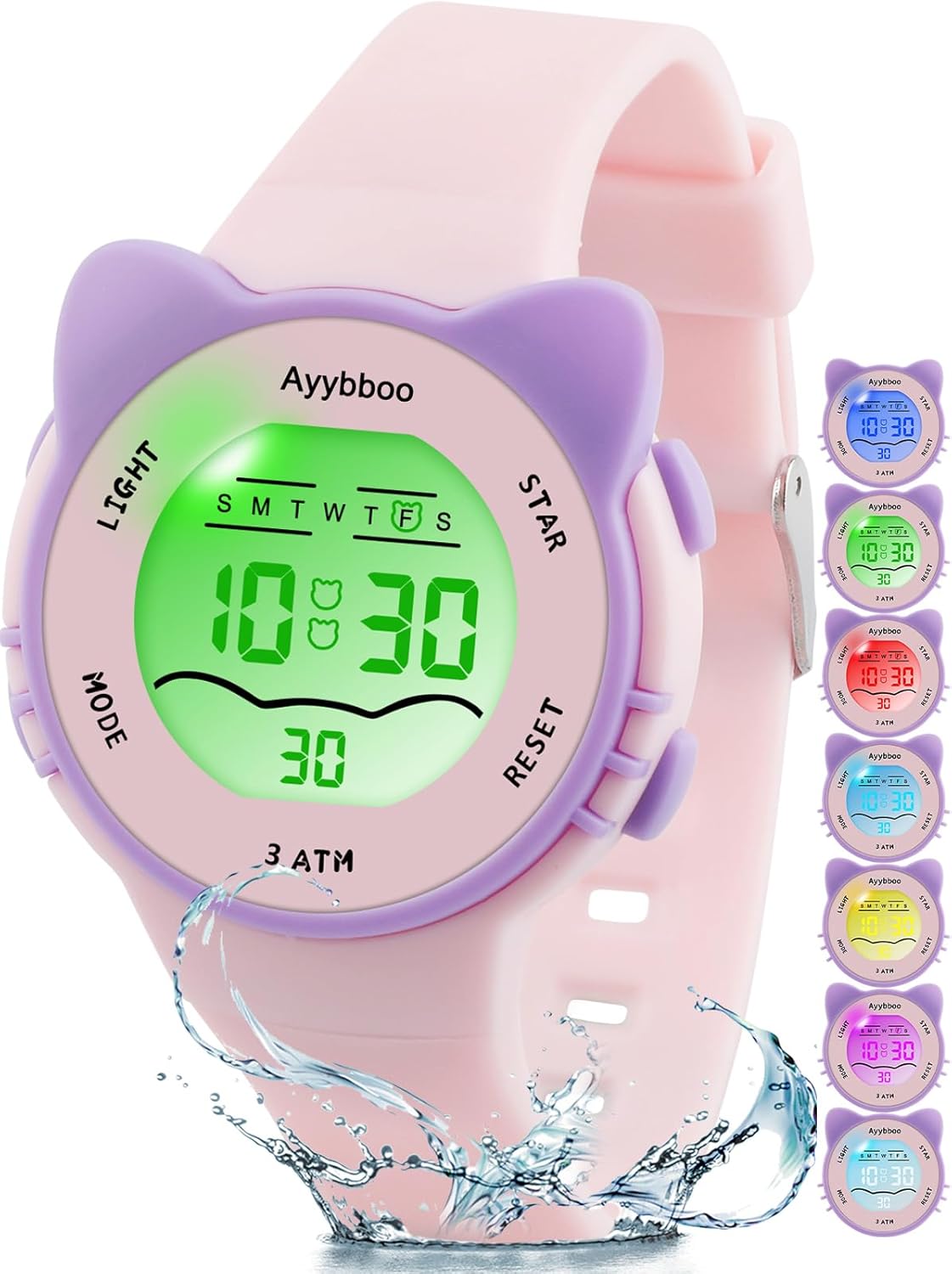
Image: Ayybboo Kids Digital Watch, showcasing its design and multiple color options.
Key Features:
- Durable Construction: High-quality resin strap and case, stainless steel back for shock resistance.
- 3 ATM Water Resistance: Suitable for daily use like hand washing, face washing, and light rain. Not suitable for hot water, sauna, or diving.
- Seven-Color Backlight: Illuminates the display for clear visibility in the dark, engaging children with various light colors.
- Multi-functional: Includes stopwatch, alarm, 12/24-hour system, and hourly chime.
- Comfortable Fit: Soft, skin-friendly strap with an adjustable stainless steel buckle.
Setup and Initial Use
Button Functions:
- LIGHT: Activates the backlight.
- MODE: Cycles through different modes (Time, Stopwatch, Alarm).
- RESET: Used for resetting stopwatch or adjusting settings.
- START: Used for starting stopwatch or confirming settings.

Image: Overview of watch functions and button labels.
Setting Time and Date:
- From the normal time display, press the MODE button three times to enter time setting mode. The seconds will start flashing.
- Press RESET to reset seconds to 00.
- Press START to move to the next setting (hours).
- Press RESET to adjust the flashing digit (hours, minutes, month, date, day of week).
- Continue pressing START to cycle through hours, minutes, month, date, and day of the week.
- Press MODE to exit setting mode and return to normal time display.
12/24-Hour Format:
In time setting mode (seconds flashing), press RESET while the hour is flashing to toggle between 12-hour (with AM/PM indicator) and 24-hour formats.
Operating Instructions
Using the Backlight:
Press the LIGHT button to illuminate the display with one of the seven available colors. The light will stay on for a few seconds.
Using the Stopwatch:
- From the normal time display, press MODE once to enter stopwatch mode. The display will show 00:00:00.
- Press START to begin timing.
- Press START again to pause timing.
- Press RESET to reset the stopwatch to 00:00:00.
- Press MODE to exit stopwatch mode.
Setting the Alarm:
- From the normal time display, press MODE twice to enter alarm setting mode. The hour digits will flash.
- Press RESET to adjust the hour.
- Press START to move to the minute setting.
- Press RESET to adjust the minutes.
- Press MODE to exit alarm setting mode.
Activating/Deactivating Alarm and Hourly Chime:
In alarm setting mode, press RESET to toggle the alarm ON/OFF. An alarm icon will appear/disappear. Press START to toggle the hourly chime ON/OFF. A chime icon will appear/disappear.
Maintenance and Care
Proper care will ensure the longevity of your Ayybboo Kids Digital Watch.
Water Resistance (3 ATM):
- The watch is designed to withstand splashes, hand washing, face washing, and light rain.
- Important: Do not press any buttons while the watch is submerged in water.
- Avoid: Hot water, saunas, diving, or prolonged submersion. Exposure to hot water or steam can damage the waterproof seals.

Image: Demonstrating the watch's 30M water resistance for daily activities.
Cleaning:
Wipe the watch clean with a soft, damp cloth. Avoid using harsh chemicals or abrasive materials.
Battery:
The watch uses a Lithium-ion battery (included). Battery replacement should ideally be performed by a qualified technician to maintain water resistance.
Troubleshooting
| Problem | Possible Cause / Solution |
|---|---|
| Display is blank or dim. | Battery may be low or depleted. Contact support for battery replacement. |
| Time is incorrect. | Time needs to be reset. Follow the "Setting Time and Date" instructions. |
| Alarm does not sound. | Ensure the alarm function is activated (alarm icon visible on display). Check alarm time setting. |
| Water inside the watch. | The watch's water resistance limits may have been exceeded (e.g., pressing buttons underwater, exposure to hot water). Discontinue use and contact support. |
Specifications
| Feature | Detail |
|---|---|
| Model Number | Ayy2206 |
| Brand | Ayybboo |
| Age Range | 5-13 years (as per product description) |
| Material | Resin case and strap, Stainless steel back |
| Water Resistance | 3 ATM (30 meters) |
| Dial Diameter | 3.5 cm (1.37 inches) |
| Dial Thickness | 1.3 cm (0.5 inches) |
| Strap Length | 22.5 cm (8.85 inches) |
| Strap Width | 1.5 cm (0.59 inches) |
| Max Wrist Circumference | 19.5 cm |
| Min Wrist Circumference | 14.3 cm |
| Weight | 26 g (0.92 oz) |
| Battery Type | 1 Lithium-ion (included) |

Image: Detailed dimensions of the Ayybboo Kids Digital Watch.
Warranty and Support
Ayybboo is committed to customer satisfaction. The product comes with a quality assurance.
- Return Policy: 90 days unconditional refund.
- Customer Service: If you have any questions about the product, please contact us. We aim to respond within 24 hours to provide a solution.
For support, please refer to the contact information provided with your purchase or visit the official Ayybboo website.

