
NICE-POWER SPS-E305
NICE-POWER SPS-E305 DC Power Supply User Manual
Model: SPS-E305 (30V 5A 150W)
1. Introduction
This manual provides essential instructions for the safe and efficient operation of your NICE-POWER SPS-E305 DC Power Supply. Please read this manual thoroughly before use and retain it for future reference. The SPS-E305 is a compact, adjustable switching regulated DC power supply designed for various applications requiring precise voltage and current control.

Image 1.1: Front view of the NICE-POWER SPS-E305 DC Power Supply.
2. Safety Information
Your safety is paramount. This DC power supply is FCC/CE certified and incorporates multiple protection features. Adhere to the following safety guidelines:
- Ensure the input voltage range (100-240V) is compatible with your local power supply.
- Do not operate the device in wet or damp conditions.
- Avoid blocking the cooling fan vents to prevent overheating.
- Always connect the load before turning on the power supply.
- Disconnect power before making any adjustments or connections to the output terminals.
- The unit features Over-voltage, Over-current, Over-power, Over-temperature, and Short-circuit protection functions.

Image 2.1: Internal components and safety protection indicators.
3. Package Contents
Verify that all items are present in the package:
- 1 x NICE-POWER SPS-E305 DC Power Supply
- 1 x Power Cord
- 1 x Output Load Cord (with alligator clips)
- 1 x User Manual
4. Product Overview
4.1 Front Panel
- Voltage Display: 3-digit LED display for output voltage.
- Current Display: 3-digit LED display for output current.
- C.V. Indicator: Constant Voltage mode indicator.
- C.C. Indicator: Constant Current mode indicator.
- Power Button: Turns the unit on/off.
- Voltage Encoder Knob: Adjusts output voltage. Press to select digit.
- Current Encoder Knob: Adjusts output current. Press to select digit.
- Output Terminals: Red (+) for positive, Black (-) for negative.
4.2 Rear Panel
- AC Power Inlet: For connecting the power cord.
- Fuse Box: Contains the protective fuse.
- Cooling Fan: Activates automatically to dissipate heat.
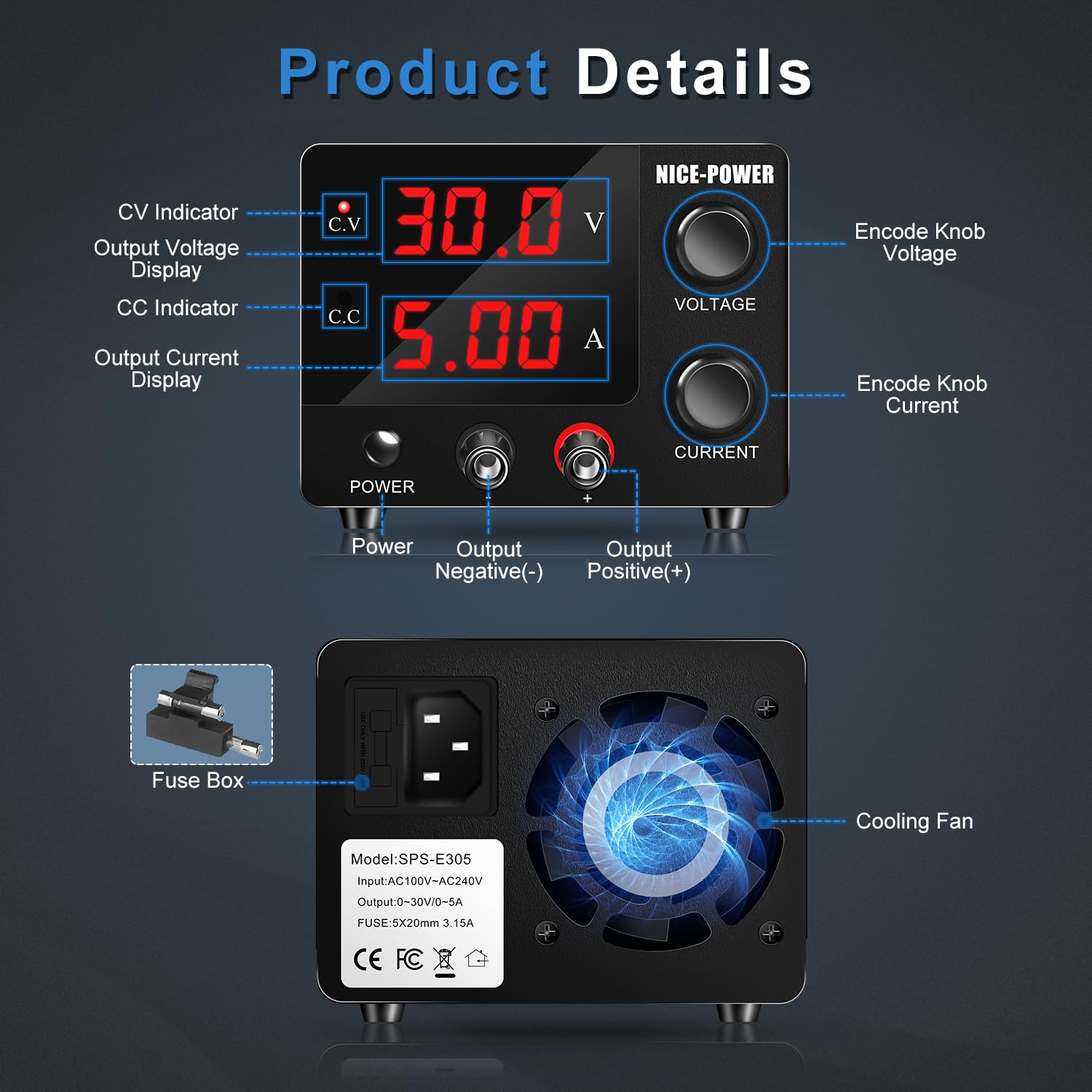
Image 4.1: Detailed view of the front and rear panels with labeled components.
5. Setup Instructions
- Place the power supply on a stable, level surface with adequate ventilation.
- Ensure the power supply is switched off (Power button in the OFF position).
- Connect the provided AC power cord to the AC power inlet on the rear panel and then to a suitable wall outlet.
- Connect the output load cord to the output terminals on the front panel. The red connector goes to the red (+) terminal, and the black connector goes to the black (-) terminal.
- Connect the other end of the output load cord (alligator clips) to your device or circuit, ensuring correct polarity.
6. Operating Instructions
6.1 Power On/Off
Press the Power button on the front panel to turn the unit on or off. The LED displays will illuminate when the unit is powered on.
6.2 Adjusting Voltage and Current
The SPS-E305 features high-precision encoder knobs for setting voltage and current. This allows for precise digital adjustment.
- To adjust Voltage: Press the Voltage encoder knob. The digit you wish to adjust will blink. Rotate the knob to change the value of the blinking digit (0-9). Press the knob again to move to the next digit. Repeat until the desired voltage is set.
- To adjust Current: Press the Current encoder knob. The digit you wish to adjust will blink. Rotate the knob to change the value of the blinking digit (0-9). Press the knob again to move to the next digit. Repeat until the desired current limit is set.
The 3-digit LED display provides clear and accurate readings for both voltage (0.1V resolution) and current (0.01A resolution).

Image 6.1: Encoder knob operation for setting voltage and current.

Image 6.2: High precision 3-digit LED display for accurate readings.
6.3 Constant Voltage (CV) and Constant Current (CC) Modes
The power supply operates in either Constant Voltage (CV) or Constant Current (CC) mode, indicated by the respective LED. When the load resistance is high, the unit maintains the set voltage (CV mode). If the load resistance decreases, causing the current to reach the set limit, the unit switches to CC mode, maintaining the set current while the voltage drops.
6.4 Applications
The compact design and precise control make this power supply suitable for various applications, including:
- Laboratory experiments
- Battery charging (e.g., LiFePO4, Lead Acid Batteries)
- Electronic device repair
- Electrolysis and electroplating
- Burn-in testing
- DIY electronics projects
- LED testing

Image 6.3: Examples of common applications for the SPS-E305.
7. Maintenance
- Keep the unit clean and free from dust. Use a soft, dry cloth for cleaning.
- Ensure the cooling fan on the rear panel is not obstructed to allow for proper heat dissipation. The fan operates automatically to maintain optimal temperature and extend product lifespan.
- If the fuse needs replacement, ensure the power supply is disconnected from the mains. Replace with a fuse of the same type and rating (refer to specifications).
8. Troubleshooting
If you encounter issues with your power supply, consider the following:
- No Power: Check the power cord connection and the fuse in the fuse box on the rear panel.
- No Output: Ensure the output terminals are correctly connected to the load and that the voltage and current limits are set appropriately. The protection circuits may have activated if an overload or short circuit occurred.
- Unstable Output: Verify all connections are secure. Ensure the load is within the specified operating range.
- Loud Fan Noise: The cooling fan activates based on internal temperature. Persistent excessive noise may indicate an issue or obstruction.
For further assistance, please contact NICE-POWER customer support.
9. Specifications
| Feature | Specification |
|---|---|
| Model Number | SPS-E305 |
| Output Voltage | 0-30V DC |
| Output Current | 0-5A DC |
| Output Wattage | 150W |
| Input Voltage Range | 100-240V AC |
| Voltage Display Resolution | 0.1V |
| Current Display Resolution | 0.01A |
| Display Type | 3-Digit LED |
| Control Method | Encoder Knob |
| Product Dimensions (L x W x H) | 6.5 x 4 x 3.2 inches (16.5 x 10.3 x 8.1 cm) |
| Item Weight | 1.54 lbs (0.7 kg) |
| Cooling Method | Air (Built-in Fan) |
| Safety Certifications | FCC/CE |
10. Warranty and Support
NICE-POWER provides a 12-month repair policy for this product. If you have any technical questions, require assistance, or need to claim warranty service, please do not hesitate to contact NICE-POWER customer support. Refer to the contact information provided with your purchase or visit the official NICE-POWER website for support details.
Related documentsSPS-E305


Ask a question about this manual
Ask about setup, troubleshooting, compatibility, parts, safety, or missing instructions. Manuals+ will review the question and use this page’s manual context to help answer it.