
1. Introduction
Thank you for purchasing the Nobsound Q10 Digital Amplifier. This ultra-compact amplifier is designed to deliver high-fidelity audio with versatile input options, including Bluetooth 5.0, Optical, and AUX. Equipped with a TPA3221 Class D amplifier chip, it provides stable and powerful output for various audio setups, from desktop speakers to car audio systems. This manual provides detailed instructions for proper setup, operation, and maintenance to ensure optimal performance and longevity of your device.

Figure 1: Front view of the Nobsound Q10 Digital Amplifier, showing the main control knob, volume display, AUX input, and Optical input.
2. Key Features
- High-Efficiency TPA3221 Class D Chip: Features a Texas Instruments TPA3221 amplifier chip, achieving ultra-low distortion below 0.001% and a high-speed response with a 1.2MHz switching frequency. Delivers stable 80W per channel (nominal 100W) into 4Ω speakers.
- Versatile 3-Way Multi-Input: Seamlessly integrates Bluetooth 5.0 (15m transmission, low-latency codec), Optical digital (for TV/game console connection), and AUX analog inputs.
- Innovative Single Knob Interface: A durable 18mm metal knob controls Power ON/OFF (long press for 3 seconds), Input Switching (short press), and Volume Adjustment (rotate). Designed for intuitive operation, even in low light.
- Wide Voltage DC9-24V Compatibility: Supports various power sources like car cigarette lighters (12V), portable power supplies (19V), and USB-PD adapters (9V). Includes a built-in ESD protection circuit to prevent surge noise.
- Optimized Compact Design: Ultra-thin body (77x22x62mm) with a heat-dissipating aluminum base plate, maintaining surface temperature below 65°C during continuous 100W output. Integrated protection circuits safeguard speakers against short circuits, overload, and overheating.

Figure 2: Illustration highlighting the TPA3221 chip and the amplifier's maximum 100W x 2 output power.
3. Package Contents
Please check that all items are present in the package:
- 1 × Nobsound Q10 Amplifier
- 1 × 19V Power Adapter (Optional, included with this variant)
- 1 × 3.5mm AUX Cable
- 1 × RCA Cable
- 1 × Optical Cable
- 1 × User Manual
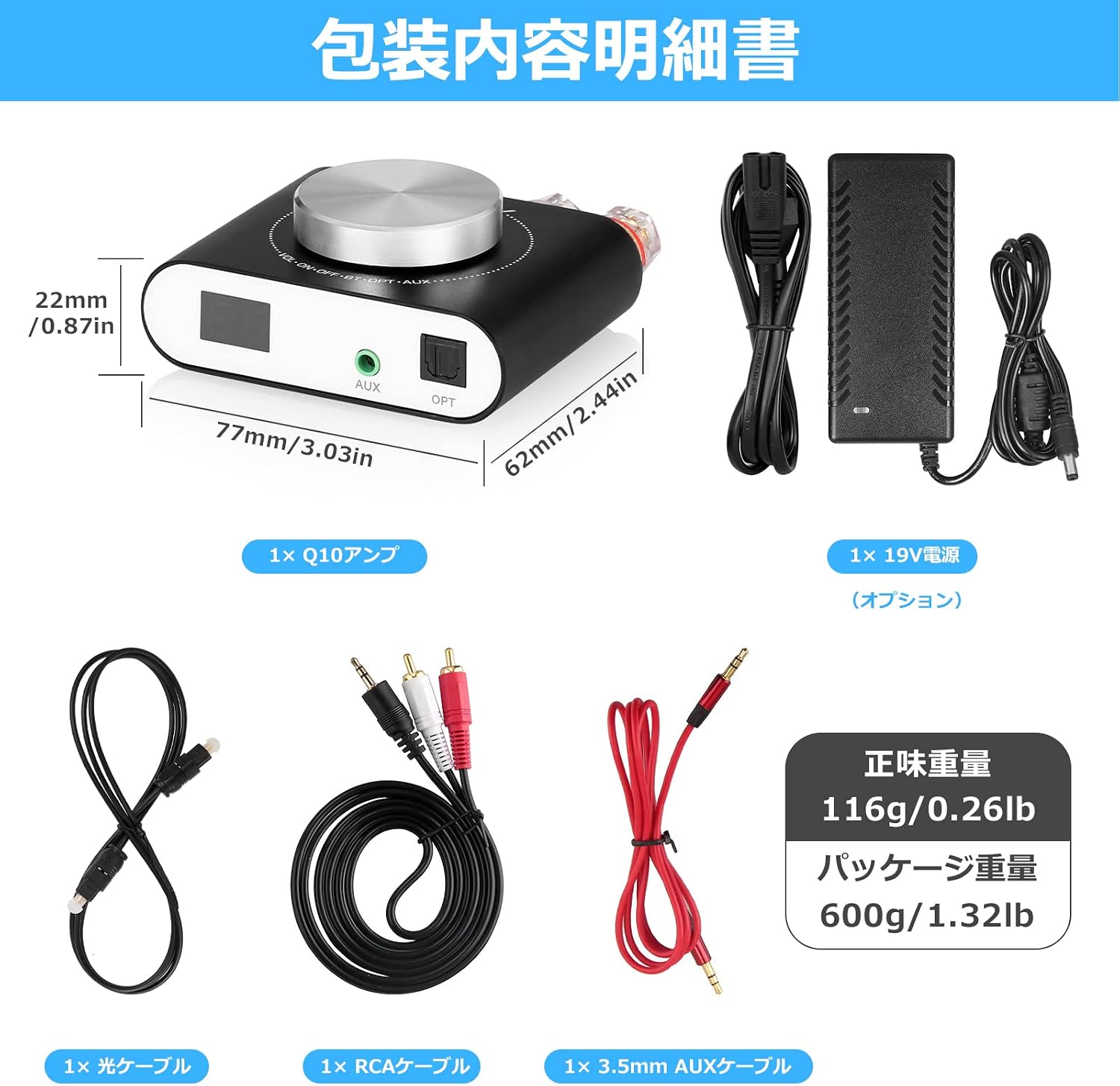
Figure 3: Diagram showing the Nobsound Q10 amplifier, included cables, power adapter, and product dimensions.
4. Setup Instructions
Follow these steps to connect your Nobsound Q10 amplifier:
- Connect Speakers: Connect your passive speakers to the speaker terminals on the rear of the amplifier. Ensure correct polarity (red to red, black to black for each channel R/L). The amplifier supports 4Ω speakers.
- Connect Audio Source: Choose one of the following input methods:
- Bluetooth: No physical connection needed. The amplifier will be discoverable once powered on.
- Optical Input (OPT): Connect an optical cable from your TV, game console, or other digital audio source to the OPT input on the front of the amplifier.
- AUX Input: Connect a 3.5mm AUX cable from your smartphone, tablet, or other analog audio device to the AUX input on the front of the amplifier. For devices with RCA output, use the provided RCA to 3.5mm cable.
- Connect Power: Connect the provided 19V power adapter to the DC9-24V IN port on the rear of the amplifier, then plug the adapter into a power outlet.

Figure 4: Detailed diagram illustrating the front and rear connections of the Nobsound Q10, including speaker terminals, power input, and various audio inputs.
5. Operating Instructions
The Nobsound Q10 features a single multi-function knob for all primary controls.
5.1 Power ON/OFF
- To Power ON: Long press the main knob for approximately 3 seconds. The display will light up.
- To Power OFF: Long press the main knob for approximately 3 seconds. The display will turn off.
5.2 Input Selection
- To Switch Inputs: Short press the main knob. The input mode will cycle through Bluetooth (BT), Optical (OPT), and AUX. The corresponding indicator light (Blue for BT, Red for AUX, Purple for OPT) will illuminate.
5.3 Volume Adjustment
- To Adjust Volume: Rotate the main knob clockwise to increase volume and counter-clockwise to decrease volume. The current volume level will be shown on the digital display.
5.4 Bluetooth Pairing
When the amplifier is in Bluetooth mode (blue indicator light), it will automatically enter pairing mode. Search for "Nobsound Q10" on your device's Bluetooth settings and connect. Once paired, the blue indicator will remain solid.

Figure 5: A hand demonstrating the operation of the single multi-function knob on the Nobsound Q10 amplifier.
6. Maintenance
To ensure the longevity and optimal performance of your Nobsound Q10 amplifier, follow these maintenance guidelines:
- Cleaning: Use a soft, dry cloth to wipe the exterior of the amplifier. Do not use liquid cleaners, aerosols, or solvents, as they may damage the finish or internal components.
- Ventilation: Ensure the amplifier is placed in a well-ventilated area. Avoid blocking the heat-dissipating surfaces. Do not place it in enclosed spaces without adequate airflow.
- Storage: When not in use for extended periods, disconnect the power adapter and store the amplifier in a cool, dry place away from direct sunlight and extreme temperatures.
- Avoid Moisture: Keep the amplifier away from water, humidity, and other liquids. Exposure to moisture can cause electrical shorts and damage the device.
7. Troubleshooting
If you encounter any issues with your Nobsound Q10 amplifier, please refer to the following troubleshooting guide:
| Problem | Possible Cause | Solution |
|---|---|---|
| No sound output |
|
|
| Distorted or poor sound quality |
|
|
| Bluetooth pairing issues |
|
|
| Amplifier suddenly turns off |
|
|
8. Specifications
| Feature | Detail |
|---|---|
| Brand | Nobsound |
| Model Number | Q10 |
| Amplifier Chip | TPA3221 Class D |
| Output Power | 80W x 2 (4Ω, nominal 100W x 2) |
| Input Options | Bluetooth 5.0, Optical, 3.5mm AUX |
| Bluetooth Range | Up to 15 meters |
| Power Supply | DC 9V-24V |
| Product Dimensions (LxWxH) | 7.7 x 6.2 x 2.2 cm (3.03 x 2.44 x 0.87 inches) |
| Product Weight | 116g (0.26 lbs) |
| Included Components | Q10 Amplifier, 19V Power Adapter (optional), 3.5mm AUX Cable, RCA Cable, Optical Cable, User Manual |
9. Warranty and Support
Nobsound products are designed for reliability and performance. This product comes with a standard manufacturer's warranty against defects in materials and workmanship. The specific warranty period may vary by region and retailer. Please retain your proof of purchase for warranty claims.
For technical support, troubleshooting assistance, or warranty inquiries, please contact your retailer or visit the official Nobsound website. You can often find additional resources, FAQs, and contact information on the manufacturer's support pages.
Official Website: www.doukaudio.com