
1. Safety Information
Please read all instructions carefully before assembly and use. Keep this manual for future reference.
- Do not exceed the maximum weight capacity of 10 kg (22 lbs).
- Ensure the TV's VESA pattern (75x75mm or 100x100mm) and size (13-32 inches) are compatible with the stand.
- Assemble the stand on a soft, clean surface to prevent scratches.
- Always use two people for lifting and positioning the TV.
- Ensure all screws are tightened securely before use. Do not overtighten.
- Keep children and pets away during assembly.
2. Product Overview
The GRIFEMA GB1005-1 is a versatile tabletop TV stand designed for flat or curved screens ranging from 13 to 32 inches. It offers robust support and flexible viewing options with its adjustable features.
Key Features:
- Universal Compatibility: Supports LCD, LED, OLED, Plasma, and Curved TVs with VESA patterns 75x75mm and 100x100mm.
- Adjustable Viewing Angles: Features +/- 90° swivel, +/- 60° tilt, and 360° rotation for optimal viewing.
- Height Adjustment: Allows for precise height positioning to suit different TV sizes and viewing preferences.
- Robust Construction: Made with alloy steel and an 8mm tempered safety glass base, supporting up to 10 kg.
- Cable Management: Integrated system to keep cables organized and out of sight.
- Anti-slip Feet: Rubber feet on the base prevent scratches and ensure stability.
Package Contents:
While specific part names may vary, your package should include all necessary components for assembly:
- TV Stand Base (Tempered Glass)
- Support Column
- VESA Mounting Plate
- Mounting Hardware (various screws, washers, spacers)
- Cable Management Clips
- Assembly Tools (e.g., Allen key)
- Instruction Manual

Image: The GRIFEMA GB1005-1 Universal TV Stand, showcasing its sleek design and sturdy base.
3. Specifications
| Feature | Detail |
|---|---|
| Model Number | GB1005-1 |
| Brand | GRIFEMA |
| Compatible TV Sizes | 13 - 32 inches |
| VESA Compatibility | 75x75mm, 100x100mm |
| Weight Capacity | Up to 10 kg (22 lbs) |
| Material | Alloy Steel, Tempered Glass |
| Color | Black |
| Tilt Angle | +/- 60 degrees |
| Swivel Angle | +/- 90 degrees |
| Rotation | 360 degrees |
| Mounting Type | Table Mount |

Image: Detailed dimensions, weight capacity, VESA patterns, and compatible screen sizes for the TV stand.
4. Setup and Installation
Follow these steps for quick and easy assembly. It is recommended to have a second person assist with mounting the TV.
- Unpack and Verify: Carefully remove all components from the packaging. Check the package contents against the list in Section 2 to ensure all parts are present and undamaged.
- Assemble the Base: Attach the support column to the tempered glass base using the provided screws and tools. Ensure it is firmly secured.
- Attach VESA Plate to Column: Secure the VESA mounting plate to the top of the support column.
- Prepare Your TV: Lay your TV face down on a soft, clean surface. Identify the VESA mounting holes on the back of your TV.
- Attach VESA Plate to TV: Align the VESA mounting plate (already attached to the column) with the mounting holes on your TV. Use the appropriate screws, washers, and spacers from the hardware kit to secure the TV to the VESA plate. Ensure a snug fit without overtightening.
- Cable Management: Once the TV is mounted, use the integrated cable management clips on the support column to route and organize your TV cables for a tidy setup.
- Final Placement: Carefully lift the assembled TV and stand and place it on your desired tabletop surface. Ensure the surface is stable and level.
Note: Detailed graphical installation guides are included with your product for visual assistance.
5. Operating Instructions
The GRIFEMA GB1005-1 stand offers multiple adjustment options to optimize your viewing experience.
Adjusting Height:
The monitor height can be adjusted to suit different TV sizes or personal height requirements. Loosen the height adjustment clamp on the support column, slide the TV up or down to the desired position, and then securely tighten the clamp.

Image: Illustration of the height adjustment mechanism, allowing for precise vertical positioning of the TV.
Adjusting Swivel, Tilt, and Rotation:
The stand allows for a wide range of motion to achieve the best viewing angle from various positions in your room.
- Swivel: Gently pivot the TV left or right up to +/- 90 degrees.
- Tilt: Adjust the vertical angle of the screen up or down by +/- 60 degrees to reduce glare or improve viewing comfort.
- Rotation: Rotate the screen 360 degrees to switch between landscape and portrait orientations as needed.
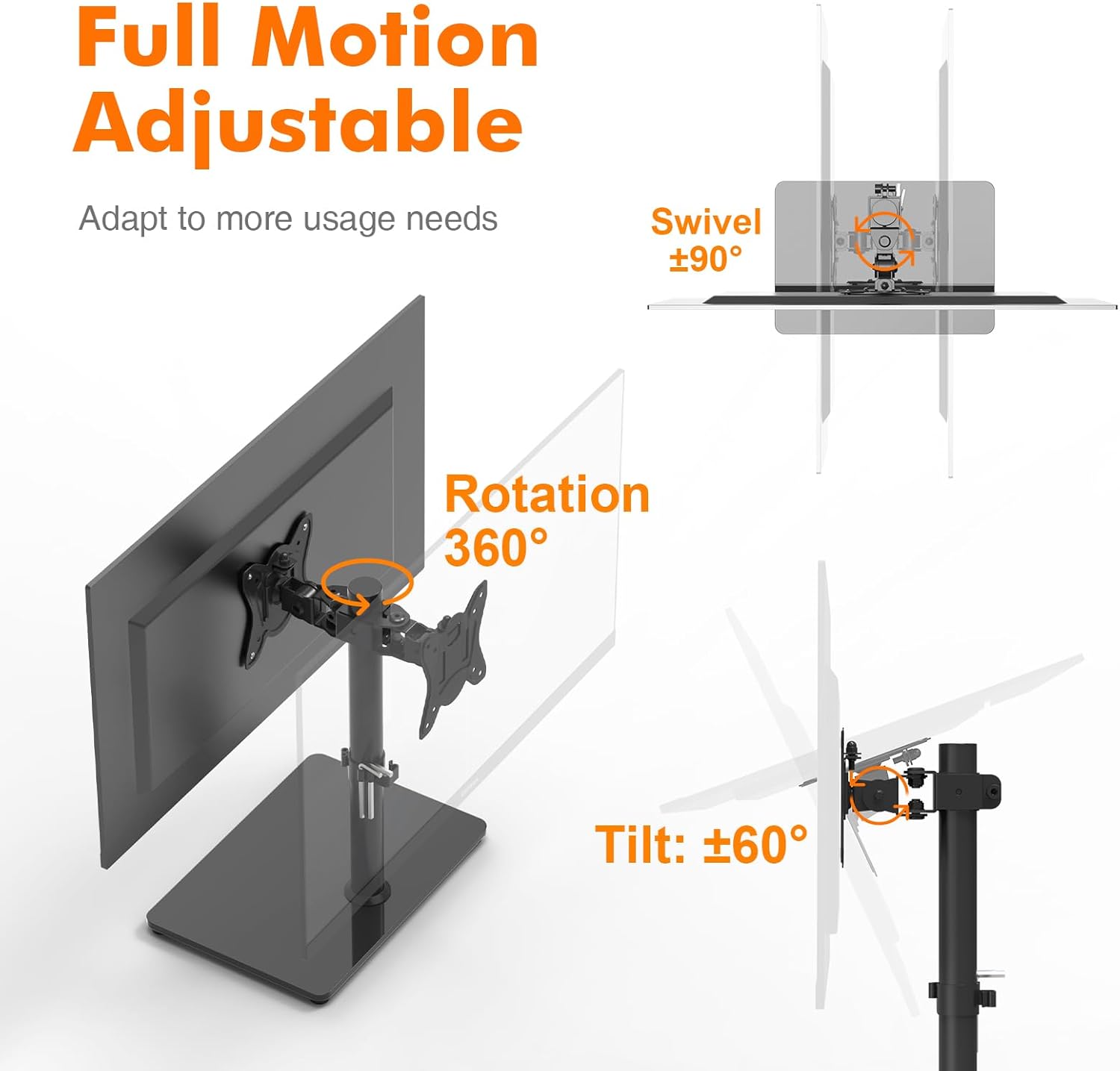
Image: Visual representation of the full motion capabilities, including swivel, tilt, and 360-degree rotation.

Image: Close-up view highlighting the 360-degree rotation, integrated cable management, polished 8mm tempered glass base, and 4 anti-slip rubber feet.
6. Maintenance
To ensure the longevity and appearance of your TV stand, follow these simple maintenance guidelines:
- Cleaning: Use a soft, dry cloth to wipe down the stand. For stubborn marks, a slightly damp cloth with mild soap can be used, followed by drying thoroughly. Avoid abrasive cleaners or solvents.
- Check Connections: Periodically check all screws and bolts to ensure they remain tight. Retighten if necessary, but do not overtighten.
- Avoid Overloading: Do not place items heavier than the specified weight capacity on the stand or TV.
- Protect Surfaces: Ensure the anti-slip rubber feet are intact to protect your furniture surfaces.
7. Troubleshooting
If you encounter any issues with your GRIFEMA GB1005-1 TV stand, refer to the common problems and solutions below:
| Problem | Possible Cause | Solution |
|---|---|---|
| TV does not fit the stand. | Incorrect VESA pattern or TV size. | Verify your TV's VESA pattern (75x75mm or 100x100mm) and screen size (13-32 inches) against the stand's specifications. |
| Stand feels unstable. | Screws are loose or TV weight exceeds capacity. | Ensure all assembly screws are securely tightened. Confirm your TV's weight is within the 10 kg limit. Place the stand on a flat, stable surface. |
| Difficulty adjusting height/tilt/swivel. | Adjustment mechanisms are too tight or obstructed. | Loosen the relevant adjustment clamps slightly. Check for any obstructions or misaligned parts. |
| Scratches on furniture surface. | Anti-slip feet are missing or damaged. | Ensure all four anti-slip rubber feet are properly attached to the base. Replace if damaged. |
8. Warranty and Support
GRIFEMA products are manufactured to high-quality standards. For information regarding warranty coverage, product support, or spare parts, please refer to the warranty card included with your purchase or visit the official GRIFEMA website. Please retain your proof of purchase for any warranty claims.