
1. Introduction
This manual provides instructions for the AULCMEET RM-AMU009 replacement remote control. This remote is designed to be compatible with a wide range of Sony Stereo systems, including models from the MHC-E, MHC-EC, CMT-MX, HCD-BX, HCD-CX, HCD-E, HCD-EC, HCD-FX, HCD-LX, HCD-MX, SS-CMX, SS-CBX, and SS-EC series. It functions as a direct replacement for your original remote control, offering immediate usability without complex setup procedures.
The RM-AMU009 remote control operates using infrared technology and requires two AA batteries for power. It features 30 buttons for comprehensive control over your compatible Sony stereo system.
2. Setup
The AULCMEET RM-AMU009 remote control is designed for immediate use. No programming or pairing is required. Simply insert the batteries, and the remote will be ready to operate your compatible Sony stereo system.
2.1 Battery Installation
- Locate the battery compartment on the back of the remote control.
- Slide open the battery compartment cover.
- Insert two (2) AA batteries, ensuring the positive (+) and negative (-) terminals align correctly with the markings inside the compartment.
- Close the battery compartment cover securely.
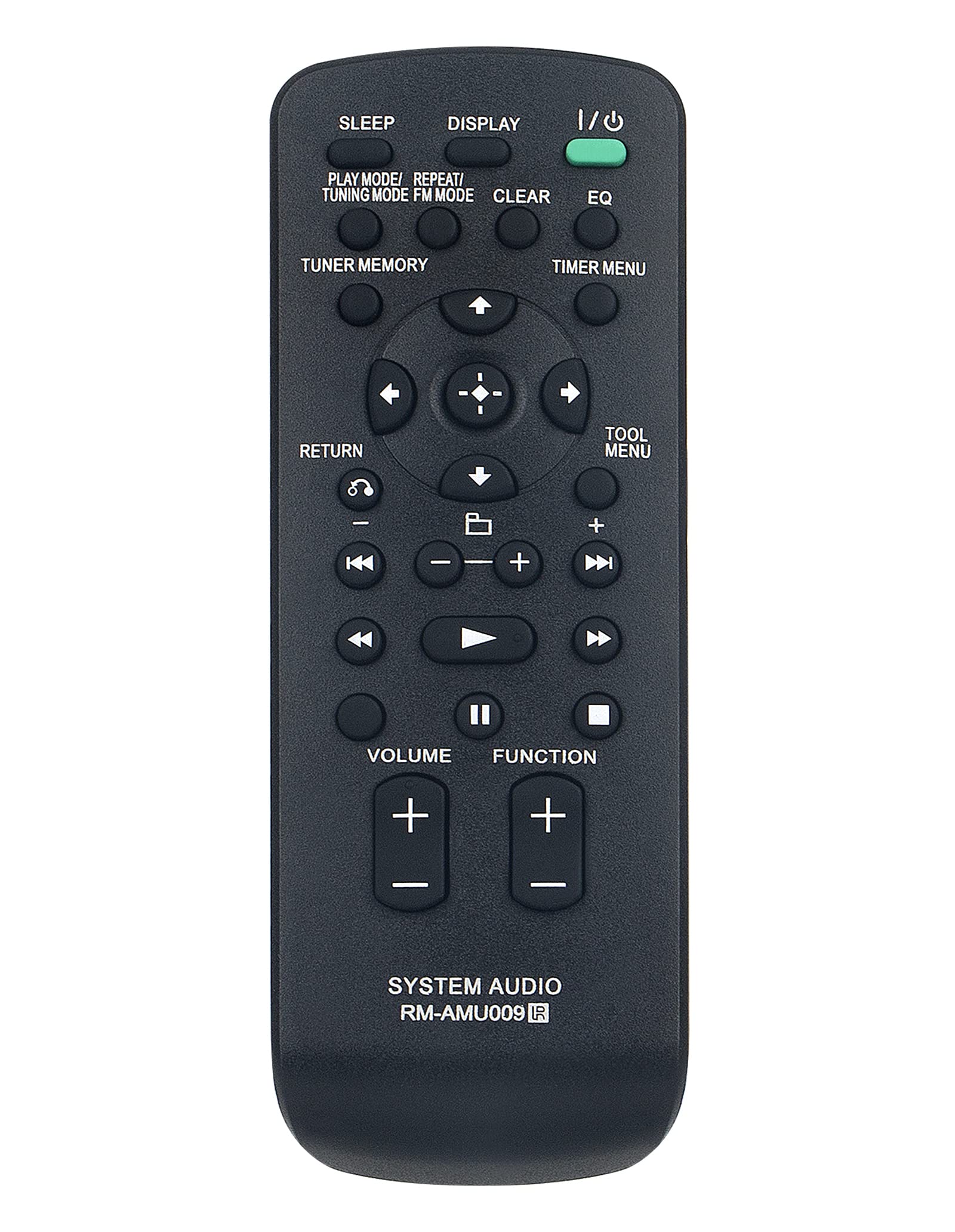
Image: Front view of the AULCMEET RM-AMU009 remote control. This image illustrates the general appearance and button layout of the remote, which is essential for understanding its operation.
Once batteries are installed, the remote is ready for operation.
3. Operating Instructions
Point the remote control directly at your Sony stereo system's infrared receiver. Ensure there are no obstructions between the remote and the stereo system for optimal performance. The maximum effective range is approximately 10 meters (33 feet).
3.1 Basic Functions
The remote control features 30 buttons, providing access to various functions of your Sony stereo system. Common functions include:
- Power On/Off: To turn the stereo system on or off.
- Volume Control: Adjusting the sound level (Volume Up/Down).
- Source Selection: Switching between different audio inputs (e.g., CD, Tuner, USB, Aux).
- Playback Controls: Play, Pause, Stop, Skip Track (Forward/Backward) for media playback.
- Tuner Controls: Station tuning, preset selection.
- Navigation: Menu navigation and selection buttons.
Refer to your Sony stereo system's original user manual for specific button functions and advanced operations, as the RM-AMU009 replicates the functionality of the original remote.
4. Maintenance
Proper care will extend the life of your remote control.
- Cleaning: Wipe the remote with a soft, dry cloth. Do not use liquid cleaners or abrasive materials.
- Battery Replacement: Replace batteries when the remote's performance degrades or it stops responding. Always replace both batteries at the same time with new AA batteries. Do not mix old and new batteries, or different types of batteries.
- Storage: If the remote will not be used for an extended period, remove the batteries to prevent leakage and potential damage.
- Avoid Damage: Do not drop the remote, expose it to extreme temperatures, or immerse it in water.
5. Troubleshooting
If you experience issues with your remote control, try the following steps:
- Remote Not Responding:
- Check if the batteries are inserted correctly with the correct polarity (+/-).
- Replace the batteries with fresh AA batteries.
- Ensure there are no obstructions between the remote and the stereo system.
- Confirm you are within the effective operating range (approx. 10 meters).
- Specific Buttons Not Working:
- Clean the remote's surface, especially around the unresponsive buttons, to remove any dirt or debris.
- Ensure your stereo system model is listed as compatible with the RM-AMU009.
- Interference:
Strong light sources (e.g., direct sunlight, fluorescent lights) can sometimes interfere with infrared signals. Try operating the remote in a different lighting condition.
If the issue persists after following these steps, contact customer support for further assistance.
6. Specifications
| Feature | Detail |
|---|---|
| Model Name | RM-AMU009 |
| Brand | AULCMEET |
| Connectivity Technology | Infrared |
| Special Feature | No Programming Required |
| Compatible Devices | Sony Stereo Systems (MHC-E, MHC-EC, CMT-MX, HCD-BX, HCD-CX, HCD-E, HCD-EC, HCD-FX, HCD-LX, HCD-MX, SS-CMX, SS-CBX, SS-EC series) |
| Battery Type | 2 x AA Batteries (not included) |
| Maximum Range | 10 meters (33 feet) |
| Button Quantity | 30 |
| Color | Black |
| Item Dimensions (L x W x H) | 5"L x 1"W x 0.5"H (approximate) |
7. Warranty and Support
This AULCMEET RM-AMU009 remote control comes with a 1-year warranty from the date of purchase. This warranty covers manufacturing defects under normal use.
For warranty claims, technical support, or any questions regarding the operation of your remote control, please contact the seller or AULCMEET customer service through the platform where the product was purchased. Please have your purchase details and product model number (RM-AMU009) ready when contacting support.