
SWAREY S1000
SWAREY Portable Power Station S1000 User Manual
Model: S1000
1. Introduction
Thank you for choosing the SWAREY Portable Power Station S1000. This powerful and versatile device is designed to provide reliable electricity for various applications, including outdoor camping, travel, RV use, and home emergency backup. With a substantial 725Wh capacity and 1000W AC output (1500W surge), it can power multiple devices simultaneously. Please read this manual thoroughly before operating the device to ensure safe and optimal performance.
2. Safety Information
Always observe the following safety precautions to prevent injury or damage to the device:
- Do not disassemble, repair, or modify the unit. Incorrect reassembly may cause fire or electric shock.
- Do not place the unit near fire or expose it to direct sunlight or high temperatures.
- Do not use or store the unit in a bathroom or in an area exposed to water or moisture.
- Use only the original charger and cables provided with the unit.
- Keep the unit away from children and pets.
- Ensure proper ventilation during use and charging to prevent overheating.
- Do not insert foreign objects into the ports or openings.
- In case of fire, use a dry powder fire extinguisher. Water may cause electric shock.
3. Package Contents
Verify that all the following items are included in your package:
- 1 x SWAREY 725Wh Portable Power Station (Model S1000)
- 1 x DC-MC4 Cable (for solar panel connection)
- 1 x Carrying Bag
- 1 x Power Cord
- 1 x Power Adapter
- 1 x Car Charger Cable
- 1 x User Manual
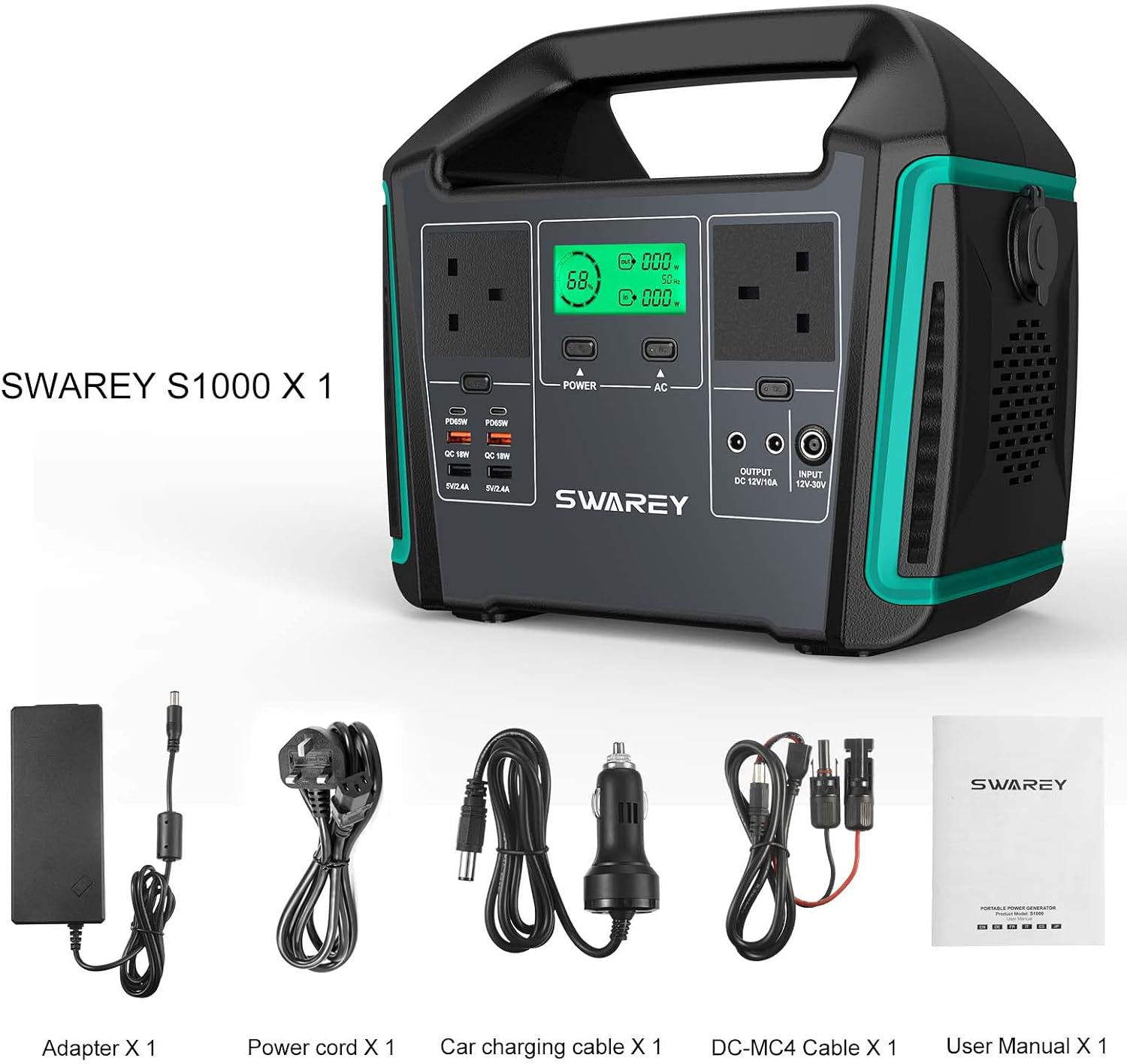
Image: SWAREY S1000 Power Station with all included accessories: power station, DC-MC4 cable, carrying bag, power cord, power adapter, car charger cable, and user manual.
4. Product Overview
Familiarize yourself with the various components and ports of your SWAREY Portable Power Station S1000.

Image: Front view of the SWAREY S1000 Portable Power Station, highlighting the display, AC outlets, USB ports, and DC ports.
4.1. Ports and Indicators
- LCD Display: Shows real-time remaining power, input/output power, and status indicators.
- AC Outlets (2x 1000W Pure Sine Wave): For powering household appliances and electronics.
- USB-C Ports (2x PD 65W): For fast charging compatible smartphones, tablets, and laptops.
- USB-A Ports (2x Standard, 2x QC 3.0): For charging various USB-powered devices.
- DC Ports (2x): For connecting DC-powered devices.
- Car Cigarette Lighter Port (1x): For automotive accessories.
- Input Port: For charging the power station via wall adapter, car charger, or solar panel.
- LED Flashlight: Features Strong, Strobe, and SOS modes for emergencies.
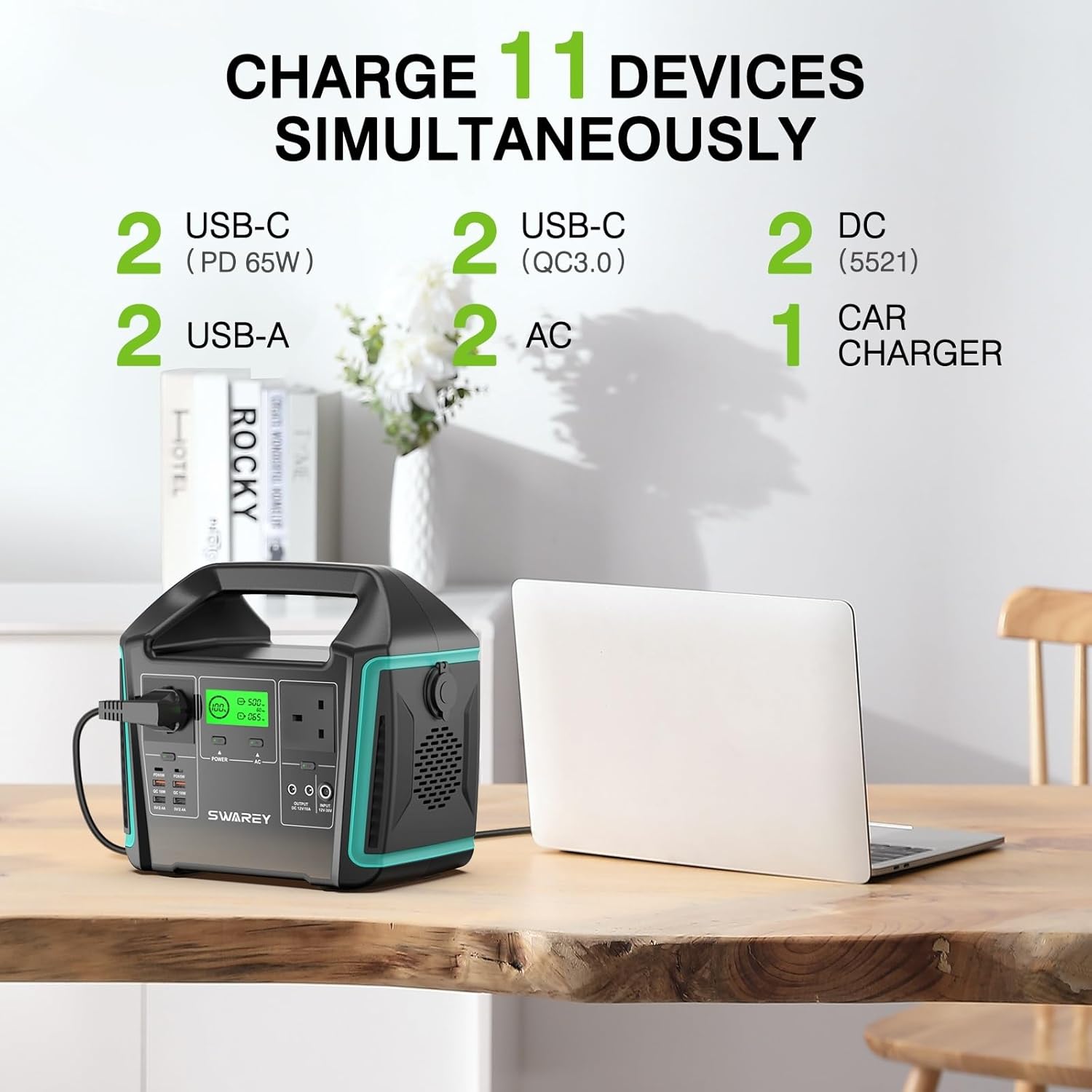
Image: Visual representation of the SWAREY S1000's ability to charge up to 11 devices simultaneously, detailing the types and quantities of available ports: 2 USB-C (PD 65W), 2 USB-C (QC3.0), 2 AC, 2 USB-A, 2 DC, and 1 Car Charger port.

Image: The SWAREY S1000 Portable Power Station demonstrating its emergency flashlight feature with three modes: Strong illumination, Strobe light, and SOS signal.
5. Setup
Before first use, it is recommended to fully charge your SWAREY Portable Power Station.
5.1. Initial Charge
- Connect the provided power adapter to the input port of the power station.
- Plug the power adapter into a standard wall outlet.
- The LCD display will show the charging status. The unit is fully charged when the battery indicator shows 100%.
A full charge from a wall outlet typically takes 7-8 hours.
6. Operating Instructions
6.1. Turning On/Off
- To turn on the unit, press and hold the main power button for a few seconds until the LCD display illuminates.
- To turn off the unit, press and hold the main power button again until the display turns off.
6.2. Using AC Outlets
- Ensure the power station is turned on.
- Press the "AC" button to activate the AC outlets. The AC indicator on the display will light up.
- Plug your AC devices into the outlets.
- After use, press the "AC" button again to turn off the AC output and conserve battery.
6.3. Using USB and DC Ports
- Ensure the power station is turned on.
- The USB and DC ports are typically active once the unit is powered on. Some models may have separate buttons for DC/USB output; refer to the specific port labels.
- Plug your USB or DC devices into the respective ports.
6.4. Using the LED Flashlight
- Press the flashlight button once for Strong illumination.
- Press again for Strobe mode.
- Press a third time for SOS mode.
- Press a fourth time to turn off the flashlight.

Image: The SWAREY S1000 Portable Power Station demonstrating its capacity to power various devices, including a tablet (30 times), drone (8.8 hours), laptop (7.7 hours), kettle (4.4 hours), and blender (1 hour), based on its 725.76Wh/1000W rating.

Image: The SWAREY S1000 Portable Power Station connected to and charging multiple devices, illustrating its capability to provide power for approximately 10 laptop charges, 62 phone charges, 12 drone charges, 38 camera charges, 20 tablet charges, or 2 hours of printer use.
7. Charging Methods
Your SWAREY S1000 can be recharged using three primary methods:
7.1. Wall Outlet Charging
- Connect the power adapter to the input port and plug into a standard wall socket.
- Charging time: Approximately 7-8 hours.
7.2. Car Charger Charging
- Use the provided car charger cable. Connect one end to the input port of the power station and the other end to your vehicle's 12V cigarette lighter socket.
- Charging time: Approximately 8-12 hours.
7.3. Solar Panel Charging
- Connect a compatible solar panel (not included) to the power station's input port using the provided DC-MC4 cable.
- The S1000 features a built-in MPPT controller, supporting up to 126W solar input for efficient charging.
- Position the solar panel in direct sunlight for optimal charging.
- Charging time: Approximately 6-7 hours with sufficient sunlight and a suitable solar panel.

Image: Illustration of the three ways to charge the SWAREY S1000 Portable Power Station: using a wall adapter, a car charger, or connecting to solar panels.

Image: The SWAREY S1000 Portable Power Station connected to solar panels on a sandy beach, with people relaxing in the background, demonstrating its outdoor charging capability.

Image: The SWAREY S1000 Portable Power Station and solar panels set up next to an RV in a picturesque outdoor landscape, highlighting its use for off-grid power.
8. Maintenance and Storage
8.1. General Maintenance
- Clean the unit with a dry, soft cloth. Do not use abrasive cleaners or solvents.
- Keep the ventilation openings clear of dust and debris.
8.2. Storage
- Store the power station in a cool, dry place, away from direct sunlight and extreme temperatures.
- For long-term storage, charge the unit to approximately 50-80% every 3-6 months to maintain battery health.
- Avoid storing the unit in a fully discharged state for extended periods.
9. Troubleshooting
If you encounter issues with your SWAREY S1000, refer to the following common problems and solutions:
| Problem | Possible Cause | Solution |
|---|---|---|
| Unit does not turn on. | Battery is completely discharged. | Charge the unit using the wall adapter. |
| AC output not working. | AC output not activated; device power exceeds 1000W. | Press the AC button to activate. Check device wattage; ensure it's below 1000W (1500W surge). |
| Slow charging via solar panel. | Insufficient sunlight; panel not optimally angled; panel wattage too low. | Reposition panel for direct sunlight. Adjust angle. Ensure panel is rated for sufficient wattage (up to 126W input). |
| Unit overheats. | Poor ventilation; excessive load. | Ensure vents are clear. Reduce connected load. Move to a cooler environment. |
| Error code on display. | Internal fault or protection mode activated (e.g., over-temperature, short-circuit). | Refer to the specific error code in the full user manual (if available) or contact customer support. Try restarting the unit. |
If the problem persists after trying these solutions, please contact SWAREY customer support.
10. Specifications
| Feature | Detail |
|---|---|
| Model | S1000 |
| Capacity | 725Wh (3.6V/201.6Ah, 21.6V/33.6Ah) |
| AC Output | 2 x 1000W Pure Sine Wave (1500W Surge) |
| USB-C Output | 2 x PD 65W |
| USB-A Output | 2 x USB-A, 2 x QC 3.0 |
| DC Output | 2 x DC ports, 1 x Car Cigarette Lighter |
| Input (Charging) | Wall Adapter, Car Charger, Solar Panel (MPPT, up to 126W) |
| Dimensions | 28 x 24.5 x 16.5 cm (10.7 x 9.8 x 6.5 inches) |
| Weight | 6 kg (13.2 lbs) |
| Safety Features | Battery Management System (BMS): Over-temperature, short-circuit, over-current, over-load, over-charge protection. |

Image: A person carrying the SWAREY S1000 Portable Power Station by its integrated handle, illustrating its compact dimensions (28cm length, 24.5cm height, 16.5cm width) and portability.
11. Warranty and Support
SWAREY products come with a standard warranty. For detailed warranty information, product registration, or technical support, please visit the official SWAREY website or contact their customer service team directly. Contact information can typically be found on the SWAREY brand store page on Amazon or within the product packaging.
SWAREY Store Link: Visit the SWAREY Store on Amazon
Related documentsS1000


Ask a question about this manual
Ask about setup, troubleshooting, compatibility, parts, safety, or missing instructions. Manuals+ will review the question and use this page’s manual context to help answer it.