
1. Introduction
Thank you for choosing the Kucacci Keypad Smart Door Lock with Handle. This smart lock provides advanced security and convenience for your home or office. With multiple unlocking methods, easy installation, and smart app management, you can control access to your property with unprecedented ease. Please read this manual carefully before installation and operation to ensure proper use and optimal performance.
2. Product Features
- Multiple Unlocking Methods: Unlock with fingerprint, passcode, mobile app, key fob, or traditional key.
- Easy DIY Installation: No drilling or locksmith required. Replaces existing locks in minutes with a screwdriver.
- Smart App Management: Effortlessly manage users, generate temporary passcodes, share e-keys, and track access records via the dedicated app.
- Enhanced Security: Features AES256 encryption for fingerprint sensor and user data privacy.
- Durable Design: Constructed from zinc alloy and stainless steel, suitable for outdoor doors with eaves or interior doors. IP66 weatherproof rating ensures performance in various conditions.
- Auto-Lock Function: Automatically locks the door after a set period for added security.
- Voice Control Compatibility: Integrates with Google Assistant and Amazon Alexa (requires a separately purchased Wi-Fi Gateway).

Figure 2.1: Multiple ways to access your Kucacci Smart Door Lock, including fingerprint, key fob, and keypad.

Figure 2.2: The fingerprint sensor provides quick and secure access, backed by advanced encryption and weather resistance.
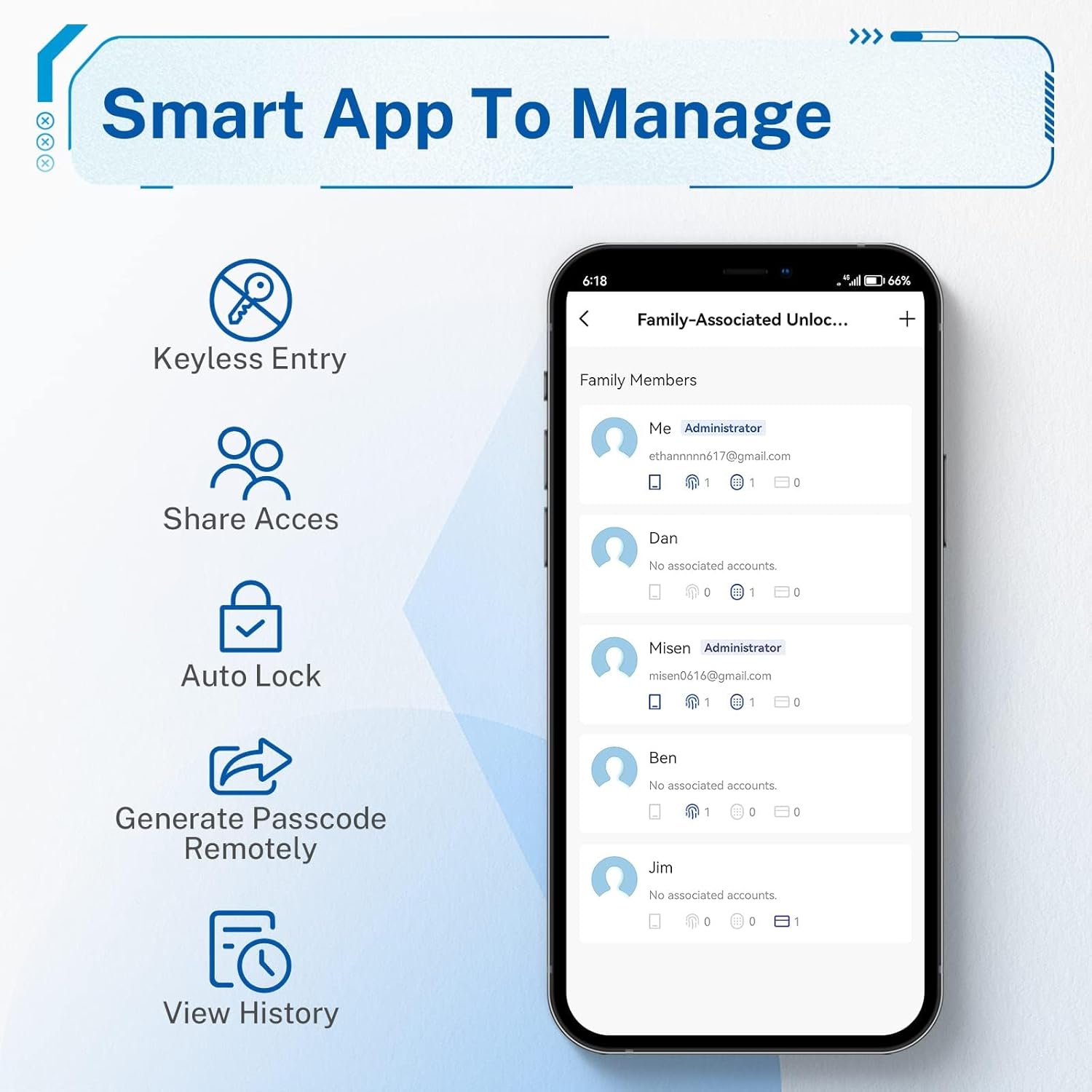
Figure 2.3: The smart app allows comprehensive management of your lock's features and user access.
3. Package Contents
Please verify that all components are present in your package:
- Kucacci Smart Door Lock with Handle (Main Unit)
- Key Fobs (Quantity: 2)
- Keys (Quantity: 2)
- Mounting Hardware (Screws, Spindle, etc.)
- User Manual (This document)
4. Installation
The Kucacci Smart Door Lock is designed for easy DIY installation, typically requiring only a screwdriver. No additional drilling is needed for most standard doors.
4.1 Door Compatibility
Ensure your door meets the following specifications:
- Door Thickness: 1-3/8 inches (35mm) to 1-31/32 inches (50mm)
- Door Hole Diameter: 2-1/8 inches (54mm)
- Backset: Compatible with 2-3/8 inches (60mm) and 2-3/4 inches (70mm)

Figure 4.1: Door preparation and dimensions for installation.
4.2 Installation Steps
- Remove your existing door lock.
- Install the latch and strike plate into the door frame.
- Install the exterior assembly of the smart lock.
- Install the interior mounting plate.
- Connect the cable from the exterior assembly to the interior assembly.
- Secure the interior assembly to the mounting plate.
- Insert batteries (4 x AAA, not included) into the battery compartment.
- Test the lock's functionality.

Figure 4.2: Visual guide for the installation process.
4.3 Changeable Handle Direction
The handle direction can be easily changed by loosening a small screw. This allows the lock to be installed on both left-handed and right-handed doors.

Figure 4.3: Adjusting the handle direction for left or right-handed doors.
5. Setup and Programming
After installation, set up your Kucacci Smart Door Lock using the mobile app and program your preferred access methods.
5.1 App Setup (NICE DIGI App)
- Download the "NICE DIGI" app from your smartphone's app store.
- Create an account and log in.
- Follow the in-app instructions to add your new smart lock. Ensure Bluetooth is enabled on your phone.
- Once connected, you can manage users, view access logs, and configure settings.
5.2 Fingerprint Enrollment
To enroll a fingerprint:
- Open the NICE DIGI app and navigate to the fingerprint management section for your lock.
- Select "Add Fingerprint" and follow the prompts.
- Place your finger on the sensor, lift, and repeat as instructed (typically 5 times) to capture a complete scan of your fingerprint.
- Confirm successful enrollment in the app.
5.3 Passcode Management
You can create various types of passcodes through the app:
- Permanent Passcodes: For regular users.
- Temporary Passcodes: For guests, valid for a specific duration.
- One-Time Passcodes: For single use.
To create a passcode:
- In the NICE DIGI app, go to "Passcode" or "Users" section.
- Select "Generate Passcode" and choose the type.
- The app will generate a code or allow you to set one. Share it with the intended user.

Figure 5.1: Generating and sharing temporary passcodes remotely.
5.4 Key Fob Setup
To add a key fob:
- In the NICE DIGI app, navigate to the "Key Fob" or "Cards" section.
- Select "Add Key Fob" and follow the instructions.
- Present the key fob to the lock's sensor when prompted.
- Confirm successful registration in the app.
5.5 Voice Control Setup (Optional)
For voice control via Amazon Alexa or Google Assistant, a Wi-Fi Gateway (sold separately) is required. Follow the gateway's instructions to connect it to your home Wi-Fi network and link it with your Kucacci Smart Lock via the NICE DIGI app. Once connected, you can use voice commands like "Alexa, lock my bedroom door."

Figure 5.2: Wi-Fi Gateway setup for voice control and remote access.
6. Operating Instructions
6.1 Unlocking the Door
- Fingerprint: Place your enrolled finger on the fingerprint sensor. The lock will unlock if the fingerprint is recognized.
- Passcode: Press any key to activate the keypad. Enter your programmed passcode followed by the checkmark (✓) button.
- App: Open the NICE DIGI app, select your lock, and tap the unlock icon.
- Key Fob: Present the registered key fob to the lock's sensor.
- Key: Insert the physical key into the keyhole and turn to unlock.
6.2 Locking the Door
- Manual Lock: Long press the checkmark (✓) button on the keypad to manually lock the door.
- Auto-Lock: The lock can be configured via the app to automatically lock after a set period (e.g., 5 seconds, 10 seconds).
- App: Open the NICE DIGI app, select your lock, and tap the lock icon.

Figure 6.1: The auto-lock feature provides automatic security.
7. Maintenance
To ensure the longevity and optimal performance of your Kucacci Smart Door Lock, follow these maintenance guidelines:
- Cleaning: Wipe the lock surface with a soft, dry cloth. Avoid abrasive cleaners or solvents that could damage the finish or electronic components.
- Battery Replacement: The lock requires 4 AAA batteries (not included). Replace all batteries when the low battery indicator appears or when the lock's response becomes sluggish. Do not mix old and new batteries or different types of batteries.
- Keypad Care: Keep the keypad clean and free of debris.
- Fingerprint Sensor: Ensure the fingerprint sensor is clean for accurate readings.
8. Troubleshooting
If you encounter issues with your Kucacci Smart Door Lock, refer to the following common problems and solutions:
| Problem | Possible Cause | Solution |
|---|---|---|
| Lock does not respond / No power | Dead batteries; Incorrect battery installation. | Replace all 4 AAA batteries; Ensure batteries are inserted with correct polarity. |
| Fingerprint not recognized | Finger not placed correctly; Sensor is dirty; Fingerprint not enrolled properly. | Ensure full contact with the sensor; Clean the sensor; Re-enroll fingerprint, ensuring multiple scans from different angles. |
| Keypad not responding or slow | Keypad not activated; Slow input. | Press any key to activate the keypad before entering the code; Enter digits slowly and deliberately. |
| Handle disengaged / Lock mechanism not working | Internal mechanism issue; Loose screws. | Check all mounting screws for tightness. If the internal mechanism is disengaged, professional assistance or product replacement may be required. Contact customer support. |
| Cannot connect to app | Bluetooth off; App not updated; Lock not in pairing mode. | Ensure Bluetooth is enabled on your phone; Update the app to the latest version; Follow app instructions to put the lock into pairing mode. |
For further assistance, please refer to the Troubleshooting Guide (PDF) or contact Kucacci customer support.
9. Specifications
| Feature | Detail |
|---|---|
| Brand | KUCACCI |
| Model Number | Keypad Smart Door Lock with Handle |
| Lock Type | Biometric, Keypad |
| Special Features | Fingerprint, Fob Unlock, Auto-Lock, One-Touch Lock, Back-Lit Keypad |
| Material | Stainless Steel, Metal |
| Color | Black |
| Item Dimensions (L x W x H) | 8.8 x 7.7 x 3.7 inches |
| Item Weight | 2.68 pounds |
| Power Source | 4 x AAA Batteries (not included) |
| Connectivity | Bluetooth, Wi-Fi (with optional Gateway) |
| Controller Type | Google Assistant, Amazon Alexa (with optional Gateway) |
| Recommended Use | Residential security and smart home integration |
10. Warranty and Support
Kucacci stands behind the quality of its products. Your Keypad Smart Door Lock with Handle comes with:
- 30-Day Money-Back Guarantee: If you are not satisfied with your purchase, you may return it within 30 days for a full refund.
- 1-Year Product Warranty: Covers defects in materials and workmanship for one year from the date of purchase.
- Lifetime Free App Access: Enjoy continuous access to the NICE DIGI app features without subscription fees.
For warranty claims, technical support, or any inquiries, please refer to the contact information provided with your purchase or visit the official Kucacci website. You can also find additional resources, including the full User Manual (PDF), on our support page.

