
1. Introduction
This user manual provides comprehensive instructions for the Khptop Motorcycle Helmet Bluetooth Headset, Model Y80. This device is designed to enhance communication and entertainment for motorcycle riders, offering features such as rider-to-rider intercom, phone connectivity, music playback, and voice assistant integration. Please read this manual thoroughly before using the product to ensure proper operation and safety.
The Khptop Y80 headset features advanced CVC noise reduction for clear audio, IPX67 waterproof and dustproof rating for durability, and a long-lasting 1000mAh battery.
2. Package Contents
Before proceeding with installation and setup, please verify that all items listed below are present in your package:
- Khptop Y80 Host Unit
- User Manual
- Type-C Charging Cable
- Clip-on Base
- Host Velcro (2 pieces)
- Magic Stick Microphone Stick (2 pieces)
- Speaker Velcro (2 pieces)
- Type-C Port Hose Headphones (for open-face helmets)
- Type-C Hard Tube Headset (for full-face helmets)
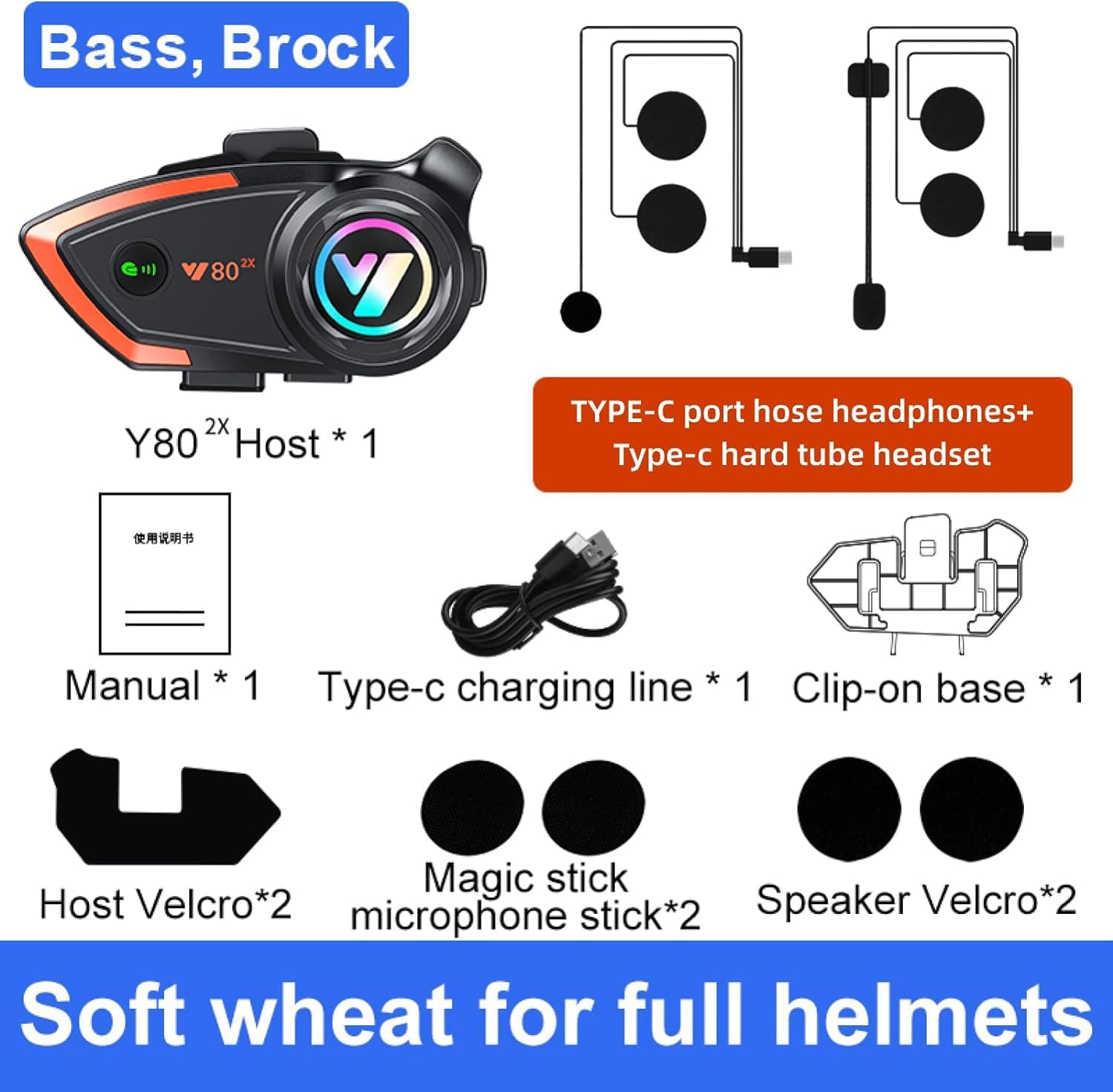
Figure 2.1: Included components of the Khptop Y80 headset package.
3. Product Overview
The Khptop Y80 is a compact and robust Bluetooth communication system designed for helmet integration. It features intuitive controls and a vibrant LED indicator.

Figure 3.1: Khptop Y80 Main Unit.
Key features include:
- Bluetooth 5.2 Connectivity: For stable and efficient wireless connections.
- 500-meter Intercom Range: Enables communication between two riders.
- CVC Noise Reduction: Enhances call clarity by minimizing background noise.
- IPX67 Waterproof: Provides protection against dust and water ingress.
- 1000mAh Battery: Offers extended usage time.
4. Installation Guide
Proper installation ensures optimal performance and comfort. Follow these steps to install the headset on your helmet:
- Mounting the Host Unit:
Attach the clip-on base to the side of your helmet. Ensure it is securely fastened. Alternatively, use the provided Host Velcro for adhesive mounting on flat surfaces.

Figure 4.1: Headset mounted on a helmet.
- Installing Speakers:
Place the speakers inside the helmet's ear pockets. Use the Speaker Velcro to secure them. Ensure the speakers are positioned directly over your ears for the best audio experience.
- Connecting the Microphone:
Choose the appropriate microphone for your helmet type:
- For open-face helmets, use the Type-C Port Hose Headphones (flexible boom mic).
- For full-face helmets, use the Type-C Hard Tube Headset (short, rigid mic).
Route the microphone cable discreetly within the helmet padding and attach the microphone using the Magic Stick Microphone Stick Velcro near your mouth for optimal voice pickup.
- Connecting Cables:
Connect the speaker/microphone cable to the Type-C port on the Khptop Y80 host unit. Ensure all connections are firm.
5. Operating Instructions
5.1 Power On/Off
- Power On: Press and hold the Power Button for 3 seconds until the LED indicator lights up.
- Power Off: Press and hold the Power Button for 3 seconds until the LED indicator turns off.
5.2 Bluetooth Pairing (Phone)
To connect your Khptop Y80 to your mobile phone:
- Ensure the headset is powered off.
- Press and hold the Power Button for approximately 5-7 seconds until the LED indicator flashes red and blue alternately, indicating pairing mode.
- On your mobile phone, enable Bluetooth and search for "Khptop Y80" in the list of available devices.
- Select "Khptop Y80" to connect. Once paired, the LED indicator will turn solid blue.
5.3 Intercom Function (Rider-to-Rider)
The Khptop Y80 supports intercom communication between two riders within a range of 200-500 meters. It is also universally compatible with other brands of Bluetooth intercom headsets.

Figure 5.1: Rider-to-rider intercom and phone call functionality.
- Ensure both Khptop Y80 units are powered on and not connected to any other devices.
- On one unit, press and hold the Intercom Button (refer to your specific unit's button layout) until it enters intercom pairing mode (e.g., flashing green).
- On the second unit, repeat the same step. The units will automatically search and connect to each other.
- Once connected, the LED indicators will change, and you can begin communicating.
5.4 Call Management
- Answer Call: Short press the Multi-function Button when a call comes in. The headset supports automatic answering after a voice announcement of the telephone number.
- End Call: Short press the Multi-function Button during a call.
- Reject Call: Press and hold the Multi-function Button for 2 seconds when a call comes in.
- Redial Last Number: Double-press the Multi-function Button.


Figure 5.2: Features: Automatic Call Answering and Voice Assistant.
5.5 Music Playback
- Play/Pause: Short press the Multi-function Button.
- Next Track: Short press the Volume Up button.
- Previous Track: Short press the Volume Down button.
- Volume Up: Long press the Volume Up button.
- Volume Down: Long press the Volume Down button.

Figure 5.3: CVC Noise Reduction for enhanced sound quality.
5.6 Voice Assistant (Siri/Google Assistant)
To activate your phone's voice assistant, press the dedicated Voice Assistant Button (or refer to your unit's specific button for this function). This allows for hands-free control of your device.
6. Maintenance and Care
To ensure the longevity and optimal performance of your Khptop Y80 headset, follow these maintenance guidelines:
- Cleaning: Wipe the unit with a soft, damp cloth. Do not use harsh chemicals or abrasive cleaners.
- Water Resistance: The unit is IPX67 waterproof, meaning it can withstand rain and splashes. However, avoid submerging it in water for extended periods. Ensure the charging port cover is securely closed when not charging.
- Charging: Use the provided Type-C charging cable. Do not overcharge the battery.
- Storage: Store the headset in a cool, dry place away from direct sunlight and extreme temperatures.

Figure 6.1: IP67 Waterproof Technology.

Figure 6.2: 1000mAh Large Capacity Battery.
7. Troubleshooting
| Problem | Possible Cause | Solution |
|---|---|---|
| Device does not power on. | Low battery. | Charge the device for at least 2 hours. |
| Cannot pair with phone. | Not in pairing mode; phone's Bluetooth off; too many paired devices. | Ensure headset is in pairing mode (flashing red/blue). Turn phone's Bluetooth off/on. Clear previous Bluetooth connections on phone. |
| Intercom not connecting. | Units too far apart; not in intercom pairing mode; interference. | Bring units closer. Ensure both are in intercom pairing mode. Move away from strong electromagnetic interference. |
| Poor audio quality / Noise. | Microphone not positioned correctly; high wind noise; volume too low/high. | Adjust microphone closer to mouth. Ensure CVC noise reduction is active. Adjust volume. Consider earplugs to reduce wind noise. |
| Battery drains quickly. | Constant use; old battery. | Reduce continuous usage. If battery life significantly degrades over time, consider replacement if within warranty. |
8. Specifications
| Feature | Detail |
|---|---|
| Model Name | Y80 |
| Brand | Khptop |
| Connectivity Technology | Wireless (Bluetooth) |
| Bluetooth Version | 5.2 |
| Intercom Range | 200-500 meters (2 riders) |
| Battery Capacity | 1000mAh Li-ion |
| Talking/Playing Time | Up to 80 hours |
| Standby Time | Up to 600 hours |
| Charging Time | Approximately 2 hours |
| Waterproof Rating | IPX67 |
| Noise Control | Active Noise Cancellation (CVC) |
| Material | Silicone, Acrylonitrile Butadiene Styrene (ABS) |
| Item Weight | 0.2 Kilograms (7 ounces) |
| Frequency Range | 20 Hz - 20,000 Hz |
9. Warranty and Support
For warranty information and technical support, please refer to the contact details provided on the product packaging or the official Khptop website. Keep your purchase receipt as proof of purchase for warranty claims.
If you encounter any issues not covered in this manual, please contact Khptop customer service for assistance.