1. Introduction
The Walimex Pro Stager 400 HSS Studio Flash Set is a comprehensive flash kit designed for professional photographers. It offers high-speed synchronization (HSS) capabilities, a powerful 400 Ws flash output, and an integrated 2.4 GHz receiver for versatile control. This manual provides essential information for the safe and effective use of your studio flash set, enabling you to achieve professional lighting results for action, product, and portrait photography.
2. Safety Instructions
- Always disconnect the power cord before cleaning or performing maintenance.
- Do not expose the flash unit to rain, moisture, or extreme temperatures.
- Ensure proper ventilation around the flash unit during operation to prevent overheating.
- Avoid direct eye exposure to the flash light, as it can cause temporary vision impairment.
- Only use accessories and replacement parts approved by Walimex Pro.
- Keep the device out of reach of children.
3. Package Contents
Please check that all items listed below are included in your package:
- 1x Walimex Pro Stager 400 HSS Studio Flash Unit
- 1x Walimex Pro AIR 290 Deluxe Lamp Stand (290 cm)
- 1x Walimex Pro Orange Line Softbox (60x90 cm)
- 1x Softbox Adapter (Bowens/Walimex Pro mount)
- 1x Walimex Pro XL 75 cm Studio Bag
- 1x Standard Reflector
- 1x Power Cable

Image 3.1: Overview of the included components in the Walimex Pro Stager 400 HSS Studio Flash Set, including the flash unit, softbox, light stand, and carrying bag.

Image 3.2: The Walimex Pro Stager 400 HSS Studio Flash Set, showcasing the compact starter kit suitable for smaller studios and on-location use, including the light stand, softbox, and studio bag.
4. Product Overview
The Walimex Pro Stager 400 HSS flash unit features a high-quality brushed aluminum finish, making it both durable and lightweight (under 3 kg). It is equipped with a powerful 25W LED pilot lamp and a pluggable flash tube. The unit includes a user-friendly control panel for easy adjustments.

Image 4.1: The Walimex Pro Stager 400 HSS studio flash unit with its standard reflector attached, ready for use.

Image 4.2: A detailed view of the Walimex Pro Stager 400 HSS flash unit, highlighting the modern LED modeling light, user-friendly controls, versatile Bowens/Walimex Pro compatibility, and powerful performance with a short recycling time.
5. Setup
5.1 Assembling the Light Stand
- Extend the legs of the Walimex Pro AIR 290 Deluxe lamp stand to form a stable base.
- Loosen the locking knobs and extend the stand sections to the desired height (up to 290 cm). Ensure all sections are securely locked. The air cushioning system provides smooth lowering.
5.2 Attaching the Softbox
- Assemble the Walimex Pro Orange Line Softbox according to its specific instructions, inserting the rods into the speed ring.
- Attach the Bowens/Walimex Pro adapter to the softbox.
- Align the softbox adapter with the Bowens mount on the front of the Stager 400 HSS flash unit. Insert and twist clockwise until it locks securely.
- Attach the front and intermediate diffusers to the softbox as desired.
5.3 Mounting the Flash Unit
- Mount the Stager 400 HSS flash unit onto the spigot of the assembled light stand.
- Tighten the locking screw on the flash unit's mounting bracket to secure it to the stand.
- Adjust the tilt angle of the flash unit as needed and secure it with the tilt locking knob.
5.4 Power Connection
- Connect the power cable to the flash unit's power input.
- Plug the other end of the power cable into a suitable electrical outlet.
6. Operating Instructions
6.1 Powering On/Off
Locate the power switch on the rear panel of the flash unit. Flip the switch to the 'ON' position to power on the device. The display will illuminate. Flip to 'OFF' to power down.
6.2 Adjusting Flash Power
The flash power can be continuously adjusted from 1/1 (full power) to 1/128. Use the control dial or buttons on the control panel to increase or decrease the flash output to your desired level.
6.3 LED Pilot Lamp
The 25W LED pilot lamp provides continuous lighting for modeling and focusing. It can be turned on or off independently using the dedicated button on the control panel. The brightness of the pilot lamp may also be adjustable.
6.4 High Speed Sync (HSS) Mode
The Stager 400 HSS supports High Speed Sync, allowing you to synchronize the flash with shutter speeds up to 1/8000s. This feature is ideal for freezing fast motion or overpowering ambient light outdoors.
- To activate HSS mode, refer to the specific instructions for your camera's radio trigger (e.g., Walimex Pro Operator). The flash unit will automatically detect and switch to HSS mode when triggered by a compatible HSS transmitter.
- HSS mode allows for creative control over motion blur, enabling you to capture sharp images of fast-moving subjects.

Image 6.1: A visual comparison demonstrating the effectiveness of HSS mode in freezing fast motion (left) versus standard flash synchronization (right).
6.5 1st and 2nd Curtain Sync
The flash supports both 1st and 2nd curtain synchronization. This allows you to choose whether the flash fires at the beginning or end of the exposure, providing creative options for depicting motion trails.
6.6 Radio Control
The integrated 2.4 GHz receiver supports 32 channels and 5 groups. This allows for wireless control of multiple flash units simultaneously or individually using an optional Walimex Pro radio trigger (e.g., Operator). Refer to your radio trigger's manual for pairing and operation instructions.
7. Maintenance
7.1 Cleaning
Ensure the flash unit is powered off and unplugged before cleaning. Use a soft, dry cloth to wipe the exterior of the flash unit. For stubborn dirt, a slightly damp cloth with mild detergent can be used, followed by a dry cloth. Do not use abrasive cleaners or solvents.
7.2 Storage
When not in use, store the flash unit and accessories in the provided Walimex Pro XL 75 cm Studio Bag in a cool, dry place, away from direct sunlight and excessive humidity. Ensure all cables are neatly coiled to prevent damage.
8. Troubleshooting
- Flash not firing: Check if the unit is powered on, connected to power, and the flash tube is correctly installed. Ensure the radio trigger is paired and functioning correctly.
- Inconsistent flash output: Verify that the power settings are correct and the unit has sufficient time to recycle between flashes.
- Overheating warning: If an overheating warning appears, power off the unit and allow it to cool down in a well-ventilated area. Ensure no obstructions are blocking the ventilation ports.
- Radio trigger issues: Check battery levels in the trigger. Ensure the flash unit and trigger are set to the same channel and group.
9. Specifications
| Feature | Specification |
|---|---|
| Model Number | 23358 |
| Flash Power | 400 Ws |
| Power Adjustment | 1/1 to 1/128 (continuous) |
| Recycle Time | ≤ 0.3 seconds |
| High Speed Sync (HSS) | Up to 1/8000 seconds |
| Pilot Lamp | 25W LED |
| Radio Receiver | Integrated 2.4 GHz (32 channels, 5 groups) |
| Mount Type | Bowens/Walimex Pro Bayonet |
| Weight (Flash Unit) | Approx. 2.8 kg |
| Dimensions (Flash Unit) | Approx. 35 cm (Length) x 13 cm (Width) x 13 cm (Height) |
| Lamp Stand Max. Height | 290 cm |
| Lamp Stand Load Capacity | Up to 7 kg |
| Softbox Dimensions | 60x90 cm |
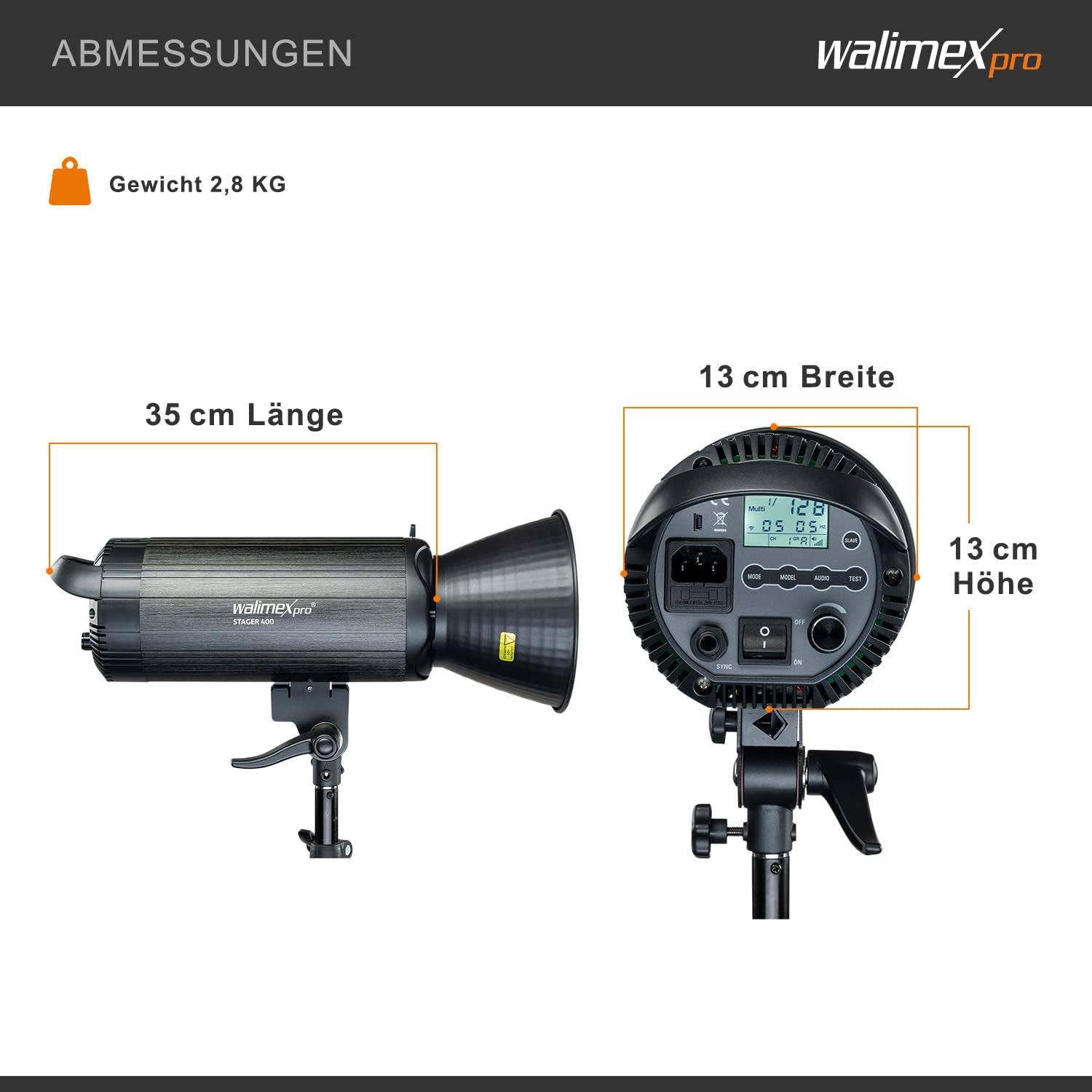
Image 9.1: Visual representation of the Walimex Pro Stager 400 HSS studio flash unit's dimensions and weight.
10. Warranty and Support
For warranty information, technical support, or service inquiries, please refer to the warranty card included with your product or visit the official Walimex Pro website. Keep your purchase receipt as proof of purchase.


