1. Introduction
Welcome to the ADO Air 20S Folding E-Bike user manual. This guide provides essential information for the safe operation, maintenance, and optimal performance of your new electric bicycle. Please read this manual thoroughly before your first ride and keep it for future reference.
The ADO Air 20S is designed for urban commuting, leisure rides, and light off-road adventures, offering a blend of portability, power, and comfort. Its lightweight design and advanced features make it an ideal choice for diverse riding conditions.

Figure 1: ADO Air 20S Folding E-Bike with included accessories.
2. Safety Information
Your safety is paramount. Always adhere to local traffic laws and regulations. Wear a helmet and appropriate safety gear. Perform a pre-ride inspection before each use.
- Always wear a certified helmet.
- Ensure tires are properly inflated before each ride.
- Check brake functionality.
- Familiarize yourself with the controls before riding in traffic.
- Do not ride under the influence of alcohol or drugs.
- Be aware of your surroundings and other road users.
3. Package Contents
Upon unboxing, please verify that all components are present:
- ADO Air 20S Folding E-Bike (90% pre-assembled)
- Battery Charger
- Tool Kit
- User Manual
4. Setup and Assembly
Your ADO Air 20S E-Bike arrives approximately 90% pre-assembled. The remaining assembly steps are straightforward and typically involve:
- Unfolding the frame and securing the locking mechanisms.
- Attaching the handlebars and adjusting their height.
- Installing the pedals (note left and right pedal orientation).
- Adjusting the seat post height for comfortable riding.
- Charging the battery fully before first use.
Refer to the included instruction manual and any provided assembly videos for detailed visual guidance.
5. Operating Instructions
5.1 Powering On/Off
To power on the e-bike, press and hold the power button on the IPS Colorful Display. To power off, press and hold the same button until the display turns off.
5.2 IPS Colorful Display
The integrated IPS Colorful Display provides real-time information about your ride, including speed, mileage, power status, and navigation sync (via APP). Familiarize yourself with the display interface and button functions.

Figure 2: IPS Colorful Display interface.
5.3 Pedal Assist Modes
The ADO Air 20S features 3 levels of pedal assist, allowing you to choose the amount of motor assistance you receive while pedaling:
- Eco Mode: Lowest support, ideal for maximum range (up to 15 km/h assist).
- Tour Mode: Medium support, balanced power and range (up to 20 km/h assist).
- Sport Mode: Highest support, for quick acceleration and climbing (up to 25 km/h assist).
Adjust the assist level using the controls on the handlebar to suit your riding conditions and desired effort.

Figure 3: Understanding the 3-level pedal assist modes.
5.4 Braking System
The e-bike is equipped with front and rear hydraulic disc brakes for reliable stopping power. Apply both brakes simultaneously for effective and safe deceleration. Hydraulic disc brakes offer superior control and heat dissipation compared to traditional mechanical brakes.
5.5 ADO Smart APP
Connect your ADO Air 20S to the ADO Smart APP via Bluetooth. The app allows you to monitor riding status, view fault maintenance records, and access customer service. It also provides a 360° interactive panoramic platform for an enhanced user experience.
6. Key Features
- Powerful Motor: 250W high-speed brushless motor for efficient and quiet operation.
- Long-Range Battery: Removable 36V 9.6Ah built-in battery, offering up to 100KM (62.2 miles) range on a single charge.
- Carbon Belt Drive System: 36% lighter than traditional chains, providing smoother, quieter transmission with up to 98% efficiency and extended service life.
- Adjustable Shock Absorption: Robust front fork with adjustable shock absorption for a comfortable ride on various terrains, including gravel, streets, meadows, and mountains.
- Lightweight Aluminum Alloy Frame: Durable yet ultra-lightweight at 18.5 KG, making it easy to fold and transport.

Figure 4: Overview of ADO Air 20S key features.

Figure 5: Detailed view of the carbon belt drive.

Figure 6: Front shock absorption and hydraulic disc brake system.
7. Maintenance
Regular maintenance ensures the longevity and safety of your e-bike.
- Cleaning: Clean the bike regularly with a damp cloth. Avoid high-pressure washing directly on electrical components.
- Battery Care: Charge the battery regularly, even if not in use, to maintain its health. Store in a cool, dry place.
- Belt Drive: The carbon belt drive requires minimal maintenance compared to traditional chains. Keep it free from excessive dirt and debris. Do not lubricate the belt.
- Brakes: Periodically check brake pads for wear and ensure proper brake lever tension.
- Tires: Check tire pressure before each ride. Recommended pressure is usually indicated on the tire sidewall.
- Fasteners: Regularly check all bolts and fasteners for tightness.
8. Troubleshooting
If you encounter issues with your ADO Air 20S, refer to the following common troubleshooting tips:
| Problem | Possible Cause | Solution |
|---|---|---|
| Bike does not power on | Low battery; loose battery connection; power button issue | Charge battery; ensure battery is securely seated; contact support if issue persists |
| Motor not assisting | Pedal assist level too low; sensor issue; motor connection | Increase assist level; check for error codes on display; contact support |
| Brakes feel spongy | Air in hydraulic line; worn brake pads | Bleed brakes (professional service recommended); replace brake pads |
| Unusual noises | Loose components; debris in belt drive; worn bearings | Inspect bike for loose parts; clean belt drive; contact support for inspection |
For more complex issues or if troubleshooting steps do not resolve the problem, please contact ADO customer support.
9. Specifications
| Feature | Specification |
|---|---|
| Model | air 20s |
| Bike Type | Electric Bike, Folding |
| Motor | 250W High-Speed Brushless |
| Battery | 36V 9.6Ah Removable |
| Max Range | Up to 100 KM (62.2 Miles) |
| Top Speed (Assisted) | 25 km/h (15.5 mph) |
| Wheel Size | 20 Inches |
| Frame Material | Alloy Steel (Aluminum) |
| Brake Type | Hydraulic Disc Brakes (Front & Rear) |
| Suspension | Front (Adjustable Shock Absorption) |
| Transmission | Carbon Belt Drive |
| Number of Speeds | 3 (Pedal Assist Modes) |
| Display | IPS Colorful Display |
| Connectivity | ADO Smart APP (Bluetooth) |
| Item Weight | 18.5 kg |
| Folded Dimensions | 850*700*430mm (approx.) |
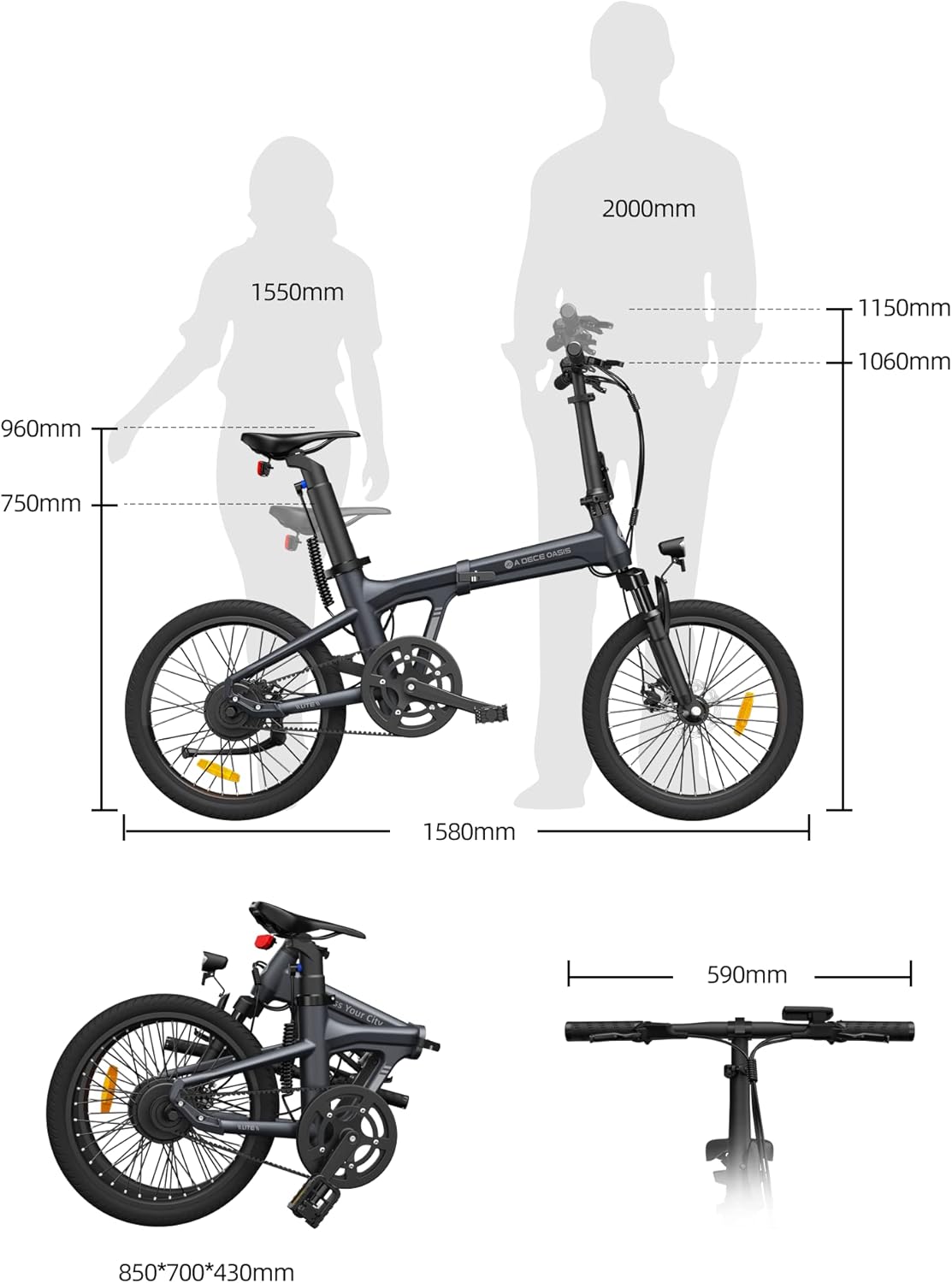
Figure 7: ADO Air 20S dimensions and folded configuration.
10. Warranty and Support
ADO is committed to providing reliable products and excellent customer service.
- Warranty: Your ADO Air 20S comes with a one-year warranty on the motor, battery, and controller. The frame is covered by a ten-year warranty. Please retain your proof of purchase for warranty claims.
- Customer Support: If you have any questions, require assistance with assembly, or need technical support, please do not hesitate to contact ADO customer service. We aim to reply within 24 hours.
For contact information, please refer to the ADO Smart APP or the official ADO website.