
1. Overview and Features
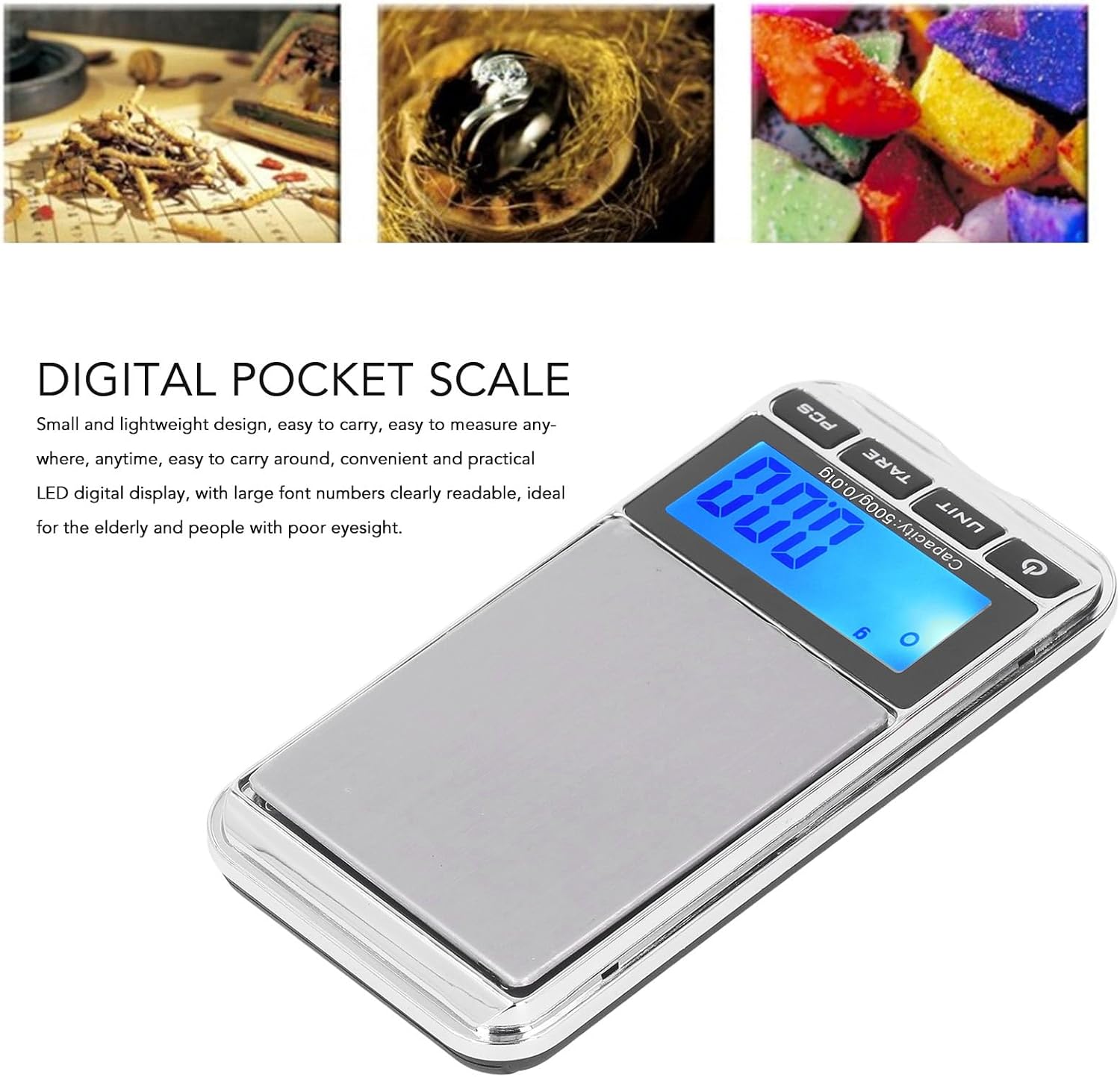
The Luqeeg Digital Pocket Gram Scale is designed for high accuracy weighing, offering precise measurements for various small items. Its compact and lightweight design makes it highly portable and convenient for use anywhere.
- Portable Design: Compact and lightweight for easy carrying and measuring anytime, anywhere.
- Large Weighing Platform: Designed to accommodate items of various sizes, meeting diverse measurement needs.
- User-Friendly Functions: Features automatic shutdown, low battery alert, and overload protection for safe and reliable operation.
- Clear Display: Equipped with an LED digital display with large, readable font numbers, ideal for all users, including the elderly.
- High Accuracy: Utilizes high-accuracy sensors to ensure precise weight measurements, suitable for applications such as jewelry weighing.
2. Package Contents
Please check the package to ensure all items are present:
- 1 x Digital Pocket Scale
- 1 x English Instruction Manual
- 1 x Storage Bag
3. Setup
3.1 Battery Installation
The scale requires 2 AAA batteries (not included in the package). To install:
- Open the battery compartment cover located on the bottom of the scale.
- Insert 2 AAA batteries, ensuring correct polarity (+/-).
- Close the battery compartment cover securely.
3.2 Initial Placement
Place the scale on a hard, flat, and stable surface to ensure accurate readings. Avoid placing it on soft or uneven surfaces.
4. Operating Instructions
4.1 Power On/Off
- To power on, press the [ON/OFF] button. The display will show '0.00g' when ready.
- To power off, press and hold the [ON/OFF] button for a few seconds. The scale also features an automatic shut-off function after a period of inactivity to conserve battery life.
4.2 Unit Conversion
To change the weighing unit:
- Press the [UNIT] button repeatedly to cycle through available units: grams (g), ounces (oz), carats (ct), grains (gn), pennyweights (dwt), troy ounces (ozt), and milliliters (ml).
4.3 Tare Function
The Tare function allows you to subtract the weight of a container, so only the weight of the contents is measured.
- Place an empty container on the weighing platform.
- Press the [TARE] button. The display will reset to '0.00g'.
- Add the items you wish to weigh into the container. The display will show the net weight of the items.
4.4 Counting Function (PCS)
This function allows you to count multiple small items of the same weight.
- Place a sample quantity (e.g., 25, 50, 75, or 100 pieces) of the items on the platform.
- Press and hold the [PCS] button until the display shows 'PCS'.
- Press the [UNIT] button to select the sample quantity (e.g., '25', '50', '75', '100').
- Press [PCS] again to confirm. The display will show the count of the sample.
- Add more items to the platform; the display will show the total count.
4.5 Calibration
For optimal accuracy, calibrate the scale regularly.
- Turn the scale on and wait for '0.00g' to appear.
- Press and hold the [MODE] button until 'CAL' is displayed, then release.
- Press [MODE] again. The display will flash the required calibration weight (e.g., '500g').
- Place the exact calibration weight (not included) on the center of the weighing platform.
- Wait for the display to show 'PASS' and then return to normal weighing mode. Remove the weight. Calibration is complete.
5. Media Gallery
5.1 Product Images



5.2 Product Videos
6. Maintenance
- Cleaning: Wipe the scale with a soft, damp cloth. Do not use abrasive cleaners or immerse the scale in water.
- Storage: Store the scale in a cool, dry place. Use the provided storage bag to protect it from dust and scratches.
- Battery Replacement: Replace batteries when the low battery indicator appears on the display to ensure continued accurate operation.
7. Troubleshooting
| Problem | Possible Cause | Solution |
|---|---|---|
| Inaccurate readings | Unstable surface; low battery; not calibrated; air currents. | Place on a stable surface; replace batteries; recalibrate the scale; avoid drafts. |
| Display shows 'Lo' | Low battery. | Replace batteries. |
| Display shows 'O-Ld' | Overload. | Remove excess weight immediately to prevent damage. |
| Scale does not turn on | No batteries; incorrect battery installation; dead batteries. | Install batteries; check polarity; replace with new batteries. |
8. Specifications
| Feature | Detail |
|---|---|
| Brand | Luqeeg |
| Item Model Number | Luqeeg9xgfpks7r1-12 |
| Capacity | 500g |
| Readout Accuracy | 0.01g |
| Display Type | LED (Backlit Display) |
| Material | Acrylonitrile Butadiene Styrene (ABS) |
| Power Source | 2 AAA batteries (not included) |
| Item Weight | 5.2 ounces |
| Package Dimensions | 5.79 x 3.46 x 0.91 inches |
| Recommended Uses | Jewellery, Kitchen, Reloading |
9. Warranty and Support
For warranty information or technical support, please refer to the contact details provided with your purchase or visit the official Luqeeg website. Please retain your proof of purchase for any warranty claims.