

1. Safety Notices
To prevent electrical shock or harm to the human body, please read this manual carefully before using this instrument to test AC voltage. Failure to do so may render all protection functions ineffective.
- Pre-Operation Check: Before operation, do not turn on or attempt to use this instrument without first reading these instructions. Always test the device on a known live AC cable to ensure it is functioning correctly.
- Voltage Detection Considerations: If the instrument does not produce sound or display on the screen, AC/DC voltage may still be present. This instrument detects the electrical field strength of AC signals. If the signal is blocked by shielding covers or thick insulation, high voltage may still exist. The detection distance for AC signals (e.g., inside walls or metal ducts) may be affected.
- Damage and Malfunction: Do not use a damaged or malfunctioning instrument. Pay attention to the test pin. If any part is broken or cracked, return it to the manufacturer for repair.
- Voltage Limits: Do not apply voltage exceeding the marked range of 1000V AC.
- Electrical Shock Hazard: Exercise caution when detecting AC voltage above 36V due to the risk of electrical shock.
- Compliance: Always comply with local and national safety regulations and rules to protect the end user.
2. Product Overview and Panel Description
The ANENG VC1019 is a non-contact AC voltage tester designed for electrical equipment testing and maintenance. It features a voice broadcast function, LCD display, flashlight, and breakpoint detection.

Image: The ANENG VC1019 voltage tester and two AAA batteries.
Panel Components:
- Detect Pin (NCV Sensor): The tip of the tester used for non-contact voltage detection.
- Torch LED: Built-in LED light for illuminating dark areas.
- Signal Strength Indicator: Visual bar graph on the LCD screen indicating detected voltage strength.
- Power On/Off Key: Button to turn the device on or off.
- Torch On/Off Key: Button to activate or deactivate the flashlight.
- Sensitivity Adjustment Key: Button to switch between high and low sensitivity modes.
- Battery Cover: Located at the bottom for battery access.
3. Setup and Battery Installation
The ANENG VC1019 requires two 1.5V AAA batteries for operation. These are typically included with the product.
Battery Installation:
- Locate the battery cover at the bottom of the tester.
- Use your fingernail to gently press down on the side of the battery cover and slide it off.
- Insert two 1.5V AAA batteries into the compartment, ensuring correct polarity (+ and - terminals match the markings).
- Slide the battery cover back into place until it clicks securely.

Image: The LCD screen displaying a low battery warning.
4. Operating Instructions
4.1 Power On/Off
- Power On: Press and hold the 'Power On/Off' key for more than one second. The power indicator will illuminate.
- Power Off: Briefly press the 'Power On/Off' key once. The power indicator will turn off.
4.2 AC Voltage Detection (NCV)
Insert the tester's probe into an AC power socket or position it near an AC wire. The tester will detect AC voltage signals and provide relevant alarms.
- The signal strength indicator lights on the LCD screen will illuminate according to the detected signal strength.
- A buzzer will emit beeping sounds with varying frequencies; stronger signals result in higher frequency beeps.
- The LCD screen will display a bar chart indicating signal strength.
- When the detected AC voltage signal reaches the highest strength, the screen will turn red. For lower strengths, the screen may show green.

Image: The ANENG VC1019 in use, detecting voltage in an electrical panel.
4.3 Live/Null Wire Detection
The tester can automatically identify live or neutral wires based on signal strength.
- Live Wire: When the tester detects a strong AC signal, it indicates a live wire. The screen will typically turn red, and the alarm frequency will be higher.
- Null Wire: When the tester detects a weaker or no AC signal, it indicates a null wire. The screen may show green or green/red, and the alarm frequency will be lower or absent.

Image: Demonstrating live wire (firewire) and null wire (zero line) detection.
4.4 Breakpoint Detection
To locate a breakpoint in a wire, move the NCV tip along the insulated wire. The voltage alarm signal will weaken or disappear at the point of the break.

Image: Illustration of breakpoint detection on a wire.
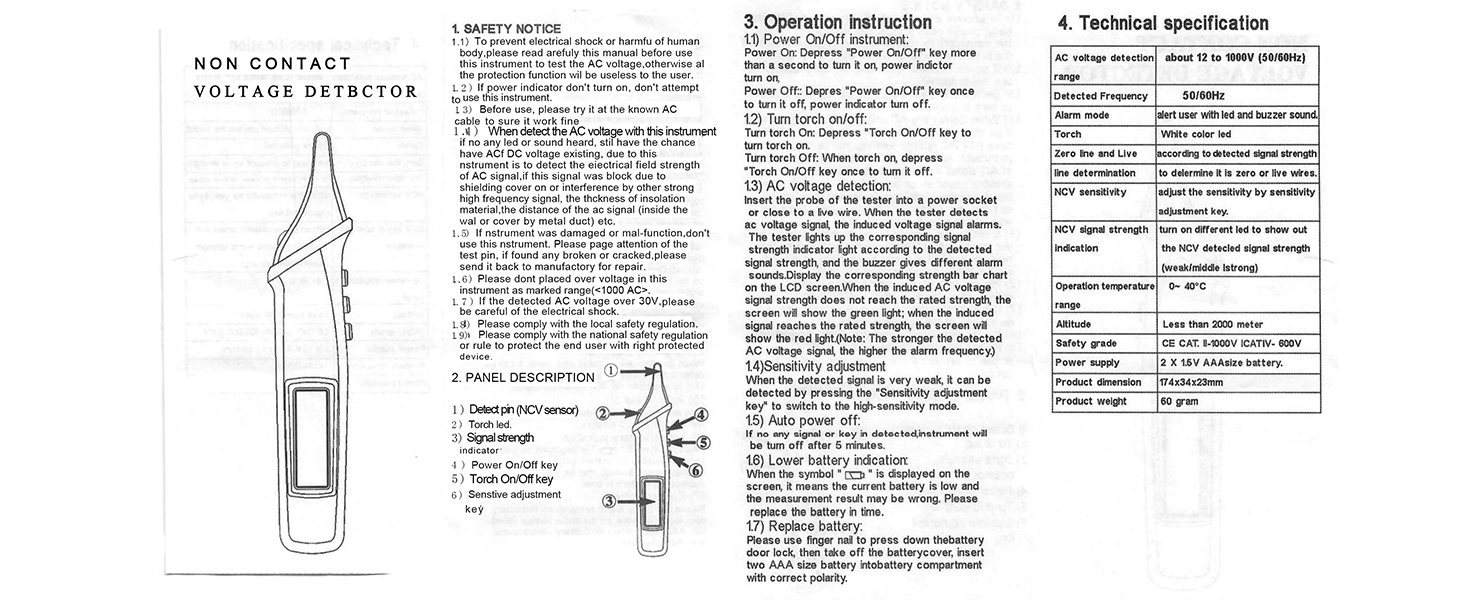
Image: Detailed diagram of the breakpoint test process.
4.5 Flashlight Operation
- Turn On: Press the 'Torch On/Off' key to activate the flashlight.
- Turn Off: While the flashlight is on, press the 'Torch On/Off' key once to turn it off.

Image: The tester's flashlight illuminating a circuit breaker panel.
4.6 Sensitivity Adjustment
If the detected signal is very weak, you can adjust the sensitivity:
- Press the 'Sensitivity Adjustment Key' to switch to the high-sensitivity mode. This allows for detection of weaker AC voltage signals.

Image: The tester indicating 'Sensitivity gear 5'.
4.7 Voice Broadcast Function
The ANENG VC1019 features a voice broadcast function that announces detection results.

Image: Visual representation of the voice broadcasting feature and its announcements.

Image: Another detailed view of the voice broadcast features.
4.8 High Voltage Alert
The tester warns against voltages exceeding 90V. Upon activation, the screen turns red and a safety symbol shines, providing clear visual cues of potential high voltage hazards.
4.9 Automatic Power-Off
To conserve battery life, the instrument will automatically turn off after 5 minutes of inactivity (no signal detection or key presses).

Image: The tester's display indicating auto power-off functionality.
4.10 Infrared Laser Positioning
The tester includes an infrared laser for precise positioning during detection tasks.

Image: The tester's infrared laser in use for positioning.
5. Maintenance
5.1 Cleaning
Wipe the exterior of the tester with a clean, dry cloth. Do not use abrasive cleaners or solvents, as these may damage the casing or internal components.
5.2 Battery Replacement
When the 'low battery' symbol is displayed on the screen, the current battery level is low, and measurement results may be inaccurate. Replace the batteries promptly following the instructions in Section 3. The tester uses two 1.5V AAA batteries.
5.3 Storage
Store the tester in a cool, dry place away from direct sunlight and extreme temperatures. If storing for an extended period, remove the batteries to prevent leakage.

Image: The tester's pocket-sized design for convenient portability.
6. Troubleshooting
If you encounter issues with your ANENG VC1019, refer to the following common troubleshooting steps:
- Device Not Powering On: Ensure batteries are correctly installed and have sufficient charge. Replace batteries if necessary.
- No Detection/Inaccurate Readings:
- Check battery level and replace if low.
- Ensure the NCV sensor is in close proximity to the AC voltage source.
- Adjust sensitivity to high mode if detecting weak signals.
- Be aware that thick insulation or metal shielding can block AC signals, potentially leading to no detection even if voltage is present.
- Voice Broadcast Unclear: Ensure the device is held in a position where the speaker is not obstructed. Check battery level as low power can affect audio clarity.
- Device Malfunction: If the instrument is damaged or consistently malfunctions after troubleshooting, discontinue use and contact customer support for assistance.
7. Technical Specifications
| Feature | Specification |
|---|---|
| AC Voltage Detection Range | 12V - 1000V AC |
| Detected Frequency | 50/60Hz |
| Alarm Mode | Sound (buzzer) and Light (LED) |
| Flashlight | White color LED |
| Live/Null Wire Determination | Based on detected signal strength |
| NCV Sensitivity Adjustment | Adjustable via sensitivity key |
| NCV Signal Strength Indication | LEDs indicate weak, middle, or strong signal |
| Operation Temperature | 0°C to 40°C |
| Altitude | Less than 2000 meters |
| Safety Grade | CAT II 1000V / CAT IV 600V, CE certified, Double Insulation |
| Power Supply | 2 x 1.5V AAA Batteries (included) |
| Product Dimensions | 174mm x 34mm x 23mm (approx. 6.85 x 1.34 x 0.91 inches) |
| Product Weight | 60 grams (approx. 2.12 ounces) |
8. Warranty and Support
ANENG provides service and technical support for its electrical testers. For any issues or inquiries not covered in this manual, please contact ANENG customer support. Specific warranty periods may vary; please refer to your purchase documentation for details.


