Introduction
Thank you for choosing the SONGMICS Electric Height Adjustable Desk. This manual provides essential information for the safe and efficient assembly, operation, and maintenance of your new desk. Please read these instructions carefully before use and retain them for future reference.
Safety Information
- Do not place the desk directly against a wall during lifting or lowering to prevent scratches.
- This desk is intended for indoor use only.
- If the desk is raised or lowered for 2 minutes continuously, the overheating protection will activate. Wait 18 minutes before adjusting the height again.
- To protect the desktop from impacts and scratches, set the built-in sensor to a higher sensitivity to detect solid objects when adjusting the height.
- Do not use power outlets or adapters with excessively high voltage.
- Ensure all cables are properly managed to avoid entanglement during height adjustments.
Product Overview
The SONGMICS Electric Height Adjustable Desk offers a versatile workspace with adjustable height settings and convenient features. Its robust design supports various work setups.

An overview of the SONGMICS Electric Height Adjustable Desk in a typical office environment, showcasing its design and functionality.

Detailed dimensions of the desk, including a length of 160 cm, width of 70 cm, and height adjustable from 72 cm to 120 cm.
Setup and Assembly
Assembly of the SONGMICS Electric Height Adjustable Desk is designed to be straightforward. All parts are labeled, and illustrated instructions are provided to guide you through the process. It is recommended to assemble the desk with two people due to its weight and size.
Key Assembly Steps:
- Unpack all components and verify against the parts list.
- Assemble the desk frame according to the provided diagrams.
- Attach the desktop sections securely to the frame.
- Install the control panel and connect all electrical components.
- Attach accessories such as the fabric bag and hooks.

The desk frame showing attachment points for the fabric storage bag (A) and headphone/bag hooks (B), highlighting integrated organization features.

A close-up view of the cable grommet, designed for efficient cable management to keep your workspace tidy.
Operating Instructions
Your electric height adjustable desk features an intuitive control panel for seamless height adjustments and memory functions.
Height Adjustment:
- Use the Up and Down arrow buttons on the control panel to adjust the desk height between 72 cm and 120 cm.
- The current height will be displayed on the digital screen.
Memory Presets:
- The desk features 4 memory buttons (M1, M2, M3, M4) to store your preferred heights.
- To save a height: Adjust the desk to your desired height, then press the "M" button followed by one of the memory buttons (M1-M4). The height is now saved.
- To recall a saved height: Simply press the corresponding memory button (M1-M4). The desk will automatically move to the saved position.
Anti-Collision System:
The desk is equipped with an anti-collision system to prevent damage. If the desk encounters an obstacle during adjustment, it will stop and slightly reverse direction. You can adjust the sensitivity of this system as needed.
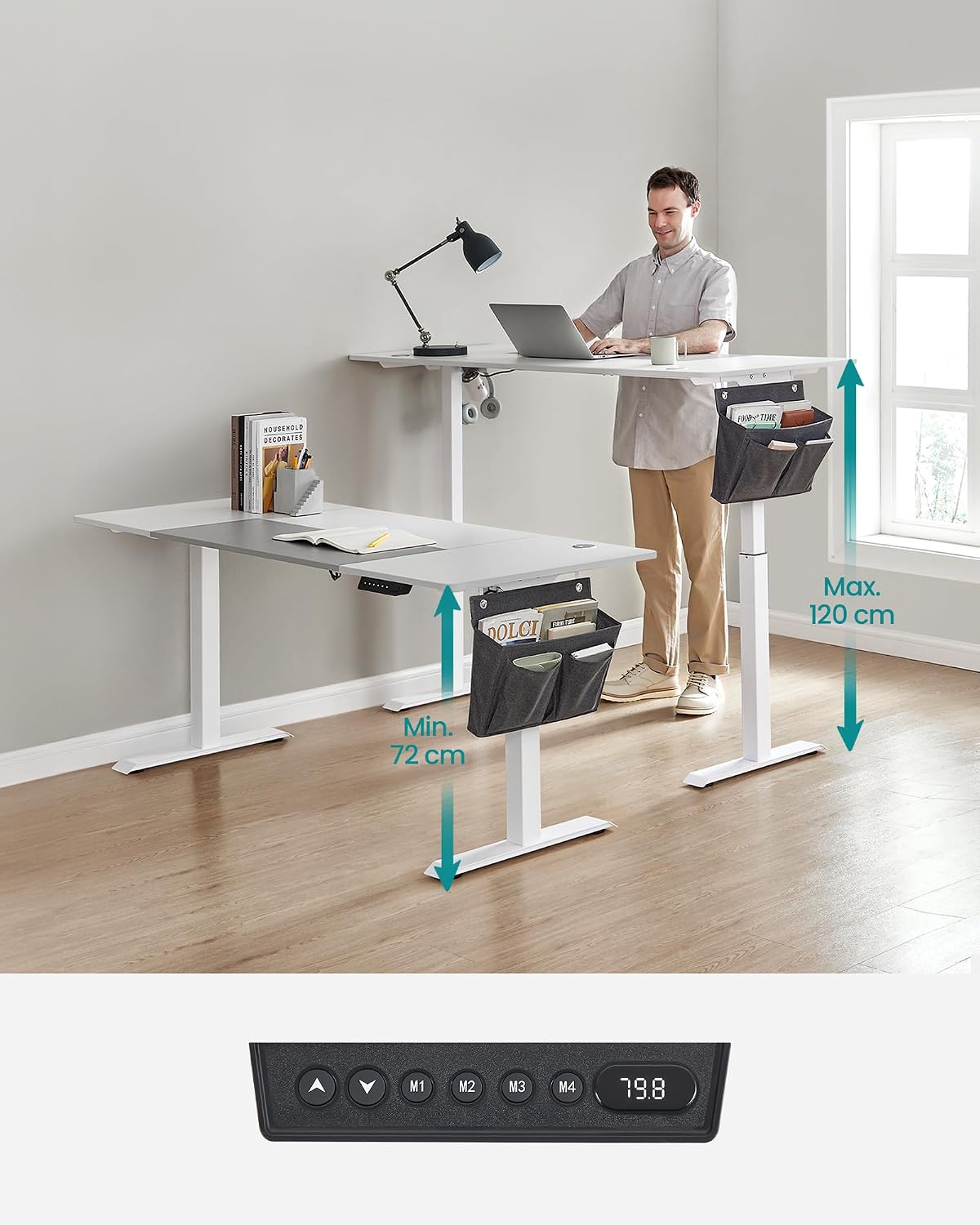
The control panel for the electric desk, showing up/down arrows, memory buttons (M1-M4), and a digital height display.

An illustration of the anti-collision system, showing the desk stopping and reversing when an obstacle is detected during downward movement.

The desk operates quietly, with a noise level below 50 dB, ensuring a peaceful working environment.
Maintenance
Regular maintenance ensures the longevity and optimal performance of your desk.
- Cleaning: Wipe the desktop and frame with a soft, damp cloth. Avoid harsh chemicals or abrasive cleaners.
- Cable Management: Periodically check and organize cables to prevent tangling and ensure smooth operation during height adjustments.
- Fasteners: Ensure all screws and fasteners remain tight. Retighten if necessary.
- Weight Capacity: Do not exceed the maximum weight capacity of 80 kg to prevent damage to the motor and frame.

The desk is built with a sturdy steel frame, capable of supporting up to 80 kg. It also features adjustable feet for stability on uneven floors.
Troubleshooting
If you encounter any issues with your desk, refer to the following common troubleshooting steps:
| Problem | Possible Cause | Solution |
|---|---|---|
| Desk does not move. | Power cable disconnected, motor overheating, control panel error. | Check power connection. Allow 18 minutes for motor to cool if overheating protection activated. Reset the desk (refer to full manual for specific reset procedure). |
| Desk moves unevenly or makes unusual noise. | Uneven load, loose fasteners, obstruction. | Distribute weight evenly. Check and tighten all assembly fasteners. Remove any obstructions. |
| Anti-collision system too sensitive/insensitive. | Sensor sensitivity setting. | Adjust the sensor sensitivity via the control panel settings (refer to full manual for specific steps). |
If the issue persists after attempting these solutions, please contact customer support.
Specifications
| Feature | Detail |
|---|---|
| Model Number | LSD026W02 |
| Dimensions (L x W x H) | 160 x 70 x (72-120) cm |
| Weight | 31.2 kg |
| Height Adjustment Range | 72 cm - 120 cm |
| Material | Engineered Wood (Desktop), Alloy Steel (Frame) |
| Color | Basic White + Dove Grey |
| Max. Load Capacity | 80 kg |
| Noise Level | < 50 dB |
| Special Features | 4 Memory Presets, Anti-Collision System, Cable Management, Hooks, Fabric Storage Bag |
Warranty and Support
For warranty information, product support, or to purchase replacement parts, please refer to the original purchase documentation or contact SONGMICS customer service directly. Keep your proof of purchase for warranty claims.
Manufacturer: SONGMICS
Contact: Please visit the official SONGMICS website or your retailer's support page for contact details.


