
LENVII LV-480 Thermal Label Printer User Manual
Model: LV-480
1. Introduction
This manual provides comprehensive instructions for the LENVII LV-480 Thermal Label Printer. It covers setup, operation, maintenance, and troubleshooting to ensure optimal performance and longevity of your device. The LV-480 is a wired thermal printer designed for efficient printing of shipping labels, product labels, and barcodes without the need for ink or toner.
Please read this manual carefully before using the printer and keep it for future reference.
2. Package Contents
Before beginning, please verify that all items listed below are included in your package:
- 1 x LENVII LV-480 Thermal Label Printer
- 1 x USB Disk (contains drivers and instruction videos)
- 1 x USB Cable
- 1 x Power Adapter
- 1 x Power Cable
- 1 x User Manual (this document)

Image: The LENVII LV-480 printer shown alongside its complete package contents, including the USB disk, cables, and power adapter.
3. Product Overview
The LENVII LV-480 is a high-performance thermal label printer designed for various labeling needs. It features a print speed of 152mm/s and a resolution of 203 DPI, ensuring clear and fast label output. The printer supports label widths ranging from 0.75 inches (19mm) to 4.25 inches (108mm) and lengths from 0.4 inches (10mm) to 90 inches (2286mm).

Image: The LENVII LV-480 Thermal Label Printer in black, with a USB drive positioned in the foreground, highlighting its compact design.
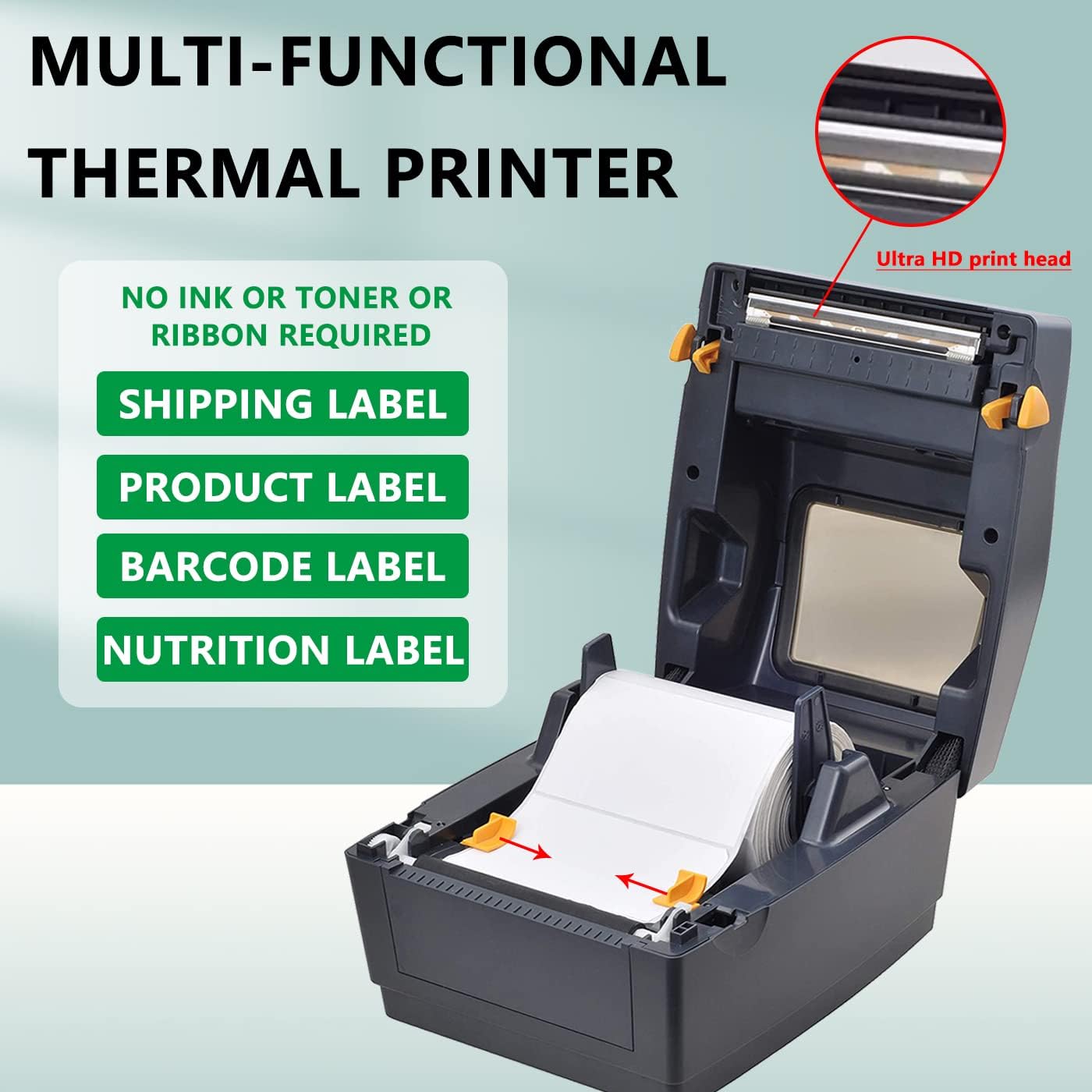
Image: An open view of the LENVII LV-480 printer, revealing the internal mechanism for loading a roll of thermal labels and the ultra HD print head.
4. Setup Guide
4.1 Hardware Connection
- Connect the power cable to the power adapter, then plug the adapter into the printer's power port and a wall outlet.
- Connect the USB cable to the printer's USB port and to an available USB port on your computer.
4.2 Driver and Software Installation
The LENVII LV-480 printer is compatible with both Windows and Mac operating systems.
- Insert the included USB Disk into your computer.
- Locate and run the appropriate driver installer for your operating system (Windows or Mac) from the USB Disk. Follow the on-screen instructions to complete the driver installation.
- For Windows users, you can install the free Dlabel label customization software from the USB Disk. This software allows for advanced label design and printing. The printer can also print directly from other applications such as Microsoft Word, Excel, or PDF readers.

Image: The LENVII LV-480 printer connected to a laptop, illustrating its compatibility with both Windows and Mac operating systems.
5. Operating Instructions
5.1 Loading Thermal Labels
- Open the printer cover.
- Place the thermal label roll onto the spindle and insert it into the printer's label compartment. Ensure the labels feed smoothly from the bottom of the roll.
- Adjust the label guides to fit the width of your labels snugly, without being too tight.
- Close the printer cover. The printer will automatically detect the label size and perform a paper feed adjustment.

Image: The LENVII LV-480 printer illustrating its auto-learning feature for paper size, with examples of different label dimensions including an FBA label (e.g., B07MXXP841).
5.2 Printing Labels
Once the printer is connected and drivers are installed, you can print labels from various applications:
- From Dlabel Software (Windows only): Open the Dlabel software, design your label, and select the LENVII LV-480 as your printer.
- From Other Applications: Open your document (e.g., shipping label PDF, Word document, Excel spreadsheet), select 'Print', and choose the LENVII LV-480 from the list of available printers. Ensure your page setup matches your label size.
The LENVII LV-480 is compatible with all major shipping and sales platforms, including Amazon, Shopify, Etsy, eBay, PayPal, Postmark, FedEx, ShipStation, ShippingEasy, and more.

Image: The LENVII LV-480 printer connected to a laptop, displaying logos of numerous compatible shipping and sales platforms such as eBay, UPS, Etsy, Amazon, and Shopify.
6. Maintenance
To ensure consistent print quality and extend the life of your LENVII LV-480 printer, follow these maintenance guidelines:
- Cleaning the Print Head: Regularly clean the thermal print head with an alcohol swab or a specialized print head cleaning pen. Ensure the printer is turned off and cooled down before cleaning.
- Cleaning the Platen Roller: Use a soft cloth dampened with alcohol to clean the platen roller, removing any adhesive residue or dust.
- General Cleaning: Keep the printer free from dust and debris by wiping its exterior with a soft, dry cloth.
- No Ink/Toner Required: As a direct thermal printer, the LV-480 does not require ink cartridges or toner, simplifying maintenance.
7. Troubleshooting
If you encounter issues with your LENVII LV-480 printer, please refer to the following common solutions:
- Printer Not Responding: Check all cable connections (power and USB). Ensure the printer is powered on.
- Poor Print Quality: Clean the print head. Ensure you are using high-quality thermal labels. Adjust print density settings in your printer preferences if available.
- Labels Not Feeding Correctly: Verify that labels are loaded correctly and the label guides are properly adjusted. Perform a manual paper calibration if necessary (refer to the instruction videos on the USB disk).
- Driver Installation Issues: If you experience problems with driver installation, please contact LENVII customer support for live technical assistance.
- Printer Offline: In your computer's printer settings, ensure the printer is not set to 'Offline' mode.
8. Specifications
| Brand | LENVII |
| Model Name | LV-480 |
| Connectivity Technology | USB |
| Printing Technology | Thermal |
| Printer Output | Monochrome |
| Max Print Speed (Monochrome) | 152 mm/s (6 inches/second) |
| Resolution | 203 x 203 DPI |
| Supported Label Width | 0.75" - 4.25" (19mm - 108mm) |
| Supported Label Length | 0.4" - 90" (10mm - 2286mm) |
| Compatible Operating Systems | Windows, Mac |
| Product Dimensions (D x W x H) | 8.62" x 5.79" x 7.44" (21.9cm x 14.7cm x 18.9cm) |
| Item Weight | 1700 g (3.75 lbs) |
9. Warranty and Support
9.1 Warranty Information
The LENVII LV-480 Thermal Label Printer comes with a 3-month warranty from the date of purchase. This warranty covers manufacturing defects under normal use. Please retain your proof of purchase for warranty claims.
9.2 Customer Support
For any technical issues, driver installation problems, or general inquiries, please contact LENVII customer support. You can reach us via Amazon Mail, or find additional contact information on the label located at the bottom of your printer.
Our support team can provide live technical assistance, including live chat and remote access, to help resolve your issues promptly.


