
1. Product Overview
The SWAREY S1000 Portable Power Station is a versatile and reliable power source designed for various outdoor and indoor applications. With a substantial 725Wh capacity and a 1000W AC output (1500W peak), it can power a wide range of electronic devices and small appliances. Its compact and lightweight design, combined with multiple charging options, makes it an ideal companion for camping, travel, fishing, RV use, and emergency backup power.

Figure 1: Front view of the SWAREY S1000 Portable Power Station, showcasing its display, AC outlets, USB ports, and DC outputs.
Key Features:
- 725Wh Capacity & 1000W AC Output: Provides ample power for various devices, including those requiring pure sine wave AC power.
- Multi-Device Charging: Equipped with 2x 1000W AC outlets, 2x USB-C (PD 65W) ports, 2x USB-A ports, 2x USB QC 3.0 ports, 2x DC outputs, and a car cigarette lighter port, allowing simultaneous charging of up to 11 devices.
- Versatile Charging Methods: Can be recharged via standard wall outlets, car chargers, or solar panels (up to 126W solar input supported with integrated MPPT controller).
- Portable Design: Weighs 6kg (13.2 lbs) with compact dimensions (27.2x24.9x16.5cm / 10.7x9.8x6.5 inches), featuring a sturdy handle and included carrying bag for easy transport.
- Safety & Reliability: Features an excellent Battery Management System (BMS) providing protection against overheating, short circuits, overcurrent, overload, overcharge, and short circuits. The display shows real-time power status.
- Integrated LED Light: Includes an LED light with SOS mode for emergency situations.
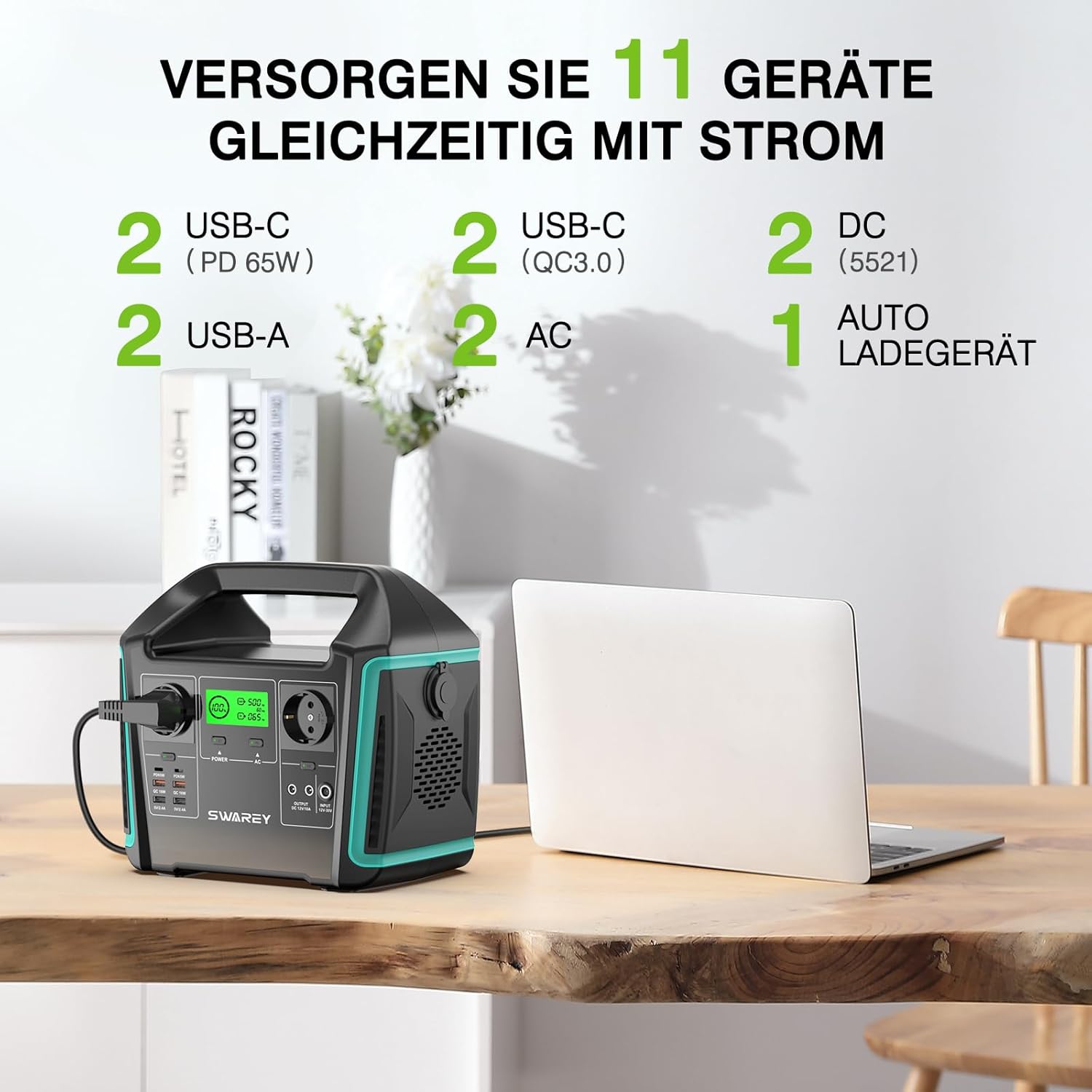
Figure 2: The SWAREY S1000 can power up to 11 devices simultaneously, including laptops, tablets, and smartphones.
2. What's in the Box
Before using your SWAREY S1000 Portable Power Station, please ensure all components are present and in good condition. Carefully unpack the box and check against the following list:
- 1x SWAREY 725Wh Power Station (Model S1000)
- 1x AC Power Adapter
- 1x AC Power Cable
- 1x Car Charging Cable
- 1x DC-to-MC4 Cable (for solar panel connection)
- 1x Carrying Bag
- 1x User Manual (this document)

Figure 3: All items included in the SWAREY S1000 package.
3. Setup and Initial Use
3.1 Initial Charging
It is recommended to fully charge the SWAREY S1000 before its first use to optimize battery performance and lifespan. You can charge the power station using one of the following methods:
- AC Wall Outlet: Connect the AC power adapter to the power station's input port and then plug the AC power cable into a standard wall outlet. The display will indicate charging status. Full charge typically takes 7-8 hours.
- Car Charger: Use the included car charging cable to connect the power station to your vehicle's 12V cigarette lighter port. This method is suitable for charging on the go. Full charge typically takes 8-12 hours.
- Solar Panel (Sold Separately): Connect a compatible solar panel (up to 126W) to the power station using the DC-to-MC4 cable. Ensure the solar panel is placed in direct sunlight for optimal charging efficiency. The integrated MPPT controller will manage the charging process. Full charge typically takes 6-7 hours depending on solar intensity.
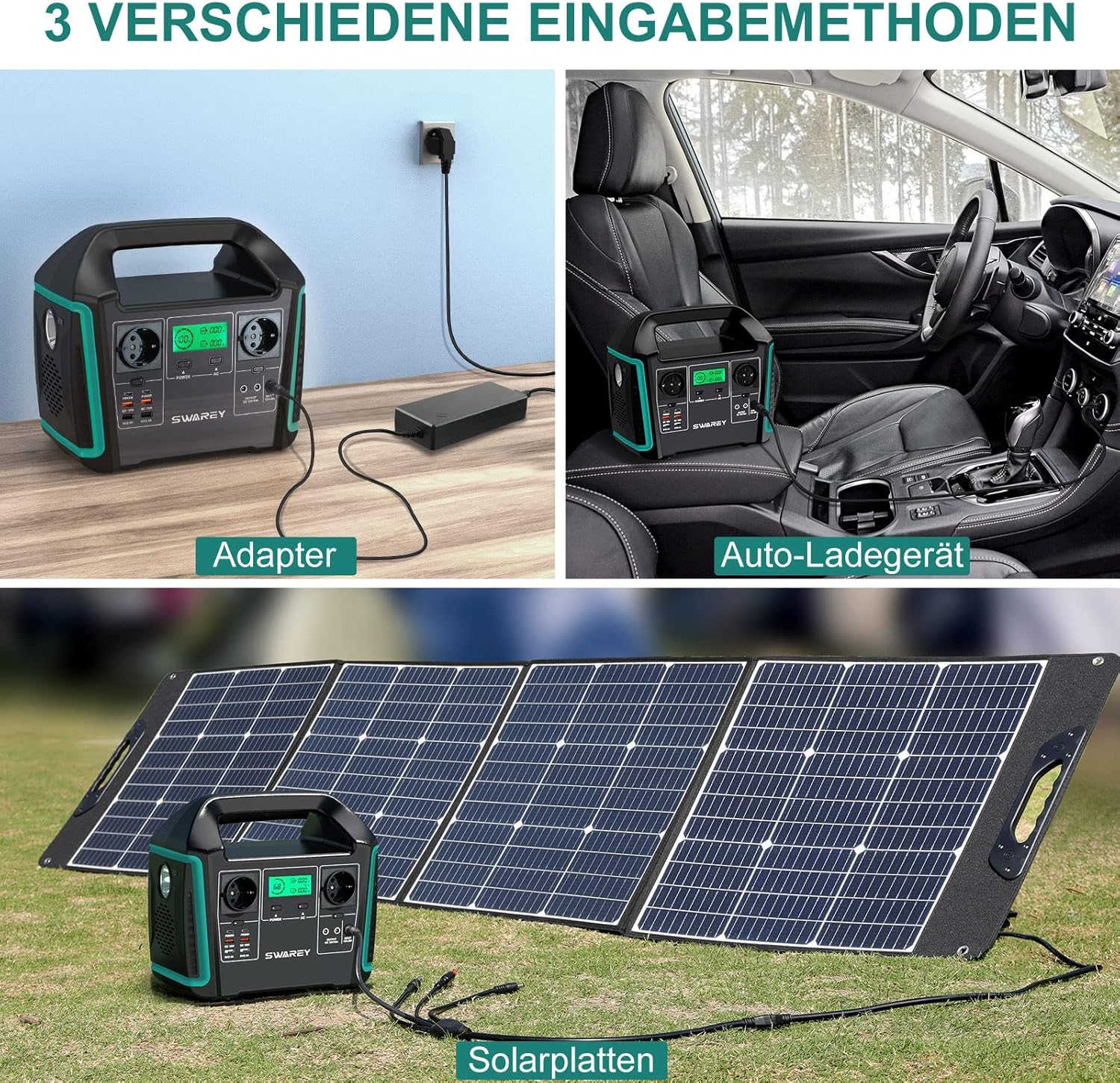
Figure 4: The SWAREY S1000 supports charging via AC adapter, car charger, and solar panels.
The digital display will show the charging input wattage and battery percentage. Once fully charged, disconnect the charging cable.
4. Operating Instructions
4.1 Turning On/Off
To turn on the power station, press and hold the main "POWER" button for a few seconds until the display illuminates. To turn it off, press and hold the "POWER" button again until the display turns off.
4.2 Using AC Outputs
The SWAREY S1000 features two pure sine wave AC outlets. To activate the AC outputs, press the "AC" button. The AC indicator on the display will light up. Plug your devices into the AC outlets. Ensure the total power consumption of your devices does not exceed 1000W (1500W peak). Press the "AC" button again to turn off the AC outputs when not in use.
4.3 Using DC Outputs (USB, DC, Car Port)
The power station provides various DC output options:
- USB-C (PD 65W): Ideal for fast charging compatible laptops, tablets, and smartphones.
- USB-A & USB QC 3.0: For charging a wide range of USB-powered devices.
- DC Outputs (5521): For devices requiring 12V DC power.
- Car Cigarette Lighter Port: For powering 12V car appliances.
To activate the DC outputs, press the "DC" button. The corresponding indicators on the display will light up. Plug your devices into the appropriate ports. Press the "DC" button again to turn off the DC outputs.

Figure 5: The SWAREY S1000 can power a variety of devices, from small electronics to kitchen appliances.
4.4 LED Light Function
The SWAREY S1000 includes an integrated LED light for illumination. To cycle through the light modes (Strong, Flash, SOS), press the dedicated "LIGHT" button. Press it repeatedly to change modes. Press and hold to turn off the light.

Figure 6: The LED light offers multiple modes for different situations.
5. Maintenance and Storage
5.1 General Maintenance
- Keep the power station dry and away from direct sunlight, heat sources, and corrosive materials.
- Clean the exterior with a soft, dry cloth. Do not use abrasive cleaners or solvents.
- Ensure ventilation openings are clear of dust and debris to prevent overheating.
5.2 Battery Care and Storage
To maximize the lifespan of the internal battery:
- For long-term storage, charge the power station to approximately 50-80% every 3-6 months.
- Store in a cool, dry place with temperatures between 0°C and 40°C (32°F and 104°F).
- Avoid storing the unit in extreme temperatures or high humidity.
- Do not fully discharge the battery for extended periods, as this can reduce its lifespan.
6. Troubleshooting
If you encounter issues with your SWAREY S1000, please refer to the following common problems and solutions:
| Problem | Possible Cause | Solution |
|---|---|---|
| Power station does not turn on. | Battery is fully discharged. | Charge the power station using an AC adapter, car charger, or solar panel. |
| AC output not working. | AC output not activated; device exceeds 1000W; overload protection triggered. | Press the "AC" button to activate. Check device wattage. Disconnect high-power devices and restart AC output. |
| DC/USB output not working. | DC output not activated; device not compatible; short circuit. | Press the "DC" button to activate. Ensure device compatibility. Remove faulty device. |
| Slow charging via solar panel. | Insufficient sunlight; panel not correctly angled; panel wattage too low. | Ensure direct sunlight. Adjust panel angle. Use a higher wattage solar panel (up to 126W). |
| Overheat warning on display. | Unit is operating in high temperatures or under heavy load. | Move the unit to a cooler environment. Reduce load. Allow unit to cool down before resuming use. |
If the problem persists after trying these solutions, please contact SWAREY customer support for further assistance.
7. Specifications
| Feature | Detail |
|---|---|
| Model Number | S1000 |
| Capacity | 725Wh (3.6V/201.6Ah, 21.6V/33.6Ah) |
| AC Output | 2x 1000W (Pure Sine Wave, 1500W Peak), 230V |
| USB-C Output | 2x PD 65W |
| USB-A Output | 2x 5V/2.4A |
| USB QC 3.0 Output | 2x QC 18W |
| DC Output | 2x 12V/10A (5521 port) |
| Car Cigarette Lighter Output | 1x 12V/10A |
| AC Input (Charging) | Via AC Adapter (approx. 7-8 hours for full charge) |
| Car Input (Charging) | Via Car Charger (approx. 8-12 hours for full charge) |
| Solar Input (Charging) | Up to 126W (MPPT Controller), 12V-30V (approx. 6-7 hours for full charge with optimal sunlight) |
| Dimensions (L x W x H) | 27.2 x 24.9 x 16.5 cm (10.7 x 9.8 x 6.5 inches) |
| Weight | 6 kg (13.2 lbs) |
| Operating Temperature | 0°C to 40°C (32°F to 104°F) |
| Protection Features | Overheating, Short Circuit, Overcurrent, Overload, Overcharge, Short Circuit Protection |
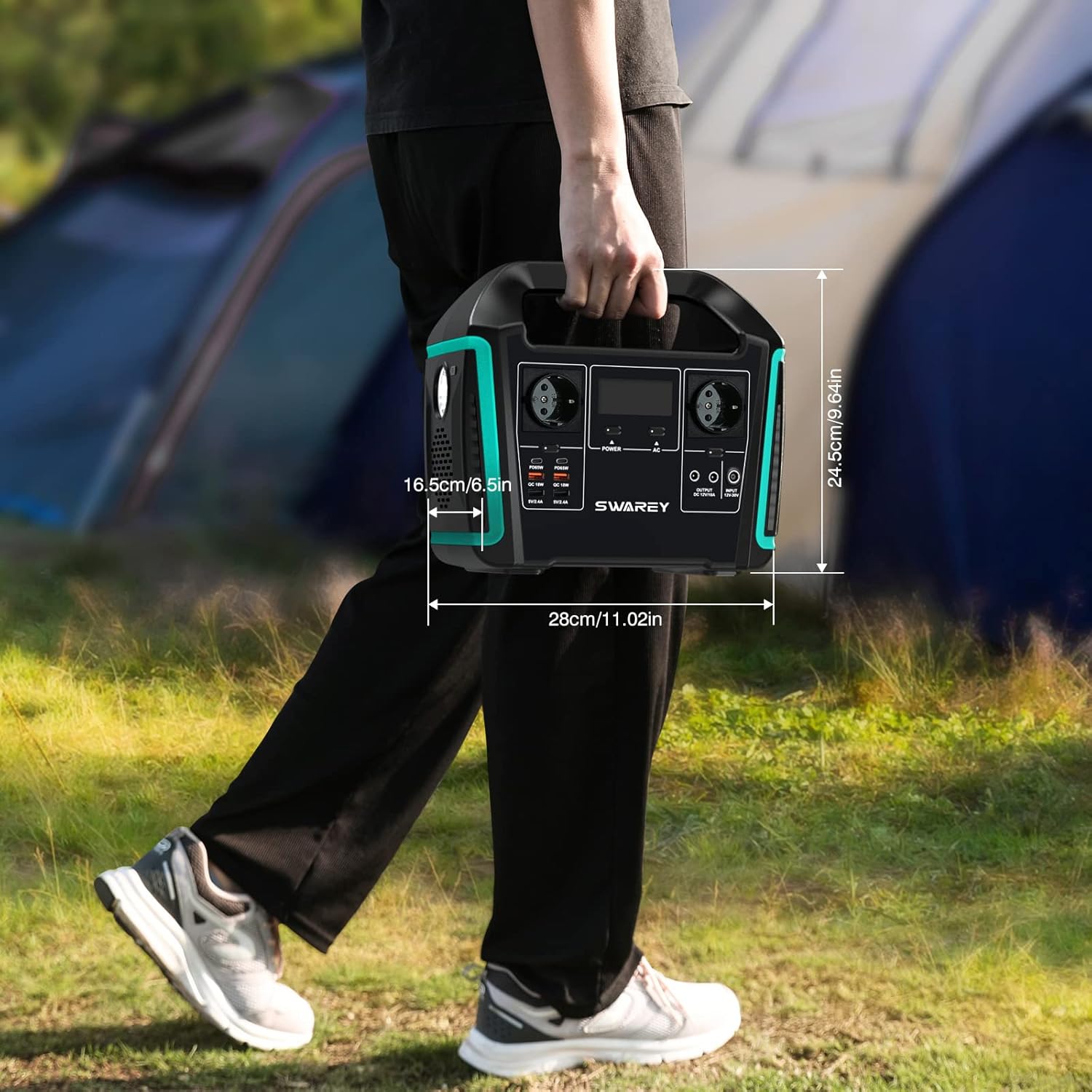
Figure 7: The compact size and integrated handle make the SWAREY S1000 highly portable.
8. Warranty and Support
SWAREY products are designed and manufactured to the highest quality standards. For information regarding warranty coverage, please refer to the warranty card included in your product packaging or visit the official SWAREY website. If you require technical assistance, have questions about product operation, or need to report an issue, please contact SWAREY customer support:
- Website: Visit the SWAREY Store on Amazon
- Email: Refer to your product documentation for specific contact email.
- Phone: Refer to your product documentation for specific contact number.
Please have your model number (S1000) and purchase date ready when contacting support.


