Introduction
This manual provides comprehensive instructions for the XTRIKE ME GM209W RGB Gaming Mouse. Please read this manual thoroughly before using the product to ensure proper operation and to maximize your gaming experience.

Image: Top view of the XTRIKE ME GM209W RGB Gaming Mouse, showcasing its lightweight honeycomb design and blue RGB illumination.
Safety Information
- Keep the device away from liquids and excessive moisture.
- Avoid extreme temperatures.
- Do not attempt to disassemble or modify the device.
- Use only with compatible USB ports.
Package Contents
- XTRIKE ME GM209W RGB Gaming Mouse
- User Manual (this document)
Product Overview
The XTRIKE ME GM209W is a lightweight RGB gaming mouse designed for precision and comfort. It features an optical sensor, customizable RGB lighting, and multiple programmable buttons.

Image: Angled view of the mouse, highlighting the scroll wheel and the RGB lighting visible through the honeycomb shell.
Button Layout:
- Left Click Button
- Right Click Button
- Scroll Wheel / Middle Click Button
- DPI Cycle Button (located behind scroll wheel)
- Forward Side Button
- Backward Side Button

Image: Side view of the mouse, clearly showing the two accessible side buttons.
Setup
Follow these steps to set up your XTRIKE ME GM209W Gaming Mouse:
- Connect the Mouse: Plug the USB connector of the mouse into an available USB port on your computer.
- Driver Installation: The mouse is plug-and-play. Your operating system (Windows 7 or newer) will automatically detect and install the necessary drivers. No additional software installation is typically required for basic functionality.
- Verification: Once connected, the mouse's RGB lighting will illuminate, and the cursor should respond to movement.
Operating Instructions
DPI Adjustment:
The mouse features an optical sensor with adjustable DPI (Dots Per Inch) settings, up to 8,000 DPI.
- Press the DPI Cycle Button (Button 4) located behind the scroll wheel to cycle through available DPI settings.
- Each press will switch to the next DPI level, indicated by a change in the RGB lighting color or pattern (specific indications may vary).
- Select the DPI setting that best suits your preference for cursor speed and precision.
RGB Lighting Control:
The mouse features customizable RGB illumination. While specific software for advanced customization is not mentioned, the lighting typically cycles through various effects automatically or changes with DPI settings.
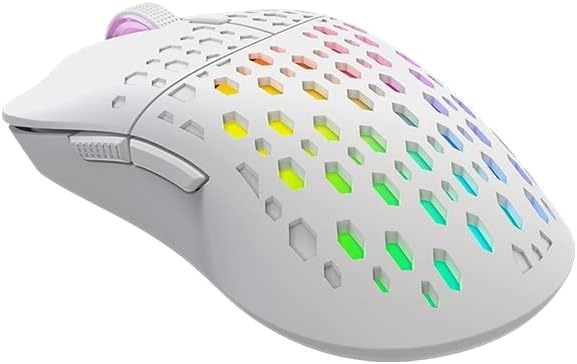
Image: Angled view of the mouse, displaying its vibrant, multi-color RGB lighting effects through the honeycomb pattern.
Side Buttons:
The Forward (Button 5) and Backward (Button 6) side buttons are typically pre-programmed for navigation in web browsers and file explorers. Their functionality can often be customized through operating system settings or third-party software, if available.
Maintenance
To ensure the longevity and optimal performance of your gaming mouse, follow these maintenance guidelines:
- Cleaning: Use a soft, dry cloth to wipe the surface of the mouse. For stubborn dirt, slightly dampen the cloth with water. Avoid using harsh chemicals or abrasive cleaners.
- Sensor Care: Keep the optical sensor on the underside of the mouse clean and free from dust or debris to maintain tracking accuracy.
- Cable Management: Avoid sharp bends or kinks in the USB cable to prevent damage.
- Storage: When not in use, store the mouse in a clean, dry environment.
Troubleshooting
| Problem | Solution |
|---|---|
| Mouse not responding |
|
| Inaccurate tracking or erratic cursor movement |
|
| RGB lighting not working |
|
Specifications
| Feature | Detail |
|---|---|
| Model | GM209W |
| Sensor Type | Optical |
| DPI | Up to 8,000 DPI |
| Buttons | 6 (Programmable via OS/software) |
| Connectivity | USB |
| Lighting | RGB Illumination |
| Weight | 65g (Lightweight) |
| Dimensions | 12.5 x 6.6 x 0.1 cm |
| Operating System Compatibility | Windows 7 or newer |

Image: Diagram showing the dimensions of the XTRIKE ME GM209W RGB Gaming Mouse: 12.5 cm length and 6.6 cm width.
Warranty and Support
For warranty information and technical support, please refer to the XTRIKE ME official website or contact your local retailer. Keep your proof of purchase for warranty claims.


