
Introduction
This manual provides detailed instructions for the assembly, operation, maintenance, and troubleshooting of your HLDIRECT 47 Inch Gaming Desk. Please read this manual thoroughly before assembly and use to ensure proper function and longevity of your product.

Image: The HLDIRECT 47 Inch Gaming Desk in a typical gaming setup, showcasing its spacious carbon fiber surface, monitor, keyboard, mouse, and other gaming accessories. The desk features a sleek black design with sturdy legs.
Product Overview and Dimensions
The HLDIRECT Gaming Desk is designed for a comfortable and efficient gaming or work experience. It features a carbon fiber surface, a sturdy alloy steel frame, and includes accessories like a cup holder and headphone hook.
- Large Gaming Surface: 47 inches (length) x 23.6 inches (width) desktop.
- Ergonomic Design: Provides a comfortable user experience.
- Sturdy Construction: 1mm steel frame with triangular structural and dual-frame support.
- Load Capacity: Supports up to 200 pounds.
- Cable Management: Features double-side cable grommets for a tidy desktop.
- Adjustable Leveling Feet: Ensures stability on various floor types.

Image: An overhead view of the HLDIRECT 47 Inch Gaming Desk highlighting its key dimensions: 47 inches in length, 23.6 inches in width, and 29 inches in height. The image also shows the carbon fiber texture of the desktop.
Setup Instructions
Assembly is required for this desk. All necessary tools are included in the package. It is recommended to assemble the desk on a soft, clean surface to prevent scratches.
- Unpack Components: Carefully remove all parts from the packaging and verify against the parts list (not provided in this manual, refer to your product's included guide).
- Assemble Frame: Attach the main support beams to the desk legs using the provided screws and tools. Ensure all connections are secure but do not overtighten initially.
- Attach Desktop: Place the desktop sections onto the assembled frame. Secure the desktop to the frame using the designated screws. Note: The 47-inch desktop may consist of two pieces. Ensure they are aligned correctly before securing.
- Install Accessories: Attach the cup holder and headphone hook to the desired locations on the desk frame.
- Level the Desk: Adjust the leveling feet at the bottom of the desk legs to ensure the desk is stable and does not wobble on your floor surface.
- Final Tightening: Once all parts are in place and aligned, carefully tighten all screws to ensure maximum stability.
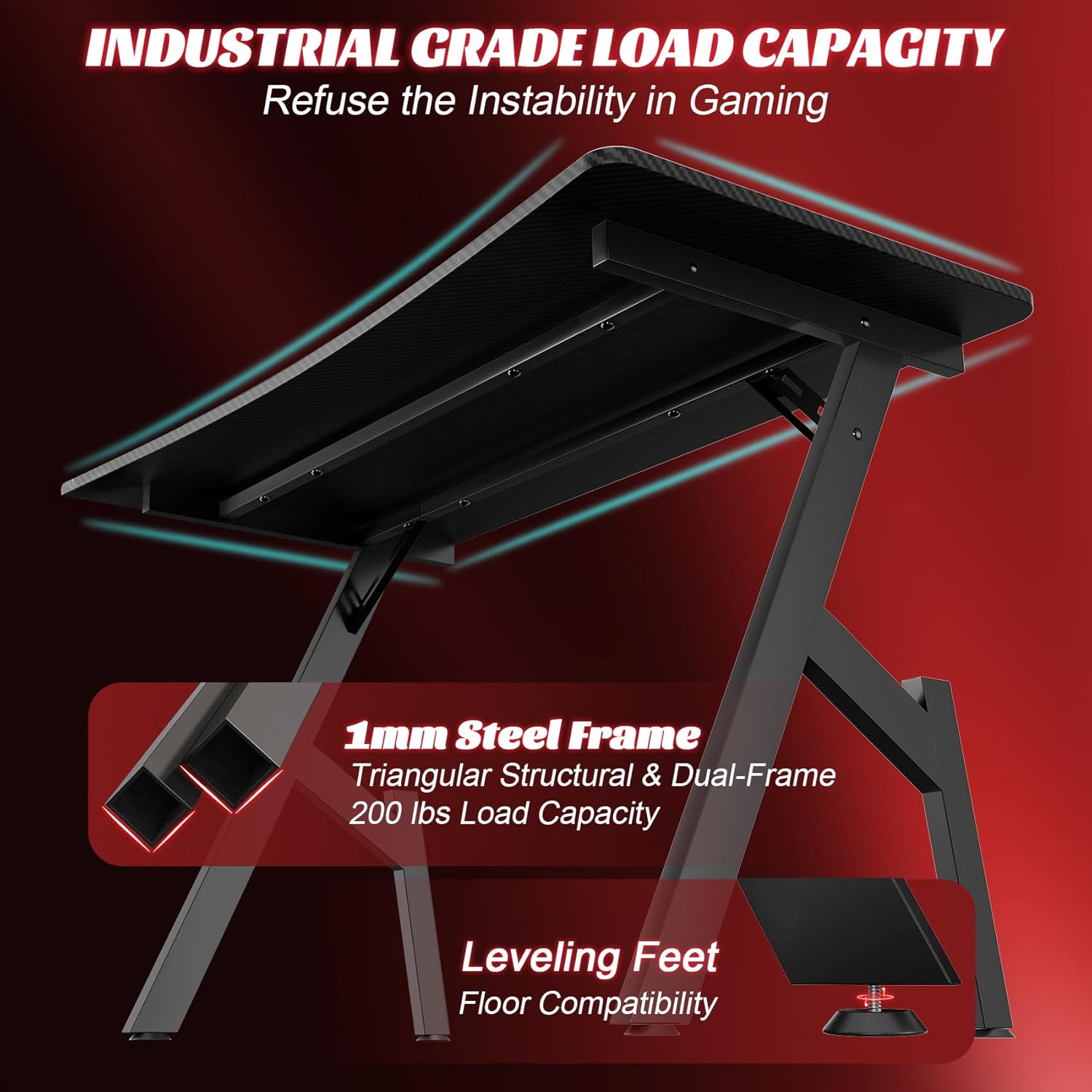
Image: An illustration of the desk's underside, highlighting the robust 1mm steel frame, triangular structural support, and dual-frame design. The leveling feet are also visible, emphasizing floor compatibility and stability.
Operating Instructions
The HLDIRECT Gaming Desk is designed for general use as a computer or gaming workstation. Follow these guidelines for optimal use:
- Weight Distribution: Distribute weight evenly across the desktop. Avoid placing heavy items on one side or corner. The maximum recommended weight capacity is 200 pounds.
- Monitor Arm Compatibility: The improved frame structure allows for the installation of a monitor arm bracket. Ensure the monitor arm is securely attached according to its own instructions.
- Cable Management: Utilize the double-side cable grommets to route and organize your cables, maintaining a neat and tidy workspace.
- Ergonomics: Position your monitor, keyboard, and mouse to promote good posture and reduce strain during extended use.

Image: A top-down view of the HLDIRECT Gaming Desk, illustrating the ergonomic design for comfortable use. The carbon fiber desktop texture is prominent, along with space for a keyboard, mouse, and other peripherals.

Image: The HLDIRECT Gaming Desk with a focus on the double-side cable grommets, demonstrating how they help maintain a neat and tidy desktop by routing cables efficiently.
Maintenance
Regular maintenance will help preserve the appearance and functionality of your desk.
- Cleaning: Wipe the carbon fiber surface with a soft, damp cloth. Avoid abrasive cleaners or harsh chemicals that could damage the finish.
- Frame Care: Clean the alloy steel frame with a mild detergent and water solution, then dry thoroughly.
- Check Connections: Periodically inspect all screws and bolts to ensure they remain tight. Retighten if necessary to maintain stability.
- Avoid Excessive Moisture: Do not expose the desk to excessive moisture or direct sunlight for prolonged periods.
Troubleshooting
If you encounter any issues with your HLDIRECT Gaming Desk, refer to the following common solutions:
- Desk Wobbles:
- Ensure all assembly screws are fully tightened.
- Adjust the leveling feet on each leg until the desk is stable on your floor surface.
- Verify that the desktop sections (if applicable) are securely fastened to the frame.
- Scratches on Surface:
- The carbon fiber surface is designed to be scratch-resistant, but avoid dragging sharp objects across it.
- Use mouse pads and coasters to protect the surface from wear and spills.
- Missing Parts:
- Double-check all packaging materials. If parts are genuinely missing, contact HLDIRECT customer support.
Specifications
| Brand | HLDIRECT |
| Model Number | A DESK |
| Desk Design | Computer Desk |
| Color | Black |
| Style | Modern |
| Top Material Type | Carbon Fiber |
| Base Material | Alloy Steel |
| Item Dimensions (L x W x H) | 120 x 60 x 74 cm (47 x 23.6 x 29 inches) |
| Item Weight | 8 Kilograms |
| Maximum Weight Recommendation | 200 Pounds |
| Required Assembly | Yes |
| Includes All Assembly Tools | Yes |
| Special Features | Ergonomic, Cup Holder, Headphone Hook, Cable Grommets |
Warranty Information
Specific warranty details for the HLDIRECT 47 Inch Gaming Desk are not provided in this manual. For information regarding warranty coverage, terms, and conditions, please refer to the documentation included with your purchase or contact HLDIRECT customer support directly.
Support
If you require further assistance, have questions about assembly, or need to report a missing or damaged part, please contact HLDIRECT customer support. Refer to your product packaging or the official HLDIRECT website for contact information.
Please retain this manual for future reference.