
1. Introduction
This instruction manual provides essential information for the safe and effective use of your BAOFENG UV-S9 Plus / UV-S9X3 2800mAh Li-ion rechargeable battery and accompanying USB fast charger. This battery is designed to provide extended power for compatible BAOFENG two-way radios, ensuring reliable communication.
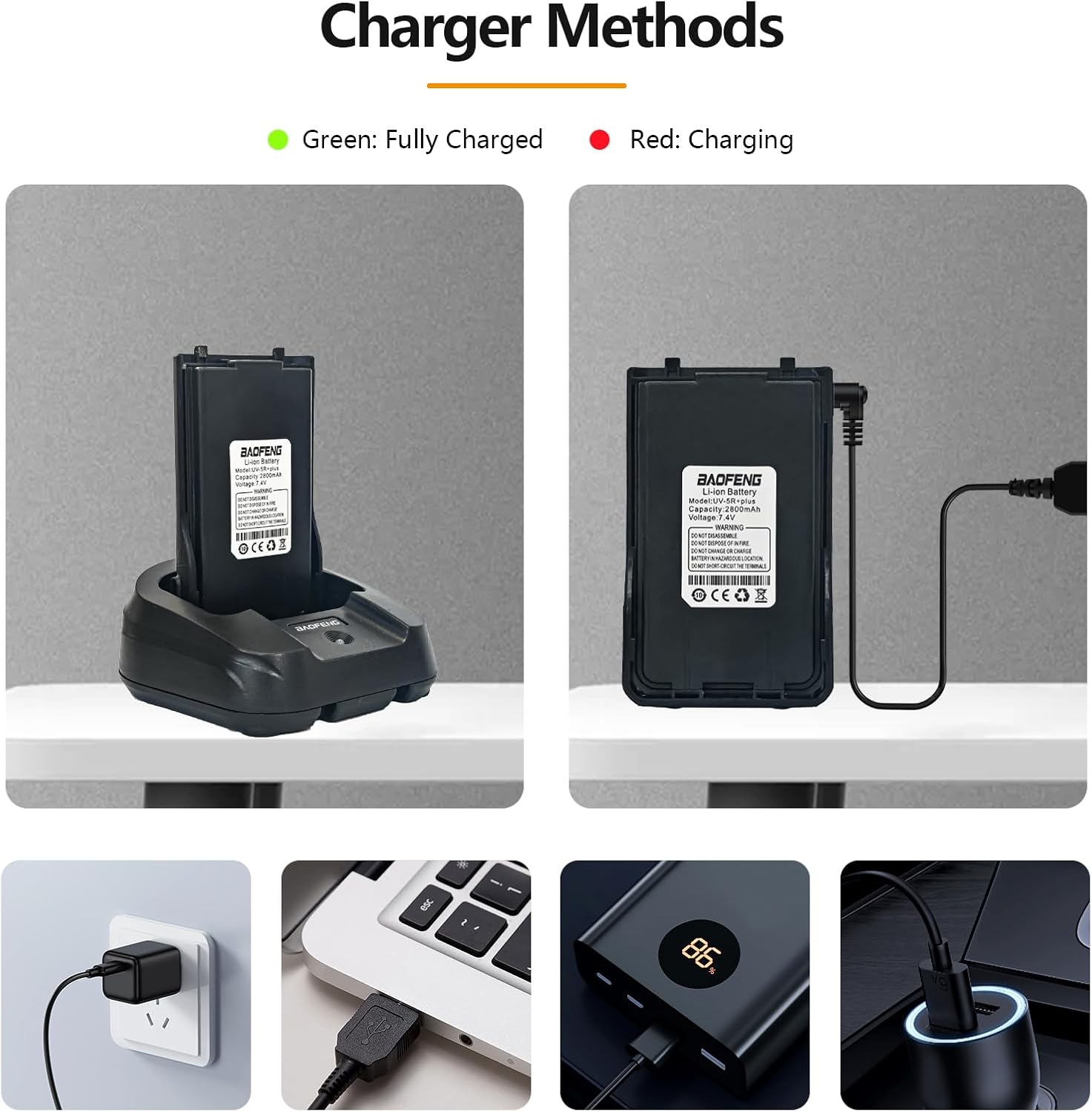
Image 1: BAOFENG UV-S9 Plus / UV-S9X3 2800mAh Li-ion Battery.
2. Product Features
- High Capacity: 2800mAh Li-ion battery for extended operating time.
- Compatibility: Designed for BAOFENG UV-S9 Plus and UV-S9X3 two-way radios.
- Dual Charging Options: Can be charged using the included charger dock or the USB fast charger cable.
- Integrated Protection: Features current overload protection and leakage protection for safe operation.
- Charging Indicator: USB fast charger cable includes an indicator light (Red for charging, Green for fully charged).

Image 2: The BAOFENG UV-S9 Plus / UV-S9X3 battery is compatible with various BAOFENG radio models, including UV-S9X3, UV-S9, UV-10R, and UV-5R+ Plus.
3. Safety Information
Please read and understand all safety precautions before using the battery. Failure to follow these instructions may result in fire, electric shock, or injury.
- Do not disassemble, open, or shred the battery pack.
- Do not expose the battery to heat or fire. Avoid storage in direct sunlight.
- Do not short-circuit the battery.
- Do not charge or use the battery in hazardous locations.
- Dispose of used batteries according to local regulations.
- Keep the battery out of reach of children.
- Use only the provided charger or a compatible BAOFENG charger.
4. Package Contents
Verify that all items are present upon opening the package:
- 1 x BAOFENG UV-S9 Plus / UV-S9X3 2800mAh Li-ion Battery
- 1 x USB Fast Charger Cable
5. Setup
5.1 Battery Installation
- Ensure your BAOFENG radio is powered off.
- Align the battery pack with the battery compartment on the back of the radio.
- Slide the battery into place until it clicks securely. Ensure it is firmly attached to prevent accidental detachment.
5.2 Charging Methods
The BAOFENG UV-S9 Plus / UV-S9X3 battery offers two convenient charging methods:
- Using the Charger Dock:
- Place the battery (either attached to the radio or separately) into the charger dock.
- Connect the charger dock to a power source.
- The indicator light on the charger dock will show the charging status.
- Using the USB Fast Charger Cable:
- Connect the USB fast charger cable directly to the battery pack.
- Plug the USB end into a compatible USB power source (e.g., wall adapter, power bank, computer USB port).
- The indicator light on the cable will be Red during charging and turn Green when the battery is fully charged.

Image 3: Various charging methods for the BAOFENG UV-S9 Plus / UV-S9X3 battery, including a charger dock and USB cable connections to different power sources.
6. Operating Instructions
Once the battery is fully charged and securely installed in your BAOFENG UV-S9 Plus or UV-S9X3 radio, you can power on the radio and begin operation. Refer to your radio's specific instruction manual for detailed operating procedures.
- Ensure the battery is fully charged before extended use to maximize performance.
- Monitor the radio's battery indicator to know when recharging is necessary.
7. Maintenance
Proper maintenance ensures the longevity and optimal performance of your battery:
- Storage: Store the battery in a cool, dry place away from direct sunlight and extreme temperatures.
- Cleaning: Use a dry, soft cloth to clean the battery terminals if necessary. Do not use liquids or abrasive cleaners.
- Regular Charging: If storing the battery for an extended period, charge it to approximately 50% every few months to prevent deep discharge.
- Avoid Overcharging/Over-discharging: While the battery has protection circuits, it's best practice to disconnect it once fully charged and recharge before it completely drains.
8. Troubleshooting
If you encounter issues with your battery, consider the following:
- Battery Not Charging:
- Ensure the charger cable or dock is properly connected to both the battery and the power source.
- Check if the power source is active.
- Verify that the charger cable is not damaged.
- Clean the battery and charger contacts to ensure good connection.
- Short Battery Life:
- Ensure the battery is fully charged before use.
- Operating the radio at high power settings or in areas with weak signals can consume more power.
- Battery capacity naturally degrades over time with repeated charge cycles. Consider replacing an old battery.
- Charger Cable Indicator Light Not Working:
- Ensure the cable is firmly connected.
- Test with a different USB power source.
- If the cable is damaged, replace it.
9. Specifications
| Feature | Description |
|---|---|
| Battery Capacity | 2800mAh |
| Material | Li-ion |
| Voltage | DC 7.4V |
| Product Dimensions | 1.96 x 0.59 x 3.38 inches |
| Item Weight | 3.52 ounces |
| Color | Black |
| Certifications | CE, FCC, RoHS |
| Compatible Devices | UV-S9 Plus Radio |

Image 4: Visual representation of the 2800mAh capacity and Li-ion chemistry of the BAOFENG battery.

Image 5: Detailed dimensions of the BAOFENG UV-S9 Plus / UV-S9X3 battery.
10. Warranty and Support
Warranty: A 3-month warranty is provided exclusively through "Shiqun Electronics Co., Ltd." Please retain your proof of purchase for warranty claims.
For further assistance or technical support, please contact the manufacturer or authorized reseller.